Skip to content
  • SiteMap
  • Our Services
  • Frequently Asked Questions (FAQ)
  • Support
  • About Us

UpdateGadh

Update Your Skills.

  • Home
  • Projects
    •  Blockchain projects
    • Python Project
    • Data Science
    •  Ai projects
    • Machine Learning
    • PHP Project
    • React Projects
    • Java Project
    • SpringBoot
    • JSP Projects
    • Java Script Projects
    • Code Snippet
    • Free Projects
  • Tutorials
    • Ai
    • Machine Learning
    • Advance Python
    • Advance SQL
    • DBMS Tutorial
    • Data Analyst
    • Deep Learning Tutorial
    • Data Science
    • Nodejs Tutorial
  • Blog
  • Contact us
  • Toggle search form
SQL DELETE DATABASE

SQL DELETE DATABASE – A Complete Guide

Posted on March 13, 2025March 13, 2025 By Rishabh saini No Comments on SQL DELETE DATABASE – A Complete Guide

SQL DELETE DATABASE

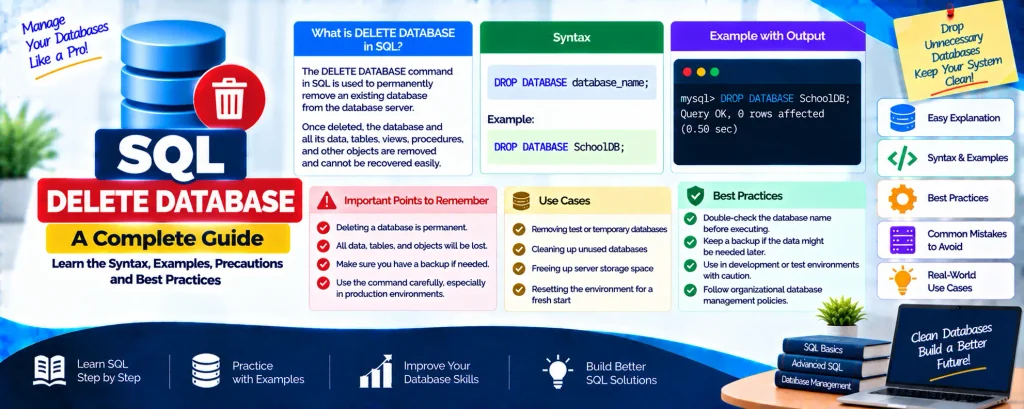
The DROP statement in SQL allows us to effectively remove or delete tables, indexes, and whole databases. However, while performing these operations, we must be careful as they lead to permanent data loss.

Complete Python Course with Advance topics:-Click Here
SQL Tutorial :-Click Here

Understanding DROP INDEX

To remove an index from a table, use the DROP INDEX statement.
Since indexes are used to optimize query performance, deleting them should be done cautiously.

DROP INDEX Syntax for Different Databases

Microsoft Access

DROP INDEX idx_customer ON Customers;

MS SQL Server

DROP INDEX Customers.idx_customer;

DB2 / Oracle

DROP INDEX idx_customer;

MySQL

ALTER TABLE Customers DROP INDEX idx_customer;

DROP DATABASE Statement

To remove a whole database, use the DROP DATABASE statement.
This operation is irreversible and will remove all the tables and data within that database.

Syntax:

DROP DATABASE SalesDB;

Important Considerations Before Dropping a Database

  • Unique Database Name: In an RDBMS, the database name must be unique.
  • Data Loss Warning: When DROP DATABASE is executed, all data is lost.
     Always ensure backups before proceeding.
  • User Privileges: Only users with the necessary permissions (e.g., DBA or ADMIN roles) can execute this command.

Download New Real Time Projects :-Click here
Complete Advance AI topics:- CLICK HERE

Final Thoughts

SQL provides powerful commands to manage databases, tables, and indexes. The DROP statement, while useful, should be handled with caution. Always double-check before executing it to prevent accidental data loss.

For more SQL insights and tutorials, stay connected with UpdateGadh!


sql delete database in recovery
sql delete database user
sql delete database in restoring state
sql delete database taking long time
sql delete database in single user mode
sql delete database in use
cannot drop database because it is currently in use
sql delete table
sql delete database w3schools
how to delete database mysql
how to delete database in sql server using query
delete all data from table sql
“drop database” statements are disabled.
drop database if exists

Post Views: 607
SQL Tutorial Tags:asp.net, basics, codecourse, database, databases, delete, delete (drop) a database in asp.net mvc, delete (drop) a database in ms sql, delete (drop) a database using sql management studio, delete record from sql database, how to create, how to delete (drop) a database in ms sql, learn mysql, learn sql, ms sql, MVC, MySQL, mysql basics, mysql terminal, mysqli, PHP, phpacademy, Programming, rename, sql, sqlserver, tutorials, Web Development

Post navigation

Previous Post: SQL DELETE DUPLICATE ROWS
Next Post: SQL DELETE VIEW

More Related Articles

SQL ORDER BY RANDOM SQL ORDER BY RANDOM: Fetching Random Records in Databases SQL Tutorial
SQL DELETE Statement Understanding SQL DELETE Statement with Example SQL Tutorial
SQL RIGHT JOIN SQL RIGHT JOIN: A Comprehensive Guide SQL Tutorial

Leave a Reply Cancel reply

Your email address will not be published. Required fields are marked *

You may also like

  1. Understanding the SQL DELETE Statement and Its Variants
  2. SQL Temporary Tables: A Handy Tool for Developers
  3. SQL SELECT TOP Clause: A Comprehensive Guide
  4. SQL ORDER BY LIMIT – Retrieve Specific Rows from a Database
  5. Understanding SQL CROSS JOIN with Examples
  6. IN vs EXISTS in SQL: A Complete Guide

Most Viewed Posts

  1. Top Large Language Models in 2025
  2. Online Shopping System using PHP, MySQL with Free Source Code
  3. login form in php and mysql , Step-by-Step with Free Source Code
  4. Flipkart Clone using PHP And MYSQL Free Source Code
  5. News Portal Project in PHP and MySql Free Source Code
  6. User Login & Registration System Using PHP and MySQL Free Code
  7. Top 10 Final Year Project Ideas in Python
  8. Blog Site In PHP And MYSQL With Source Code || Best Project
  9. Online Bike Rental Management System Using PHP and MySQL
  10. E learning Website in php with Free source code
  • AI
  • ASP.NET
  • Blockchain
  • ChatCPT
  • code Snippets
  • Collage Projects
  • Data Science Project
  • Data Science Tutorial
  • DBMS Tutorial
  • Deep Learning Tutorial
  • Final Year Projects
  • Free Projects
  • How to
  • html
  • Interview Question
  • Java Notes
  • Java Project
  • Java Script Notes
  • JAVASCRIPT
  • Javascript Project
  • JSP JAVA(J2EE)
  • Machine Learning Project
  • Machine Learning Tutorial
  • MySQL Tutorial
  • Node.js Tutorial
  • PHP Project
  • Portfolio
  • Python
  • Python Interview Question
  • Python Projects
  • PythonFreeProject
  • React Free Project
  • React Projects
  • Spring boot
  • SQL Tutorial
  • TOP 10
  • Uncategorized
  • Real-Time Medical Queue & Appointment System with Django
  • Online Examination System in PHP with Source Code
  • AI Chatbot for College and Hospital
  • Job Portal Web Application in PHP MySQL
  • Online Tutorial Portal Site in PHP MySQL — Full Project with Source Code

Most Viewed Posts

  • Top Large Language Models in 2025 (8,617)
  • Online Shopping System using PHP, MySQL with Free Source Code (5,227)
  • login form in php and mysql , Step-by-Step with Free Source Code (4,877)

Copyright © 2026 UpdateGadh.

Powered by PressBook Green WordPress theme