SQL UPDATE with JOIN
The SQL UPDATE JOIN statement is used to modify records in one table by taking updated values from another table based on a matching condition. This approach is especially useful when fresh or corrected data is available in a secondary table and needs to be synchronized with the main table.
For example, suppose a users table needs to be updated using the latest information stored in a users_backup table. We can use an INNER JOIN with a common identifier, such as user_id, to match the corresponding records.
Complete Advance AI Topics: Click Here
SQL Tutorial: Click Here
SQL UPDATE JOIN Syntax
UPDATE users u
INNER JOIN users_backup ub
ON u.user_id = ub.user_id
SET u.user_name = ub.user_name,
    u.email = ub.email
WHERE u.user_id IN (101, 102);
This statement updates the users table by copying the latest user_name and email values from users_backup. The update is performed only when the user_id values match and the specified IDs satisfy the WHERE condition.
Using Multiple Tables in SQL UPDATE with JOIN
Let’s create two tables named employees and employees_new. We will then use a JOIN to update the existing employee information with the newer values.
Creating Table 1: employees
CREATE TABLE employees (
    emp_id INT PRIMARY KEY,
    emp_salary INT,
    emp_role VARCHAR(100)
);

INSERT INTO employees (emp_id, emp_salary, emp_role)
VALUES (101, 50000, 'Developer'),
       (102, 60000, 'Designer'),
       (103, 70000, 'Manager'),
       (104, 80000, 'Director');
Creating Table 2: employees_new
CREATE TABLE employees_new (
    emp_id INT PRIMARY KEY,
    emp_salary INT,
    emp_role VARCHAR(100)
);

INSERT INTO employees_new (emp_id, emp_salary, emp_role)
VALUES (103, 75000, 'Senior Manager'),
       (104, 85000, 'Senior Director');
Viewing the Initial Data
Before performing the update, we can use the following queries to view the contents of both tables:
SELECT * FROM employees;
SELECT * FROM employees_new;
employees Table Before Update:
| emp_id | emp_salary | emp_role |
|---|---|---|
| 101 | 50000 | Developer |
| 102 | 60000 | Designer |
| 103 | 70000 | Manager |
| 104 | 80000 | Director |
employees_new Table Before Update:
| emp_id | emp_salary | emp_role |
|---|---|---|
| 103 | 75000 | Senior Manager |
| 104 | 85000 | Senior Director |
Updating Table Using JOIN
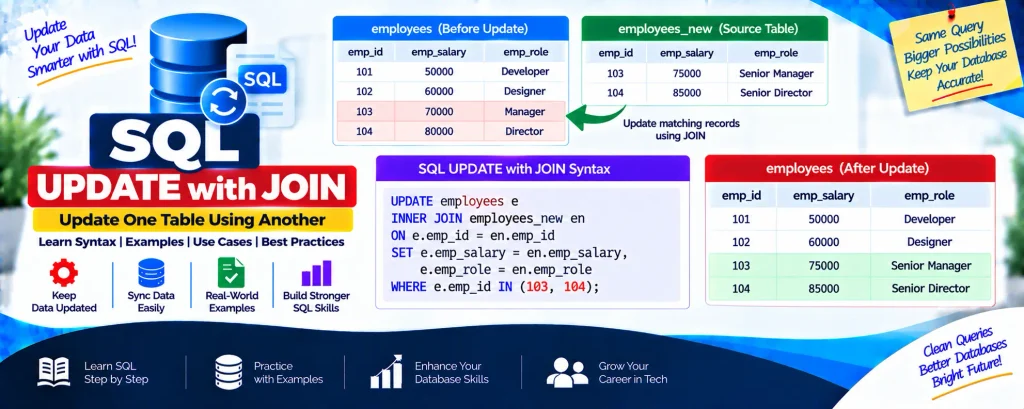
Now we can update the employees table using the latest salary and role information from employees_new.
UPDATE employees e
INNER JOIN employees_new en
ON e.emp_id = en.emp_id
SET e.emp_salary = en.emp_salary,
    e.emp_role = en.emp_role
WHERE e.emp_id IN (103, 104);
The INNER JOIN matches employee records using emp_id. The salary and role in the main employees table are then replaced with the corresponding values from employees_new.
After completing the update, run the following query to verify the changes:
SELECT * FROM employees;employees Table After Update:
| emp_id | emp_salary | emp_role |
|---|---|---|
| 101 | 50000 | Developer |
| 102 | 60000 | Designer |
| 103 | 75000 | Senior Manager |
| 104 | 85000 | Senior Director |
Download New Real Time Projects :- Click here
Conclusion
The SQL UPDATE JOIN statement provides an efficient way to update records in one table using information stored in another table. By combining UPDATE with an INNER JOIN, matching records can be synchronized while keeping the database information current.
This technique is particularly useful for data synchronization, ETL processes, and enterprise applications where records need to remain accurate and up-to-date.
Start using UPDATE JOIN in your SQL queries to make database updates more efficient and manageable.
SEO Keywords
sql update with join w3schools
sql update with join postgres
mysql update with join
sql update with join oracle
sql update with join and where clause
update query with inner join in sql server
hana sql update with join
snowflake update with join
postgresql update with join
sql update