
SQL UPDATE Statement
SQL provides several powerful commands for managing and modifying data stored in databases. Among these commands, UPDATE and DELETE are commonly used to modify existing records. The SQL UPDATE statement allows you to change existing values in a table and can be used with a WHERE clause to target specific records.
In this guide, we will understand the SQL UPDATE statement, its syntax, and different examples of updating data in a table.
Complete Advance AI Topics: Click Here
SQL Tutorial: Click Here
Understanding the SQL UPDATE Statement
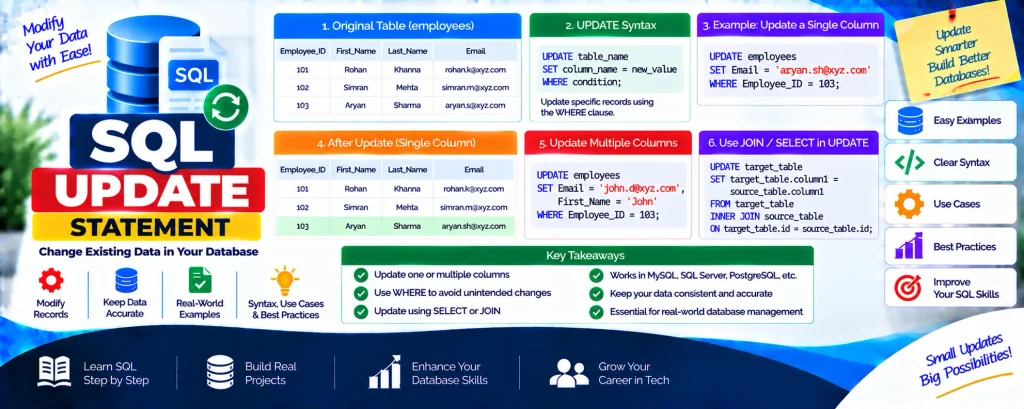
The SQL UPDATE statement is used to modify existing records in a database table. The WHERE clause determines which rows should be changed. If the WHERE clause is not included, the UPDATE statement can modify all rows in the table.
SQL UPDATE Syntax
UPDATE table_name
SET column_name = new_value
WHERE condition;
This syntax allows you to update only the records that satisfy the specified condition.
Example: Updating a Single Column
Suppose an employees table contains the following records:
| Employee_ID | First_Name | Last_Name | |
|---|---|---|---|
| 101 | Rohan | Khanna | rohan.k@xyz.com |
| 102 | Simran | Mehta | simran.m@xyz.com |
| 103 | Aryan | Sharma | aryan.s@xyz.com |
Now, suppose we need to change the email address of the employee whose Employee_ID is 103.
UPDATE employees
SET Email = 'aryan.sh@xyz.com'
WHERE Employee_ID = 103;
After running the query, the table will contain:
| Employee_ID | First_Name | Last_Name | |
|---|---|---|---|
| 101 | Rohan | Khanna | rohan.k@xyz.com |
| 102 | Simran | Mehta | simran.m@xyz.com |
| 103 | Aryan | Sharma | aryan.sh@xyz.com |
Updating Multiple Columns
You can modify more than one column in the same UPDATE statement. Simply separate each column assignment with a comma.
UPDATE employees
SET Email = 'john.d@xyz.com', First_Name = 'John'
WHERE Employee_ID = 103;
Updated Table:
| Employee_ID | First_Name | Last_Name | |
|---|---|---|---|
| 101 | Rohan | Khanna | rohan.k@xyz.com |
| 102 | Simran | Mehta | simran.m@xyz.com |
| 103 | John | Sharma | john.d@xyz.com |
MySQL Syntax for Updating a Table
The basic MySQL UPDATE syntax follows the same approach for modifying one or more columns:
UPDATE table_name
SET column1 = new_value1, column2 = new_value2
[WHERE condition];
The WHERE condition can be used to limit the update to the required records.
SQL UPDATE with SELECT Query
An UPDATE statement can also work with a SELECT query when values need to be updated dynamically using information from another table.
SQL UPDATE with SELECT Syntax:
UPDATE target_table
SET target_table.column_name = source_table.column_value
WHERE EXISTS (
    SELECT source_table.column_value
    FROM source_table
    WHERE source_table.join_column = target_table.join_column
);
Another approach is to update records by using an INNER JOIN:
UPDATE target_table
SET target_table.column1 = source_table.column1,
    target_table.column2 = source_table.column2
FROM target_table
INNER JOIN source_table
ON target_table.id = source_table.id;
Updating a Single Column in SQL
To change the value of a particular column, use UPDATE together with a condition that identifies the required record.
UPDATE employees
SET Employee_ID = 201
WHERE First_Name = 'Amit';
This statement changes the Employee_ID to 201 for the record where the First_Name is Amit.
Updating Multiple Columns in SQL
When several values need to be changed at the same time, multiple column assignments can be included in the SET clause.
UPDATE employees
SET First_Name = 'Raj', Department = 'Finance'
WHERE First_Name = 'Arun';
This query changes the First_Name from Arun to Raj and updates the Department to Finance for matching records.
Download New Real Time Projects :- Click here
Conclusion
The SQL UPDATE statement is an essential command for modifying existing database records. By combining UPDATE with the WHERE clause, SELECT queries, and JOINs, you can update data according to specific requirements while maintaining accuracy and consistency.
Understanding how UPDATE works with individual columns, multiple columns, and related tables is an important skill for database developers and administrators who regularly manage database records.
SEO Keywords
sql update statement with join
update query in sql server
sql update from select
update column value in sql
sql update from another table
delete command in sql
sql update multiple columns
update query in mysql
sql insert statement
sql delete statement


