Skip to content
  • SiteMap
  • Our Services
  • Frequently Asked Questions (FAQ)
  • Support
  • About Us

UpdateGadh

Update Your Skills.

  • Home
  • Projects
    •  Blockchain projects
    • Python Project
    • Data Science
    •  Ai projects
    • Machine Learning
    • PHP Project
    • React Projects
    • Java Project
    • SpringBoot
    • JSP Projects
    • Java Script Projects
    • Code Snippet
    • Free Projects
  • Tutorials
    • Ai
    • Machine Learning
    • Advance Python
    • Advance SQL
    • DBMS Tutorial
    • Data Analyst
    • Deep Learning Tutorial
    • Data Science
    • Nodejs Tutorial
  • Blog
  • Contact us
  • Toggle search form
SQL SELECT AS

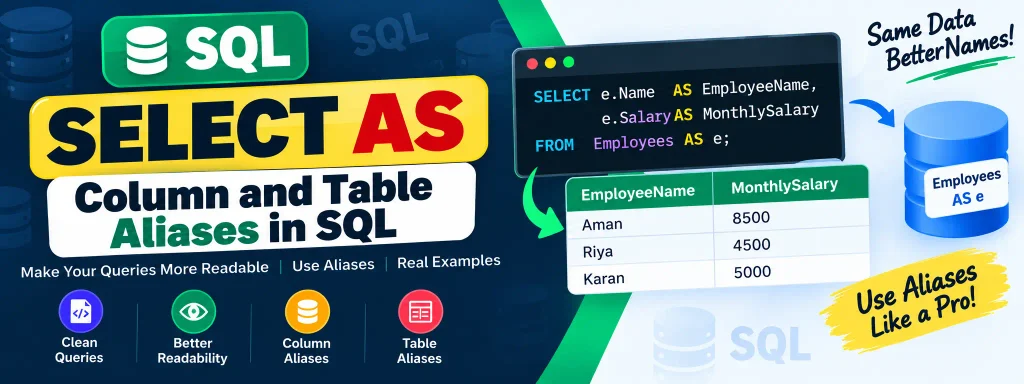
SQL SELECT AS – Column and Table Aliases in SQL

Posted on February 6, 2025February 6, 2025 By Rishabh saini No Comments on SQL SELECT AS – Column and Table Aliases in SQL

SQL SELECT AS

SQL AS is a powerful tool that allows developers to assign temporary names to columns or tables. This feature helps improve query readability, enhances presentation, and makes result sets more understandable without permanently altering the database schema.

By using AS, you can label columns and tables in a way that makes sense for specific queries, making it easier to analyze and interpret the data.

Complete Python Course with Advance topics:-Click Here
SQL Tutorial :-Click Here

Syntax of SQL SELECT AS

SELECT Column_Name1 AS New_Column_Name, Column_Name2 AS New_Column_Name FROM Table_Name;

  • Column_Name: The original column name from the table.
  • New_Column_Name: A temporary alias for that column.
  • Table_Name: The name of the table containing the columns.

Aliases only exist for the duration of the query execution and do not modify the original database structure.

Example 1: Assigning Temporary Column Names

Consider a table named purchases with the following data:

Order_DateBuyerItemQuantity
05-01-2022RahulSmartphone3
18-03-2022SimranLaptop1
30-06-2023AakashHeadphones5

Now, if we want to rename Order_Date as Purchase_Date and Buyer as Customer, we use the following query:

SELECT Order_Date AS 'Purchase_Date', Buyer AS 'Customer', Item, Quantity FROM purchases;

Result:

Purchase_DateCustomerItemQuantity
05-01-2022RahulSmartphone3
18-03-2022SimranLaptop1
30-06-2023AakashHeadphones5

As seen above, the original column names remain unchanged in the database, but for this query, we have customized their appearance.

Example 2: Using SQL AS with Aggregate Functions

Let’s consider another table named students with the following data:

Roll_NoNameGenderMobileCityAgeMarks
1Aman JoshiMale9123456789Delhi2185
2Priya MehtaFemale8765432109Mumbai2290
3Rahul VermaMale9988776655Kolkata2388
4Shruti ShahFemale9876543210Chennai2492
5Kabir RaoMale9654321098Jaipur2089

Query 1: Calculate the Average Marks

SELECT Name AS Student, AVG(Marks) AS Average_Marks FROM students;

Result:

StudentAverage_Marks
Aman Joshi88.80

(Note: The average is calculated for all students, but SQL only returns one row since there is no GROUP BY clause.)

Query 2: Retrieve Roll Numbers and Mobile Numbers with Custom Labels

SELECT Roll_No AS 'Student_ID', Mobile AS 'Contact' FROM students;

Result:

Student_IDContact
19123456789
28765432109
39988776655
49876543210
59654321098

Query 3: Combine Multiple Columns Using CONCAT()

If we want to merge the student’s mobile number and city into one column named Student_Info, we can use CONCAT():

SELECT Roll_No AS 'Student_ID', CONCAT(Mobile, ', ', City) AS Student_Info FROM students;

Result:

Student_IDStudent_Info
19123456789, Delhi
28765432109, Mumbai
39988776655, Kolkata
49876543210, Chennai
59654321098, Jaipur

Example 3: Assigning a Temporary Name to a Table

SQL also allows us to create table aliases for easier reference.

Consider the students table from the previous example. If we want to retrieve details for a specific student (Roll No 3) but use a shorter alias for the table, we can do this:

SELECT s.Roll_No, s.Name, s.Gender, s.Mobile, s.City FROM students AS s WHERE s.Roll_No = 3;

Here, s is the temporary alias assigned to the students table, making it easier to reference columns.

Result:

Roll_NoNameGenderMobileCity
3Rahul VermaMale9988776655Kolkata


Download New Real Time Projects :-Click here
Complete Advance AI topics:- CLICK HERE

Conclusion

The SQL AS statement is an essential tool for enhancing query readability. Whether renaming columns for presentation purposes, using aliases for aggregate functions, or simplifying table references, AS makes SQL queries more intuitive and structured.

Using aliases effectively can improve the clarity of reports, ease query maintenance, and enhance collaboration among developers and analysts. Next time you run an SQL query, try implementing aliases for better organization and interpretation!

For more database-related tutorials and SQL tips, stay connected with UpdateGadh.


sql select as table
sql with
sql alias
sql alias in where clause
group by sql
alias in sql example
sql as table
sql table alias join
sql
sql join
sql select as example
sql select as column
sql select as oracle
sql select as w3schools

Post Views: 703
SQL Tutorial Tags:basic select sql, becoming a data scientist, becomingads.com, csv, Data Science, data scientist, database, databases, from, git, github, how to select in sql, learn sql, limit, order by, postgresql select, primary key, queries, query, relational database, repository, select, select query, socratica, socraticacs, sql, sql select, sql select queries, sql select tutorial, sql tutorial, structured query language, what is select in sql, where

Post navigation

Previous Post: How to Remove an Element from a List in Python
Next Post: Build a Video Chat Application in Django

More Related Articles

WHERE and HAVING in SQL Difference Between WHERE and HAVING in SQL SQL Tutorial
SQL DELETE DUPLICATE ROWS SQL DELETE DUPLICATE ROWS SQL Tutorial
SQL DELETE TABLE SQL DELETE TABLE: Understanding DELETE, TRUNCATE, and DROP Statements SQL Tutorial

Leave a Reply Cancel reply

Your email address will not be published. Required fields are marked *

You may also like

  1. Understanding the SQL DELETE Statement and Its Variants
  2. SQL Temporary Tables: A Handy Tool for Developers
  3. SQL SELECT TOP Clause: A Comprehensive Guide
  4. SQL UPDATE with JOIN
  5. Understanding SQL CROSS JOIN with Examples
  6. IN vs EXISTS in SQL: A Complete Guide

Most Viewed Posts

  1. Top Large Language Models in 2025
  2. Online Shopping System using PHP, MySQL with Free Source Code
  3. login form in php and mysql , Step-by-Step with Free Source Code
  4. Flipkart Clone using PHP And MYSQL Free Source Code
  5. News Portal Project in PHP and MySql Free Source Code
  6. User Login & Registration System Using PHP and MySQL Free Code
  7. Top 10 Final Year Project Ideas in Python
  8. Online Bike Rental Management System Using PHP and MySQL
  9. E learning Website in php with Free source code
  10. E-Commerce Website Project in Java Servlets (JSP)
  • AI
  • ASP.NET
  • Blockchain
  • ChatCPT
  • code Snippets
  • Collage Projects
  • Data Science Project
  • Data Science Tutorial
  • DBMS Tutorial
  • Deep Learning Tutorial
  • Final Year Projects
  • Free Projects
  • How to
  • html
  • Interview Question
  • Java Notes
  • Java Project
  • Java Script Notes
  • JAVASCRIPT
  • Javascript Project
  • JSP JAVA(J2EE)
  • Machine Learning Project
  • Machine Learning Tutorial
  • MySQL Tutorial
  • Node.js Tutorial
  • PHP Project
  • Portfolio
  • Python
  • Python Interview Question
  • Python Projects
  • PythonFreeProject
  • React Free Project
  • React Projects
  • Spring boot
  • SQL Tutorial
  • TOP 10
  • Uncategorized
  • Online Examination System in PHP with Source Code
  • AI Chatbot for College and Hospital
  • Job Portal Web Application in PHP MySQL
  • Online Tutorial Portal Site in PHP MySQL — Full Project with Source Code
  • Online Job Portal System in JSP Servlet MySQL

Most Viewed Posts

  • Top Large Language Models in 2025 (8,612)
  • Online Shopping System using PHP, MySQL with Free Source Code (5,209)
  • login form in php and mysql , Step-by-Step with Free Source Code (4,859)

Copyright © 2026 UpdateGadh.

Powered by PressBook Green WordPress theme