Online Exam Management System in PHP and MySQL
The Online Exam Management System in PHP and MySQL is a web-based application designed to simplify examination management, question creation, online assessments, and result processing. It provides a digital platform where administrators can manage students, courses, and exams, while students can attempt examinations and view their results.
Developed using PHP, MySQL, HTML, CSS, and JavaScript, this project demonstrates important web development concepts such as authentication, database connectivity, CRUD operations, and role-based access. It is suitable for BCA, MCA, and other computer application students who want practical experience developing a database-driven examination application.
Complete Advance AI Topics: Click Here
Real Time Projects on YouTube:- DecodeIT
What Is an Online Exam Management System?
An Online Exam Management System is a web application that allows educational institutions to organize and conduct examinations digitally. It helps administrators manage courses, students, exam schedules, and questions, while students can access available exams, submit answers, and check their results.
The system reduces dependence on manual examination processes and provides a centralized platform for managing examination-related information.
What Are the Project Details?
The project uses PHP for backend processing, MySQL for storing examination data, and HTML, CSS, and JavaScript for the frontend interface. These technologies work together to support administrative tasks and student examination activities.
| Project Details | Description |
|---|---|
| Project Name | Online Exam Management System |
| Languages Used | HTML, CSS, JavaScript, PHP |
| Database | MySQL |
| Project Type | Web Application |
How Does the Online Exam Management System Work?
The system provides separate interfaces for administrators and students. Administrators manage courses, students, exams, and questions, while students register, log in, attempt available examinations, submit answers, and view results.
PHP processes application requests and communicates with MySQL to store and retrieve information. The frontend provides the interface through which users interact with the examination modules.
What Features Are Available in the Online Exam Management System?
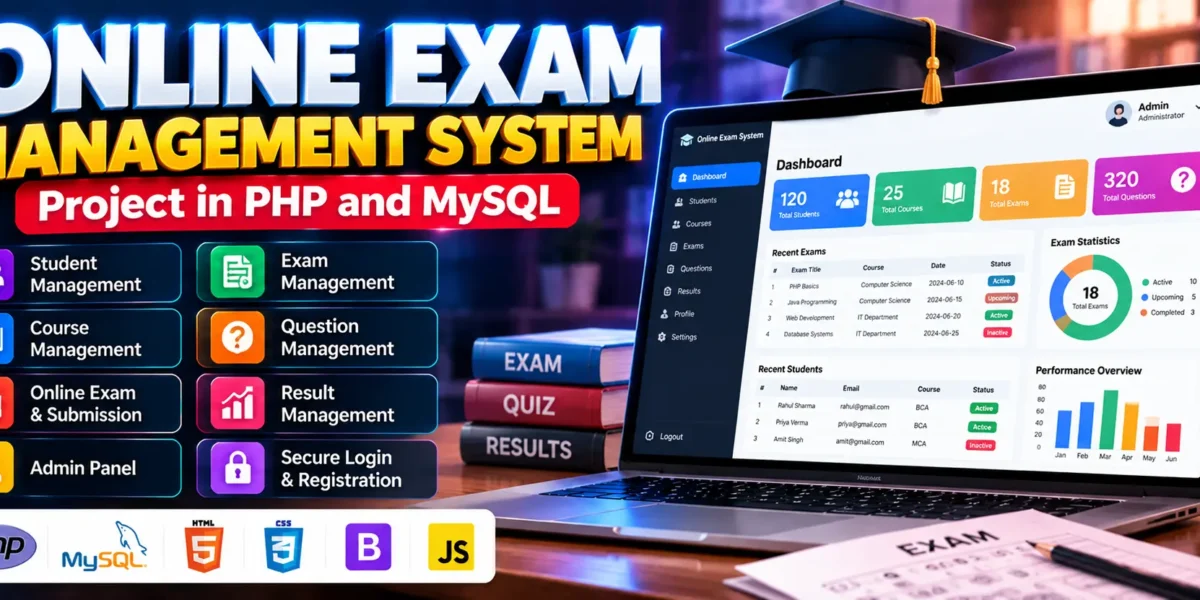
The project includes administrator authentication, dashboard statistics, student management, course management, exam scheduling, question management, student registration, online examination, answer submission, result viewing, and profile management.
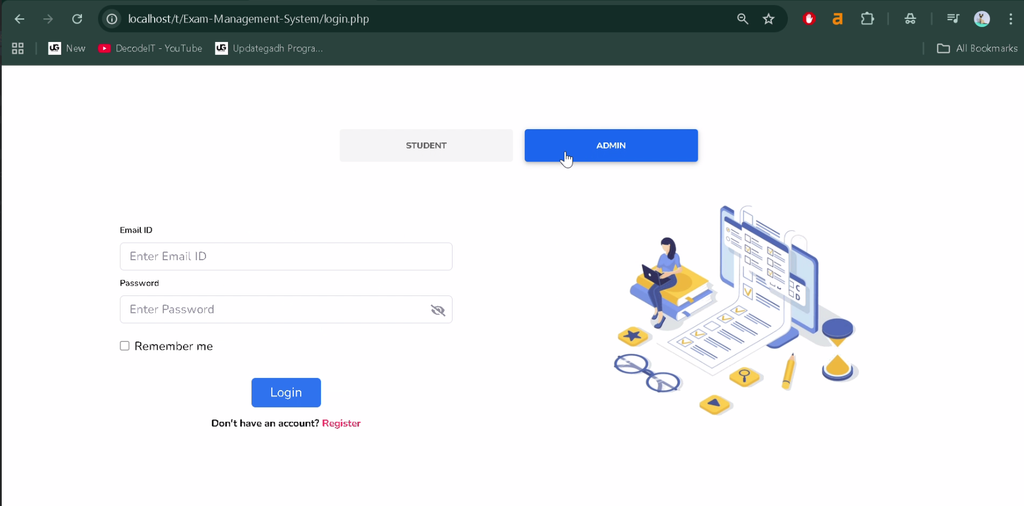
1. Admin Registration and Login
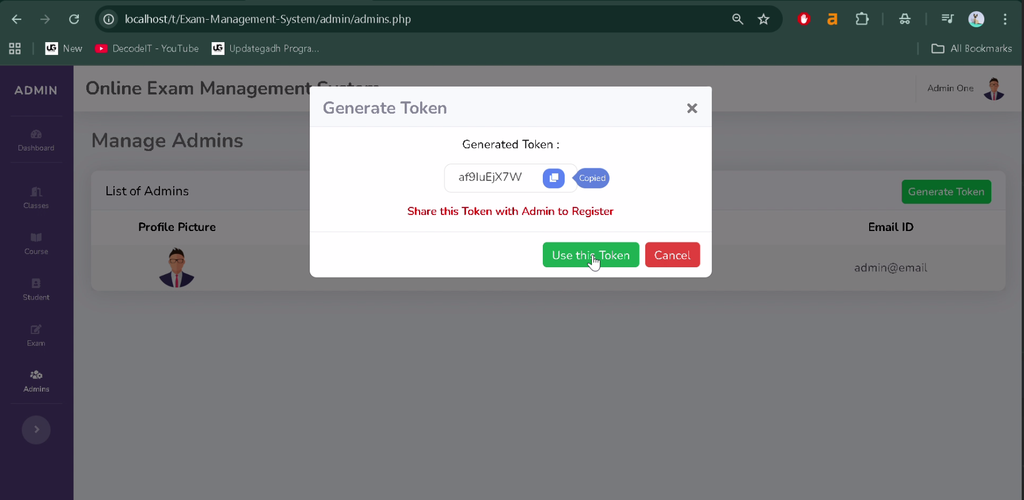
The administrator authentication module allows authorized administrators to register and log in to access examination management functions.
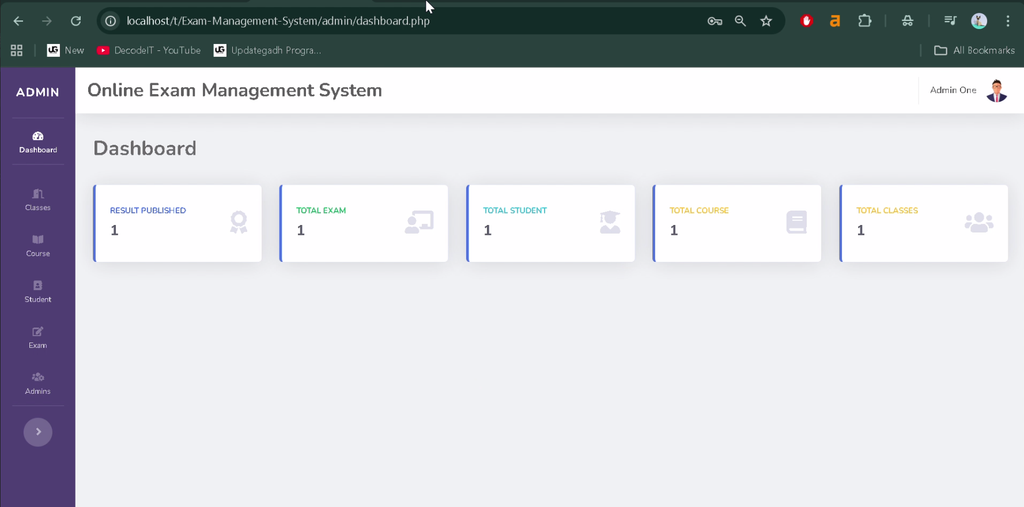
2. Admin Dashboard
The dashboard provides an overview of important information, including registered students, available courses, and examinations. It helps administrators organize their examination activities.
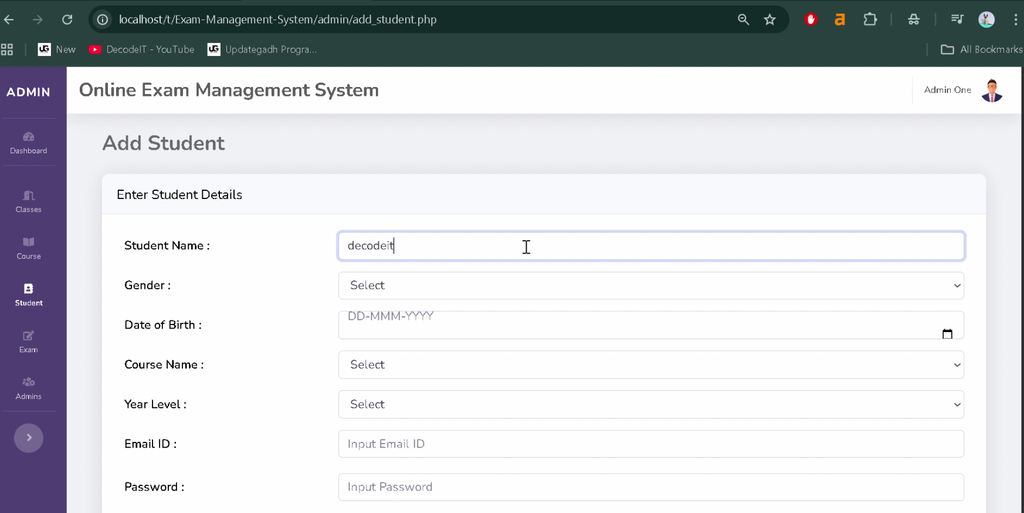
3. Student Management
Administrators can add new students, update existing records, and remove student accounts when required. This module helps maintain organized student information.
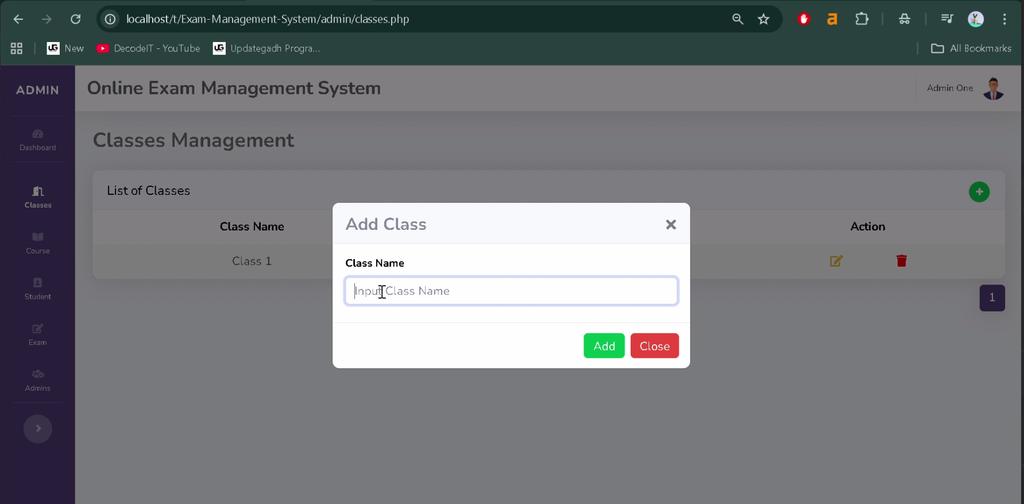
4. Course Management
The course management module allows administrators to create courses, edit course details, and associate examinations with relevant courses.
5. Exam Management
Administrators can create examinations, update exam details, and schedule assessments according to academic requirements.
6. Question Management
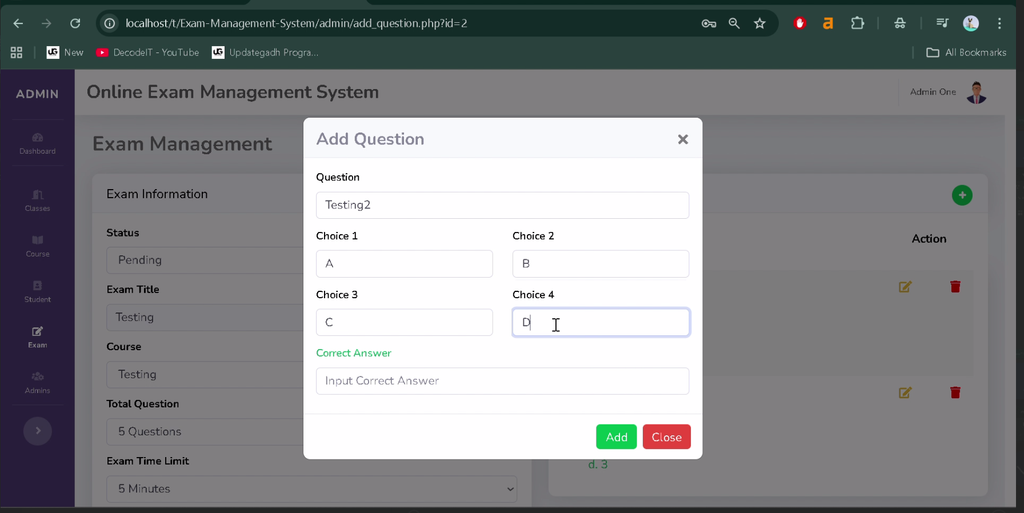
The system allows administrators to add questions and associate them with specific examinations. This supports digital question management for online assessments.
7. Student Registration and Login
Students can register for accounts and log in to access the examination platform. Authentication provides access to the student-specific functions available in the application.
8. View Available Exams
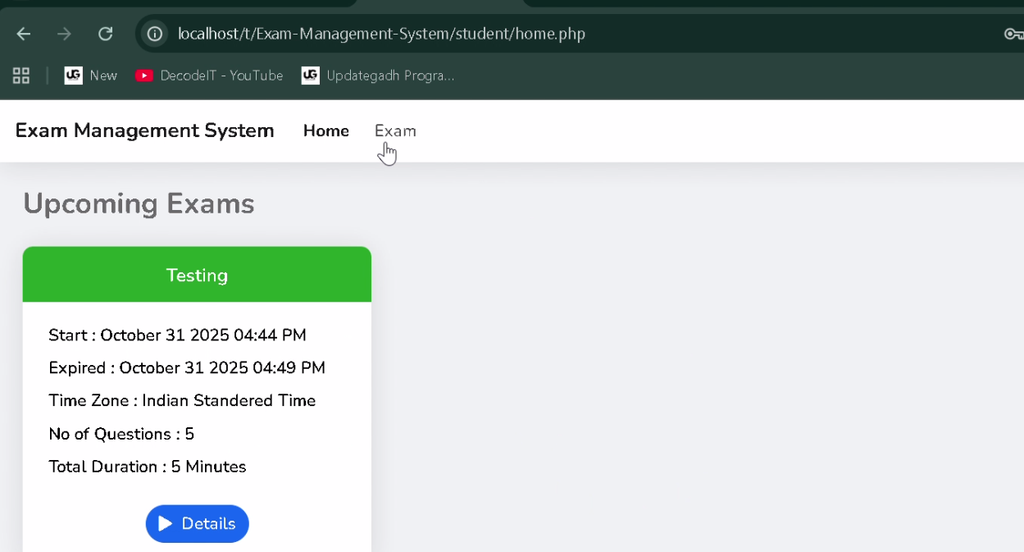
Students can view the examinations available to them through the student interface. This helps them identify assessments they can attempt.
9. Online Examination and Answer Submission
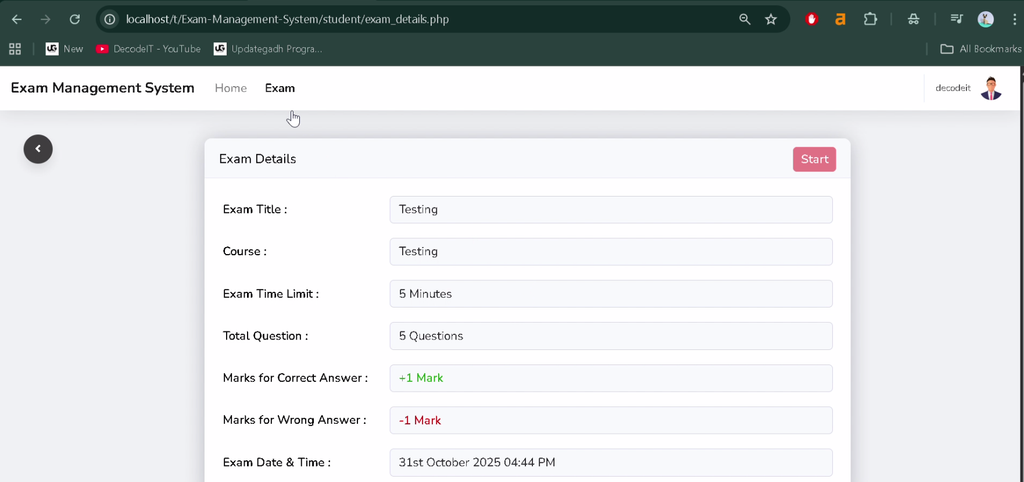
Students can start examinations, answer questions, and submit their responses through the platform. The supplied project description also mentions timed examinations, although the exact timer implementation should be verified in the project files.
10. Result Management
Students can view their examination results after completing the assessment and the applicable evaluation process. Result availability depends on how the examination and evaluation functionality is implemented.
11. Profile Management
Administrators can manage their profile information, while students can update personal details and other available account information.
How to Download
The complete package is available so you can run, study, and submit it with confidence. It includes:
- Full Source Code
- Project Report
- Synopsis
- PPT Presentation
Screenshot
How to Install the Online Exam Management System in VS Code?
You can run the project locally using XAMPP, Visual Studio Code, and a web browser. The setup involves extracting the project files, importing the MySQL database, and configuring the database connection.
Step 1: Install the Required Software
Install the following software before starting:
- XAMPP Server for Apache and MySQL.
- Visual Studio Code for editing the project files.
- Web Browser
Step 2: Extract the Project Files
Extract the downloaded project folder named Exam-Management-System into the XAMPP htdocs directory. The example path is:
C:\xampp\htdocs\Exam-Management-SystemStep 3: Start Apache and MySQL
Open the XAMPP Control Panel and start both Apache and MySQL. These services are required to run the PHP application and connect to its database.
Step 4: Create and Import the Database
Open phpMyAdmin using the following address:
http://localhost/phpmyadminCreate a database named exam_management. Open the Import tab and select the SQL file supplied with the project:
Exam-Management-System/SQL/exam_management.sqlClick Go to import the database tables and any included initial data.
Step 5: Configure the Database Connection
Locate the connection.php file in the project folder and check that the database credentials match your local MySQL configuration. The original instructions provide this example:
<?php
$con = mysqli_connect(
    "localhost",
    "root",
    "",
    "exam_management"
);

if (!$con) {
    die("Connection failed: " . mysqli_connect_error());
}
?>
Step 6: Run the Project
Open your browser and visit the following local URL, assuming the project folder has the specified name:
http://localhost/Exam-Management-System/If the project files and database configuration are correct, the application should open. Use the appropriate admin or student login interface to access the available features.
How to Use the Online Exam Management System?
The application has two primary roles: Admin and Student. Administrators manage examination-related information, while students use the platform to attempt exams and access their results.
Admin Role
Administrators manage the examination workflow through the administrative interface.
- Log in through the admin panel.
- View dashboard information about students, courses, and exams.
- Create and manage courses.
- Add examinations and assign them to courses.
- Create questions for examinations.
- Add, update, or remove student records.
- Manage profile information.
Student Role
Students use the student portal to access available examinations and manage their accounts.
- Register and log in to the student portal.
- View available examinations.
- Start examinations and answer questions.
- Submit examination answers.
- View results when they become available.
- Update profile information.
Why Is This Project Useful for Students?
The Online Exam Management System provides practical experience with full-stack web development and database-driven application design. It demonstrates how authentication, CRUD operations, and role-based interfaces can be combined to support an educational workflow.
- PHP Development: Learn how backend logic processes examination-related requests.
- MySQL Database: Understand how student, course, question, and exam records are stored.
- CRUD Operations: Practice creating, viewing, updating, and deleting records.
- User Authentication: Understand separate access workflows for administrators and students.
- Frontend Development: Explore how HTML, CSS, and JavaScript create an interactive interface.
- Real-World Application: Learn how digital systems can organize examination activities.
Frequently Asked Questions (FAQs)
1. Which technologies are used in the Online Exam Management System?
The project uses HTML, CSS, JavaScript, PHP, and MySQL.
2. What are the main modules of this project?
The main modules include student management, course management, exam management, question management, online examinations, result viewing, and profile management.
3. Which database is used in the project?
The project uses MySQL, with exam_management as the database name in the provided installation instructions.
4. Can this project run using XAMPP and VS Code?
Yes. You can edit the project in VS Code and run it locally using XAMPP after importing the database and configuring the connection settings.
5. Is the Online Exam Management System suitable for BCA students?
Yes. It is suitable for BCA, MCA, and other computer application students who want practical experience with PHP, MySQL, authentication, CRUD operations, and web application development.
Final Thoughts
The Online Exam Management System Project in PHP and MySQL demonstrates how educational examination activities can be organized through a web-based application. Its student, course, exam, and question management modules provide practical examples of database-driven software development.