
Introduction
The primary purpose of a Database Management System (DBMS) is to efficiently store, manage, and retrieve data while maintaining reliability and consistency. Among the various mechanisms used to ensure database reliability, checkpoints play an important role in data recovery.
Checkpoints are mainly used to improve data integrity and recoverability during system failures. When a database system crashes, the recovery process uses transaction logs to determine which transactions need to be redone and which need to be undone.
Without checkpoints, the recovery system may need to scan a large portion of the transaction log, which can be time-consuming and resource-intensive. Checkpoints reduce this work by providing a known recovery starting point.
What is a Checkpoint in DBMS?
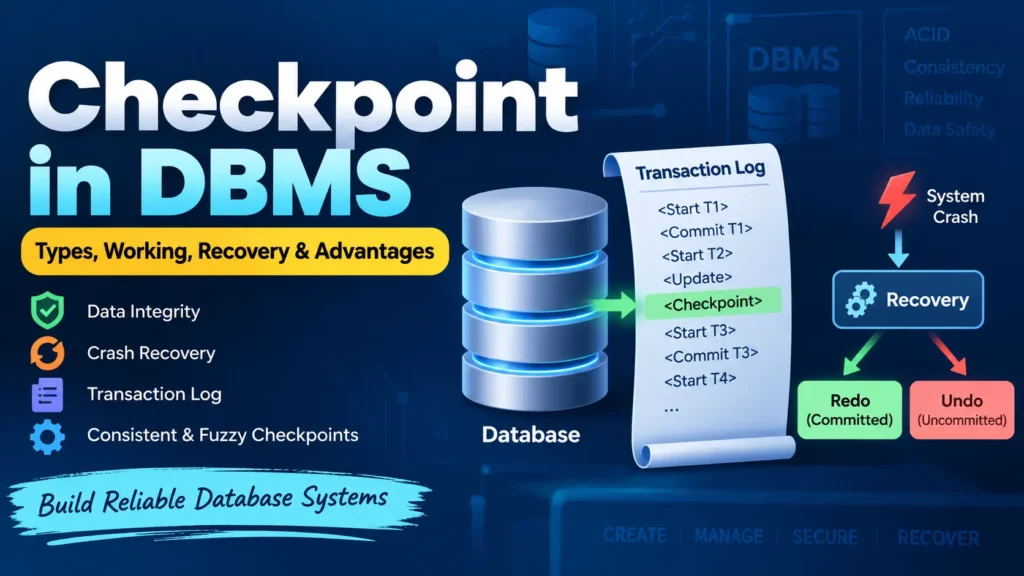
A checkpoint in DBMS is a specific point in the transaction log where the database system records enough information to simplify the recovery process after a failure.
Think of a checkpoint as a bookmark in the transaction log. Instead of scanning the entire log from the beginning after a crash, the recovery system can start from the most recent checkpoint and process only the relevant transactions.
For example, consider an airline reservation system where hundreds of transactions are processed every minute. The transaction log can grow very quickly. If the system crashes, checking the entire log would take significant time. A checkpoint allows the recovery process to begin from a more recent and known point.
Key Properties of Checkpoints
- They provide a known point from which database recovery can begin.
- They reduce the amount of transaction log that must be processed during recovery.
- They help reduce database recovery time after a crash.
- They help manage transaction logs more efficiently.
Types of Checkpoints in DBMS
1. Consistent Checkpoint
A consistent checkpoint is created when the database reaches a consistent state, typically after ensuring that the necessary updates have been safely recorded.
This approach can simplify recovery, but creating such checkpoints may temporarily restrict or delay some database operations.
2. Fuzzy Checkpoint
A fuzzy checkpoint allows transactions to continue executing while the checkpoint is being created. The database does not need to stop all transaction processing.
Fuzzy checkpoints generally provide better system availability and performance, but the recovery process can be more complex because transactions may remain active while the checkpoint is being established.
Complete Advance AI Topics: Click Here
SQL Tutorial: Click Here
How Does a Checkpoint Work?
When a DBMS creates a checkpoint, it performs several operations to ensure that enough recovery information is safely stored.
- Write log information: Important information from memory is written to stable storage.
- Flush modified buffers: Modified database pages that need to be persisted are written to disk.
- Write a checkpoint record: A checkpoint record is added to the transaction log.
These operations provide the recovery system with a known reference point. After a crash, the DBMS can use this information to determine which transactions need further processing.
Recovery Using Checkpoints
After a system failure, the recovery manager uses the transaction log and the most recent checkpoint to determine the state of transactions.
Transactions are generally classified into two categories:
- Redo List: Transactions that were committed but whose changes may not have been completely written to disk. Their operations may need to be applied again.
- Undo List: Transactions that were active when the crash occurred and were not committed. Their changes need to be rolled back.
Recovery Process
- The recovery system identifies the most recent checkpoint.
- It examines the relevant portion of the transaction log.
- Committed transactions are identified for redo when necessary.
- Uncommitted transactions are identified for undo.
- The required recovery operations are performed to restore database consistency.
This approach significantly reduces the amount of work required compared with scanning the complete transaction history.
When Should a Checkpoint Be Taken?
There is no single fixed rule for determining when a checkpoint should be created. Database systems can use different strategies depending on workload and performance requirements.
Common checkpoint strategies include:
- After a fixed number of transactions.
- After a specific time interval.
- When a certain amount of log data has been generated.
- When the system reaches an appropriate workload condition.
- During periods of relatively low system activity.
- When manually triggered by a database administrator.
The ideal checkpoint frequency depends on the database workload, recovery requirements, storage system, and performance characteristics.
Example of Checkpoint in DBMS
Consider a bank database that creates a checkpoint after processing 10 transactions.
- T1–T10 are executed, and a checkpoint is created.
- After the checkpoint, T11 and T12 are processed.
- Suddenly, the database system crashes.
During recovery, the DBMS can use the latest checkpoint as a reference point and examine the transactions that may require recovery.
- If T11 or T12 was committed but its changes were not fully persisted, the transaction may need to be redone.
- If a transaction was still active and had not committed, its changes may need to be undone.
Without a checkpoint, the recovery system could potentially need to examine a much larger portion of the transaction log.
Advantages of Checkpoints in DBMS
- Faster Recovery: Reduces the amount of log information that must be processed after a crash.
- Reduced Recovery Overhead: The recovery system can start from a known point rather than processing the entire log.
- Improved Reliability: Helps the DBMS restore a consistent database state after failures.
- Better Log Management: Checkpoints can help manage the amount of log information that must remain available for recovery.
- Reduced Downtime: Faster recovery can help reduce the time a database remains unavailable after a failure.
Challenges of Checkpoints
Although checkpoints improve recovery, they also introduce some overhead.
- Writing log and database information to stable storage consumes I/O resources.
- Creating checkpoints can temporarily increase system workload.
- Frequent checkpoints may negatively affect database performance.
- Large databases may require significant I/O operations during checkpoint processing.
- Fuzzy checkpoints require more sophisticated recovery mechanisms.
- Poorly chosen checkpoint intervals may result in unnecessary overhead or longer recovery times.
Applications of Checkpoints in DBMS
- Crash Recovery: Helps restore the database quickly after system failures.
- Transaction Management: Supports efficient recovery of committed and uncommitted transactions.
- Distributed Databases: Can assist recovery and consistency management across distributed systems.
- Database Maintenance: Helps manage transaction logs and recovery information.
- Performance Management: Database administrators can evaluate checkpoint frequency and its effect on system performance.
YT:- DecodeIT
Conclusion
A checkpoint in DBMS is an important mechanism used to improve database recovery and reliability. It acts as a reference point in the transaction log, allowing the recovery system to avoid processing unnecessary historical log information.
By working together with transaction logging, redo operations, and undo operations, checkpoints help modern database systems recover more efficiently after crashes and maintain database consistency.
As databases continue to process larger amounts of data and increasingly complex workloads, properly designed checkpoint mechanisms remain essential for achieving a balance between performance, reliability, and recovery speed.
Keywords
Checkpoint in DBMS, DBMS Checkpoint, Checkpoint in Database, Types of Checkpoint in DBMS, Consistent Checkpoint, Fuzzy Checkpoint, Database Recovery, Transaction Recovery, Crash Recovery in DBMS, DBMS Recovery, Redo and Undo in DBMS, Transaction Log, Database Management System