Rock Paper Scissors Game with Python
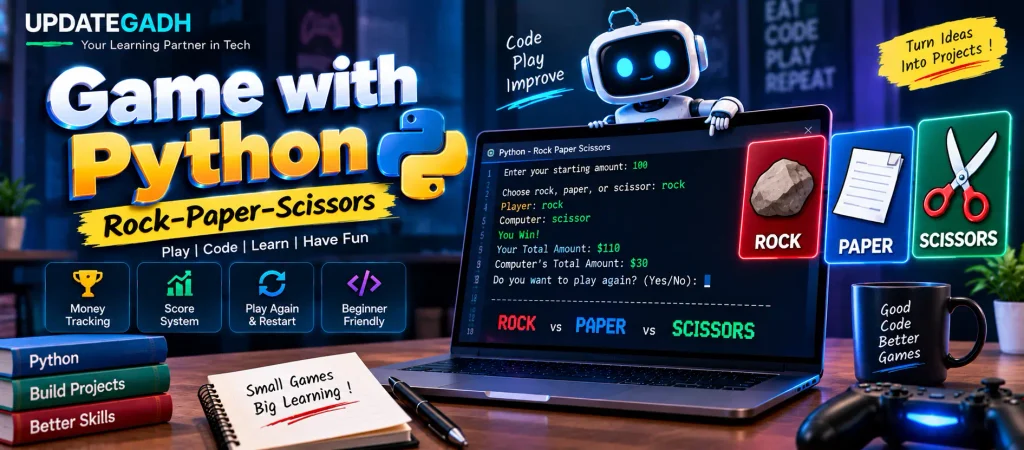
Rock Paper Scissors is a simple game, but it is also a useful Python project for practicing conditions, loops, random selections, input validation, and variable handling. In this project, we will create a command-line version of the game where the player competes against the computer.
This version adds an interesting money-tracking system. Both the player and computer have a balance, and every winning round changes their respective amounts. The game continues until the player chooses to stop or one side runs out of money.
What Makes This Python Game Different?
The basic Rock Paper Scissors rules are combined with a simple balance system, making the project more interactive.
- Balance Tracking: The player and computer maintain separate amounts throughout the game.
- Round-Based Gameplay: Every round produces a new result and updates both balances.
- Game Over Condition: The game stops when either balance reaches zero.
- Input Validation: Invalid values are rejected before the game continues.
- Restart Option: Players can start another game with a different initial amount.
- Random Computer Choice: Python’s
randommodule determines the computer’s selection.
How the Game Works
1. Initial Setup
The computer begins with a fixed balance of $40. The player is asked to enter their own starting amount. The program checks that the entered value is a valid positive number.
2. Making a Choice
During every round, the player selects rock, paper, or scissor. At the same time, the computer randomly selects one of the three choices.
3. Determining the Winner
The normal Rock Paper Scissors rules are used to determine the result. Rock defeats scissors, paper defeats rock, and scissors defeat paper. When both choices are identical, the round is considered a tie.
4. Updating the Balance
A winning player receives $10, while the losing side loses $10. After each round, the updated balances are printed on the screen.
5. Ending or Restarting the Game
If either participant reaches zero, the current game ends. Otherwise, the player can decide whether to continue playing. After leaving the game loop, another option allows the player to restart with a new starting amount.
Complete Python Code
import random

# Initial money for the computer
comp_money = 40

while True:
    # Get player's starting amount
    try:
        player_money = int(input("Enter your starting amount: "))

        if player_money <= 0:
            print("Please enter a valid amount greater than 0.")
            continue

    except ValueError:
        print("Invalid input. Please enter a numeric value.")
        continue

    # Game loop
    while True:

        # Available choices
        choices = ["rock", "paper", "scissor"]

        # Computer selects randomly
        comp_choice = random.choice(choices)
        player_choice = None

        # Validate player's selection
        choice_numbers = {"1": "rock", "2": "paper", "3": "scissor"}
        while player_choice not in choices:
            player_choice = input(
                "Choose 1 for rock, 2 for paper, or 3 for scissor (q to quit): "
            ).strip().lower()

            if player_choice == "q":
                break

            player_choice = choice_numbers.get(player_choice, player_choice)

            if player_choice not in choices:
                print("Invalid choice. Enter 1, 2, 3, rock, paper, or scissor.")

        if player_choice == "q":
            break

        print(f"Player: {player_choice}")
        print(f"Computer: {comp_choice}")

        # Determine the winner
        if player_choice == comp_choice:
            print("It's a Tie!")

        elif (
            (player_choice == "rock" and comp_choice == "scissor")
            or
            (player_choice == "paper" and comp_choice == "rock")
            or
            (player_choice == "scissor" and comp_choice == "paper")
        ):
            print("You Win!")
            player_money += 10
            comp_money -= 10

        else:
            print("Computer Wins!")
            player_money -= 10
            comp_money += 10

        # Display current balances
        print(f"Your Total Amount: ${player_money}")
        print(f"Computer's Total Amount: ${comp_money}")

        # Check whether someone has lost all money
        if player_money <= 0:
            print("You're out of money! Game over.")
            break

        elif comp_money <= 0:
            print("Computer is out of money! You win the game.")
            break

        # Ask whether to continue
        play_again = input(
            "Do you want to play again? (Yes/No): "
        ).lower()

        if play_again != "yes":
            break

    # Ask whether to restart with a new amount
    restart = input(
        "Do you want to restart the game with a new amount? (Yes/No): "
    ).lower()

    if restart != "yes":
        break

print("Bye! Thanks for playing!")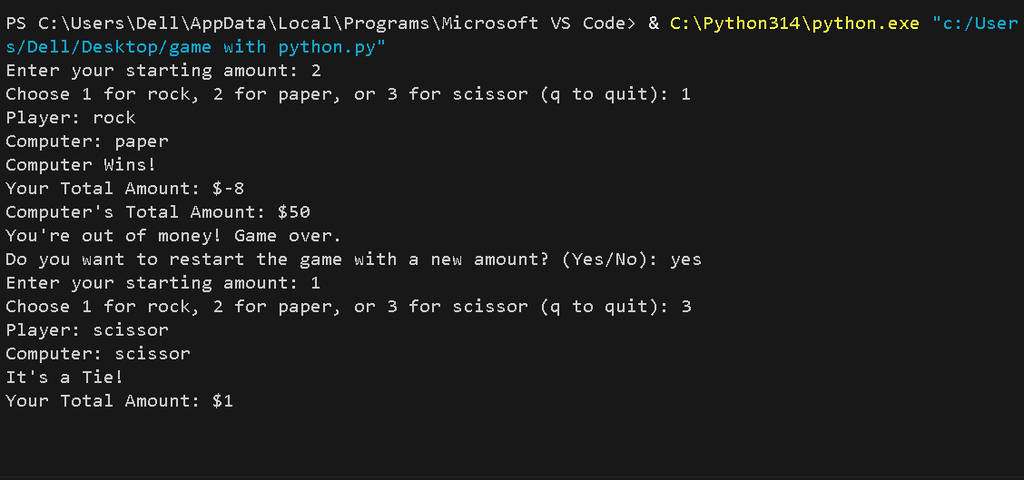
Understanding the Important Parts
Using the random Module
The random module is imported at the beginning of the program. The random.choice() function selects one item from the available choices, allowing the computer to make a different selection during each round.
Validating the Starting Amount
The starting amount is converted into an integer using int(). If the user enters something that cannot be converted into a number, ValueError is handled and the program asks for another value.
Validating Rock Paper Scissors Choices
The inner while loop keeps requesting a choice until the entered value matches one of the three accepted options. Converting the input with lower() also makes the comparison easier.
Managing the Game Balance
When the player wins, their balance increases by $10 while the computer’s balance decreases by $10. The opposite happens when the computer wins. A tie does not change either balance.
Key Features
- Random computer moves
- Rock, paper, and scissor selection
- Positive-number validation
- Invalid-choice handling
- Automatic winner detection
- Player and computer balance tracking
- $10 balance adjustment after a win or loss
- Game-over conditions
- Play-again functionality
- Complete game restart option
How to Run the Project
You only need Python installed on your computer to run this command-line project.
- Create a Python file such as
rock_paper_game.py. - Copy the program into the file.
- Save the file.
- Open Command Prompt or Terminal in the project folder.
- Run the program using
python rock_paper_game.py. - Enter your starting amount and follow the instructions displayed in the terminal.
Complete Advance AI Topics: Click Here
SQL Tutorial: Click Here
YT:- DecodeIT
Frequently Asked Questions
1. How do you make a Rock Paper Scissors game in Python?
You can create it using the random module, user input, conditional statements, and loops to compare the player’s choice with the computer’s choice.
2. Which Python module is used for the computer’s choice?
The program uses Python’s built-in random module. The random.choice() function selects one option from the available choices.
3. What choices are available in this game?
The player can choose rock, paper, or scissor.
4. How does the money system work?
The winner receives $10 while the losing side loses $10. A tie leaves both balances unchanged.
5. When does the game end?
The game ends when either the player’s balance or the computer’s balance reaches zero, or when the player chooses not to continue.
6. Can the player restart the game?
Yes. After the current game ends, the program asks whether the player wants to restart with a new starting amount.
7. Why is input validation used?
Input validation prevents invalid starting amounts and unsupported game choices from interfering with the program’s logic.
8. Is Tkinter required for this project?
No. This version runs in the terminal and does not require Tkinter. It uses standard Python input and output instead.
Conclusion
This Rock Paper Scissors Game with Python is a practical beginner-friendly project for understanding programming fundamentals. It combines random selection, loops, conditional logic, input validation, and balance management into one interactive application.
The project can also serve as a starting point for creating more advanced Python games. Once the command-line version is understood, the same game logic can be extended with additional features and a graphical interface.
Keywords: Game with Python, rock paper scissors Python code, rock paper scissors game in Python, rock paper scissors game Python project, rock paper scissors Python with score, rock paper scissors game with money tracking, Python game source code, rock paper scissors Python project, rock paper scissors using random module, Python command line game, rock paper scissors Python tutorial, rock paper scissors game in Python using functions