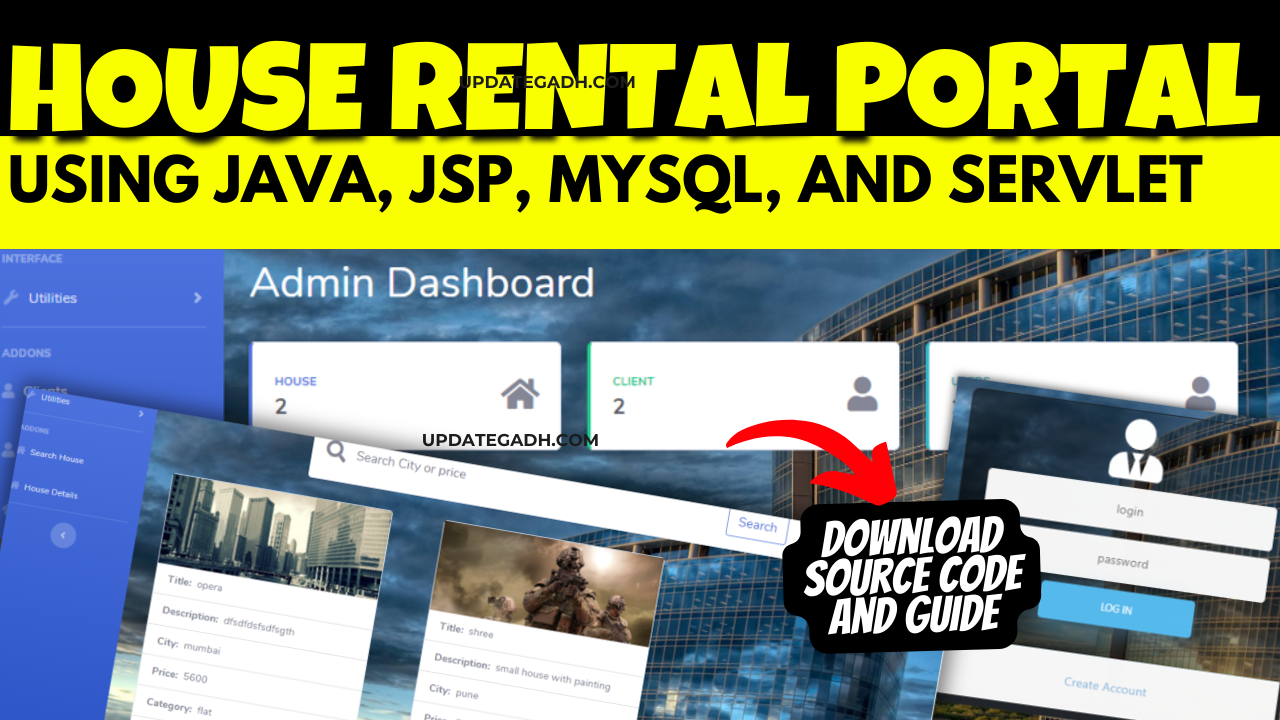
House Rental Portal
Are you looking to create a sophisticated house rental portal using Java, JSP, MySQL, and Servlet? Look no further! This comprehensive guide will take you through the process step by step, covering everything from setting up the project to running the web application successfully.
The house rental portal is an online platform designed to facilitate efficient and cost-effective exchange of information between homeowners and potential tenants. It offers a user-friendly interface tailored to meet the needs of both parties involved. Additionally, it implements a novel strategy aimed at simplifying the management of rental properties
Introduction
In today’s digital age, having an online platform for house rentals is essential for landlords and tenants alike. By leveraging Java, JSP, MySQL, and Servlet, you can create a powerful and user-friendly house rental portal that streamlines the process of finding and listing rental properties.
Check 50+ JAVA Projects with Source Code
Making the Project
The first step in creating a house rental portal is setting up the project. To do this, you will need to create a new web application project in your preferred Integrated Development Environment (IDE). Make sure to include all the necessary files and directories for building a robust web application.
Once the project is set up, you can start designing the user interface using JSP (Java Server Pages). JSP allows you to create dynamic web pages that interact with the user and display information from the database. It’s essential to create a user-friendly interface that makes it easy for users to search for rental properties and submit listings.
| Name | Required |
|---|---|
| Project Name | House Rental Portal on Java, JSP, MySQL (JSP) |
| Project Platform | JSP |
| Programming Language | Servlet/JSP/Bootstrap/HTML/MySQL |
| Front End | Html, css, js, jsp, |
| Back End | java, MySQL |
| IDE Tool | Eclipse Neon |
| Database | MySQL |
| Project Type | Web Application |
Essential Features
A successful house rental portal should have several essential features to attract both landlords and tenants. Some of the key features to include in your portal are:
- User authentication: Allow users to create accounts, log in, and manage their profiles.
- Property search: Implement a search functionality that allows users to filter rental properties based on location, price, and other criteria.
- Listing submission: Enable landlords to submit information about their rental properties, including descriptions, photos, and contact details.
- Booking functionality: Allow tenants to book rental properties online and communicate with landlords.
By incorporating these essential features, you can create a comprehensive house rental portal that meets the needs of both landlords and tenants.
OWNER:
- Owners register with the application, requiring authorization from the client.
- Owners can upload property details, including room specifications, pictures, location, and rent pricing.
- The module enables owners to view their properties and add new listings.
CLIENT:
- The client module is managed by an administrator overseeing user registration and status management.
- Administrators can activate or deactivate users, including owners and customers.
- This module acts as the administrative backbone, ensuring smooth operation and user management.
CUSTOMER:
- Customers register within the application as individuals seeking rental properties.
- After registration and activation by the client, customers can search for rental properties based on their preferences.
- Customers receive detailed information about available rentals to facilitate informed decision-making.
Check 100+ Spring Boot Projects with Source Code
Required Software and Tools
To build a house rental portal on Java, JSP, MySQL, and Servlet, you will need the following software and tools:
- Java Development Kit (JDK): Install the latest version of JDK to write and compile Java code.
- Apache Tomcat: Use Apache Tomcat as the web server to deploy and run your web application.
- MySQL: Set up a MySQL database to store information about rental properties, users, and bookings.
- IDE: Choose an IDE like Eclipse or IntelliJ IDEA for developing and testing your web application.
By using these software and tools, you can efficiently develop and deploy your house rental portal with ease.
Technologies Used:
- Java
- J2EE
- Servlets
- JSP
- HTML
- CSS
- Bootstrap
Tools Used:
- Tomcat Server
Hardware Requirements:
- Processor : Pentium IV
- Hard Disk : 40GB
- RAM : 512MB or more
Software Requirements:
- Operating System : Windows 10/ 11/7 or Linux
- User Interface : HTML, CSS
- Client-side Scripting : JavaScript
- Programming Language : Java
- Web Applications : JDBC, Servlets, JSP
- Database : Mysql
- Server Deployment : Tomcat 5.0
Running the Web Application
Once you have completed the development of your house rental portal, it’s time to run the web application and test its functionality. Deploy your application on Apache Tomcat and access it through a web browser to ensure that all features are working correctly.
Test the property search functionality, listing submission process, user authentication, and booking functionality to make sure everything is functioning as expected. Make any necessary adjustments to improve the user experience and overall performance of the portal.
Download and Extract Files:
- Download the project files in ZIP format and extract them onto your Desktop using a reliable tool such as WinRAR.
[Backend Setup]
- Open XAMPP: Start XAMPP and ensure that both Apache and MySQL services are activated.
- Open your web browser and go to .
- Import Database: Within PHPMyAdmin, import the project database by selecting the “Import” option and choosing the provided database file.
[Front-end Setup]
- Open Eclipse (Download link): Launch Eclipse, ensuring a smooth initiation of the development environment.
- Import Project: Navigate to File > Import > General > Existing Projects into Workspace within Eclipse’s interface. Choose the root directory where your project is located and select the project before clicking Finish.
- Add MySQL Connector: In the project structure, go to Src > Web > lib folder. Integrate the MySQL Connector JAR file seamlessly into this designated folder.
Step 2: Run House Rental Portal on Java on Server
- Right-click on Project: In the Project Explorer, right-click on your project to reveal a contextual menu.
- Run As – Run on Server: Opt for “Run As” and then choose “Run on Server” to initiate the deployment process.
- Select Tomcat V8.0: Choose Tomcat V8.0 as the server for execution during the configuration.
- Next and Add All: Proceed to the next step in the configuration process. Click “Add All” to include all necessary resources and configurations for the project.
- Done: Complete the configuration process by clicking “Done.”
Step 3: Open Browser After Successful Setup
After completing the above steps, open your web browser and navigate to the specified local server address or to access and interact with your successfully set up project
Screenshots
EXISTING SYSTEM:
- The housing sector faces challenges in adapting to changing needs and preferences.
- Relocation to different cities or states for various reasons increases the demand for suitable accommodation.
- Many rental options available do not align with specific customer requirements, leading to dissatisfaction.
- Download All Free Project :-
(Note: Only for Educational Purpose)
Document and Reports
This document file contains a project Synopsis, Reports, and various diagrams. Also, the abstract pdf file is inside the zip and you can modify it accordingly. Documents and Reports take 2-3 days to create as per the user Requirements
Conclusion
creating a House Rental Portal on Java, JSP, MySQL, and Servlet is a rewarding endeavor that can bring value to both landlords and tenants. By following this comprehensive guide, you can build a sophisticated and user-friendly platform that simplifies the process of finding and listing rental properties.
So, what are you waiting for? Start developing your House Rental Portal on Java today and revolutionize the way rental properties are managed online!
Keyword
house rental agreement
house rental agreement format
house rental agreement format in word