Movie Ticket Management System in JSP
The Movie Ticket Management System in JSP is a web-based application developed using Java, JDBC, Servlets, JSP, and database technologies. It provides a platform where customers can browse movies, search for movie details, book tickets, and view their booking history. Administrators can manage movie information by adding new movies, updating existing records, and deleting movies when required.
This project demonstrates how Java web technologies can be used to develop a movie ticket booking portal. It is useful for students learning JSP, Java Servlets, database connectivity, and web application development.
Advance AI Topics: Click Here
What Is the Movie Ticket Management System in JSP?
The Movie Ticket Management System is a dynamic web application designed to simplify movie browsing and ticket booking. Users can explore available movies, check details such as genre and ticket price, book tickets, and review previous bookings. Administrators can maintain the movie database through movie management operations.
The application uses JSP to generate dynamic pages, Java Servlets to process requests, and database connectivity to manage movie and booking information. Its main purpose is to organize the movie ticket booking process through a web-based interface.
Real Time Projects on YouTube:- DecodeIT
Requirements: Movie Ticket Management System in JSP
| Column 1 | Column 2 |
|---|---|
| Project Name | Movie Ticket Management System in JSP |
| Project Platform | JSP |
| Programming Language | Servlet, JSP, Bootstrap, HTML, MySQL |
| Front End | HTML, CSS, JavaScript, JSP |
| Back End | Java, MySQL |
| IDE Tool | Eclipse Neon |
| Database | MySQL |
| Project Type | Web Application |
Objective: Movie Ticket Management System in JSP
The primary objective of the Movie Ticket Management System is to provide an organized platform for browsing movies and managing ticket bookings. It allows customers to find movie information, select tickets, calculate booking costs, and access their booking history.
Feature
- Browse Movies:
- Users can view a list of available movies and explore the movies listed in the application.
- Search and Filter:
- Users can search for movies using criteria such as title, date, location, genre, and movie ID.
- Movie Details:
- Users can access information about a selected movie, including title, director, description, genre, date, location, total seats, available seats, and ticket price.
- Booking Tickets:
- Users can book tickets by providing the movie ID and quantity of tickets. The system also handles the total ticket price.
- Booking History:
- Users can review their previous bookings, including movie details, booked ticket quantity, and total price.
- Add, Delete, and Update Movies:
- Administrators can add new movies, delete existing movies, and update movie information in the database.
Technologies Used:
- JSP (JavaServer Pages):
- Used to generate dynamic web pages and display application information.
- Java Servlets:
- Handle backend requests and process application data.
- JavaBeans:
- Help organize application data and business logic.
- MySQL Database:
- Stores and retrieves movie, user, and booking information.
- HTML, CSS, and JavaScript:
- Support the frontend structure, styling, and user interactions.
Movie Ticket Booking System in Java :- Click here.
How to Download
The complete package is available so you can run, study, and submit it with confidence.
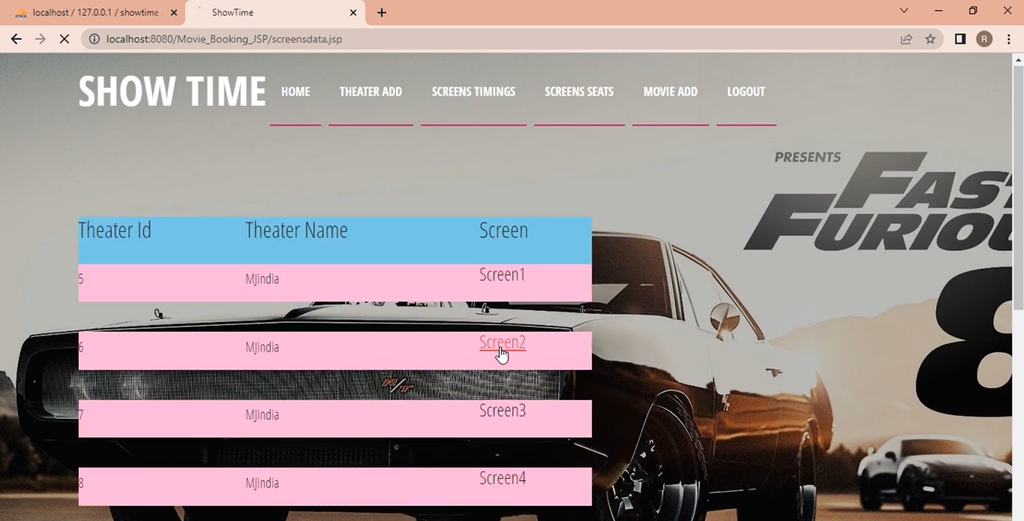
Screenshot


How to Run the Project?
To run the project, prepare Eclipse Enterprise Edition and the compatible Apache Tomcat server. Follow these steps to import and launch the application.
Step 1: Open Eclipse Enterprise Edition and select File → Import to import the project ZIP file.
Step 2: Right-click the imported project and select Run As → Run on Server.
Step 3: Select the configured Tomcat server, click Next, and then click Finish.
Step 4: Open the Servers tab and double-click the Tomcat server to check its port configuration.
Step 5: Open the application using the localhost URL and port configured for the project.
Step 6: Test movie browsing, searching, ticket booking, booking history, and the available administrator functions.
The administrator functionality focuses on maintaining movie records. By combining movie browsing, ticket booking, and movie management, the application demonstrates how a database-driven Java web application can organize common movie booking activities.
Benefits:
- Efficient Ticket Management: Organizes movie browsing and ticket booking through a single application.
- Movie Information Access: Helps users view movie details, ticket prices, and seat availability displayed by the system.
- User-Friendly Experience: Allows customers to explore movies and review their booking history.
- Data-Driven Administration: Enables administrators to add, update, and delete movie information.
Movie Recommender :- Click here.
Software And Tools Required
JDK/JRE Version: 11+
Web Server: Tomcat Server 9.0.x
Database Server: MS SQL Server 2017, as listed in the supplied software requirements.
Libraries:
- jstl-1.2 (JSP)
- mssql-jdbc-8.2.x-JRE11
Recommended JDK/JRE Version: Java 11.0.9 LTS
Important: The project overview specifies MySQL, whereas the software requirements mention Microsoft SQL Server and its JDBC driver. Check the actual project configuration to confirm which database and driver are required.
Movie Ticket Booking System in PHP and MySQL :- Click here.
Frequently Asked Questions (FAQs)
1. What is the Movie Ticket Management System in JSP?
It is a web application that allows users to browse movies, book tickets, view movie information, and check their booking history.
2. Which programming technologies are used in this project?
The project description lists Java, JSP, Servlets, JavaBeans, HTML, CSS, JavaScript, and database technologies.
3. Which IDE is mentioned in the requirements?
Eclipse Neon is listed as the development environment for the project.
4. Which server is required to run the project?
Apache Tomcat 9.0.x is listed in the supplied software requirements.
5. What can administrators do in the system?
Administrators can add new movies, update existing movie details, and delete movie records.
The Movie Ticket Management System in JSP demonstrates movie browsing, searching, ticket booking, booking history, and movie administration using Java web technologies. It helps students understand JSP, Servlets, JavaBeans, database operations, and web application deployment