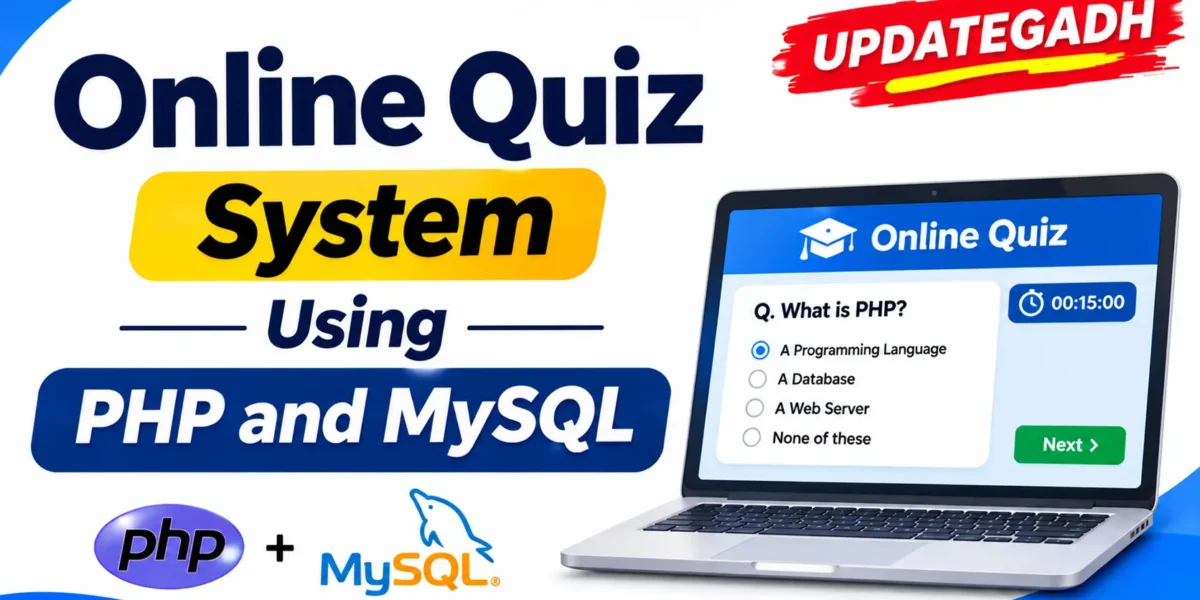
Online Quiz System Using PHP and MySQL
Introduction
Online Quiz System Using PHP and MySQL is a web-based examination application designed to conduct online quizzes and manage student performance. It provides separate panels for administrators and students, allowing administrators to create quiz categories, add questions, manage student accounts, and review examination results.
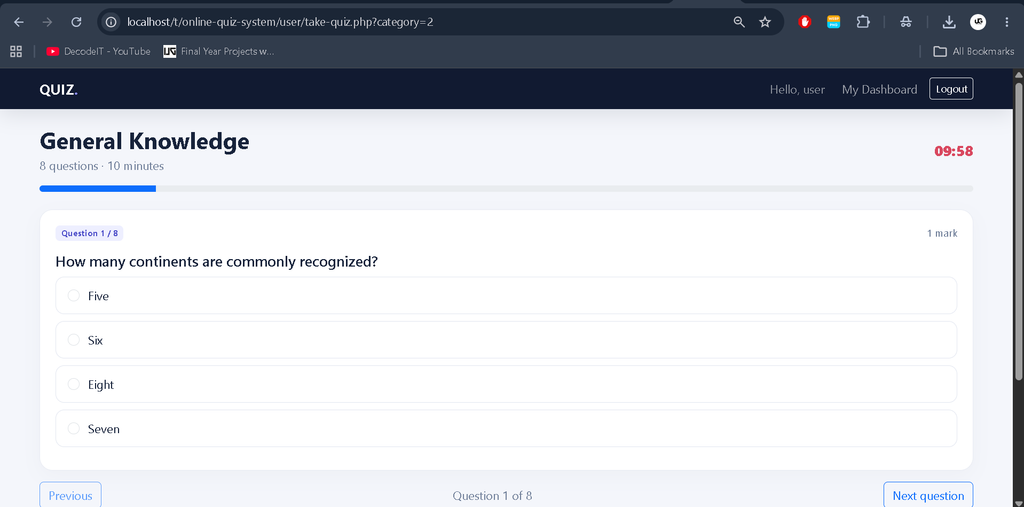
Students can register, log in, select quiz categories, answer questions, and submit their exams within a specified time. The system includes a countdown timer, AJAX-based answer submission, automatic submission when time expires, answer review, and previous attempt history.
Real Time Projects on YouTube:- DecodeIT
Project Overview
The Online Quiz System provides an organized platform for conducting timed examinations. Administrators manage quizzes and student accounts, while students participate in quizzes and review their results.
| Project Details | Information |
|---|---|
| Project Name | Online Quiz System |
| Programming Language | PHP 8.1+ |
| Database | MySQL / MariaDB |
| Frontend | HTML, CSS, JavaScript |
| UI Framework | Bootstrap |
| Additional Technology | AJAX |
| Database Connection | PDO |
| Local Server | XAMPP |
| Code Editor | Visual Studio Code |
| Project Type | Web-Based Examination System |
What Are the Main Features of the Online Quiz System?
The application includes separate functionalities for administrators and students to manage and participate in online examinations.
Online Quiz Management System Using Python and Django :- Click Here
1. Admin Dashboard
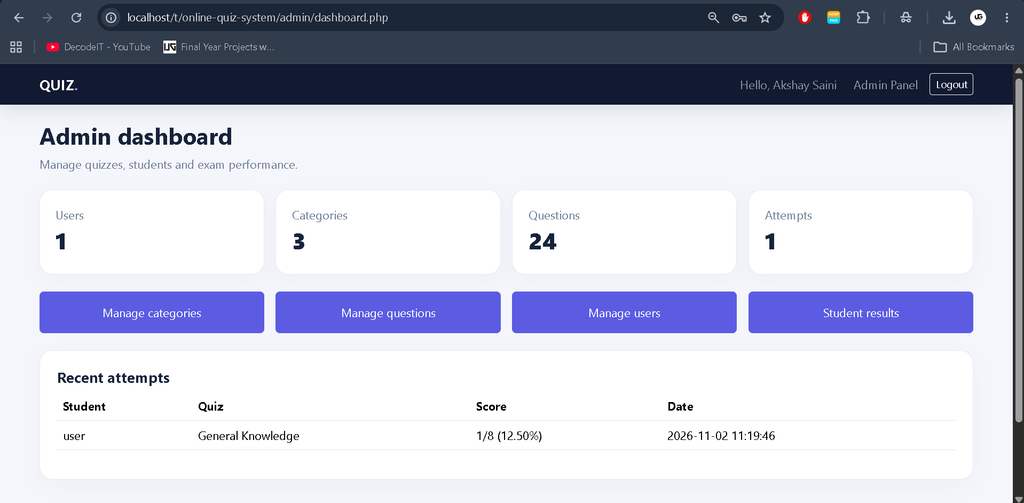
The administrator can access the Admin Panel to manage quiz-related activities and monitor student performance.
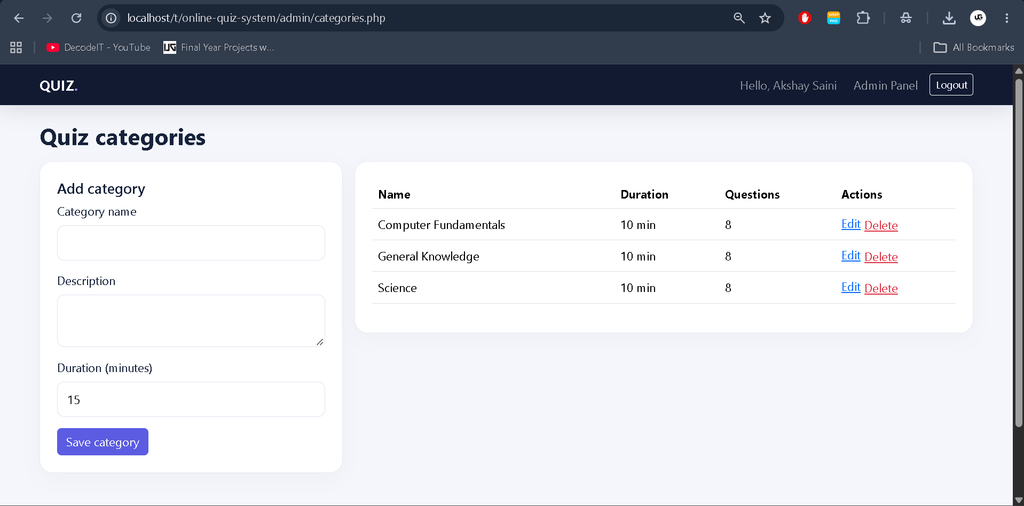
- Create and manage quiz categories.
- Set examination duration for each category.
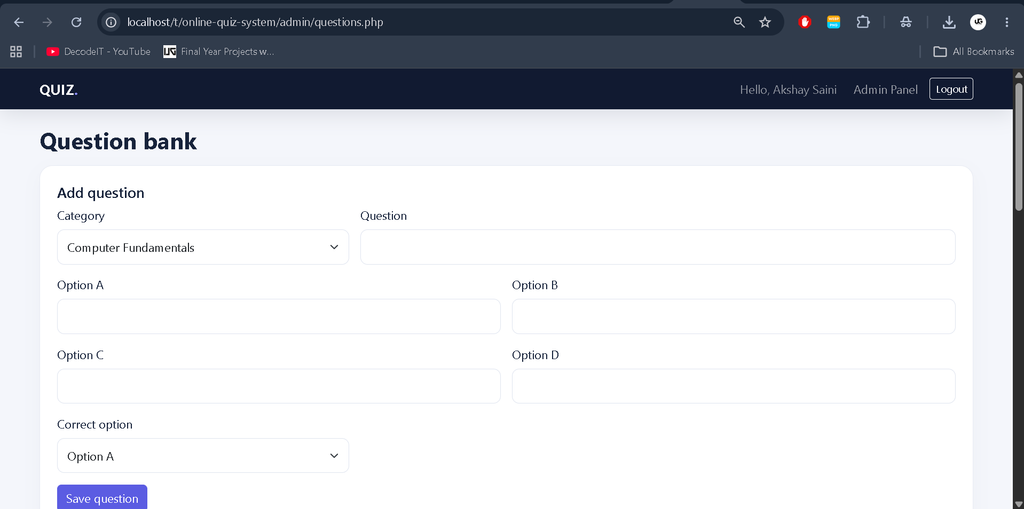
- Add questions with four answer options.
- Select the correct answer for each question.
- Manage student accounts.
- Block or unblock student access.
- Review recorded student results.
- View recent examination attempts.
2. Student Registration and Login
Students can register on the platform using their name, email address, and password. The password must contain at least eight characters. Registered students can log in to access available quizzes.
3. Quiz Categories
Students can select a quiz category containing questions. Administrators can create categories and configure the examination duration in minutes.
4. Timed Examination
The system provides a countdown timer for quizzes. Students must complete their examinations within the configured duration.
5. AJAX-Based Answer Submission
Answers are saved to the active examination attempt when students select an option. Students can navigate between questions using the Previous and Next Question buttons without losing their previously selected answers.
6. Automatic Quiz Submission
When the countdown reaches zero, the system automatically submits the examination. Students can also submit their answers manually before the time expires.
7. Result and Answer Review
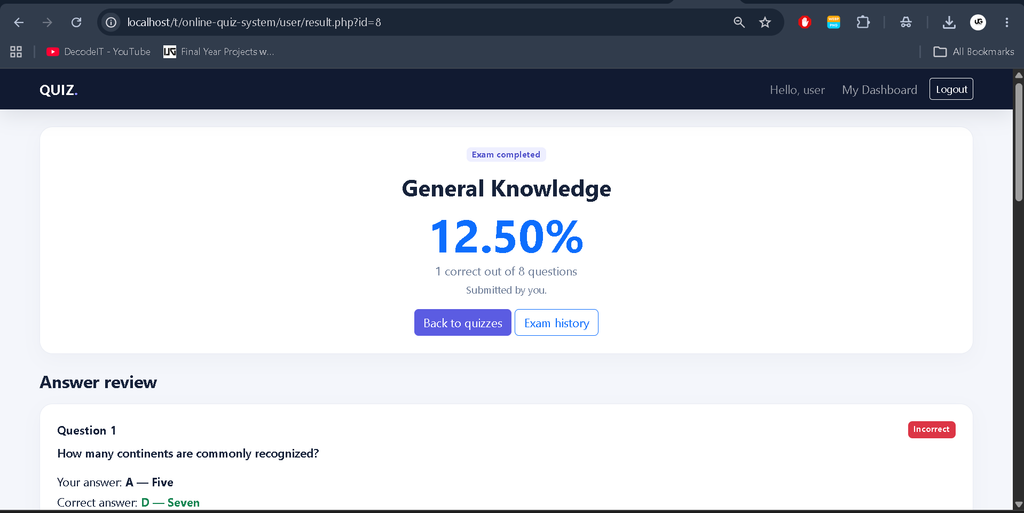
After submitting an examination, students can review their scores, selected answers, and correct answers.
8. Attempt History
Students can view their previous examination attempts and check their recorded results.
What Are the Main Modules of the Online Quiz System?
1. Administrator Module
The administrator manages the examination platform through the Admin Panel.
- Manage quiz categories and examination duration.
- Add questions with four options and correct answers.
- Manage student accounts.
- Block and unblock students.
- Review student examination results.
- Monitor recent quiz attempts.
2. Student Module
The student module provides access to online quizzes and examination results.
- Register and log in to the application.
- Select available quiz categories.
- Attempt timed examinations.
- Navigate using Previous and Next Question buttons.
- Submit answers manually or automatically when time expires.
- Review scores and correct answers.
- View previous examination attempts.
Online Quiz System in PHP :- Click Here
How to Download
The complete package is available so you can run, study, and submit it with confidence. It includes:
- Full Source Code
For PPT and Project Report Content, Contact Us: Rishabh saini
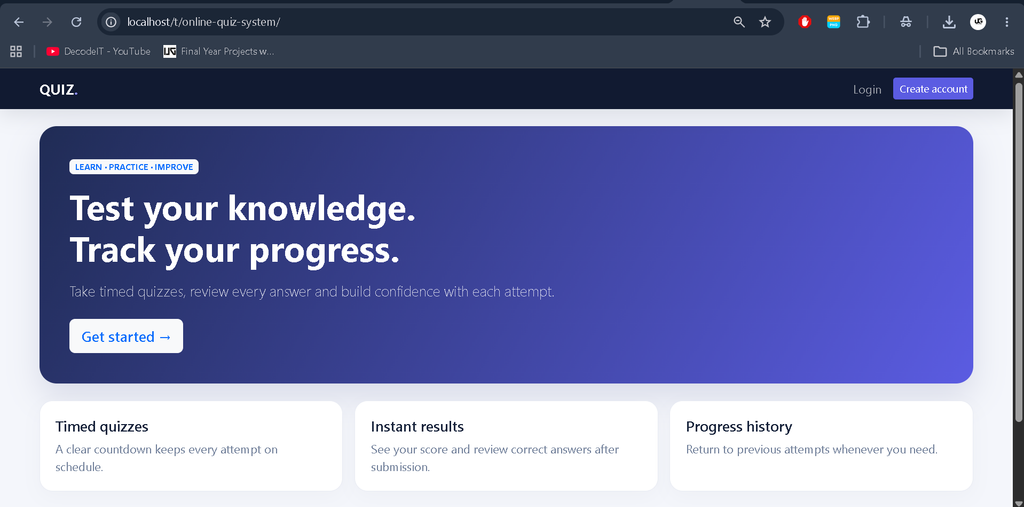
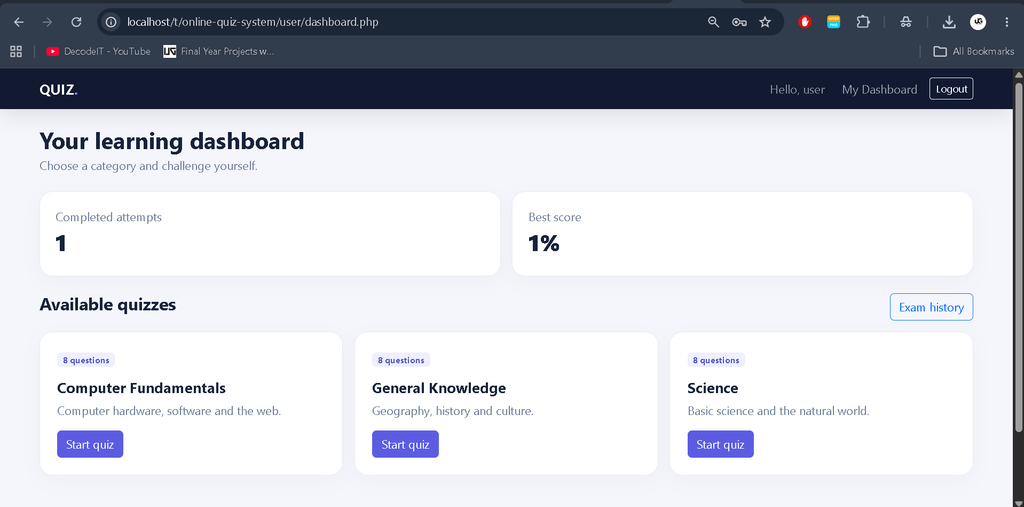
Screenshot
How to Install and Run the Online Quiz System in XAMPP?
Follow these steps to install and run the Online Quiz System on your Windows computer using XAMPP and Visual Studio Code.
Step 1: Install Required Software
Install XAMPP with PHP 8.1 or higher and MySQL/MariaDB. Also install Visual Studio Code or another code editor.
Step 2: Extract the Project
Extract the downloaded online-quiz-system.zip file and place the project folder inside the XAMPP htdocs directory.
C:\xampp\htdocs\online-quiz-system
Step 3: Start Apache and MySQL
- Open the XAMPP Control Panel.
- Start Apache.
- Start MySQL.
Step 4: Open phpMyAdmin
Open your browser and visit:
http://localhost/phpmyadmin
Step 5: Import the Database
- Open the Import tab in phpMyAdmin.
- Select the SQL file from the project’s
databasefolder. - Choose
online_quiz_system.sql. - Run the import.
The SQL script creates the database, tables, and 24 sample questions across three quiz categories.
Step 6: Configure Database Connection
Open config.php in Visual Studio Code and check the database configuration values.
DB_HOST
DB_NAME
DB_USER
DB_PASS
Update these values according to your local MySQL configuration. The supplied defaults are suitable for a standard XAMPP installation.
Step 7: Create the Initial Administrator
Open the following URL once in your browser to create the initial administrator account:
http://localhost/online-quiz-system/setup_admin.php
Step 8: Open the Login Page
Visit the login page to access the application:
http://localhost/online-quiz-system/login.php
Step 9: Delete the Setup File
Immediately delete setup_admin.php after creating the initial administrator account. Change the initial administrator password before using the application publicly.
What Are the Default Admin Login Credentials?
Use the following credentials to access the initial administrator account:
| Login Details | Credentials |
|---|---|
admin@updategadh.com | |
| Password | Admin@12345 |
Important: The setup script does not reset an existing administrator password. Delete the setup script after its first use.
How to Use the Online Quiz System?
Administrator Instructions
- Log in using the administrator credentials.
- Open the Admin Panel.
- Create quiz categories.
- Set the examination duration in minutes.
- Add questions with four options.
- Select the correct answer for each question.
- Manage student accounts and access.
- Review student results and recent attempts.
Student Instructions
- Register with your name, email, and password.
- Log in to your student account.
- Select a quiz category containing questions.
- Start the timed examination.
- Select answers and navigate using Previous and Next Question.
- Submit the examination or allow the timer to submit it automatically.
- Review your score, selected answers, and correct answers.
- Check your previous examination attempts.
What Is the Project Folder Structure?
The project files are organized into separate directories for administration, student functionality, AJAX requests, common components, assets, and database files.
| Folder | Description |
|---|---|
admin/ | Administrator dashboard and CRUD screens. |
user/ | Student dashboard, timed quiz, results, and history. |
ajax/ | AJAX examination submission endpoint. |
assets/ | Responsive CSS and JavaScript files. |
includes/ | Common layout and helper functions. |
database/ | MySQL database schema. |
What Security Features Are Included?
The project includes several security measures to protect user accounts, database operations, and form submissions.
- Password Protection: Passwords are stored using PHP
password_hash()and verified usingpassword_verify(). - Database Security: PDO prepared statements are used for database access.
- CSRF Protection: Forms use session-based CSRF tokens.
- Output Escaping: Output is escaped using
htmlspecialchars(). - Session Security: Session IDs are regenerated after successful login.
Production Security Note: Before making the application publicly accessible, enable HTTPS, configure secure cookies, add rate limiting and password reset functionality, review server permissions, and remove setup utilities.
How to Fix Common Installation Problems?
1. Database Connection Failed
Check whether MySQL is running in XAMPP and verify the database credentials in config.php.
2. Duplicate Entry ‘0’ for Key ‘PRIMARY’
If this error occurs, import database/online_quiz_system.sql through phpMyAdmin. The supplied SQL script repairs existing ID keys, restores demo question-to-category links, adds attempt status, and seeds missing demo data without creating duplicate tables or rows.
3. 404 Page Not Found
Check that the project folder is directly inside the XAMPP htdocs directory and that the browser URL matches the folder name.
4. AJAX Submission Error
Ensure PHP sessions and MySQL tables are available. Reload the quiz page to obtain a fresh CSRF token.
5. Bootstrap Styles Not Loading
Check your internet connection because Bootstrap is loaded through the jsDelivr CDN.
Frequently Asked Questions
1. What is an Online Quiz System Using PHP and MySQL?
It is a web-based examination application that allows students to attempt timed quizzes and administrators to manage categories, questions, accounts, and results.
2. Which programming language is used?
PHP 8.1 or higher is used for backend development.
3. Which database is used?
MySQL or MariaDB is used for database management.
4. Does the system support automatic quiz submission?
Yes, the examination is automatically submitted when the countdown reaches zero.
5. Can students review their answers?
Yes, students can review their scores, selected answers, correct answers, and previous attempts.
6. How many sample questions are included?
The database SQL script includes 24 sample questions across three quiz categories.
7. What is the default administrator password?
The initial administrator password is Admin@12345. The corresponding email is admin@updategadh.com.
Final Thoughts
Online Quiz System Using PHP and MySQL is a practical web development project for understanding online examination management. It includes separate administrator and student panels, quiz category management, timed examinations, AJAX-based answer saving, automatic submission, result review, and attempt history.