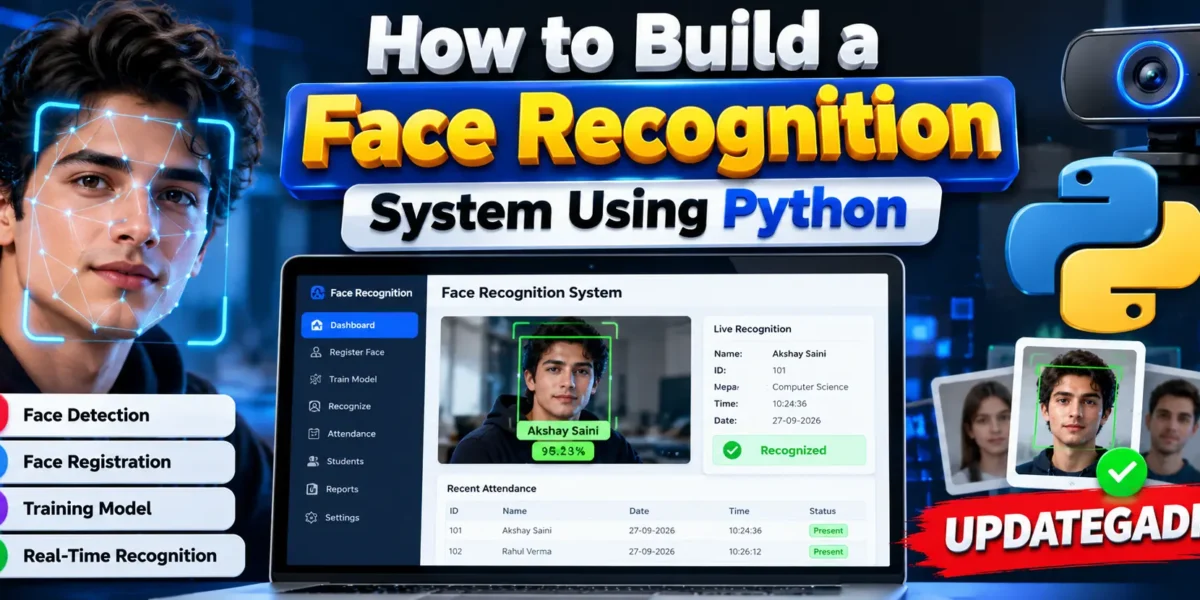
How to Build a Face Recognition System Using Python
Face recognition is one of the most practical applications of Artificial Intelligence and Computer Vision. From attendance management and identity verification to access control and smart security systems, face recognition can be used to identify a person automatically through a camera.
In this tutorial, we will understand how to build a Face Recognition System using Python. We will explore the complete workflow, including face detection, image collection, face encoding, recognition, and storing the identification result. Python is especially suitable for this type of project because it provides powerful libraries for computer vision, image processing, machine learning, and application development.
Table of Contents
Complete Advance AI Topics: Click Here
Real Time Projects on YouTube:- DecodeIT
What Is a Face Recognition System?
A Face Recognition System is an application that identifies or verifies a person by analyzing their facial characteristics. Unlike simple face detection, which only determines whether a face is present in an image or video, face recognition attempts to determine whose face it is.
A typical system uses a camera to capture a face, detects the facial region, converts important facial information into a numerical representation, and compares that representation with previously registered users.
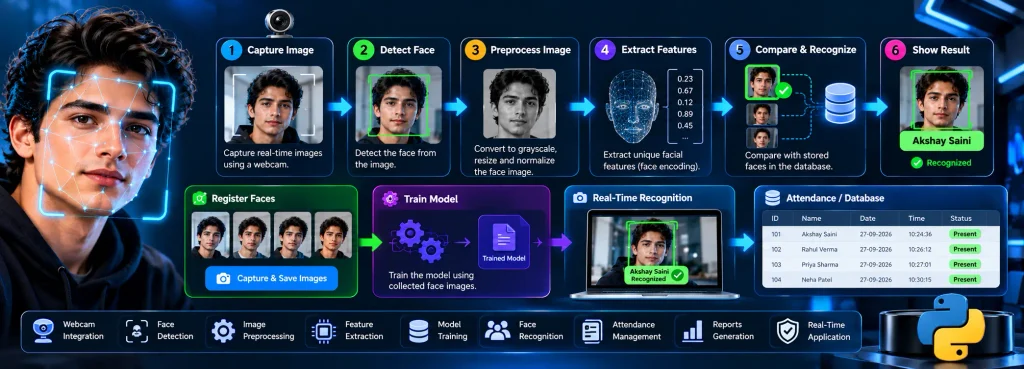
The basic workflow is:
- Capture an image or video frame.
- Detect the face from the frame.
- Extract useful facial information.
- Generate or compare facial representations.
- Match the face against registered users.
- Display the identified person’s information.
Advanced Face Recognition Attendance Project
If you want to move beyond a basic face recognition demonstration, UPDATEGADH also provides a complete advanced-level Face Recognition Based Attendance project.
The advanced project extends the basic concept into a practical attendance management application. Instead of simply identifying a face on the screen, the system can combine face registration, model training, real-time recognition, attendance recording, user information, and report management.
This makes it much more suitable for students looking for a final-year project, major project, practical project, or advanced Python project.
Complete Advanced Project: Face Recognition Based Attendance System
The linked project is specifically useful if you want to study how face recognition can be connected with an actual attendance workflow rather than building only an isolated face-detection demo.
Why Build a Face Recognition System Using Python?
Python has become a popular choice for computer vision and AI projects because of its extensive ecosystem. Libraries such as OpenCV can handle camera input, image processing, face detection, and other computer vision operations.
A student project can start with basic webcam-based recognition and later be extended into a complete application with authentication, attendance management, databases, reports, dashboards, and administrative controls.
Technologies Used
| Technology | Purpose |
|---|---|
| Python | Main programming language |
| OpenCV | Image processing, camera access, and computer vision |
| NumPy | Numerical and image-data processing |
| Pandas | Data handling and report processing |
| Tkinter / Web Framework | User interface development |
| CSV / MySQL | Storing user and attendance information |
How Face Recognition Works
A face recognition application generally contains multiple stages. Understanding these stages is more important than simply running the final application because it helps students explain the project during a practical examination or viva.
1. Face Detection
The first step is detecting a face inside an image or video frame. OpenCV can process frames obtained from a webcam and locate facial regions using computer vision techniques.
The detected region can then be cropped and processed separately from the rest of the image.
2. Face Data Collection
Before recognition can take place, the application needs information about the people it is expected to recognize. During registration, multiple face images can be captured using a webcam.
Using multiple samples can help the system handle differences in facial position, lighting, and expression better than relying on a single photograph.
3. Face Processing
The captured facial images are processed so that the system can extract information useful for recognition. Depending on the implementation, this can involve traditional recognition algorithms or modern embedding-based approaches.
For educational projects, OpenCV-based methods such as LBPH are commonly used because they are relatively straightforward to understand and demonstrate.
4. Face Recognition
During recognition, the camera continuously captures frames. The system detects faces and compares them with the registered facial data.
If a sufficiently close match is found, the application can display the person’s name or ID and perform another action, such as marking attendance.
5. Result Processing
After successful recognition, the application can save the result along with additional information such as date and time. This makes face recognition useful for real-world applications instead of being limited to a simple camera demonstration.
Basic Project Flow
The complete face recognition workflow can be represented as:
Camera
   ↓
Capture Video Frame
   ↓
Detect Face
   ↓
Extract Face
   ↓
Compare With Registered Data
   ↓
Recognize Person
   ↓
Display / Store Result
Setting Up the Python Environment
Start by creating a project folder and opening it in VS Code. It is recommended to create a virtual environment so that the project’s Python packages remain isolated.
python -m venv venvActivate the environment on Windows:
venv\Scripts\activateInstall the required packages according to the recognition approach used by your project. For an OpenCV-based implementation, commonly required packages include:
pip install opencv-contrib-python
pip install numpy
pip install pandas
pip install pillow
If your implementation uses additional machine learning or face-encoding libraries, install the versions specified by that project’s requirements file.
Capturing Faces From a Webcam
The next stage is collecting face samples. OpenCV provides access to a computer’s webcam through VideoCapture().
import cv2

camera = cv2.VideoCapture(0)

while True:
    ret, frame = camera.read()

    if not ret:
        break

    cv2.imshow("Face Capture", frame)

    if cv2.waitKey(1) & 0xFF == 27:
        break

camera.release()
cv2.destroyAllWindows()
This basic example opens the webcam and displays the live camera feed. A complete registration module can be extended to detect the user’s face and save multiple face images automatically.
Training the Recognition Model
Once face samples have been collected, the recognition component needs to learn how to distinguish registered users. One traditional OpenCV approach is the Local Binary Pattern Histogram (LBPH) face recognizer.
The general process is to associate captured face images with user IDs and train the recognizer using those samples. The resulting trained model can then be loaded when the application starts its recognition process.
The exact implementation depends on the selected recognition approach. Modern systems may instead use face embeddings generated by deep-learning-based models and compare those embeddings using an appropriate similarity measure.
Real-Time Face Recognition
After training or preparing the facial representations, the system can start real-time recognition. The webcam continuously supplies frames, faces are detected, and each detected face is compared against the registered data.
When the system identifies a registered person, the application can display information such as:
- Student or employee name
- Unique ID
- Recognition status
- Date
- Time
This same mechanism can be connected to attendance management, secure entry, user verification, or other application workflows.
Building a Complete Face Recognition Application
A simple recognition script is useful for learning the concept, but a complete project should contain multiple modules. A professional student project can include a registration module, face data management, model training, real-time recognition, attendance management, reporting, and an administrative interface.
A typical structure can look like this:
FaceRecognitionSystem/
│
├── main.py
├── registration.py
├── training.py
├── recognition.py
├── attendance.py
├── requirements.txt
│
├── TrainingImage/
├── TrainingImageLabel/
├── StudentDetails/
├── Attendance/
└── static/
This modular structure makes the project easier to understand, maintain, and extend.
Possible Features of an Advanced System
- Student or employee registration
- Face image capture through webcam
- Face detection and recognition
- Model training
- Real-time attendance marking
- Date and time recording
- Student information management
- Daily attendance records
- CSV-based reporting
- Database integration
- Admin management
- Manual attendance support
- Attendance filtering and reporting
The exact features depend on the implementation and project version. An advanced version can also be extended with a web interface, database dashboards, role-based authentication, automated reports, and other management features.
Where Can Face Recognition Systems Be Used?
Face recognition has applications in many different types of software systems. Educational institutions can use it for attendance and identity verification, while organizations can integrate similar technology into access-control or employee-management workflows.
Common project use cases include:
- College attendance systems
- School attendance management
- Employee attendance
- Identity verification
- Access-control prototypes
- Smart classroom systems
- Visitor management
- Security and authentication applications
Important Considerations
Face recognition involves biometric information, so real deployments should consider privacy, consent, security, data retention, and applicable laws or institutional policies. A student project should also avoid treating recognition as automatically perfect. Lighting, camera quality, pose, occlusion, training data, and recognition thresholds can affect results.
For academic projects, it is useful to clearly explain these limitations and demonstrate the system with authorized test users.
How to Run the Project
- Install Python and VS Code.
- Create and activate a virtual environment.
- Install the project’s required dependencies.
- Configure the camera and project settings.
- Register users and capture their face samples.
- Train or generate the required face-recognition data.
- Start the recognition module.
- Allow the webcam to identify registered users.
- Check the generated attendance or recognition records.
Conclusion
Building a Face Recognition System using Python is an excellent way to understand how Artificial Intelligence and Computer Vision can be applied to a real-world problem. The development process begins with face detection and data collection, followed by face processing, recognition, and result management.
Keywords: How to Build a Face Recognition System Using Python, Face Recognition System Python, Python Face Recognition Project, Face Recognition Attendance System, OpenCV Face Recognition, Python Computer Vision Project, AI Face Recognition Project, Face Recognition Project for Students,Face Recognition System Face Recognition System – Google Search face recognition system is based on which type of approach face recognition system project face recognition system github face recognition system is based on face recognition system ai or automation face recognition system github link face recognition system in delhi face recognition system using python face recognition system for attendance