Introduction
Building your first API can feel like a daunting task, but it’s a crucial skill for any developer aiming to thrive in today’s tech landscape. APIs, or Application Programming Interfaces, are the backbone of modern software, enabling different applications to communicate with each other. In this guide, we’ll walk you through the process of building your first API, from planning and development to deployment and maintenance.
Table of Contents
Complete Advance AI Topics: Click Here
SQL Tutorial: Click Here
Understanding APIs
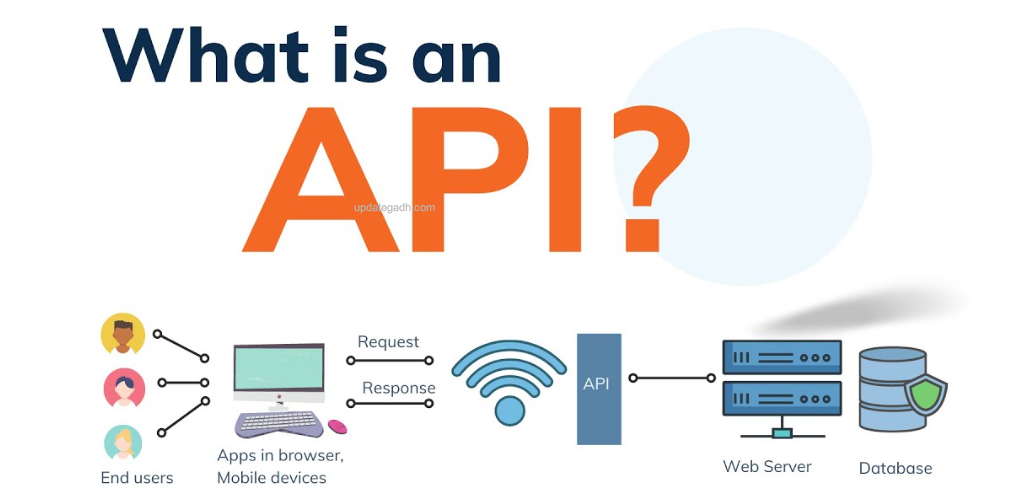
What is an API?
A set of guidelines known as an API, or application programming interface, enables communication between various software entities.Think of it as a bridge that connects your application to the outside world, enabling it to send and receive data.
Types of APIs (REST, SOAP, GraphQL, etc.)
APIs come in various flavors, with REST (Representational State Transfer) being the most popular due to its simplicity and scalability. SOAP (Simple Object Access Protocol) is another common type, often used in enterprise applications for its robust security features. GraphQL, on the other hand, offers flexibility by allowing clients to request only the data they need.
Setting Up Your Development Environment
Choosing the Right Tools
It’s crucial to set up your development environment before you begin coding. Popular options for developing APIs are Node.js, Express.js, and Visual Studio Code (VSCode), which is an excellent code editor. These tools are perfect for both novice and seasoned developers because they strike the right mix between strength and simplicity.
Installing Node.js and npm
The Node.js runtime environment enables you to execute JavaScript code without a browser, and the Node Package Manager (npm) facilitates the installation of libraries and tools. Head to the official Node.js website, download the installer, and follow the prompts to get set up.
Creating Your Project Directory
For your project, create a new directory and use your terminal to go inside it. This will be the workspace where you’ll build your API.
mkdir my-first-api
cd my-first-api
Planning Your API
Defining the Purpose of Your API
Before writing any code, it’s crucial to define what your API will do. For example, let’s say you want to build an API that manages a list of books. Your API will allow users to add, update, delete, and retrieve books from a database.
Designing the API Structure
Once you’ve defined the purpose, think about the structure of your API. What endpoints will you need? For our book API, we might have endpoints like /books for retrieving all books, /books/:id for a specific book, and so on.
Choosing the Right Framework (e.g., Express for Node.js)
For this tutorial, we’ll use Express, a minimal and flexible Node.js framework that simplifies the process of building APIs. It’s lightweight and easy to get started with, making it an excellent choice for your first API.
Understanding Endpoints and HTTP Methods (GET, POST, PUT, DELETE)
APIs use HTTP methods to perform different actions. Here’s a quick overview:
- GET: Retrieve data from the server.
- POST: Send data to the server in order to build something new.
- PUT: Update existing data on the server.
- DELETE: Remove data from the server.
Building Your First API
Creating a Basic Express Server
To start building, initialize a new Node.js project by running npm init and following the prompts. Then, install Express:
npm install expressCreate a new file called index.js and set up a basic Express server:
const express = require('express');
const app = express();
const port = 3000;

app.get('/', (req, res) => {
  res.send('Hello World!');
});

app.listen(port, () => {
  console.log(`Server running at );
});
Run your server with node index.js, and visit in your browser. You should see “Hello World!”
Defining Routes and Endpoints
Now, let’s define some routes. For our book API, we’ll start with a simple GET /books route that returns a list of books:
app.get('/books', (req, res) => {
  res.json([{ id: 1, title: '1984', author: 'George Orwell' }]);
});
Handling Requests and Responses
Express makes it easy to handle requests and send responses. For example, you can use req.params to access route parameters and req.body to access request data (after setting up middleware).
Testing Your API with Postman
Postman is a powerful tool for testing APIs. You can use it to send requests to your API and see how it responds. Download and install Postman, then test your API by sending a GET request to .
Connecting Your API to a Database
Choosing a Database (e.g., MongoDB, MySQL)
APIs often need to store and retrieve data, which is where databases come in. MongoDB is a popular NoSQL database that’s easy to integrate with Node.js. Alternatively, you could use a relational database like MySQL.
Setting Up a Connection to the Database
Installing the mongoose package is required in order to connect to MongoDB
npm install mongooseThen, set up the connection in your index.js file:
const mongoose = require('mongoose');

mongoose.connect('mongodb://localhost:27017/mydatabase', {
  useNewUrlParser: true,
  useUnifiedTopology: true,
});
Performing CRUD Operations with the Database
Now that you’re connected to the database, you can perform CRUD (Create, Read, Update, Delete) operations. For example, you can create a new book entry:
const Book = mongoose.model('Book', { title: String, author: String });

app.post('/books', (req, res) => {
  const book = new Book(req.body);
  book.save().then(() => res.json(book));
});
Error Handling in Your API
Adding Basic Error Handling in Express
You can add error handling middleware in Express to catch errors:
app.use((err, req, res, next) => {
  console.error(err.stack);
  res.status(500).send('Something broke!');
});
Returning Appropriate Status Codes
YT:- DecodeIT
Always return appropriate HTTP status codes. For example, if a resource isn’t found, return a 404 status code:
res.status(404).send('Not Found');what is an api,what is api,what is an api call,what is an api key,what is an application programming interface,what is an api gateway,what is rest api,what is an api example,what is an api testing,what is an api tutorial,what is an api exlpained,what’s an api,what is api and how it works,what exactly is an api,what is an api in programming,what is an api & how does it work,what is an api and how does it work,what is a api,what is a web api