
What Is This Project?
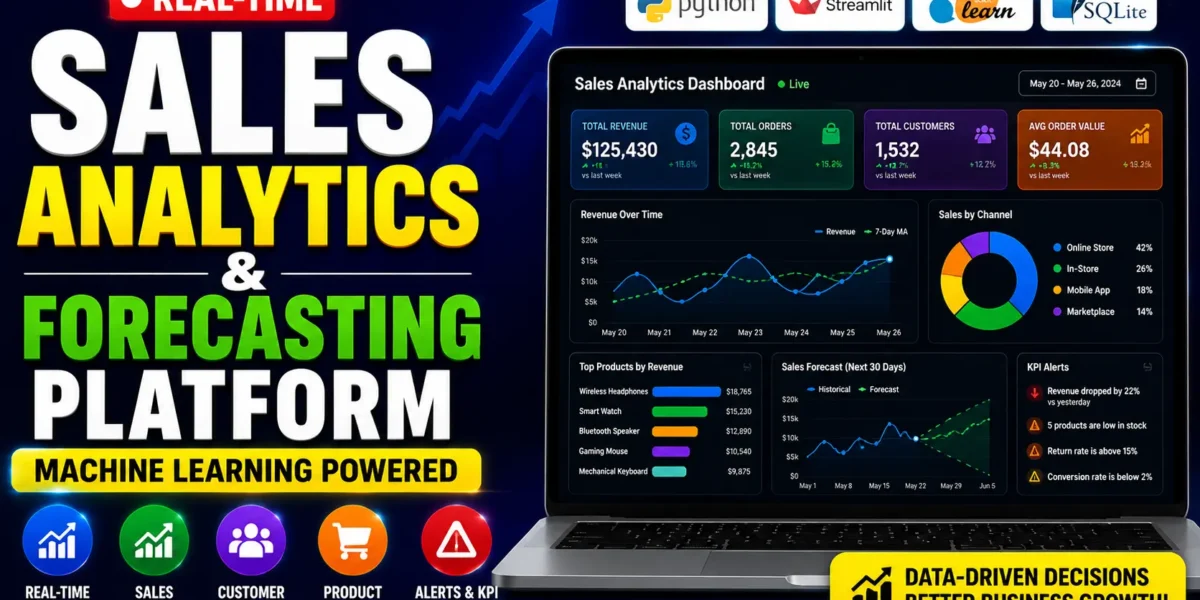
SalesIQ is a fully working sales analytics platform built using Python and Streamlit. It is not a notebook or a demo – it is a complete, deployable web application that runs on any laptop in under 5 minutes.
When you launch the app for the first time, it automatically creates a local SQLite database. It fills it with 5,000+ realistic sales records, 500 customers, 50 products across 8 categories, and 2 years of history – no manual data entry needed.
It comes with a login system (two roles: Admin and Manager), a dark-themed dashboard, and six fully built feature modules powered by real machine learning models.
Real-Time Sales Analytics & ML Forecasting Dashboard
6 Built-In Feature Modules
1. Real-Time KPI Dashboard
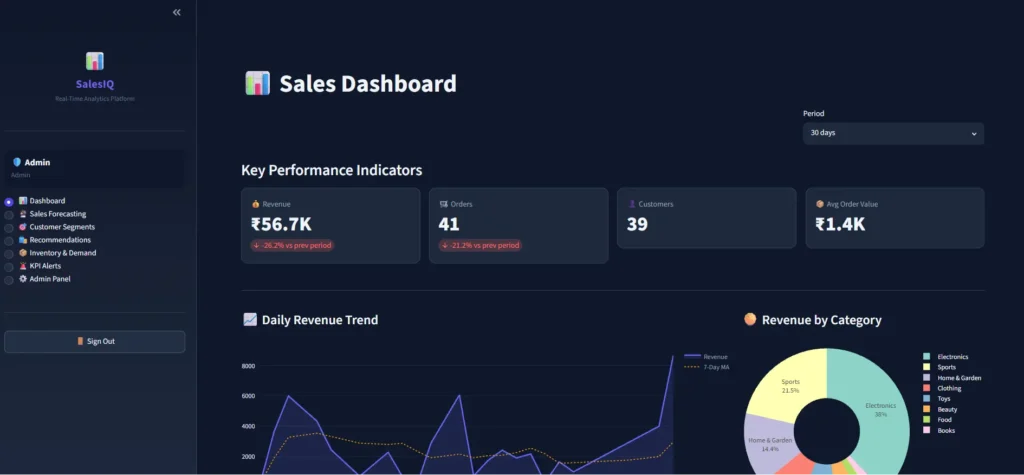
Shows live revenue, order counts, unique customers, and average order value – all with period-over-period percentage change. Charts include daily revenue trend with a 7-day moving average, category-wise revenue donut chart, sales by channel, top 10 products by revenue, and a dual-axis conversion rate chart.
2. ML Sales Forecasting
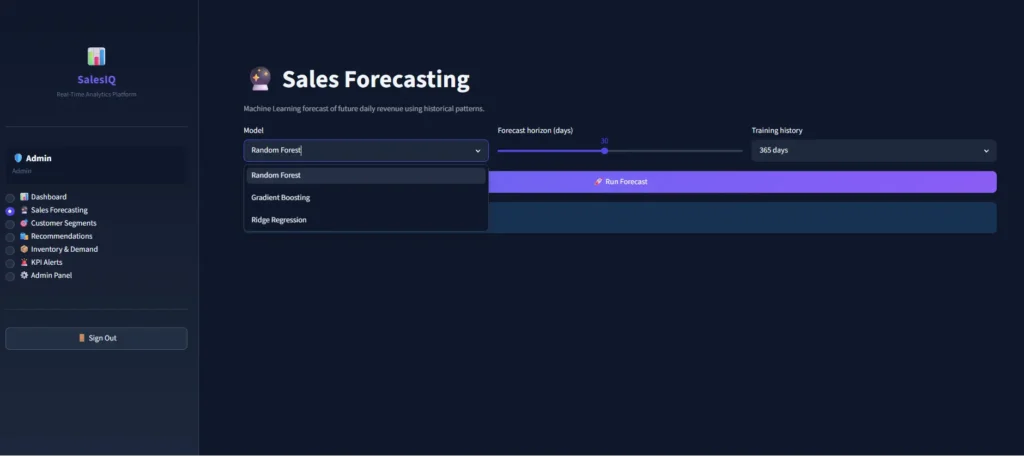
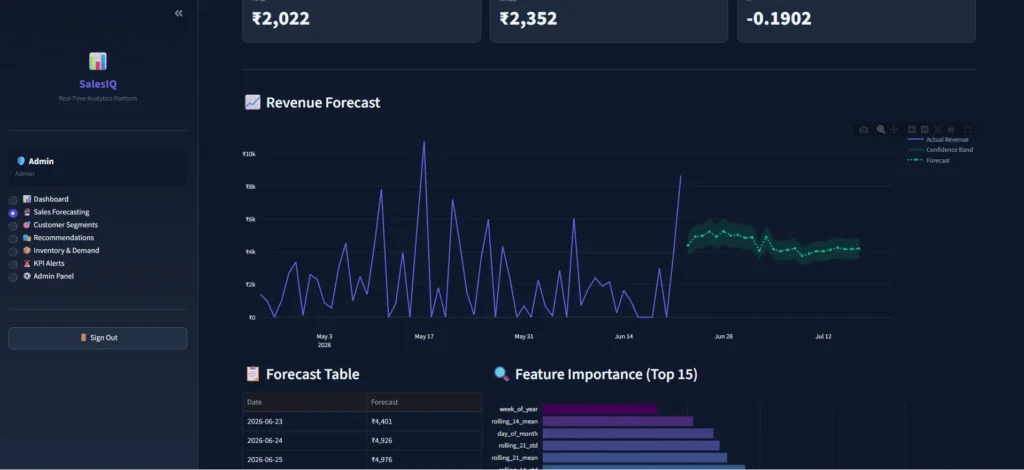
Predicts future daily revenue using three machine learning models you can switch between: Random Forest, Gradient Boosting, and Ridge Regression. The model engineers lag features (7, 14, 21, 28 days), rolling mean/standard deviation, and calendar features like day of week, month, and is_weekend. Outputs include a forecast chart with a confidence band, model accuracy metrics (MAE, RMSE, R²), a forecast table, and a feature importance chart.
3. Customer Segmentation (RFM + KMeans)
Segments all 500 customers using industry-standard RFM Analysis (Recency, Frequency, Monetary) combined with KMeans clustering. Customers are automatically labelled as Champions, Loyal Customers, At Risk, or Lost Customers based on their purchase behaviour. Visualizations include a PCA-based 2D cluster scatter plot, revenue by segment bar chart, and RFM score distribution histograms.
4. Product Recommendation Engine
Implements item-item collaborative filtering using cosine similarity on a customer-product purchase matrix – the same approach used by Amazon and Netflix. You can select any customer and get their top-N product recommendations ranked by similarity score, or select any product and find the most similar products in the catalogue.
5. Inventory & Demand Prediction
Monitors real-time stock levels across all 50 products and flags low stock (under 10 units) and out-of-stock items automatically. The demand forecast tab uses a global Random Forest model trained across all products to predict units sold per day for the next 7–30 days. Also calculates stock coverage days based on predicted demand.
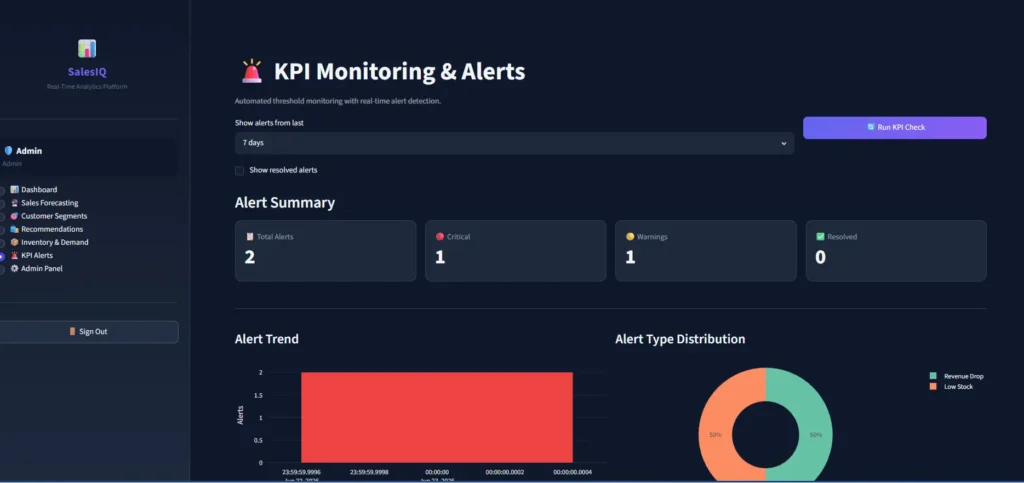
6. KPI Alerts & Monitoring
Automated threshold monitoring that checks five KPIs: revenue drop greater than 20% vs yesterday, stock below 10 units, stock at zero, return rate above 15%, and conversion rate below 2%. New alerts are saved to the database with severity levels (critical or warning), shown with timestamps, and can be resolved with a single click.
Check AI-related Project:https://updategadh.com/ai-powered-resume-screening-system/
Technology Stack
- Web UI: Streamlit 1.58 – interactive dashboard and page routing
- Database: SQLite
- Machine Learning: scikit-learn – Random Forest, Gradient Boosting, Ridge, KMeans, PCA, cosine similarity
- Data Processing: pandas, numpy
- Charts: Plotly – interactive charts with hover, zoom, dual axes
- Authentication: bcrypt – secure password hashing
- Fake Data: Faker – realistic synthetic customers and orders
- Python version: 3.9 to 3.13 are all supported
Project File Structure
Real Time Sales Analytics ML/
├── app.py               – Entry point, routing, auth gate, Admin Panel
├── config.py            – All constants (thresholds, ML params, paths)
├── requirements.txt     – Python dependencies
├── database/
│   ├── db_setup.py      – Creates tables, seeds 5000+ records on first run
│   └── db_connection.py – SQLite helper functions
├── modules/
│   ├── auth.py          – bcrypt login, session state, role-based access
│   ├── dashboard.py     – KPI cards, revenue trend, top products
│   ├── forecasting.py   – Revenue forecasting (RF / GBM / Ridge)
│   ├── segmentation.py  – RFM scoring + KMeans customer clusters
│   ├── recommendation.py – Cosine similarity recommendation engine
│   ├── inventory.py     – Stock overview + demand prediction
│   └── alerts.py        – KPI threshold detection and alert management
└── .streamlit/
    └── config.toml      – Streamlit theme settings
Demo Video
https://www.youtube.com/c/DecodeIT2/
Screenshots
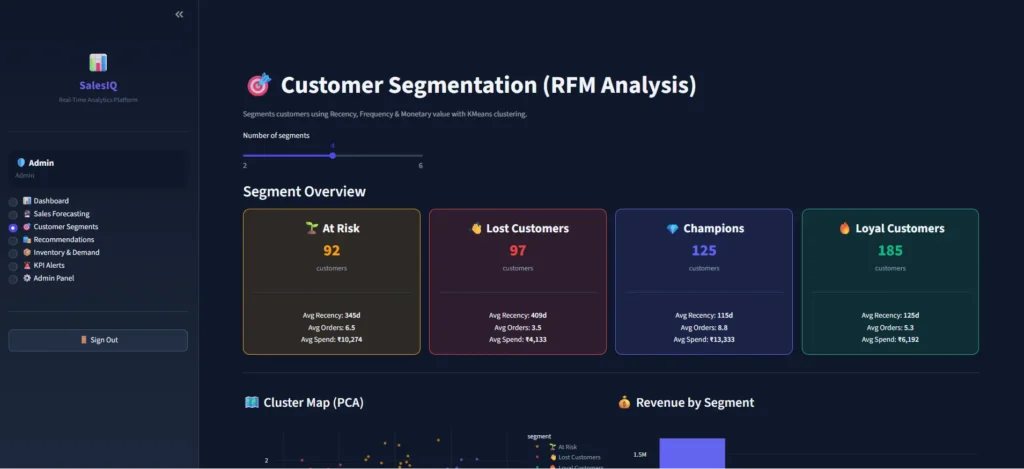
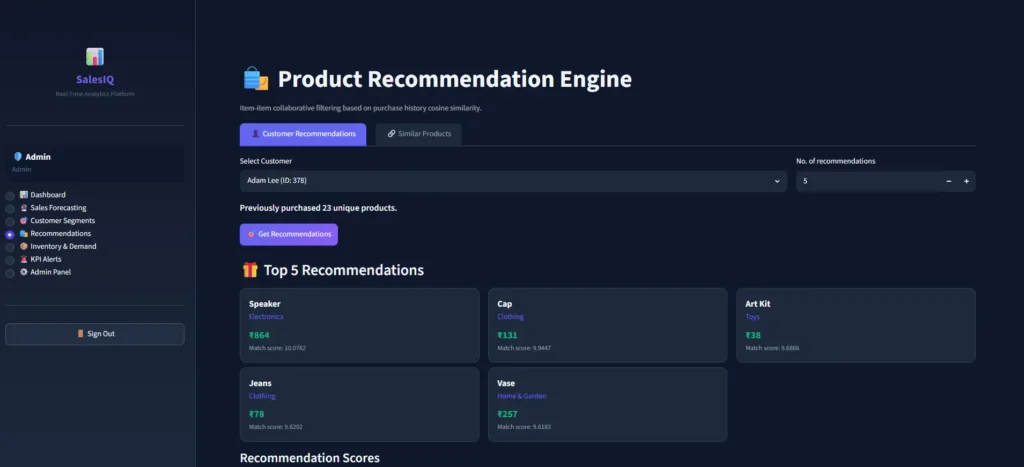
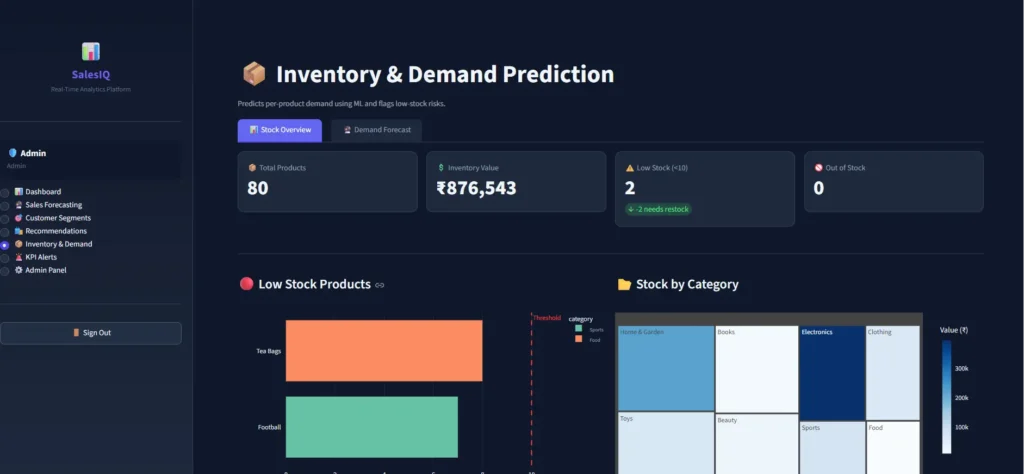
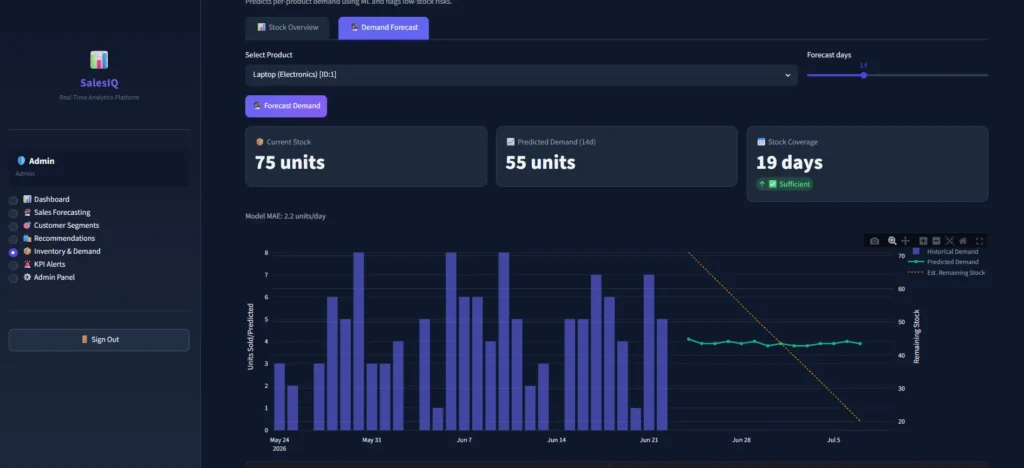
How to Run It
- Copy the project folder to your laptop
- Open a terminal inside the folder and run:
python -m venv venv - Activate the environment:
venvScriptsactivate(Windows) orsource venv/bin/activate(Mac/Linux)
- Install libraries:
pip install --prefer-binary streamlit pandas numpy scikit-learn plotly faker bcrypt python-dateutil - Run the app:
streamlit run app.pythen
Default login credentials:
- Admin: username
admin/ passwordadmin123 - Manager: username
manager/ passwordmanager123
Note: On first run, the app seeds the database automatically. This takes about 5–10 seconds and only happens once.
How to Download
Get This Project
The complete package is available so you can run, study, and submit it with confidence. It includes:
- Full Source Code
- Project Report
- Synopsis
- PPT Presentation
For any queries or a quick response, reach out on WhatsApp: +91 79834 34684
What You Will Learn From This Project
- How to structure a real multi-module Python application
- How to connect Streamlit to a SQLite database with proper connection helpers
- How to build time-series lag features and rolling features for ML models
- How Random Forest, Gradient Boosting, and Ridge Regression work on real sales data
- How RFM Analysis and K-Means Clustering are used in real e-commerce companies
- How collaborative filtering and cosine similarity power recommendation engines
- How to implement bcrypt password hashing and role-based access control in Python
- How to generate realistic synthetic data using Faker and NumPy
- How to build interactive Plotly charts with dual axes and fill areas
Who Should Get This Project?
Final year students (BCA, MCA, BTech, B.Sc Data Science, MBA IT): Submit as your final year project with a complete working code, a real database, multiple ML models, and a web UI – far beyond what most students submit.
Job seekers: Add a real end-to-end ML + dashboard project to your resume and GitHub. Shows recruiters you can build production-quality systems, not just Jupyter notebooks.
Learners and developers: Study how authentication, database design, ML pipelines, and a web UI all connect in a single real Python codebase.
Frequently Asked Questions
Do I need the internet to run this?
No. The entire project runs 100% offline. SQLite is a local file, ML models train on local data, and Streamlit serves on localhost. No external APIs or cloud accounts needed.Can I submit this as a final year project?
Yes. It is suitable for BCA, MCA, BTech CSE, BTech IT, B.Sc Data Science, MBA IT and similar programs. It covers databases, machine learning, web development, authentication, and business analytics – exactly what most universities expect.Can I deploy this online?
Yes. You can deploy it to Streamlit Community Cloud (free) by pushing the code to GitHub and connecting the repo. It will install dependencies and run automatically.Which Python version should I use?
Python 3.9 to 3.13 all work. Python 3.10 or 3.11 is recommended for the smoothest installation experience.What does the Admin Panel include?
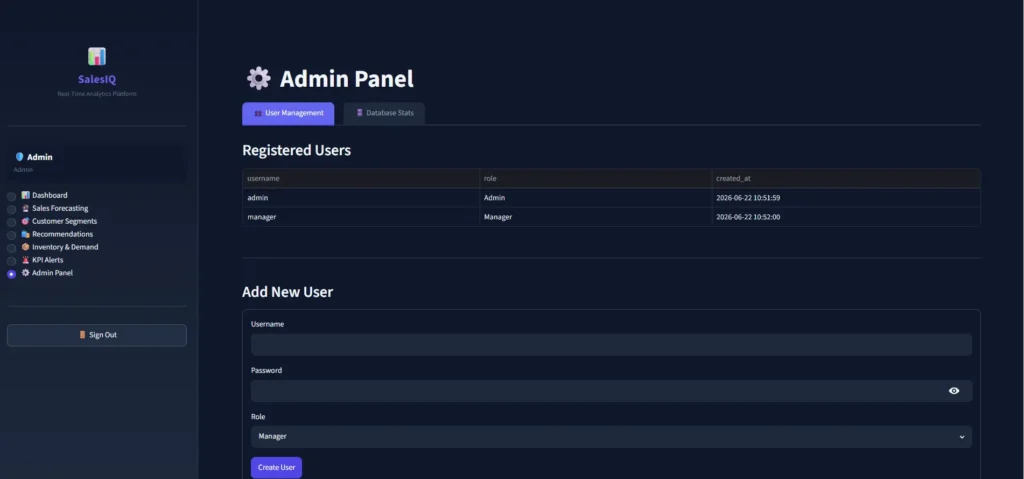
Admins can view all registered users, create new user accounts with hashed passwords, check row counts for all 8 database tables, and delete resolved alerts.
This Project vs a Typical Student Project
| Feature | This Project | Typical Student Project |
|---|---|---|
| Database | SQLite with 8 tables | CSV files only |
| Authentication | bcrypt hashed login | No auth |
| ML Models | RF + GBM + Ridge + KMeans | Single model |
| UI | Streamlit web app | Jupyter notebook |
| Data | 5,000+ auto-generated records | Small manual dataset |
| Access Control | Admin and Manager roles | Single user |
| Setup | 5 minutes on any laptop | Complex environment setup |
Get the complete source code, run it in 5 minutes, and submit a project that actually stands out.
- real time sales analytics & ml forecasting dashboard tutorial
- real time sales analytics & ml forecasting dashboard github
- real time sales analytics & ml forecasting dashboard example
- Predictive analytics for sales forecasting project
- sales forecast prediction github
- store sales – time series forecasting
- sales forecast mlops at scale
- sales forecasting ml project GitHub


![Food Management System in Python [Django Framework ]](https://updategadh.com/wp-content/uploads/2024/06/Food-Management-System-in-Python-Django-Framework-.png)