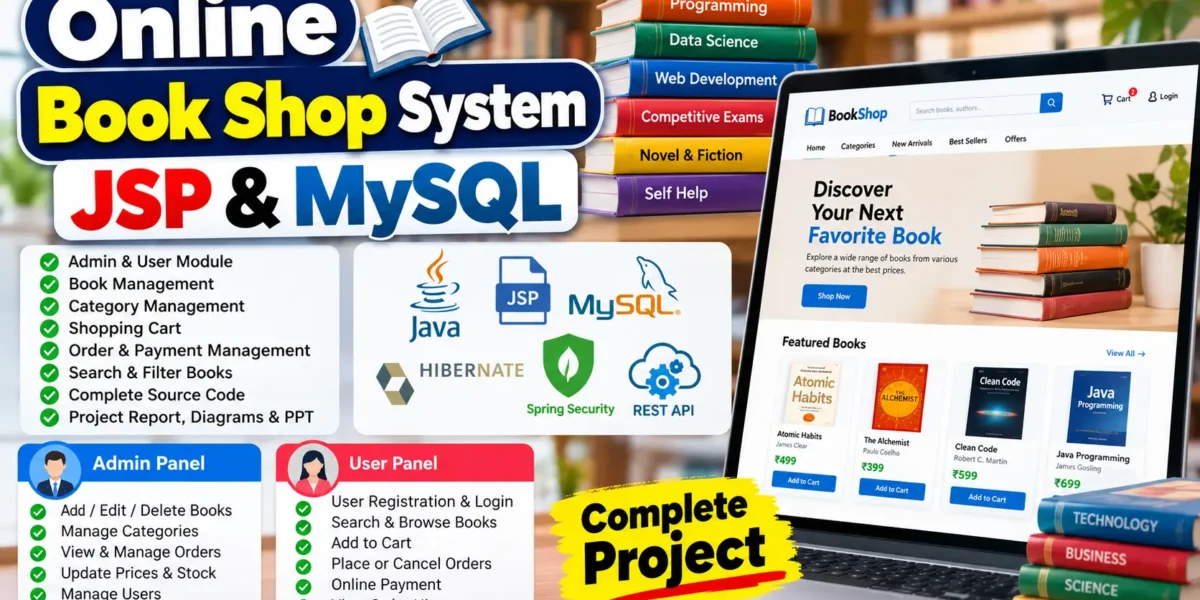
Online Book Shop System Using JSP and MySQL
The Online Book Shop System Using JSP and MySQL is a web-based application designed to make book shopping convenient and accessible online. Customers can browse books, search by category, add books to their shopping carts, place orders, and review their purchase history. The system also helps administrators manage books, prices, inventory, customer accounts, and orders through a centralized platform.
This project uses Advanced Java, JSP, Hibernate, JPA, REST APIs, MySQL, and frontend technologies. It provides separate Admin and User modules for managing bookstore operations and customer shopping activities. The project is suitable for BCA, MCA, B.Tech, Diploma, and Computer Science students who want practical experience developing an e-commerce web application.
Complete Advance AI Topics: Click Here
Real Time Projects on YouTube:- DecodeIT
Project Overview
| Project Detail | Description |
|---|---|
| Project Name | Online Book Shop System Using JSP and MySQL |
| Programming Language | Java |
| Frontend | HTML, CSS, JavaScript, JSP |
| Backend Technologies | Java, JSP, Hibernate, JPA |
| API Architecture | REST API |
| Security | Spring Security |
| Database | MySQL |
| Web Server | Apache Tomcat 8.5 |
| Project Type | E-commerce Web Application |
What Are the Main Features of the Online Book Shop System?
The application provides book browsing, shopping cart functionality, order processing, and administrative management. These features support the essential activities of an online bookstore.
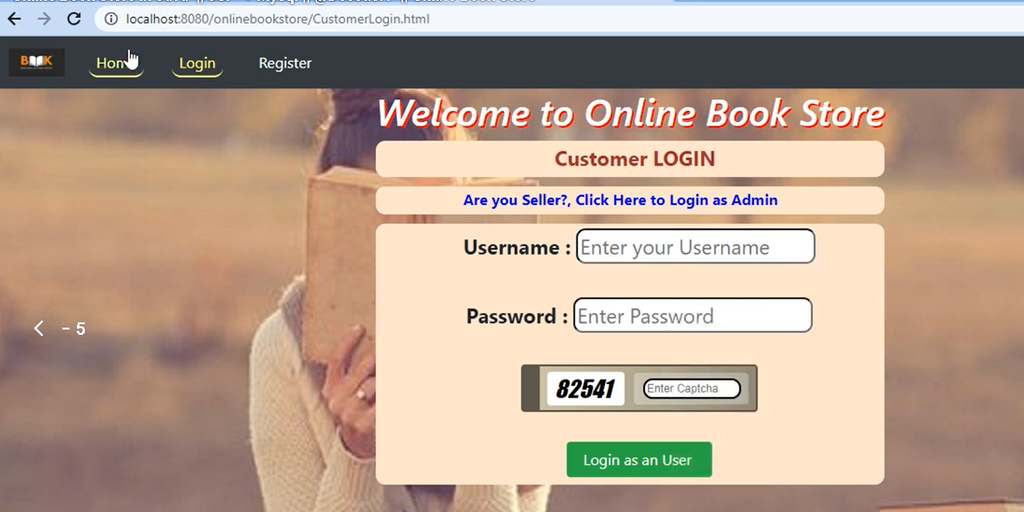
- User Registration and Login: Users can create accounts and sign in to access shopping features.
- Book Search: Customers can search for books and browse available categories.
- Shopping Cart: Users can add selected books to their cart before ordering.
- Order Management: Customers can place orders and cancel them where supported.
- Payment Management: The application includes payment-related functionality and payment tracking.
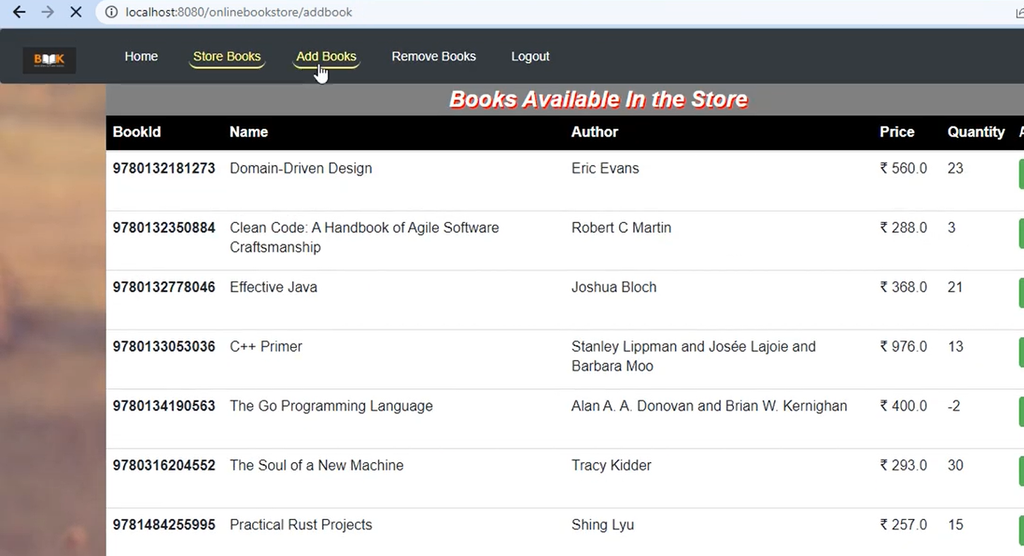
- Book Inventory: Administrators can manage book details, prices, and availability.
- Order History: Users can view their previous purchases.
- Profile Management: Administrators and users can manage their profile information.
- Authentication: Spring Security is listed for authentication and access control.
- REST APIs: REST endpoints support communication between application components where implemented.
What Are the Main Modules of the Project?
The system separates administrative operations from customer activities through dedicated modules. This organization makes bookstore management and online shopping easier to understand and maintain.
Admin Module
The Admin module provides tools for maintaining the bookstore’s products, categories, orders, and inventory.
- Secure login and logout
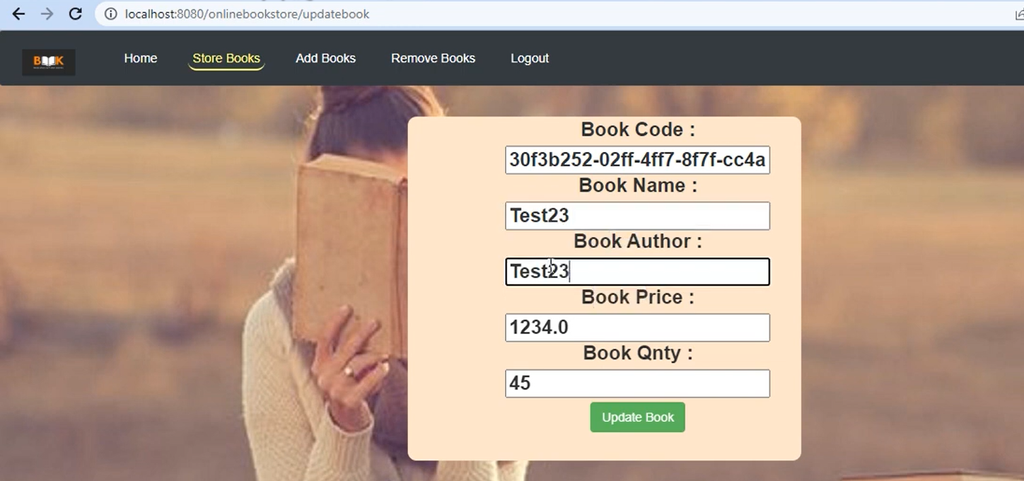
- Add, edit, and delete books
- Manage book categories
- View, confirm, and cancel orders
- Track payment records
- Update book prices and stock availability
- Manage administrator profiles
User Module
The User module allows customers to browse books, purchase products, and manage their accounts.
- User registration and login
- Search and browse books by category
- Add books to the shopping cart
- Place or cancel orders
- Use the available online payment functionality
- View order history
- Manage user profiles
Category, Order, and Payment Management
Category management organizes books into suitable groups so customers can find relevant titles. Order and payment management supports the ordering process, order status updates, and payment record tracking.
Sales and Availability Management
This module helps administrators maintain stock information, update book prices, and monitor sales records. Accurate inventory information helps the bookstore manage product availability.
Which Technologies Are Used in the Project?
The project combines Java web technologies, database tools, and frontend technologies to create an online shopping platform.
| Technology | Purpose |
|---|---|
| Java | Core application programming |
| JSP | Dynamic web page rendering |
| Hibernate | Object-relational mapping |
| JPA | Standard for Java persistence |
| REST API | Communication between application components |
| Spring Security | Authentication and access control |
| MySQL | Database storage |
| HTML, CSS, JavaScript | Frontend structure and interactivity |
| Apache Tomcat 8.5 | Application server environment |
How to Download
The complete package is available so you can run, study, and submit it with confidence. It includes:
- Full Source Code
- Project Report
- Synopsis
- PPT Presentation
Demo Video
Screenshot


How to Run the Online Book Shop System in Eclipse?
To run the project, import its source code into a compatible Java IDE, configure MySQL, and deploy the application using the server and build configuration required by the project. The exact steps may vary depending on the supplied project files.
- Install the required software: Install a compatible JDK, Eclipse IDE, MySQL Server, and the configured Apache Tomcat version.
- Extract the project: Download and extract the project ZIP file into a convenient folder.
- Import into Eclipse: Open Eclipse and select File → Import. Choose the appropriate project type, such as an existing Maven project or an existing web project, according to the supplied files.
- Configure MySQL: Start MySQL Server and create the database using the supplied SQL file or database instructions.
- Update database settings: Configure the database URL, username, and password in the appropriate configuration file. Update
application.propertiesonly if the project uses it. - Check dependencies: Resolve the required Maven dependencies or project libraries. Verify that the configured Java, JSP, Servlet, Hibernate, and Spring versions are compatible.
- Configure the server: Add the compatible Tomcat installation to Eclipse and assign the project to the server if it is a deployable web application.
- Build the project: Run the appropriate Maven build or Eclipse project build and resolve any configuration errors.
- Start the application: Run the project on the configured server and check the Eclipse console for startup errors.
- Open the application: Visit the local URL shown by the server configuration. The exact port and application path depend on the deployment settings.
Important: The supplied project configuration should determine the exact run procedure. A project combining JSP, REST APIs, Hibernate, JPA, and Spring Security may require specific framework versions. Confirm compatibility before changing the server or dependencies.
Who Can Use This Project?
The Online Book Shop System is suitable for students who want practical experience with Java development and e-commerce workflows.
- BCA and MCA final-year projects
- B.Tech and Diploma projects
- Java and JSP practice
- Academic project demonstrations
- Portfolio development
Frequently Asked Questions
Which programming language is used?
The project uses Java with JSP and other Java web technologies.
Which database is used?
MySQL is used to store application data, including book and order information.
Does the project include Admin and User modules?
Yes, the described application provides separate modules for bookstore administration and customer shopping.
How can I run the project?
Import it into a compatible Java IDE, configure MySQL and the required dependencies, deploy it to the configured server, and open its local URL.
Final Thoughts
The Online Book Shop System Using JSP and MySQL is a practical academic project for learning Java web development, database integration, authentication, and e-commerce workflows. Its Admin and User modules demonstrate how books, customers, inventory, orders, and payment records can be managed within one application. Students can use this project to strengthen their understanding of Java-based application development and prepare for future software development work.
Online Book Shop System JSP and MySQL, Online Book Store Project, Java JSP Project, MySQL Project, E-commerce Project,Online Book Shop System JSP and MySQL, online book shop system, online book store project in Java, online book shop project source code, book shop management system, JSP project, Java web application project, online bookstore using JSP and MySQL, online book store management system, book store project in Java, book shop project for students, online book shopping website project, Java e-commerce project, Hibernate project in Java, Spring Security project, MySQL database project, online book store project report, online book shop system ER diagram, online book store project PPT, online book shop system source code