How to Sort a Dictionary in Python
A dictionary in Python stores information as key-value pairs. It is widely used when data needs to be accessed through meaningful keys instead of numeric positions. Python dictionaries can be modified after they are created, so their contents can be updated whenever required.
Each key inside a dictionary must be unique, while multiple keys can have the same value. Dictionary data is written inside curly brackets, with each key connected to its corresponding value using a colon.
Example
student = {
    "name": "Devansh",
    "age": 22,
    "roll_no": 90014
}

print(student)
Output
{'name': 'Devansh', 'age': 22, 'roll_no': 90014}Why Sort a Dictionary in Python?
Sorting becomes useful when dictionary data needs to be displayed in a particular order or examined more easily. For example, you may want to arrange student marks from lowest to highest, display names alphabetically, or process records according to a custom sequence.
Python’s sorted() function makes these operations straightforward. Depending on the requirement, you can sort dictionary keys, values, or complete key-value pairs.
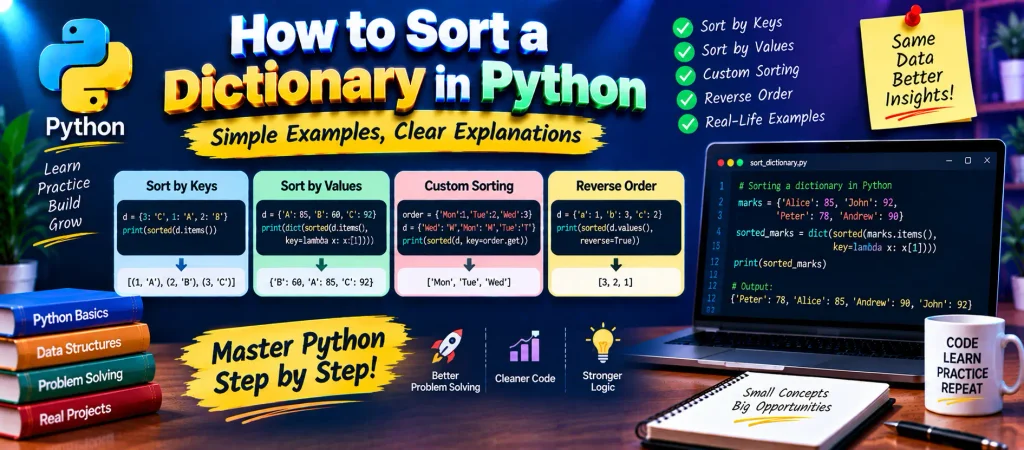
Common Ways to Sort a Dictionary
- Sort dictionary data by keys.
- Arrange entries according to their values.
- Apply a custom sorting rule.
- Change ascending order into descending order.
1. Sort a Dictionary by Keys
If the keys determine the required order, you can pass the dictionary keys or items to the sorted() function. The result is returned in ascending order by default.
Example
names = {
    1: "Alice",
    2: "John",
    4: "Peter",
    3: "Andrew",
    6: "Ruffalo",
    5: "Chris"
}

print(sorted(names.keys()))
print(sorted(names.items()))
Output
[1, 2, 3, 4, 5, 6]

[(1, 'Alice'), (2, 'John'), (3, 'Andrew'),
 (4, 'Peter'), (5, 'Chris'), (6, 'Ruffalo')]
The first result contains the keys in numerical order. Using items() gives you key-value pairs, which are sorted according to their keys in this example.
2. Sort a Dictionary by Values
Sometimes the keys are not what you want to arrange. For example, a marks dictionary may need to be ordered according to the marks instead of student names. In such cases, sorted() can use a custom key function.
Example
scores = {
    "Alice": 85,
    "John": 92,
    "Peter": 78,
    "Andrew": 90
}

sorted_scores = dict(
    sorted(scores.items(), key=lambda item: item[1])
)

print(sorted_scores)
Output
{'Peter': 78, 'Alice': 85, 'Andrew': 90, 'John': 92}Here, items() supplies each key-value pair, while lambda item: item[1] tells Python to use the value portion for comparison. The result is then passed to dict() to create a dictionary from the sorted pairs.
3. Sort Dictionary Data Using a Custom Order
Normal alphabetical or numerical sorting is not always suitable. Sometimes the data has a predefined order that should be followed. A custom key function can be supplied to sorted() for such situations.
Example
days = {
    "one": "Monday",
    "six": "Saturday",
    "three": "Wednesday",
    "two": "Tuesday",
    "five": "Friday",
    "seven": "Sunday"
}

order = {
    "one": 1,
    "two": 2,
    "three": 3,
    "four": 4,
    "five": 5,
    "six": 6,
    "seven": 7
}

print(sorted(days, key=order.__getitem__))
print([days[key] for key in sorted(days, key=order.__getitem__)])
Output
['one', 'two', 'three', 'five', 'six', 'seven']

['Monday', 'Tuesday', 'Wednesday',
 'Friday', 'Saturday', 'Sunday']
The order dictionary supplies a numerical position for each day name. Python uses those numbers while arranging the keys, allowing the dictionary to follow the required custom sequence.
Complete Advance AI Topics: Click Here
SQL Tutorial: Click Here
YT:- DecodeIT
4. Sort in Descending Order
By default, sorted() produces ascending results. To reverse that order, set the reverse parameter to True.
Example
numbers = {
    "a": 2,
    "b": 1,
    "c": 3,
    "d": 4,
    "e": 5,
    "f": 6
}

print(sorted(numbers.values(), reverse=True))
Output
[6, 5, 4, 3, 2, 1]The reverse=True argument changes the normal ascending arrangement into descending order.
Sorting a Dictionary: Quick Comparison
| Requirement | Approach |
|---|---|
| Sort keys | sorted(dictionary.keys()) |
| Sort key-value pairs by key | sorted(dictionary.items()) |
| Sort entries by value | sorted(dictionary.items(), key=lambda item: item[1]) |
| Use a custom order | Provide a custom function through key |
| Sort in descending order | Use reverse=True |
Important Points to Remember
- The
sorted()function returns a new sorted result rather than changing the original dictionary in place. keys()can be used when only dictionary keys are required.items()provides both keys and values for sorting.- A
lambdaexpression can specify whether keys or values should control the sorting. - The
reverse=Trueoption produces descending order. - A custom mapping or function can be used when normal sorting does not match the required order.
Conclusion
Sorting dictionary data in Python becomes simple once you know what part of the dictionary should control the order. Keys can be arranged directly, while values can be selected through a custom sorting function. For more specific requirements, the key parameter allows you to define your own sorting logic.
Learning these techniques is useful when working with student records, scores, reports, configuration data, and other collections where information needs to be presented in an organized sequence.
Frequently Asked Questions
How do I sort a dictionary by key in Python?
You can use sorted(dictionary.items()) to obtain the dictionary’s key-value pairs in key order.
How do I sort a dictionary by value?
Use sorted() with the key parameter, such as key=lambda item: item[1].
How do I sort dictionary values in descending order?
Pass reverse=True to the sorted() function.
Can I sort a dictionary using a custom rule?
Yes. The key parameter allows you to provide a function or mapping that determines how the entries should be ordered.
Does sorted() modify the original dictionary?
No. sorted() creates a sorted result. If you want a dictionary from sorted key-value pairs, you can pass the result to dict().
Keywords
How to Sort a Dictionary in Python, sort dictionary by value Python, sort dictionary by key Python, Python dictionary sorting, sort dictionary in Python by value, sort dictionary by value descending Python, Python sorted function, Python dictionary key sorting, Python dictionary value sorting, Python lambda sorting, sort dictionary alphabetically Python, Python custom sorting, Python dictionary tutorial, sorted dictionary Python, reverse dictionary sorting Python