How to Clear the Python Shell
While working with Python, the shell or terminal can quickly become filled with previous commands and their output. When the screen becomes crowded, clearing it can make the environment easier to read and work with.
The method used to clear the Python screen depends on where Python is running. A terminal such as Command Prompt, PowerShell, or a Linux/macOS terminal can use operating-system commands, while Python IDLE works differently.
YT:- DecodeIT
How to Clear the Terminal in Windows and Linux
Python can execute operating-system commands through the os module. The command required to clear the screen depends on the operating system.
Clear Screen on Windows
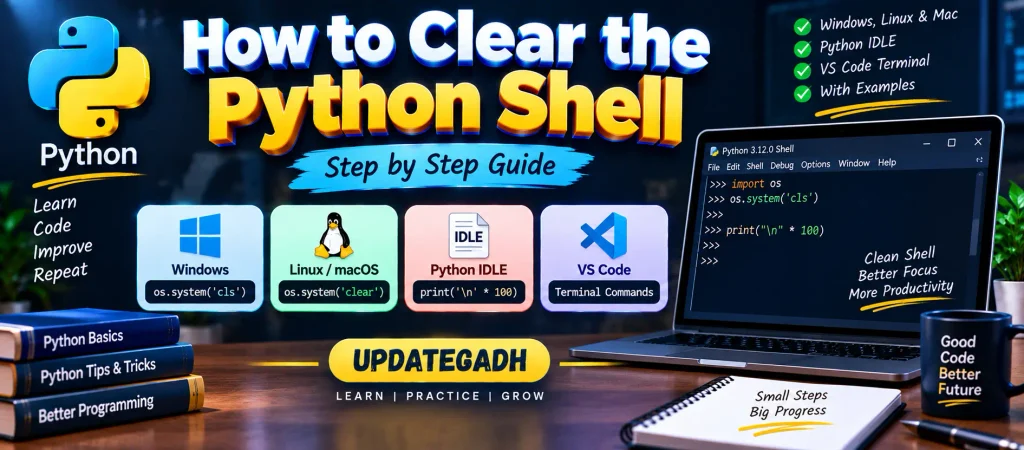
On Windows, the cls command is used to clear the terminal.
import os

os.system("cls")
Clear Screen on Linux and macOS
Linux and macOS terminals generally use the clear command.
import os

os.system("clear")
The os.system() function sends the specified command to the operating system. These commands are useful in terminal-based Python environments.
How to Clear the Python IDLE Shell
Python IDLE does not provide the same terminal command interface as Command Prompt or a standard Linux terminal. Therefore, commands such as cls and clear cannot be used directly to remove the previous IDLE output.
One simple workaround is to print a large number of blank lines. This moves the previous content upward and gives you a cleaner area to continue working.
print("\n" * 100)This does not actually delete the previous output. Instead, it pushes the existing content out of the visible area of the shell.
Create a Function to Clear the Screen
If you frequently need to create a clean-looking shell, you can place the newline logic inside a function. This saves you from writing the same statement repeatedly.
def clear_screen():
    print("\n" * 100)
You can then call the function whenever you want to move the previous output out of view:
clear_screen()This method is particularly simple for beginners because it does not require operating-system-specific commands.
Clear the Python Terminal Automatically Using a Script
If you are creating a Python program that needs to clear the terminal, you can make the code work across different operating systems by checking the current platform.
from os import system, name
from time import sleep

def clear():
    if name == "nt":
        system("cls")
    else:
        system("clear")

print("Hello\n" * 10)

sleep(2)

clear()
How This Code Works
nameidentifies the operating-system environment. The value"nt"is used for Windows.- On Windows,
system("cls")is executed to clear the terminal. - On other systems,
system("clear")is used. - The
print()statement displays sample text in the terminal. sleep(2)pauses the program for two seconds.- After the delay, the
clear()function runs and clears the terminal.
Why Does the Clearing Method Depend on the Environment?
Python itself does not use one universal command for clearing every type of shell. The terminal is managed by the operating system or development environment, so the appropriate command can vary.
For example, Windows terminals use cls, while Linux and macOS terminals commonly use clear. IDLE has its own shell interface and does not behave like a regular system terminal.
How to Clear Python Terminal in VS Code
When running Python through the integrated terminal in VS Code, you can use the same operating-system commands that apply to your terminal.
For Windows:
clsFor Linux or macOS:
clearYou can also run the corresponding Python os.system() command from your program when needed.
Important Points to Remember
clsis commonly used to clear a Windows terminal.clearis commonly used on Linux and macOS terminals.os.system()can execute these commands from Python.- Python IDLE does not directly support terminal clearing commands such as
clsandclear. - Printing multiple newline characters can make the IDLE screen appear clean.
- A function can be created if you need to perform the operation repeatedly.
- The exact behavior depends on the environment in which Python is running.
Complete Advance AI Topics: Click Here
SQL Tutorial: Click Here
Conclusion
Clearing the Python shell depends on the environment you are using. In a Windows terminal, cls can be used, while Linux and macOS terminals generally use clear. These commands can also be executed from Python with the help of the os module.
Python IDLE works differently because it is not a standard system terminal. In that case, printing multiple newline characters is a simple way to move previous output out of sight. For programs that need to work across operating systems, checking the platform before selecting the appropriate command provides a more flexible solution.
Frequently Asked Questions
How do I clear the Python shell in Windows?
In a Windows terminal, you can use the cls command. From Python, you can also use os.system("cls").
How do I clear the Python shell in macOS?
In a macOS terminal, the clear command can be used. From Python, you can execute it with os.system("clear").
How do I clear the Python shell in Linux?
Use the clear command in the terminal. You can also execute it from Python using os.system("clear").
How do I clear the Python IDLE shell?
IDLE does not provide a direct terminal-style clear command. A simple workaround is print("\n" * 100), which moves previous output above the visible area.
How do I clear the Python terminal in VS Code?
In the VS Code integrated terminal, use cls on Windows and clear on Linux or macOS.
Does printing new lines actually delete previous output?
No. Printing new lines only pushes the existing content upward. The previous output is still part of the shell history.
Keywords
how to clear screen in Python IDLE in Windows, how to clear the Python shell in Windows 10, how to clear the Python shell in Windows 11, how to clear the Python terminal in VS Code, how to clear the Python shell on Mac, how to clear the Python shell, command to clear Python shell, how to clear shell in IDLE, clear Python terminal, Python clear screen, Python os system cls, Python os system clear, clear terminal using Python