How to Build an AI Chatbot Using OpenAI and Streamlit
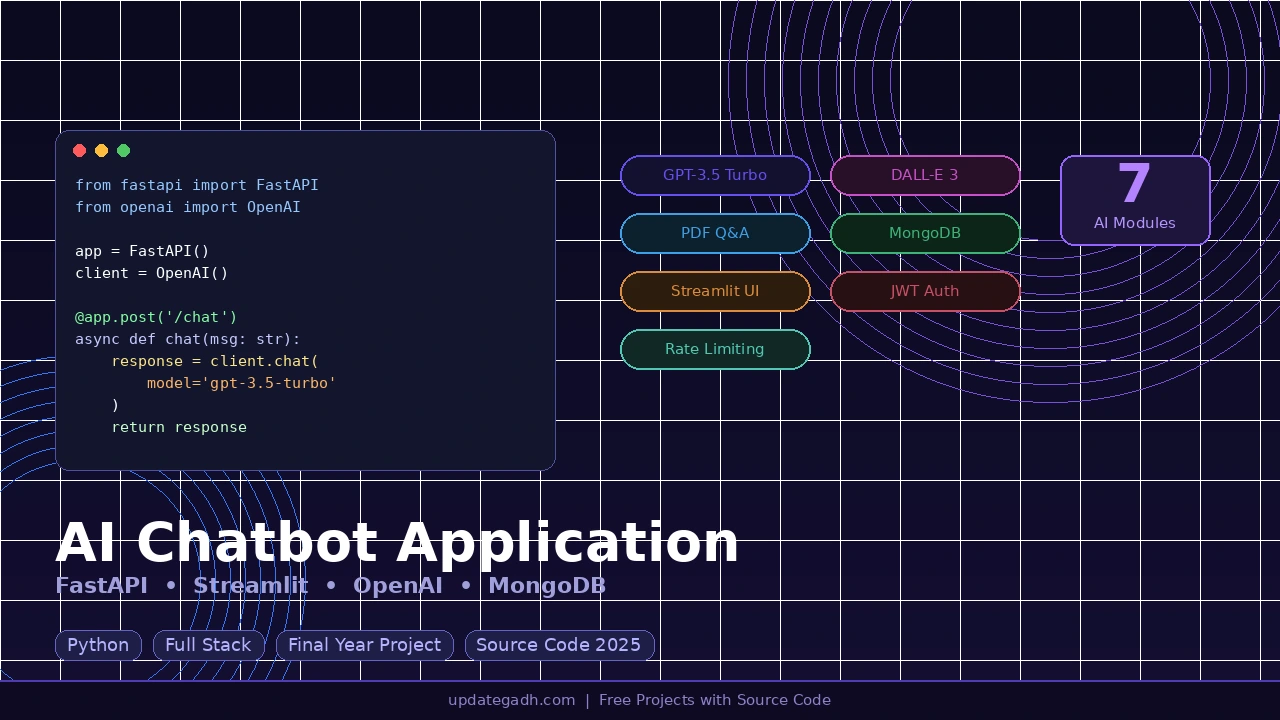
Want to build a production-level AI Chatbot Application that goes beyond a simple chat interface? This full-stack Python project uses FastAPI as the backend, Streamlit as the frontend, OpenAI GPT-3.5 Turbo as the AI brain, and MongoDB as the database making it one of the most complete final year projects for BCA, MCA, and B.Tech CS/IT students in 2026.
This project includes 7 powerful AI modules from AI chat and image generation to PDF Q&A and text summarization all secured with JWT authentication and daily usage limits.
Also Explore These Popular AI and Python Projects on UpdateGadh:
Project Overview
| Project Name | AI Chatbot Application |
| Backend | FastAPI (Python) |
| Frontend | Streamlit |
| AI Engine | OpenAI GPT-3.5 Turbo + DALL-E 3 |
| Database | MongoDB with Motor async driver |
| Authentication | JWT Token + bcrypt |
| Difficulty | Intermediate to Advanced |
| Best For | BCA, MCA, B.Tech CS/IT Final Year Students |
7 Key Modules of This Project
| Module | Description |
|---|---|
| AI Chat | Conversational AI using GPT-3.5 Turbo with full context memory |
| Image Generator | Generate images from text prompts using DALL-E 3 |
| PDF Q&A | Upload any PDF and ask questions get AI-powered answers |
| Text Summarizer | Paste any text and get short, medium, or long summary instantly |
| Chat History | Browse, view, resume, or delete all past conversations |
| Profile and Settings | Edit username, change password, monitor daily usage stats |
| Authentication | Secure login and registration with JWT tokens and bcrypt hashing |
Download Full Source Code
The complete source code backend routes, Streamlit pages, .env template, and requirements.txt is available below.
Technologies Used
| Layer | Technology | Purpose |
|---|---|---|
| Frontend | Streamlit | Interactive web UI |
| Backend | FastAPI | High-performance async REST API |
| AI Chat | OpenAI GPT-3.5 Turbo | Chat, PDF Q&A, and text summarization |
| Image AI | OpenAI DALL-E 3 | Text-to-image generation |
| Database | MongoDB | Store users, conversations, usage data |
| DB Driver | Motor | Async MongoDB driver for Python |
| Auth | python-jose + bcrypt | JWT tokens and secure password hashing |
| PDF Parser | PyPDF2 | Extract and chunk text from uploaded PDFs |
| HTTP Client | Requests | Frontend-to-backend communication |
| Config | python-dotenv | Load environment variables from .env |
Project Folder Structure
Ai chatbot/
 .env
 requirements.txt
 run.bat

 backend/
    main.py
    config.py
    database/
       mongodb.py
    models/
       user.py
       chat.py
    routes/
       auth.py
       chat.py
       image.py
       pdf.py
       summarizer.py
    services/
        auth_service.py
        ai_service.py
        pdf_service.py

 frontend/
     app.py
     pages/
        login.py
        register.py
        chat.py
        image_gen.py
        pdf_qa.py
        summarizer.py
        history.py
        settings.py
     utils/
         api_client.py
Prerequisites
- Python 3.10 or higher installed on your system
- MongoDB running on localhost:27017 (local install or Docker)
- OpenAI API Key from platform.openai.com with billing enabled
- Basic knowledge of Python, REST APIs, and terminal commands
How to Run This Project
Step 1 Install All Dependencies
cd "Ai chatbot"
pip install -r requirements.txt
Step 2 Configure Your .env File
Create a .env file in the root project folder and add the following:
OPENAI_API_KEY=sk-proj-your-actual-api-key-here
MONGODB_URL=mongodb://localhost:27017
DATABASE_NAME=ai_chatbot
JWT_SECRET_KEY=your-random-secret-key-here
JWT_ALGORITHM=HS256
ACCESS_TOKEN_EXPIRE_MINUTES=60
MAX_MESSAGES_PER_DAY=50
MAX_MESSAGE_LENGTH=2000
MAX_PDF_SIZE_MB=10
Step 3 Start MongoDB
# Local install
mongod

# Or using Docker
docker run -d -p 27017:27017 --name mongodb mongo:latest
Step 4 Start the FastAPI Backend
cd "Ai chatbot"
uvicorn backend.main:app --host 127.0.0.1 --port 8000
Backend runs at:
API docs at:
Step 5 Start the Streamlit Frontend
streamlit run frontend/app.py --server.port 8501Frontend runs at: open this in your browser and you’re ready!
API Endpoints Reference
Authentication
| Method | Endpoint | Description | Auth |
|---|---|---|---|
| POST | /api/auth/register | Register a new user | No |
| POST | /api/auth/login | Login and get JWT token | No |
| GET | /api/auth/profile | Get user profile | Yes |
| PUT | /api/auth/profile | Update username or name | Yes |
| POST | /api/auth/change-password | Change password | Yes |
AI Chat
| Method | Endpoint | Description | Auth |
|---|---|---|---|
| POST | /api/chat/send | Send message, get AI response | Yes |
| GET | /api/chat/conversations | List all conversations | Yes |
| GET | /api/chat/conversations/{id} | Get full conversation | Yes |
| DELETE | /api/chat/conversations/{id} | Delete a conversation | Yes |
| GET | /api/chat/usage | Get today’s usage stats | Yes |
Image, PDF and Summarizer
| Method | Endpoint | Description | Auth |
|---|---|---|---|
| POST | /api/image/generate | Generate image using DALL-E 3 | Yes |
| POST | /api/pdf/upload | Upload a PDF file | Yes |
| POST | /api/pdf/ask | Ask question about the PDF | Yes |
| POST | /api/summarize/ | Summarize a block of text | Yes |
Security Features
- JWT Authentication all protected routes require a valid Bearer token
- bcrypt Password Hashing passwords are never stored as plain text
- Pydantic Input Validation all request data is validated for format and length
- Daily Rate Limiting each user is limited to 50 messages per day (configurable)
- PDF File Size Cap uploads are limited to 10MB by default
- CORS Middleware cross-origin requests handled securely
Configurable Limits via .env
| Limitation | Default | Config Key |
|---|---|---|
| Messages per day per user | 50 | MAX_MESSAGES_PER_DAY |
| Max characters per message | 2,000 | MAX_MESSAGE_LENGTH |
| Max PDF file size | 10 MB | MAX_PDF_SIZE_MB |
| Max text for summarization | 10,000 chars | hardcoded in model |
| Image prompt max length | 1,000 chars | hardcoded in model |
| JWT token expiry | 60 mins | ACCESS_TOKEN_EXPIRE_MINUTES |
MongoDB Collections
| Collection | Purpose | Key Fields |
|---|---|---|
| users | User accounts and profiles | username, email, password_hash, full_name |
| chats | Conversations and messages | user_id, title, module, messages[], pdf_text |
| daily_usage | Rate limit tracking | user_id, date, count |
How the Application Works
Login and Registration
- User fills the form on the Streamlit UI
- Frontend sends POST to /api/auth/register or /api/auth/login
- Backend validates credentials and creates or verifies user in MongoDB
- JWT token is returned and stored in Streamlit session state
- All future requests include the token as Authorization: Bearer token
AI Chat
- User types a message in the Streamlit chat UI
- Message is sent to /api/chat/send with JWT token
- Backend loads the last 10 messages for conversation context
- Full context is sent to OpenAI GPT-3.5 Turbo
- AI response is saved to MongoDB and returned to the frontend
PDF Q&A
- User uploads a PDF PyPDF2 extracts all text from the file
- Extracted text is stored in a MongoDB conversation document
- User asks a question about the PDF content
- Text is chunked and relevant sections found using keyword matching
- Relevant context plus question is sent to GPT-3.5 Turbo and answer is returned
Image Generation
- User enters a text prompt and selects size and quality settings
- Request is sent to /api/image/generate
- Backend calls DALL-E 3 API with the prompt and preferences
- Generated image URL is returned and displayed in the Streamlit UI
Why This is a Great Final Year Project
- Uses real industry-level tools FastAPI, OpenAI API, MongoDB, JWT
- Covers both frontend and backend ideal for full stack Python developers
- 7 modules in one project highly impressive for viva and presentations
- Easy to extend add voice input, language translation, or analytics
- GPT-3.5 Turbo and DALL-E 3 are the most in-demand AI skills in 2026
- One-click Windows startup with run.bat easy to demo to examiners
You Might Also Like These Projects on UpdateGadh:
Need help setting it up? Drop a comment below or visit for more free Python projects with source code.