States of Transaction in DBMS
A transaction in a database is a sequence of operations performed as a single logical unit of work. A transaction may involve operations such as reading, inserting, updating, or deleting data.
During its execution, a transaction passes through different states. These states help the DBMS manage successful execution, failures, recovery, and database consistency.
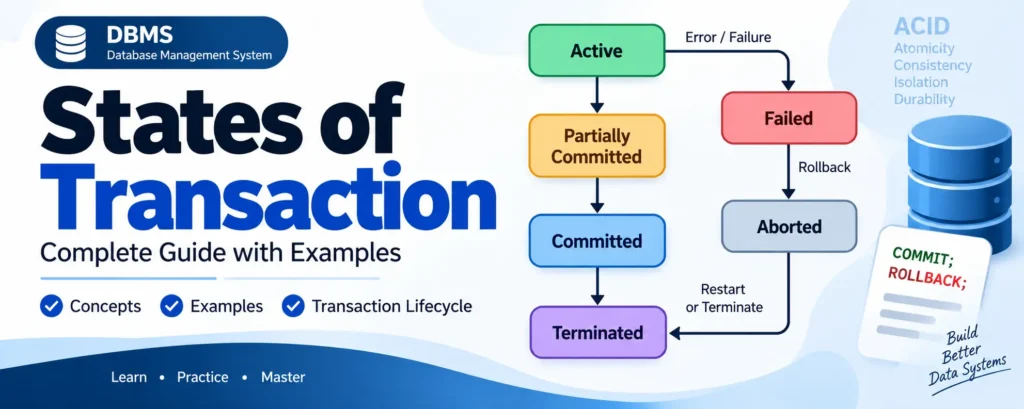
States of Transaction
The major states of a transaction in DBMS are:
- Active State
- Partially Committed State
- Committed State
- Failed State
- Aborted State
- Terminated State
1. Active State
The Active State is the initial state of a transaction. In this state, the transaction is currently executing its operations.
A transaction remains active while it performs operations such as reading data, inserting records, updating values, or deleting records.
Example: Suppose a transaction transfers ₹1,000 from Account A to Account B. While the transaction is reading the account balances and performing the required updates, it is in the active state.
Complete Advance AI Topics: Click Here
SQL Tutorial: Click Here
2. Partially Committed State
When a transaction has successfully executed its last operation, it enters the Partially Committed State.
At this point, the transaction has completed its execution, but the changes may not yet be guaranteed to be permanently recorded on stable storage. A failure during this stage can therefore prevent the transaction from reaching the committed state.
Example: If a transaction has completed all operations required for a money transfer but the final commit has not yet been safely recorded, the transaction is partially committed.
3. Committed State
When all operations of a transaction have completed successfully and the required changes have been safely recorded, the transaction enters the Committed State.
A committed transaction has successfully completed, and its changes are considered permanent according to the database’s durability guarantees.
Example: After ₹1,000 is successfully deducted from Account A and added to Account B, and the transaction is committed, the changes become permanent.
4. Failed State
If a transaction cannot continue because of an error or unexpected problem, it enters the Failed State.
A transaction may fail because of:
- System failure
- Hardware failure
- Transaction errors
- Constraint violations
- Deadlocks or concurrency-related problems
- Invalid operations
Example: If a transaction attempts to insert a duplicate value into a column with a unique constraint, the transaction may fail.
5. Aborted State
After a transaction enters the failed state, the DBMS may roll back its changes to restore the database to a consistent state. After the rollback is completed, the transaction enters the Aborted State.
An aborted transaction can generally follow one of two paths:
- The transaction may be restarted.
- The transaction may be terminated.
Example: If a transaction updates several records and then fails, the DBMS can undo those changes so that incomplete modifications do not remain in the database.
6. Terminated State
The Terminated State is the final state of a transaction. A transaction reaches this state after its execution has finished and the DBMS no longer needs to perform further processing for that transaction.
A transaction can reach the terminated state after either:
- A successful commit
- An aborted transaction that is not restarted
Transaction State Diagram
The basic transaction lifecycle can be represented as follows:
                +----------------+
                |     Active     |
                +----------------+
                   |          |
              Last operation  |
                   |          | Error
                   v          v
          +----------------+  +----------------+
          |    Partially   |  |     Failed     |
          |    Committed   |  +----------------+
          +----------------+          |
                   |                  |
              Commit success         Rollback
                   |                  |
                   v                  v
          +----------------+  +----------------+
          |    Committed   |  |    Aborted     |
          +----------------+  +----------------+
                   |             |          |
                   |             | Restart  | Terminate
                   |             |          |
                   v             v          v
              +--------------------------------+
              |          Terminated            |
              +--------------------------------+
Transaction Lifecycle in DBMS
The transaction lifecycle describes how a transaction moves from its beginning to its final state.
Step 1: Transaction Starts
When a transaction begins execution, it enters the Active State. It performs all required read and write operations.
Step 2: Transaction Completes Its Operations
After the transaction executes its final operation successfully, it enters the Partially Committed State.
Step 3: Transaction Commits
If the DBMS successfully completes the commit process, the transaction enters the Committed State. Its changes are then considered permanent.
Step 4: Transaction Fails
If an error occurs during execution or before the transaction can safely commit, it enters the Failed State.
Step 5: Transaction Is Aborted
The DBMS performs the necessary recovery actions, such as undoing the transaction’s changes. The transaction then enters the Aborted State.
Step 6: Transaction Terminates or Restarts
An aborted transaction may be restarted if the failure was temporary. Otherwise, it is terminated. A successfully committed transaction also eventually reaches the terminated state.
YT:- DecodeIT
COMMIT and ROLLBACK in Transactions
SQL provides commands such as COMMIT and ROLLBACK to control transaction processing.
COMMIT
The COMMIT command permanently applies the changes made by a transaction according to the DBMS’s transaction and durability mechanisms.
UPDATE accounts
SET balance = balance - 1000
WHERE account_id = 101;

COMMIT;
ROLLBACK
The ROLLBACK command undoes changes made during the current transaction, subject to the transaction’s scope and DBMS behavior.
UPDATE accounts
SET balance = balance - 1000
WHERE account_id = 101;

ROLLBACK;
Difference Between Transaction States
| State | Description |
|---|---|
| Active | The transaction is currently executing. |
| Partially Committed | The final operation has completed, but the transaction is not yet fully committed. |
| Committed | The transaction has completed successfully and its changes are permanent according to durability guarantees. |
| Failed | The transaction cannot continue because of an error or failure. |
| Aborted | The transaction has been rolled back and its incomplete changes have been undone. |
| Terminated | The transaction has completed its lifecycle and requires no further processing. |
Conclusion
Understanding the States of Transaction is essential for understanding transaction management and recovery in DBMS. A transaction normally moves from the Active state to Partially Committed and then to Committed when execution is successful.
If an error occurs, the transaction can move from Active or Partially Committed to Failed, followed by Aborted after recovery actions. It may then be restarted or terminated.
Keywords
States of Transaction, Transaction States in DBMS, DBMS Transaction States, Active State, Partially Committed State, Committed State, Failed State, Aborted State, Terminated State, Transaction Lifecycle in DBMS, Transaction Management, COMMIT, ROLLBACK, Database Transactions, DBMS Recovery