
Building a Flipkart clone in PHP and MySQL is one of the most rewarding final year projects you can attempt, because it forces you to solve every problem a real online store faces — catalogue design, faceted search, cart state, checkout flow, order fulfilment and an admin back office. Instead of a toy CRUD assignment, you end up with a complete commerce platform that looks and behaves like the storefront millions of shoppers use every day.
Table of Contents
This post walks you through a fully working e-commerce system built with plain PHP 8 and MySQL — no frameworks, no Composer, no build step. You will see the database design, the module breakdown, the simulated payment flow, the setup steps, and exactly why this project performs so well in viva and placement interviews.
| Detail | Description |
|---|---|
| Project Name | Flipkart Clone — Online Shopping System |
| Language | PHP 8.1, JavaScript (Vanilla), HTML5, CSS3 |
| Framework | Core PHP (no framework, no Composer) |
| Database | MySQL / MariaDB (15 InnoDB tables) |
| Server | Apache via XAMPP / WAMP / LAMP |
| Project Type | Full Stack E-Commerce Web Application |
| Difficulty | Intermediate to Advanced |
| Best For | BCA, MCA, B.Tech CS/IT, M.Tech Final Year |
| Category | Web Development / E-Commerce |
| Modules | Customer Storefront + Admin Panel |
| Year | 2026 |
| Developer | Updategadh |
About the Flipkart Clone Project
Most e-commerce demos students submit stop at listing a few products and printing a total. Real online retail is far messier. A shopper needs to filter thousands of items by brand, price band, rating and discount before finding anything. A guest who fills a cart and only then logs in expects that cart to survive. Stock must reduce the moment an order is confirmed and return the moment it is cancelled. An order placed today must still display the correct price next month, even if the seller changed it. Meanwhile the store owner needs a back office to add products, moderate reviews, run coupons and push orders through packing, shipping and delivery.
This Flipkart clone in PHP and MySQL handles all of it. The schema uses fifteen related InnoDB tables with foreign keys, so order line items store a snapshot of the product name, image and price at purchase time and stay accurate forever. Guest carts live in the session and merge into the database on login. Cancelling an order restores inventory and flags a paid order as refunded automatically. The admin panel mirrors a genuine seller console, complete with revenue charts and low stock alerts. Payment is deliberately simulated so the project runs anywhere without gateway keys, while still modelling the exact states a live integration passes through.
Key Features of the Online Shopping System
Customer Storefront Module
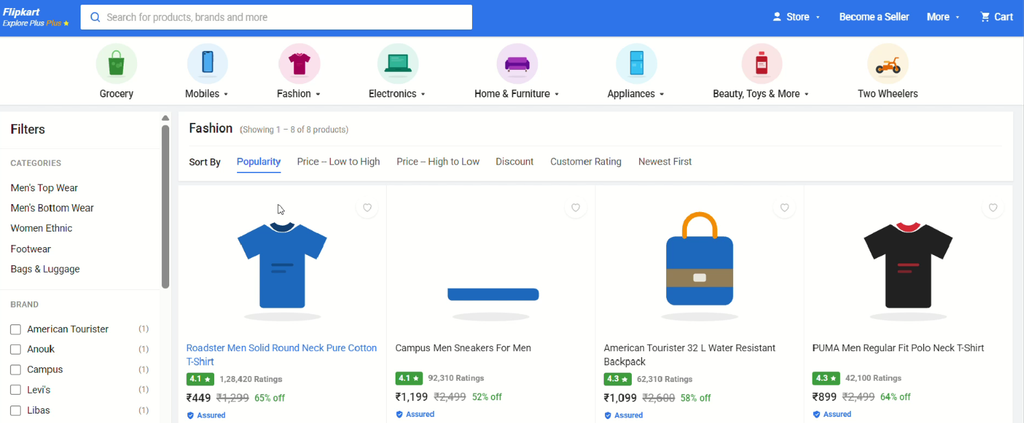
- Flipkart-Style Interface: Familiar blue application bar, category icon strip with hover mega-menus, auto-playing hero carousel and horizontally scrolling deal rows.
- Live Search Suggestions: Type-ahead dropdown that fetches matching products with thumbnails through an AJAX endpoint as the user types.
- Faceted Product Filters: Narrow results by category, brand, price range, customer rating, discount percentage and stock availability, with removable filter chips.
- Six Sorting Options: Popularity, price low to high, price high to low, discount, customer rating and newest first.
- Rich Product Detail Page: Sticky image gallery with thumbnail swapping, bank offer list, pincode delivery checker, grouped specification tables and a rating distribution histogram.
- Ratings & Reviews: Star picker with one review per customer per product, and aggregate ratings recalculated on submission.
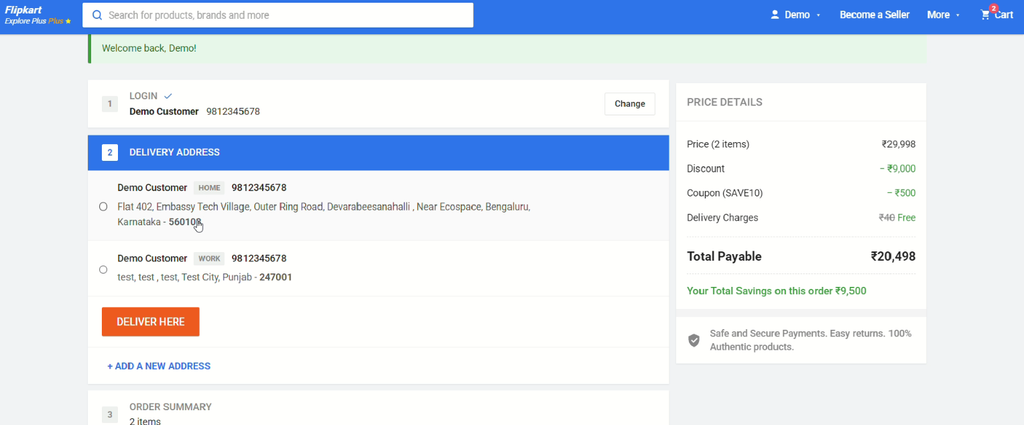
- Smart Shopping Cart: Quantity stepper, save-for-later, coupon apply and remove, plus a live price details panel showing discount and delivery savings.
- Guest Cart Merging: Items added before signing in are transferred into the customer account automatically at login.
- Four-Step Checkout: Login, delivery address, order summary and payment options presented as a stepped accordion.
- Order Tracking Timeline: Visual progress from placed through confirmed, packed, shipped, out for delivery and delivered.
- Order Cancellation: Customers can cancel before dispatch, which returns stock and marks paid orders as refunded.
- Wishlist & Address Book: Save products for later and manage multiple delivery addresses with a default selection.
Admin Panel Module
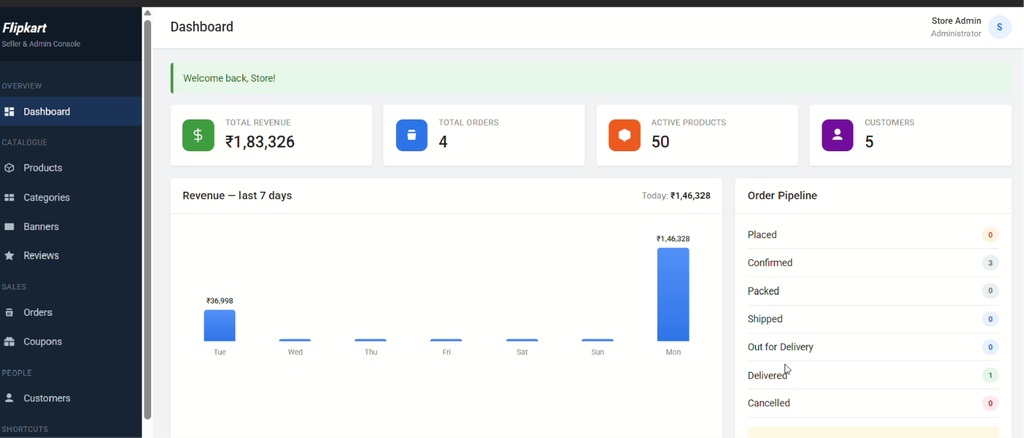
- Analytics Dashboard: Revenue, order, product and customer indicators with a seven-day revenue chart, order pipeline breakdown, low stock alerts and best-selling products.
- Product Management: Complete create, read, update and delete operations with multi-image upload, primary image selection and a repeatable specification builder.
- Category Management: Two-level category tree with icon upload and delete protection for categories still in use.
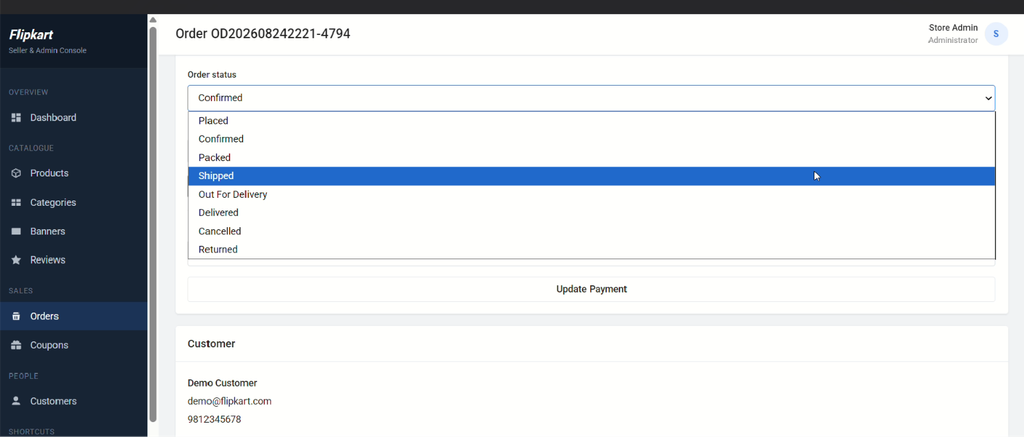
- Order Workflow: Filter by status, payment state or date range, then advance orders through the fulfilment pipeline with internal notes.
- Customer Administration: Search accounts, enable or disable users, promote to administrator, and view lifetime spend per customer.
- Coupon Engine: Flat or percentage discounts with minimum order value, maximum discount cap, expiry date and usage limits.
- Banner Manager: Control the home page carousel slides and promotional strips without touching code.
- Review Moderation: Browse, filter and remove customer reviews while keeping product counters consistent.
Technologies Used in This E-Commerce Project
| Layer | Technology |
|---|---|
| Frontend | HTML5, CSS3 |
| Interactivity | Vanilla JavaScript |
| Backend | PHP 8.1 (Core PHP) |
| Database | MySQL |
| Data Access | PDO with Prepared Statements |
| Server | Apache (XAMPP / WAMP / LAMP) |
| Security | Bcrypt Hashing, CSRF Tokens |
| Assets | SVG Graphics |
How the Flipkart Clone Works
- Browsing: The visitor lands on a home page assembled from database-driven banners, category deal rows and recommended products.
- Discovery: They search using the type-ahead box or drill into a category, then apply brand, price, rating and discount filters until the result set matches their need.
- Evaluation: On the product page they review the gallery, highlights, specification tables, offers and customer ratings, and check delivery timing by entering a pincode.
- Cart: Items are added to a session cart as a guest or a database cart when signed in. Quantities can be adjusted, items saved for later, and a coupon code applied.
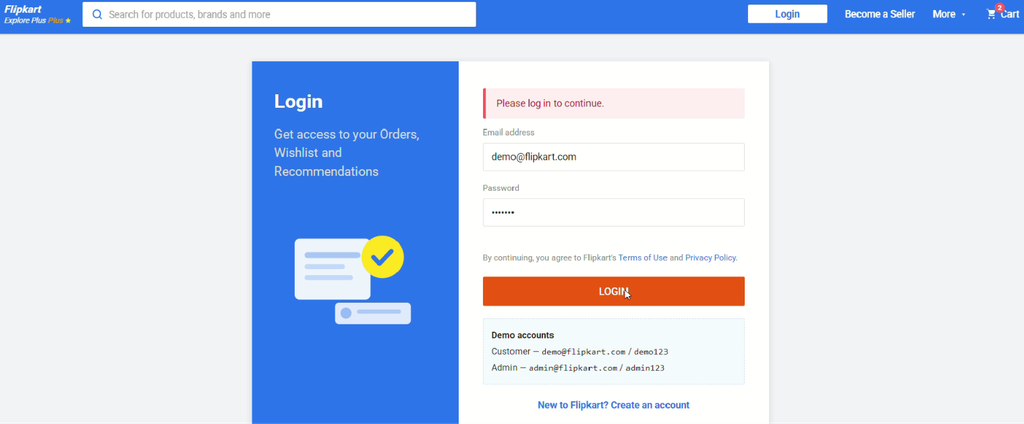
- Authentication: At checkout the customer registers or signs in, and any guest cart items merge into their account seamlessly.
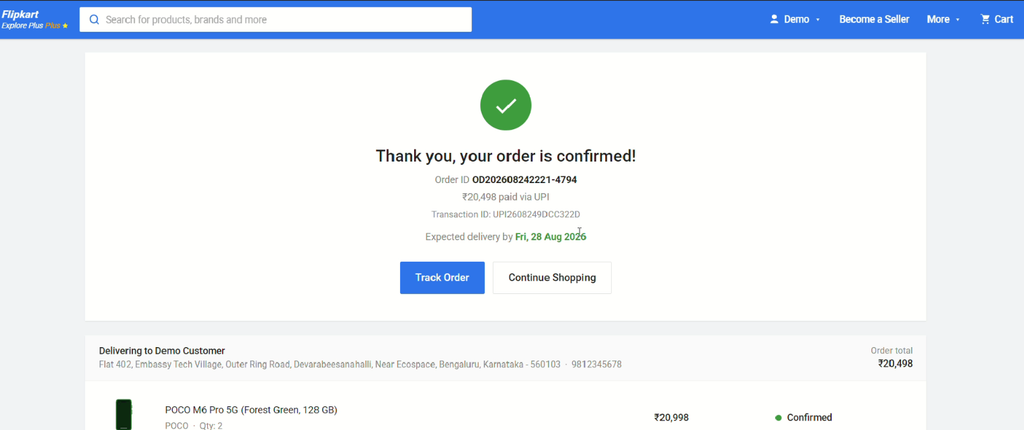
- Checkout: They select or add a delivery address, confirm the order summary, and choose a payment method from UPI, card, net banking, wallet or cash on delivery.
- Order Creation: The system validates stock, writes the order and its line item snapshots inside a database transaction, reduces inventory and records the opening status entry.
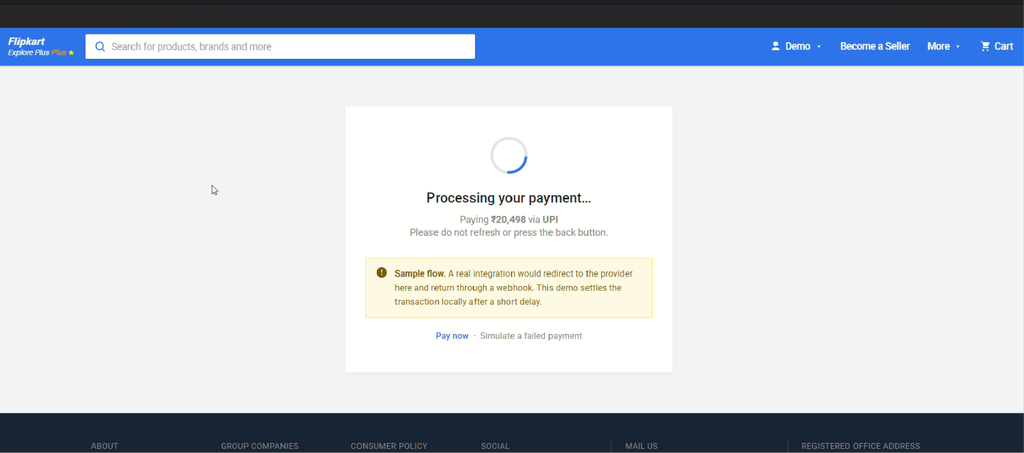
- Payment Simulation: Non-cash methods route through a processing screen that settles the transaction, stores a generated reference and moves the order to confirmed.
- Fulfilment: The administrator advances the order through packing, shipping, out for delivery and delivered, with each transition logged to the tracking timeline.
- Post-Purchase: The customer follows progress on the tracking page, cancels before dispatch if required, and returns to rate the product once delivered.
How to Run This Project
Step 1: Prerequisites
Install XAMPP (or WAMP / LAMP) with PHP 8.0 or newer and MySQL or MariaDB. No Composer, Node.js or build tooling is required.
Step 2: Place the Project Files
Extract the downloaded source code into your web server root directory.
C:\xampp\htdocs\FCloneStep 3: Start the Server
Open the XAMPP Control Panel and start both the Apache and MySQL services.
Step 4: Configure Database Credentials
Open the configuration file and update the credentials if your MySQL root account uses a password.
// config/config.php

define('DB_HOST', 'localhost');
define('DB_NAME', 'flipkart_clone');
define('DB_USER', 'root');
define('DB_PASS', '');
Step 5: Create the Database
Choose whichever method you prefer. The one-click installer checks your environment, builds the schema and loads the sample catalogue automatically.
http://localhost/FClone/install.phpAlternatively, import the supplied SQL dump through phpMyAdmin, or run it from the command line.
mysql -u root -p < database/flipkart_clone.sqlStep 6: Launch the Application
Open the storefront and the admin console in your browser.
Storefront : http://localhost/FClone/
Admin Panel: http://localhost/FClone/admin/login.php
Step 7: Sign In with the Demo Accounts
Admin    : admin@flipkart.com  /  admin123
Customer : demo@flipkart.com   /  demo123

Working coupon codes: FLAT100, SAVE10, NEW50
Once setup is complete, delete install.php so the database cannot be rebuilt accidentally.
How to Download
Get This Project
The complete package is available so you can run, study, and submit it with confidence. It includes:
- Full Source Code
- Project Report
- Synopsis
- PPT Presentation
For any queries or a quick response, reach out on WhatsApp: +91 79834 34684
Demo Video
Project Screenshots
Admin
Why This Is a Great Final Year Project
- Complete Full Stack Scope — you present database design, backend logic, frontend interface and an administrative module in a single submission, covering every heading your evaluation rubric expects.
- Serious Database Design — fifteen related tables with foreign keys, snapshot records and self-referencing category hierarchy give you plenty of substance for the ER diagram and normalisation chapters of your report.
- Viva-Ready Talking Points — examiners routinely ask how you prevent SQL injection, how sessions persist a cart, or how you keep order history accurate after a price change. This project gives you a concrete answer to each.
- Placement-Relevant Skills — prepared statements, CSRF protection, password hashing, transactions, file upload validation and AJAX endpoints are exactly the topics that surface in junior developer interviews.
- Resume-Worthy Outcome — an e-commerce platform is instantly recognisable to any recruiter, far more so than a generic management system, and it demonstrates commercial thinking alongside coding ability.
- No Framework Dependency — because it is written in core PHP, you can explain every line rather than pointing at framework magic, which builds real confidence during questioning.
- Runs Anywhere Instantly — the payment layer is simulated and all artwork is self-contained, so the demonstration never fails because of missing gateway keys or a dead internet connection.
- Easy to Extend — the modular structure lets you add one distinctive feature of your own, which is the surest way to stand out from classmates submitting similar work.
Possible Extensions and Future Enhancements
- Live Payment Gateway — replace the simulated settlement with Razorpay, PayU or Stripe, verifying results through a secure webhook.
- Email and SMS Notifications — send order confirmations, dispatch alerts and delivery updates automatically.
- Multi-Vendor Marketplace — allow independent sellers to register, list products and manage their own orders and payouts.
- Product Recommendation Engine — suggest items based on browsing history, purchase patterns or collaborative filtering.
- Product Variants — support size, colour and storage options with separate stock levels and pricing per variant.
- REST API and Mobile App — expose the catalogue and cart through JSON endpoints to power an Android or Flutter client.
- Return and Refund Workflow — add a structured post-delivery returns process with pickup scheduling and refund tracking.
- Advanced Search — integrate full-text or Elasticsearch-style relevance ranking with typo tolerance and synonym handling.
Watch More Project Tutorials
Subscribe for complete walkthroughs, source code explanations and final year project guidance published every week.
Subscribe to DecodeIT2 on YouTube
Frequently Asked Questions
Which technologies are used in this Flipkart clone project?
The project is built with core PHP 8, MySQL or MariaDB, vanilla JavaScript, HTML5 and CSS3, running on Apache through XAMPP. It uses PDO with prepared statements for all database access and requires no framework, Composer or Node.js installation.
Is this Flipkart clone in PHP and MySQL suitable for BCA, MCA and B.Tech students?
Yes. It is ideally scoped for BCA, MCA, B.Tech CS/IT and M.Tech final year submissions. The difficulty sits at intermediate to advanced level, so it demonstrates genuine capability while remaining fully understandable and explainable during your viva.
Does the project include real payment gateway integration?
The payment layer is intentionally simulated. It models the complete lifecycle a real gateway follows — pending, processing, then success or failure — and stores generated transaction references, but no gateway keys are needed and no card details are ever saved. This means the project runs on any machine without configuration, and integrating a live provider later requires changing only one file.
Can I customise the project and does the package include a report and PPT?
Yes to both. The code is organised into clear modules with comments throughout, so you can rename the store, change the colour scheme, add products or extend the feature set easily. The download package includes the complete source code, the SQL database file, a project report, a synopsis and a PPT presentation ready for your defence.