Types of Databases in DBMS
A database is the foundation of modern applications, websites, banking systems, hospitals, and enterprise software. It provides a structured way to store, organize, retrieve, and manage data efficiently.
In this tutorial, you will learn what a database is, its purpose, and the different types of databases in DBMS with examples, advantages, and disadvantages.
Related Tutorials: Machine Learning Tutorial, Data Science Tutorial, Complete Advanced AI Topics, Deep Learning Tutorial
Complete Advance AI Topics: Click Here
SQL Tutorial: Click Here
What is a Database?
A database is an organized collection of related data stored electronically so that it can be accessed, updated, and managed efficiently. Instead of keeping information in scattered files, databases store data in a structured format using a Database Management System (DBMS).
For example:
- A banking application stores customer accounts and transaction information in a database.
- An e-commerce website stores products, customers, orders, and payment information.
- A college management system stores student, faculty, course, and attendance records.
Database and DBMS Relationship
The DBMS acts as an intermediary between users and the database. It manages data storage, security, queries, transactions, and user access.
Users / Applications
        ↓
       DBMS
        ↓
     Database
Purpose of a Database
Databases do much more than simply store information. They help organizations maintain accurate, secure, and easily accessible data while allowing multiple users to work with the same information.
Why Are Databases Important?
- Store large amounts of data efficiently.
- Provide organized data storage and retrieval.
- Allow multiple users to access data simultaneously.
- Prevent data conflicts through concurrency control.
- Maintain data consistency and integrity.
- Provide different views of data based on user requirements.
- Improve data security through authentication and authorization.
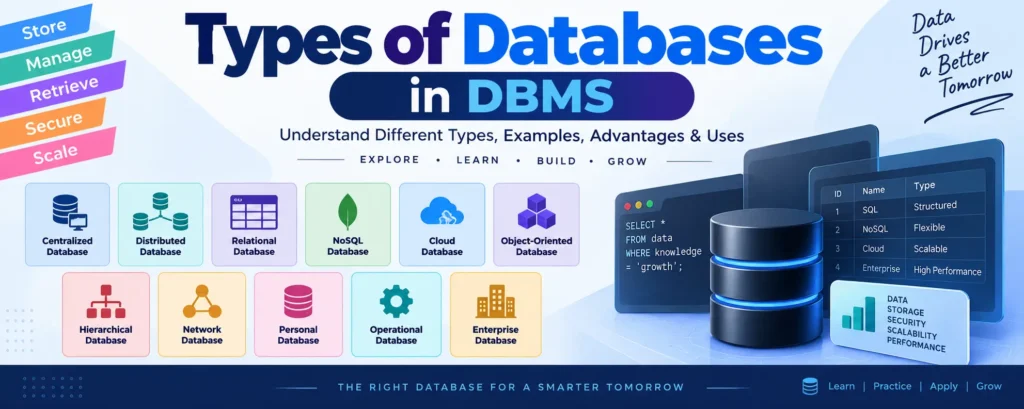
Types of Databases in DBMS
Databases can be classified into different types based on their architecture, data model, storage method, and application requirements.
| Database Type | Best Used For |
|---|---|
| Centralized Database | Single-location systems |
| Distributed Database | Multi-location organizations |
| Relational Database | Structured business data |
| NoSQL Database | Big data and flexible data |
| Cloud Database | Scalable cloud applications |
| Object-Oriented Database | Object-oriented applications |
| Hierarchical Database | Tree-structured data |
| Network Database | Complex relationships |
| Personal Database | Individual users |
| Operational Database | Real-time transactions |
| Enterprise Database | Large organizations |
1. Centralized Database
A Centralized Database stores all data at a single central location, usually on one main server. Users from different locations access the database through a network or application.
Example: A university library management system where all library records are maintained on a central server.
Advantages of Centralized Database
- Easy database administration and maintenance.
- Better data consistency.
- Centralized security management.
- Lower infrastructure and maintenance costs.
Disadvantages of Centralized Database
- The central server can become a single point of failure.
- Performance may decrease when many users access the system simultaneously.
- Server downtime can affect all connected users.
2. Distributed Database
A Distributed Database stores data across multiple servers or locations. These systems are connected through a communication network and work together as a single logical database.
Examples: Apache Cassandra and HBase are examples of distributed database technologies.
Types of Distributed Databases
- Homogeneous Distributed Database: Uses the same DBMS and similar technologies at different locations.
- Heterogeneous Distributed Database: Uses different DBMS products, operating systems, or hardware at different locations.
Advantages of Distributed Database
- High availability.
- Better fault tolerance.
- Improved scalability.
- Faster access to locally stored data.
Disadvantages of Distributed Database
- More difficult to design and maintain.
- Data synchronization can be complex.
- Maintaining data consistency across locations can be challenging.
3. Relational Database
A Relational Database stores data in tables consisting of rows and columns. Relationships between tables are established using keys such as primary keys and foreign keys.
Relational databases are widely used in banking, education, healthcare, e-commerce, and business applications.
Examples: MySQL, Oracle Database, Microsoft SQL Server, and PostgreSQL.
ACID Properties
Relational database systems commonly use the ACID properties to ensure reliable transaction processing.
| Property | Meaning |
|---|---|
| Atomicity | A transaction is completed completely or not executed at all. |
| Consistency | Data remains valid before and after a transaction. |
| Isolation | Concurrent transactions do not improperly interfere with each other. |
| Durability | Committed data remains stored even after a system failure. |
Advantages of Relational Database
- Well-structured and easy to understand.
- Strong data integrity.
- Powerful SQL query support.
- Reliable transaction management.
- Strong security features.
Disadvantages of Relational Database
- Less flexible for highly unstructured data.
- Horizontal scaling can be more challenging.
- Complex applications may require careful database design.
4. NoSQL Database
NoSQL stands for Not Only SQL. NoSQL databases are designed to handle large volumes of structured, semi-structured, and unstructured data using flexible data models.
They are commonly used in real-time applications, social media platforms, IoT systems, and large-scale web applications.
Types of NoSQL Databases
| Type | Description | Example |
|---|---|---|
| Key-Value | Stores data as key-value pairs. | Redis |
| Document | Stores data as documents, commonly using JSON-like structures. | MongoDB |
| Graph | Designed for highly connected data and relationships. | Neo4j |
| Wide-Column | Stores data using column families. | Cassandra |
Advantages of NoSQL Database
- Highly scalable.
- Flexible schema.
- Suitable for large datasets.
- Works well with rapidly changing data.
- Useful for distributed and real-time applications.
Disadvantages of NoSQL Database
- Query languages vary between database systems.
- Complex relationships can be difficult to manage in some NoSQL models.
- Not every NoSQL system provides the same transaction guarantees as traditional relational databases.
5. Cloud Database
A Cloud Database is hosted on cloud computing infrastructure rather than being maintained entirely on local servers. Cloud databases can be accessed remotely and can scale according to application requirements.
Examples: Amazon RDS, Google Cloud SQL, Microsoft Azure SQL, and Amazon DynamoDB.
Advantages of Cloud Database
- Easy scalability.
- Reduced hardware requirements.
- Remote accessibility.
- Flexible pricing models.
- Backup and disaster recovery options.
Disadvantages of Cloud Database
- Internet connectivity may be required.
- Cloud provider dependency can create vendor lock-in.
- Data privacy and compliance must be carefully managed.
6. Object-Oriented Database
An Object-Oriented Database (OODBMS) stores information as objects. It is designed to work closely with object-oriented programming concepts such as classes, objects, inheritance, and encapsulation.
Object-oriented databases can be useful for applications that work with complex objects and object-oriented programming languages.
Advantages of Object-Oriented Database
- Natural integration with object-oriented programming.
- Supports complex data structures.
- Supports concepts such as inheritance and encapsulation.
Disadvantages of Object-Oriented Database
- Less widely adopted than relational databases.
- Limited standardization compared with SQL-based systems.
- May not be the best choice for applications requiring extensive relational queries.
7. Hierarchical Database
A Hierarchical Database organizes data in a tree-like structure. Records are arranged using parent-child relationships.
In a traditional hierarchical model, a child record is associated with a single parent, making the model particularly suitable for one-to-many relationships.
Advantages of Hierarchical Database
- Simple tree-based structure.
- Fast navigation through parent-child relationships.
- Efficient for one-to-many relationships.
Disadvantages of Hierarchical Database
- Difficult to modify the database structure.
- Not suitable for many-to-many relationships.
- Less flexible than modern database models.
8. Network Database
A Network Database is a database model that allows records to have multiple parent and child relationships. It provides more flexibility than the traditional hierarchical model.
Advantages of Network Database
- Supports complex relationships.
- Can represent many-to-many relationships.
- Can reduce data redundancy.
- Provides efficient navigation between related records.
Disadvantages of Network Database
- Complex database design.
- Difficult to maintain.
- Querying can be more complicated.
9. Personal Database
A Personal Database is designed for individual users or small-scale applications. It is generally stored on a personal computer or local device.
Examples: Microsoft Access and SQLite can be used for many small-scale database applications.
Advantages of Personal Database
- Easy to set up and manage.
- Low hardware requirements.
- Suitable for small applications.
- Simple administration.
10. Operational Database
An Operational Database is used to support an organization’s daily business operations. It is designed to process frequent real-time transactions such as sales, payments, reservations, and account updates.
Examples:
- Banking transaction systems.
- Retail Point-of-Sale systems.
- Airline reservation systems.
- Hospital management systems.
Advantages of Operational Database
- Supports real-time transactions.
- Provides fast data updates.
- Suitable for day-to-day business operations.
- Supports concurrent users and transactions.
11. Enterprise Database
An Enterprise Database is designed for large organizations that need to manage massive amounts of data and support a large number of users simultaneously.
Enterprise databases are commonly used by banks, telecom companies, healthcare organizations, government departments, and large businesses.
Features of Enterprise Database
- High availability.
- Large-scale data processing.
- Advanced security.
- Data replication.
- High performance under heavy workloads.
- Support for many concurrent users.
Comparison of Different Database Types
| Database Type | Structure | Scalability | Example |
|---|---|---|---|
| Centralized | Single central server | Medium | Library Database |
| Distributed | Multiple servers | High | Cassandra |
| Relational | Tables | Medium to High | MySQL |
| NoSQL | Flexible data models | Very High | MongoDB |
| Cloud | Cloud-hosted | Very High | Amazon RDS |
| Object-Oriented | Objects | Medium | ObjectDB |
| Hierarchical | Tree | Low to Medium | IBM IMS |
| Network | Network of records | Medium | CA IDMS |
| Personal | Local storage | Low | SQLite |
| Operational | Transactional | High | Banking System |
| Enterprise | Large-scale | Very High | Oracle Database |
Which Database Should You Choose?
The choice of database depends on the application’s data structure, scalability, performance, consistency, and business requirements.
| Requirement | Recommended Database |
|---|---|
| Banking System | Relational Database |
| Social Media Application | NoSQL Database |
| E-Commerce Application | Relational and/or NoSQL Database |
| Cloud Application | Cloud Database |
| College Management System | Relational Database |
| Multi-Branch Organization | Distributed Database |
| Object-Oriented Application | Object-Oriented Database |
YT:- DecodeIT
Conclusion
Databases provide an efficient and organized way to store, retrieve, update, and manage information. Different database types are designed to solve different data management requirements.
Relational databases are ideal for structured business applications, while NoSQL databases are useful for flexible and large-scale data. Cloud databases provide scalability and remote access, whereas distributed databases are suitable for systems operating across multiple locations.
Understanding the types of databases in DBMS helps developers and database administrators select the right database architecture for a particular application.
Keywords
Types of Databases in DBMS, types of databases, types of databases in SQL, types of databases in DBMS, what are the types of database, types of database management system, relational database, NoSQL database, cloud database, centralized database, distributed database, hierarchical database, network database, object oriented database, enterprise database, operational database, personal database, database types with examples, different types of databases and their uses, types of DBMS