Knowing how to build an ecommerce website project is one of the most useful skills you can show in your final year. Almost every examiner has shopped online, so they understand the idea in seconds. That means your viva is about how well you built it, not about explaining what it is.
This guide is for BCA, MCA and B.Tech students who want to build a shopping website from scratch. You will learn the modules, the database tables, the steps in the right order, and which tech stack to pick. We also link to real ecommerce projects in PHP, Java, Python and MERN so you can see a finished version before you start.
| Item | Details |
|---|---|
| Topic | How to Build an Ecommerce Website Project |
| Project Type | Web application (online shopping store) |
| Main Languages | PHP, Java, Python, JavaScript |
| Frameworks | Spring Boot, Django, React, Express |
| Database | MySQL or MongoDB |
| Front End | HTML, CSS, JavaScript, Bootstrap or React |
| Difficulty | Beginner to Advanced |
| Best For | BCA, MCA, B.Tech CSE / IT final year |
| Year | 2026 |
| Developer | Updategadh |
What Is an Ecommerce Website Project?
An ecommerce website project is a web application where users can browse products, add them to a cart, place an order and track it, while an admin manages products, stock and orders from a separate panel. In a college project, payment is usually a test or cash-on-delivery option, not real money.
It is a popular final year choice because it covers everything examiners want to see: login and roles, database design, CRUD operations, sessions, and a clear real-world use.
Modules You Need in an Ecommerce Website Project
Split your project into two sides. This also makes your report and your demo much easier to explain.
User Side
- Registration and Login: sign up, login, logout and a profile page.
- Product Catalogue: categories, product list, product details, search and filters.
- Cart: add, remove and change quantity, with a live total.
- Checkout: address, order summary and a payment option (cash on delivery or a test gateway).
- My Orders: order history and order status.
Admin Side
- Dashboard: total orders, users, products and sales.
- Product Management: add, edit and delete products with images and stock.
- Category Management: create and edit categories.
- Order Management: view orders and change status (placed, shipped, delivered).
- User Management: view and block users.
Database Tables for an Ecommerce Website
Design the database before you write any page. If you are wondering how to build an ecommerce website project that does not fall apart later, this is the step that decides it. These six tables are enough for a complete final year project.
| Table | Main Columns | Purpose |
|---|---|---|
| users | id, name, email, password_hash, role | Customers and admin accounts |
| categories | id, name | Groups products |
| products | id, category_id, name, price, stock, image | Items for sale |
| cart | id, user_id, product_id, quantity | Items a user has added |
| orders | id, user_id, total, address, status, created_at | One row per order |
| order_items | id, order_id, product_id, quantity, price | Products inside each order |
Keep the price in order_items as well. If the admin changes a product price later, old orders still show what the customer actually paid. Examiners like this detail.
How to Build an Ecommerce Website Project Step by Step
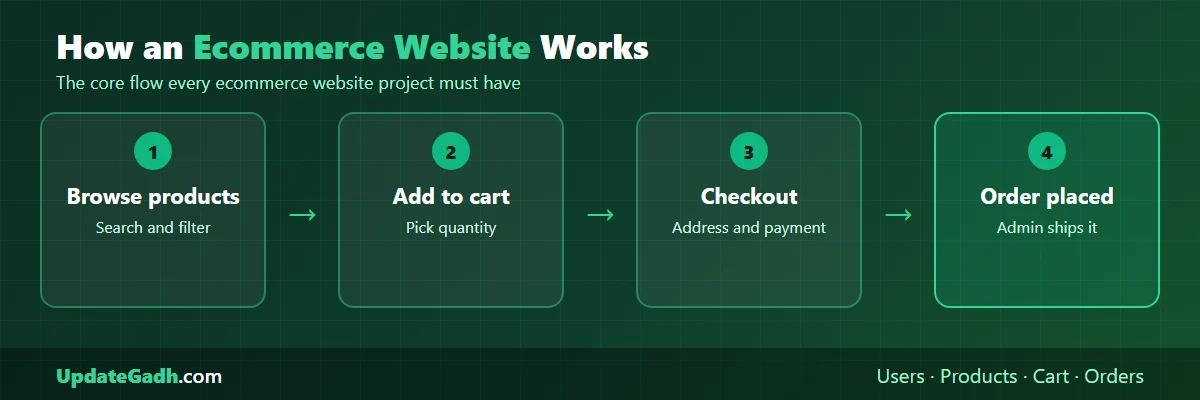
Follow these eight steps in order. This is how to build an ecommerce website project without getting stuck halfway, because each step gives the next one something real to work with.
Step 1: Write the Requirements
List the user and admin modules above on one page. This becomes the first chapter of your project report and keeps you from adding features you cannot finish.
Step 2: Design the Database
Create the six tables with primary and foreign keys. Draw an ER diagram now; you will need it for the report and the viva.
Step 3: Build Login and Roles
Make registration and login first, and store passwords as hashes, never as plain text. Add a role column so the same login sends admins to the dashboard and customers to the shop.
Step 4: Build the Admin Product Panel
Build product and category management before the shop pages. You need real products in the database to test everything else.
Step 5: Build the Product Catalogue
Show products by category, add a product details page, then add search and a price filter.
Step 6: Build the Cart and Checkout
Store the cart in the database (or in the session before login). At checkout, create one orders row and one order_items row per product, then reduce the stock.
Step 7: Add Payment and Order Tracking
Start with cash on delivery. If you want more, add a payment gateway in test mode, such as Razorpay test mode, so no real money moves during your demo.
Step 8: Test, Then Prepare the Demo
Test with two accounts: place an order as a user, then ship it as the admin. Fix empty-cart, out-of-stock and wrong-password cases before your viva day.
If this is your first web project, start with our web development projects for beginners to warm up.
Which Tech Stack Should You Use?
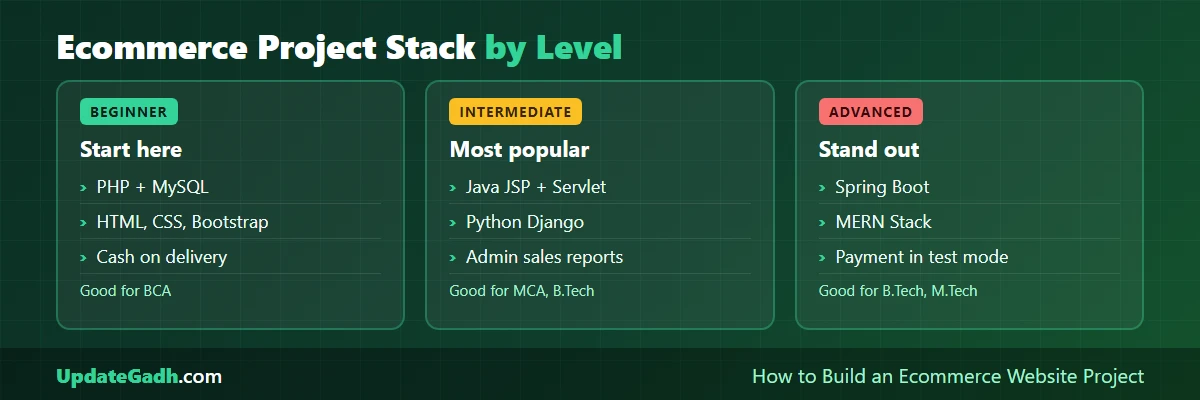
Pick the stack your syllabus and your team already know. Every stack below can build the same project; the difference is how much setup and code you write.
| Stack | Front End | Back End | Database | Difficulty | Good For |
|---|---|---|---|---|---|
| PHP + MySQL | HTML, CSS, Bootstrap | PHP | MySQL | Beginner | BCA, first full project |
| Java (JSP + Servlet) | JSP, Bootstrap | Servlets, JDBC | MySQL | Intermediate | MCA, Java syllabus |
| Python Django | Django templates | Django | SQLite or MySQL | Intermediate | Python learners, fast build |
| Spring Boot | Thymeleaf or React | Spring Boot, JPA | MySQL | Advanced | B.Tech, Java job roles |
| MERN | React | Node.js, Express | MongoDB | Advanced | B.Tech, full stack roles |
For Django, the official Django tutorial covers models, views and the admin panel you will use for products.
Real Ecommerce Projects You Can Study
Seeing a finished project makes the steps above much clearer, and it shows how to build an ecommerce website project in your own stack. Each of these posts shows the modules, screenshots and setup steps for one stack:
- E-commerce Website Using PHP and MySQL: the easiest place to start.
- E-commerce Website Project in Java Servlets and JSP: classic Java web project.
- E-commerce Website Using Spring Boot: modern Java with REST and JPA.
- E-commerce Website Using Python: simple Python version.
- Advanced E-Commerce Management System Using Django: full admin and reports.
- E-commerce Website Using MERN Stack: React front end with a Node.js API.
Common Mistakes to Avoid
- Starting with the design: a beautiful home page with no working cart will not pass the viva. Build the flow first, style it last.
- Plain-text passwords: always hash them. Examiners often open the database during the demo.
- No stock check: stop users from ordering more than the available stock.
- Too many features: reviews, coupons and wishlists are nice, but finish the core flow before adding them.
Viva Questions on an Ecommerce Website Project
Why did you use a separate order_items table?
One order can have many products. Storing them in a separate table keeps the database normalised and lets each item keep the price paid at that time.
How do you keep user passwords safe?
Passwords are stored as a one-way hash, so even the admin cannot read them. At login, the entered password is hashed and compared.
What happens to stock when an order is placed?
The stock of each product is reduced inside the same database transaction that creates the order, so two users cannot buy the last item at the same time.
How is the admin different from a normal user?
Both log in from the same form, but a role column decides which pages they can open. Admin pages check this role before loading.
Final Thoughts on How to Build an Ecommerce Website Project
Learning how to build an ecommerce website project teaches you the full web development cycle in one go: database design, login, CRUD, sessions and a real business flow. Keep the scope small, finish the user and admin flow end to end, and practise the demo with two accounts. A simple project that works every time scores better than a big one that breaks on viva day.
Get a Ready Ecommerce Project
Want a complete ecommerce project with source code, project report, synopsis and PPT? Explore our ready projects and spend your time on understanding and presenting it.
Watch project demos and setup guides on our YouTube channel.
Subscribe to DecodeIT2 on YouTube
Frequently Asked Questions
How long does it take to build an ecommerce website project?
A basic PHP or Django version takes about three to four weeks for a student working a few hours a day. Spring Boot or MERN versions usually take five to six weeks.
Which language is best for an ecommerce website project?
PHP with MySQL is the easiest for beginners. Java or Spring Boot suits a Java syllabus, and MERN is best if you want a full stack JavaScript role.
Can I add real online payment to my college project?
Use a payment gateway in test mode or cash on delivery. Test mode shows the full payment flow in your demo without moving real money.
Is an ecommerce website a good final year project?
Yes, if you build it well. Add a clear admin panel, stock handling and order tracking, and be ready to explain your database design in the viva.