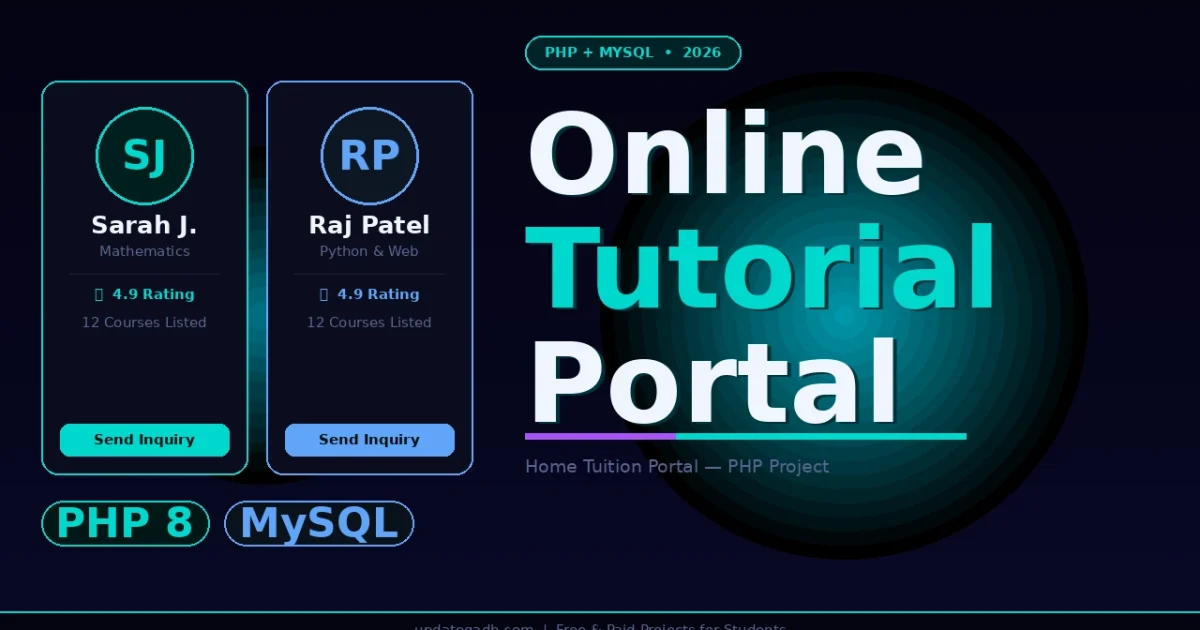
Online Tutorial Portal Site (OTPS) is exactly what you need. Built with PHP 8, MySQL, Bootstrap 4, and AdminLTE 3, this project connects students with tutors through a professional three-panel web application — a public-facing portal, a dedicated tutor self-registration and management panel, and a fully-featured admin dashboard. Students browse tutors, view profiles, explore listed courses, and send inquiries directly from the portal. Tutors register, upload avatars, manage their courses, and track student inquiries. Admins control everything —
Get This Project
This is a complete, ready-to-run paid project. It includes the full PHP source code across all three panels, the otps_db.sql database file, default admin and tutor login credentials, Report + PPT, setup files, and remote setup support from our team.
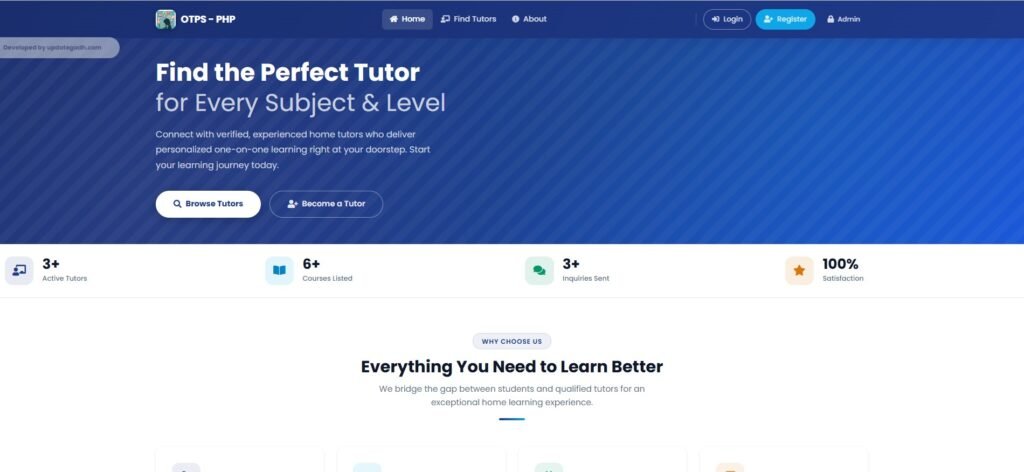
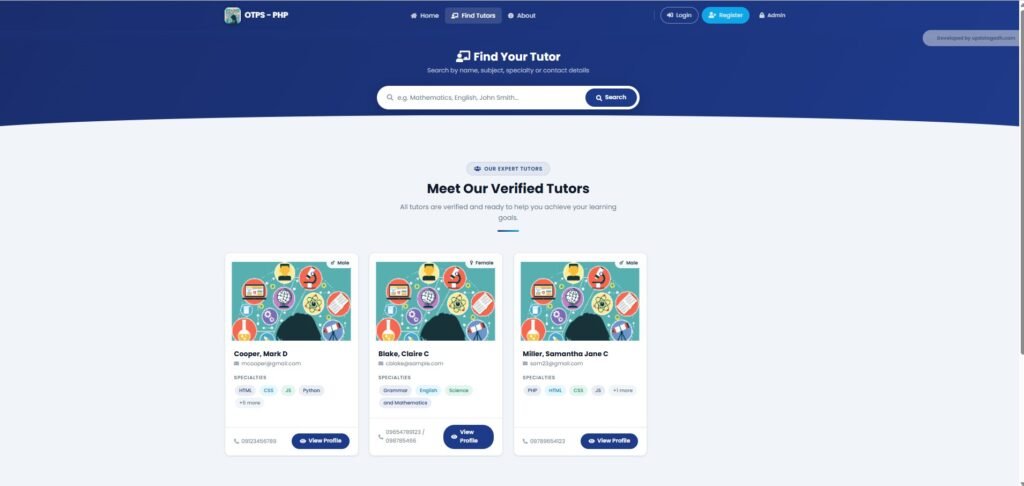
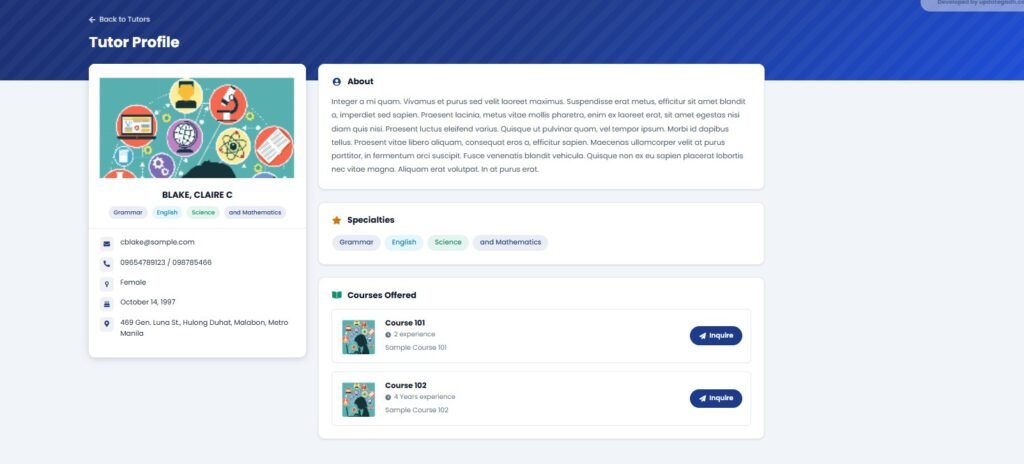
Online Tutorial Portal Site (OTPS) — PHP 8 + MySQL
Full source code + SQL database + login credentials + remote support included
Need help after purchase? Contact us on WhatsApp or via our support page
Project Overview
| Project Name | Online Tutorial Portal Site (OTPS) |
| Language | PHP 8.x |
| Database | MySQL / MariaDB 10.x (otps_db) |
| Frontend | Bootstrap 4, AdminLTE 3, jQuery 3.x |
| Rich Text Editor | Summernote |
| UI Libraries | Font Awesome 5, DataTables, SweetAlert2, Toastr, Chart.js |
| Type | Web Application — Three-Panel Portal |
| Local Server | XAMPP (Apache + MySQL) or PHP built-in server |
| DB Config File | config.php |
| Best For | BCA, MCA, B.Tech CS/IT Final Year Students Globally |
Key Features
- Public portal with tutor browsing and search — students browse all registered tutors from a professional homepage, use the search feature to filter by subject or specialty, and view detailed tutor profiles with courses and contact information
- Student inquiry system — students send direct inquiries to any tutor from the portal using a modal-based inquiry form, without needing to create an account, keeping the student-side experience frictionless
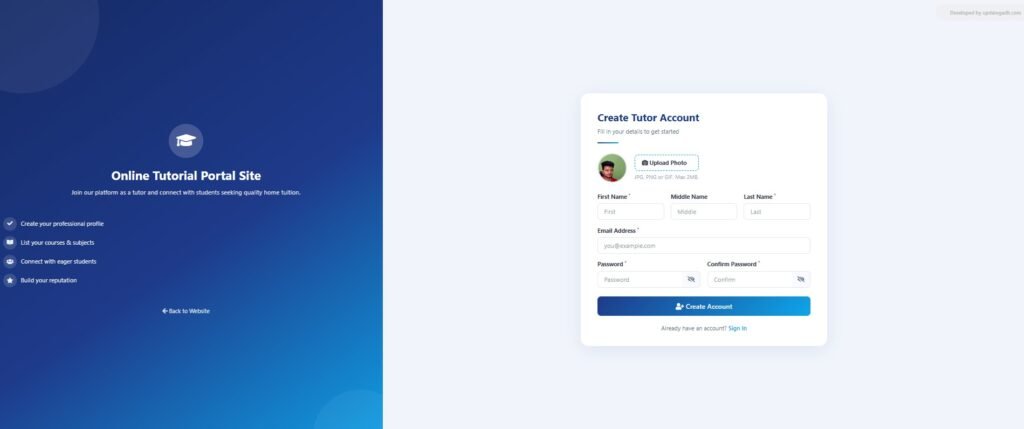
- Tutor self-registration with avatar upload — tutors register themselves on the portal by filling a registration form and uploading a profile avatar, making the platform self-service and scalable without admin intervention
- Tutor course management — registered tutors add, edit, and manage their own courses with logos, descriptions, and specialties from their dedicated AdminLTE-powered tutor panel
- Tutor inquiry dashboard — tutors view all incoming student inquiries from their panel with student contact details and message content for easy follow-up
- Admin tutor management — admin can approve, suspend, or delete tutors from a dedicated management section, giving full control over who is listed on the public portal
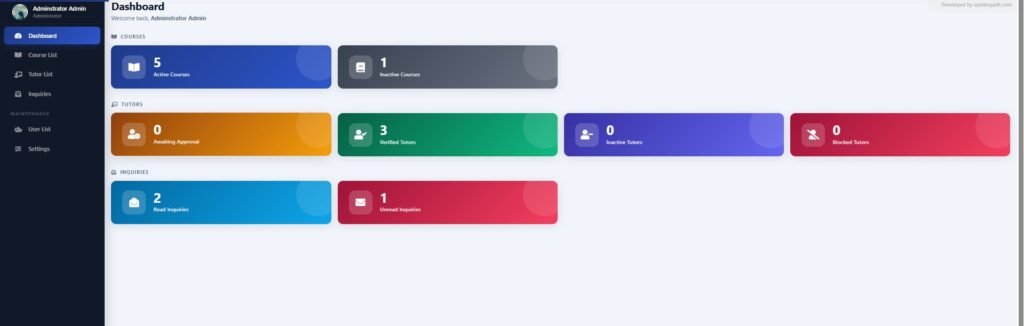
- Admin course and inquiry management — admin views and manages all courses across all tutors and handles all student inquiry records from the centralised AdminLTE dashboard
- Dynamic system settings — admin can update the site name, logo, and cover image directly from the dashboard, making the portal rebrandable without touching code
- Secure session-based login for all roles — separate login pages and session management for admin and tutor ensure role-specific access and prevent unauthorised panel access
🎬 Watch the Full Project Tutorial on YouTube!
We’ve built this project step by step on our YouTube channel. Watch the full video, like, and subscribe for daily project tutorials.
Technologies Used on Online Tutorial Portal Site
| Layer | Technology | Purpose |
|---|---|---|
| Backend Language | PHP 8.x | Core logic, session management, file uploads, form processing |
| Database | MySQL / MariaDB 10.x | Store tutors, courses, inquiries, admin accounts, system settings |
| Admin UI Framework | AdminLTE 3 | Professional dashboard layout for tutor and admin panels |
| Frontend Framework | Bootstrap 4 + jQuery 3.x | Responsive public portal and panel layouts |
| Icons | Font Awesome 5 | UI icons across all pages and panels |
| Rich Text | Summernote | WYSIWYG editor for course and bio descriptions |
| Tables | DataTables | Searchable, sortable tables for tutor, course, and inquiry lists |
| Alerts | SweetAlert2 + Toastr | Interactive confirmation dialogs and toast notifications |
| Charts | Chart.js | Admin dashboard analytics and stats visualisation |
| Local Server | XAMPP / PHP Built-in Server | Run the application locally for development and demo |
Online Tutorial Portal Site Project Folder Structure
otps/
├── admin/                      # Admin panel (AdminLTE 3)
│   ├── login.php               # Admin login page
│   ├── home.php                # Admin dashboard with stats
│   ├── courses/                # Manage all courses
│   ├── inquiries/              # Manage all student inquiries
│   ├── tutors/                 # Approve, suspend, delete tutors
│   ├── user/                   # Admin account management
│   └── inc/                    # Admin layout partials
│
├── tutor/                      # Tutor panel (AdminLTE 3)
│   ├── login.php               # Tutor login
│   ├── register.php            # Tutor self-registration + avatar upload
│   ├── home.php                # Tutor dashboard
│   ├── courses/                # Tutor course management
│   ├── inquiries/              # View incoming student inquiries
│   ├── user/                   # Tutor profile management
│   └── inc/                    # Tutor layout partials
│
├── tutors/                     # Public tutor listing (student-facing)
│   ├── index.php               # Browse and search tutors
│   ├── view_tutor.php          # Tutor profile with courses
│   └── inquire.php             # Send inquiry (modal form)
│
├── classes/                    # PHP backend logic
│   ├── DBConnection.php        # Database connection class
│   ├── Login.php               # Authentication logic
│   ├── Master.php              # Core CRUD operations
│   ├── SystemSettings.php      # Site settings handler
│   └── Users.php               # User/admin management
│
├── inc/                        # Public layout partials
│   ├── header.php
│   ├── topBarNav.php
│   ├── footer.php
│   └── navigation.php
│
├── assets/
│   └── css/
│       └── portal-theme.css    # Custom portal theme styles
│
├── uploads/                    # All user-uploaded files
│   ├── avatars/                # Tutor profile photos
│   ├── tutors/
│   ├── courses/                # Course logos
│   └── banner/                 # Site cover images
│
├── database/
│   └── otps_db.sql             # Full MySQL dump — import via phpMyAdmin
│
├── config.php                  # DB credentials and global config
├── initialize.php              # Base URL and app bootstrap helpers
├── home.php                    # Public homepage
├── about.php                   # About the portal page
└── index.php                   # Application entry point
Database Tables
| Table | Description |
|---|---|
| users | Admin and staff login accounts |
| tutor_list | Registered tutor accounts with login credentials |
| tutor_meta | Extended tutor profile fields — bio, specialty, contact, birthday, gender |
| course_list | Courses listed by each tutor with logos and descriptions |
| inquiry_list | Student inquiries sent to tutors from the public portal |
| system_info | Site-wide settings — site name, logo, and cover image |
Login with default credentials in Online Tutorial Portal Site
# Admin Panel — /admin/login.php
Username : admin
Password : admin123

# Tutor Panel — /tutor/login.php
Email    : mcooper@gmail.com
Password : (reset via DB if needed)

# Reset any tutor password via MySQL:
UPDATE tutor_list SET password = MD5('yourpassword') WHERE email = 'tutor@email.com';
How It Works
Student inquiry flow (public portal)
- Student visits the public homepage and sees professional stats, featured tutors, and course categories — no registration required to browse
- Student clicks Browse Tutors and uses the search bar to filter tutors by subject, specialty, or name — results show tutor cards with avatar and key details
- Student clicks a tutor card to open their full profile page — sees bio, listed courses with logos and descriptions, contact info, and specialty tags
- Student clicks Send Inquiry — a modal form opens with fields for name, email, contact number, and message; on submission the inquiry is saved to the database and linked to that tutor
- The tutor sees the new inquiry appear on their panel dashboard and contacts the student directly using the provided details
Tutor self-service flow
- Tutor visits the registration page, fills in personal details including name, bio, specialty, gender, and birthday, and uploads a profile avatar — registration is submitted for admin approval
- Once approved by admin, tutor logs in to the AdminLTE-powered tutor panel using their email and password
- Tutor opens Course Management — adds new courses with a course logo, name, description written using the Summernote rich text editor, and specialty tags
- Tutor views the Inquiry section — all student inquiries appear in a DataTables-powered sortable list with student name, email, phone, message, and submission timestamp
- Tutor manages their profile from the user section — updates bio, contact details, specialty, and avatar photo at any time
Admin management flow
- Admin logs in to the AdminLTE dashboard which shows Chart.js-powered stats for total tutors, courses, inquiries, and pending approvals
- Admin opens Tutor Management — views all registered tutors, approves pending registrations to make them visible on the public portal, suspends inactive or policy-violating tutors, or deletes accounts permanently
- Admin opens Course Management — views all courses across all tutors, edits or removes any course that violates guidelines
- Admin opens Inquiry Management — views all student inquiries submitted through the portal, tracks which tutor each inquiry belongs to, and manages records
- Admin opens System Settings — updates the site name, logo, and cover banner image; changes take effect site-wide immediately without touching any code
- Admin manages admin user accounts from the User Management section and securely logs out to end the session
User Roles and Access
| Role | Login URL | Access Level |
|---|---|---|
| Student (Public) | No login required | Browse tutors, view profiles and courses, send inquiries via modal |
| Tutor | /tutor/login.php | Register, manage own profile and courses, view incoming student inquiries |
| Admin | /admin/login.php | Approve/suspend/delete tutors, manage all courses and inquiries, update system settings, manage admin accounts |
Why This “Online Tutorial Portal Site “is a Great Final Year Project
- Three-panel architecture — a public portal, tutor panel, and admin panel all in one codebase demonstrates advanced PHP application design that goes far beyond what most students submit as final year projects
- AdminLTE 3 integration is a real-world admin dashboard framework used in production PHP applications — having it on your resume shows examiners and interviewers that you work with professional tools, not just plain HTML
- Tutor self-registration with avatar file upload covers PHP file handling, image storage, form validation, and session-based approval workflow — four distinct concepts demonstrated in a single feature
- Dynamic system settings — admin changing site name, logo, and cover image at runtime from the dashboard demonstrates understanding of database-driven configuration, which is a concept directly relevant to CMS and SaaS development
- Summernote + DataTables + SweetAlert2 integration shows you can combine multiple industry-standard JavaScript libraries in a single PHP project — a skill that directly maps to frontend-backend integration tasks in real jobs
- Chart.js admin analytics dashboard gives you a strong talking point during viva — explaining how you aggregate database records into chart data using PHP and JSON output is a question examiners and interviewers love to ask
- No student registration required for inquiries — this design decision demonstrates understanding of UX and conversion-focused thinking, making the project feel like a real product and not just a college exercise
You Might Also Like:
SEO Details
- Online Tutorial Portal Site
- online tutor portal
- online tutor portal site
- online training portal
- online training portal cbse
- online course portal
- online training portal for teachers
- online training portal for employees
- web tutorial Online Tutorial Portal Site
- online course portal project
- Online Tutorial Portal Site
- elder scrolls online tutorial portals
- melbourne tutorial online portal
- online portal meaning
- online portal examples
- online tutorials login
- online tutoring portal
- portal tutorials
- portal Online Tutorial Portal Site
🎓 Need Complete Final Year Project?
Get Source Code + Report + PPT + Viva Questions (Instant Access)
🛒 Visit UpdateGadh Store →