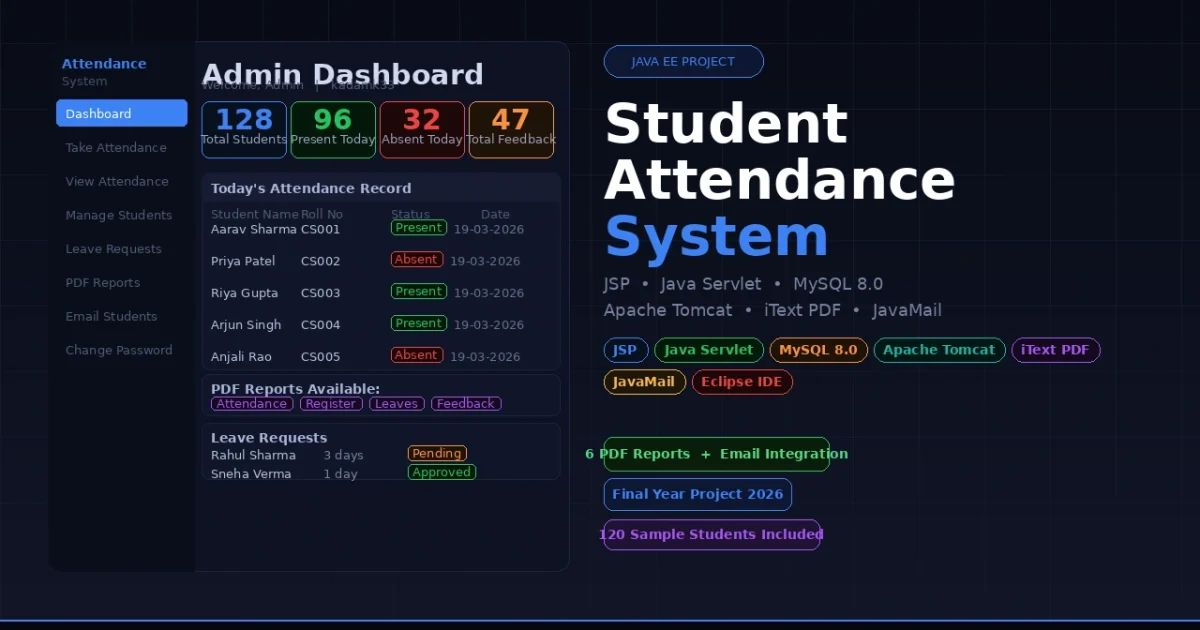
If you are looking for a Java EE final year project that covers dual-role portals, PDF report generation, email integration, and a complete attendance workflow — the Student Attendance System built with JSP, Java Servlets, and MySQL is exactly what your examiner wants to see. It handles everything from taking daily attendance and managing leave requests to bulk password resets and downloading six different PDF reports, all running on Apache Tomcat — making it one of the most feature-complete Java web projects available for BCA, MCA, and B.Tech CS students in 2026.
Student Attendance System JSP Java Servlet MySQL
Also Explore on UpdateGadh:
Project Overview
| Project Name | Student Attendance System |
| Presentation Layer | JSP (JavaServer Pages) + Bootstrap 3/4 + jQuery |
| Business Logic | Java Servlets (annotation-based @WebServlet) |
| Database | MySQL 8.0 with raw JDBC (no ORM) |
| Application Server | Apache Tomcat 8.0 |
| Java Version | Java SE 8 (JRE 1.8) |
| PDF Reports | iText PDF 5.5.1 |
| JavaMail API — Gmail SMTP / STARTTLS | |
| Build Tool | Eclipse IDE (no Maven or Gradle required) |
| Best For | BCA, MCA, B.Tech CS/IT Final Year Students |
Key Features
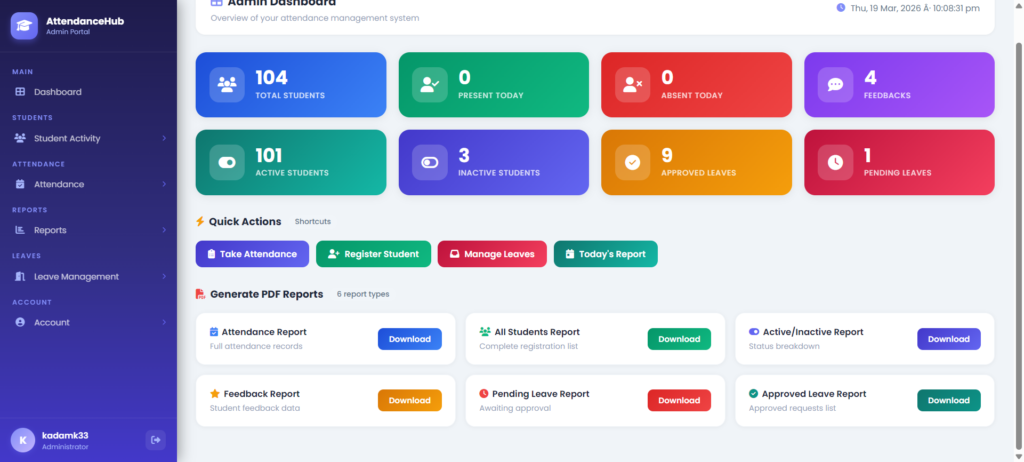
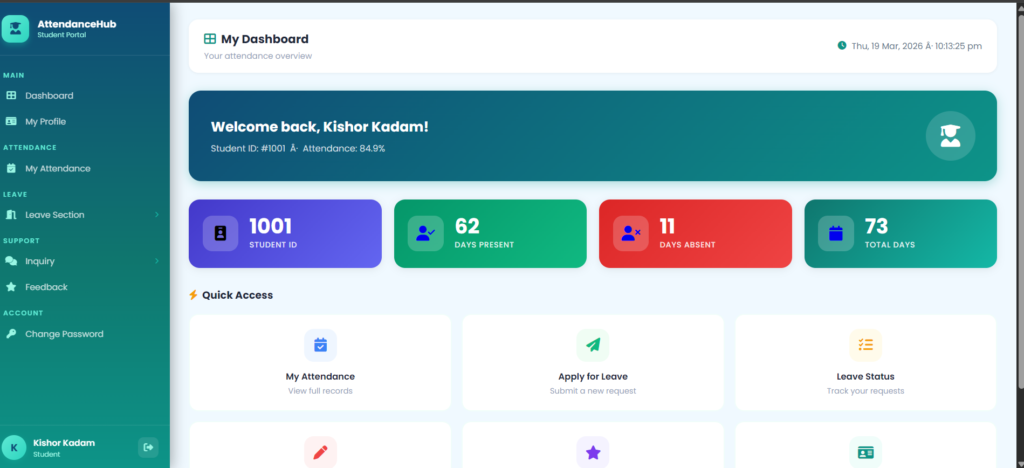
- Dual portal system — completely separate Admin and Student dashboards with independent login, session management, and navigation, each showing only what that role is allowed to see
- Full attendance workflow — admin marks each active student as present or absent for the current day, views today’s records, searches by date, and generates monthly summaries per student
- Leave request management — students submit leave applications with reason and number of days; admin approves or rejects each request and views separate lists of approved, rejected, and pending leaves
- Six downloadable PDF reports using iText — attendance records, student registrations, active/inactive lists, feedback summaries, approved leaves, and pending leaves all exportable as PDF files
- Email credential delivery — admin sends auto-generated login credentials to individual students or resets passwords in bulk, with email delivered via Gmail SMTP through the JavaMail API
- Student feedback and inquiry system — students submit feedback and complaints from their portal; admin reads, responds, and tracks all submissions from the admin panel
- Session-based authentication — every protected JSP checks for an active session; expired or unauthenticated access is automatically redirected to the correct login page
🎬 Watch the Full Project Tutorial on YouTube!
We’ve built this project step by step on our YouTube channel. Watch the full video, like, and subscribe for daily project tutorials.
Technologies Used
| Layer | Technology | Purpose |
|---|---|---|
| Presentation | JSP + Bootstrap 3/4 | Dynamic web pages and responsive UI layout |
| Business Logic | Java Servlets (@WebServlet) | Handle all form submissions, login, and data processing |
| Database | MySQL 8.0 + JDBC | Store attendance, students, leaves, feedback, and inquiries |
| App Server | Apache Tomcat 8.0 | Deploy and serve the Java EE web application |
| PDF Generation | iText PDF 5.5.1 | Generate and download six types of PDF reports |
| JavaMail API + Gmail SMTP | Send login credentials and password reset emails to students | |
| UI Interactivity | jQuery + DataTables | Sortable and searchable tables across admin and student portals |
| Icons / Charts | Font Awesome + Morris.js | Dashboard icons and attendance trend charts |
| Sidebar Nav | MetisMenu | Collapsible sidebar navigation menu in admin panel |
| IDE | Eclipse IDE for Java EE | Project import, build, and deployment to Tomcat |
Project Folder Structure
StudentAttendanceSystem/
├── database/
│   └── student_attendance.sql          # Full DB schema + seed data (~120 students)
│
└── StudentAttendanceSystem/            # Eclipse Dynamic Web Project root
    ├── src/
    │   └── com/
    │       ├── attendance/             # Core servlets
    │       │   ├── DatabaseConnection.java
    │       │   ├── AdminLogin.java
    │       │   ├── AdminRegistration.java
    │       │   ├── AdminPasswordChange.java
    │       │   ├── ForgetAdminPassword.java
    │       │   ├── StudentLogin.java
    │       │   ├── StudentRegistration.java
    │       │   ├── StudentPasswordChange.java
    │       │   ├── StudentAttendance.java
    │       │   ├── StudentLeave.java
    │       │   ├── StudentFeedback.java
    │       │   ├── StudentQuery.java
    │       │   ├── ManageStudents.java
    │       │   ├── ManageLeaves.java
    │       │   ├── StudentsRemoval.java
    │       │   ├── PasswordGeneration.java
    │       │   └── PasswordGenerationIndividually.java
    │       ├── email/
    │       │   ├── EmailUtility.java
    │       │   └── EmailSendingServlet.java
    │       └── reports/                # PDF report servlets (iText)
    │           ├── StudentAttendanceReport.java
    │           ├── AllStudentsRegisterReport.java
    │           ├── StudentsActiveOrInactive.java
    │           ├── StudentsFeedbackReport.java
    │           ├── StudentsLeaveApproved.java
    │           └── StudentsLeavePending.java
    │
    └── WebContent/
        ├── index.jsp                   # Admin login and registration
        ├── student_login.jsp           # Student login page
        ├── after_adminLogin.jsp        # Admin dashboard
        ├── after_studentLogin.jsp      # Student dashboard
        ├── logout.jsp
        ├── forgetPassword.jsp
        ├── admin_side_header.jsp
        ├── student_side_header.jsp
        ├── footer.jsp
        ├── css/ js/ images/ fonts/ assets/
        └── WEB-INF/
            ├── web.xml                 # SMTP config, session timeout (5 min)
            └── lib/
                ├── mysql-connector-java-8.0.11.jar
                ├── itextpdf-5.5.1.jar
                ├── mail.jar
                └── gmail.jar
Database Schema
| Table | Purpose | Key Fields |
|---|---|---|
| admin | Admin login credentials and profile | uname, password, email, mobile |
| students | Registered student records and login info | name, email, uname, password, status (active/inactive) |
| student_attendance | Daily attendance records | student_id, date, status (present/absent) |
| student_leave | Leave requests with approval status | student_id, reason, days, status (Pending/Approved/Rejected) |
| student_feedback | Student feedback submissions | student_id, message, date |
| inquiry | Student complaints and queries | student_id, subject, message, admin_reply |
Get This Project
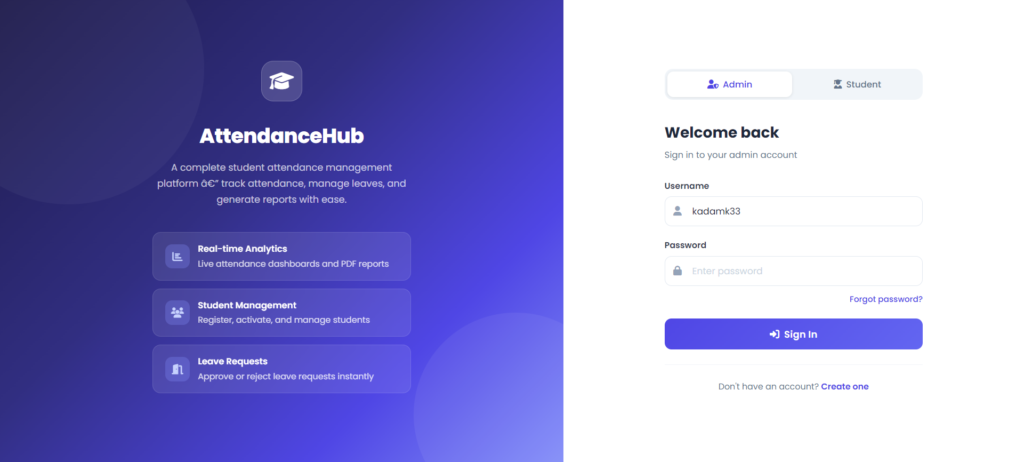
This is a complete, ready-to-run paid project. It includes the full Java EE source code, all Servlet and JSP files, the complete MySQL database dump with seed data, Eclipse project configuration, iText PDF library, JavaMail setup guide, and remote setup support from our team.
Student Attendance System — JSP + Java Servlet + MySQL
Full source code + SQL database + PDF reports + email setup + remote support included
Need help after purchase? Contact us on WhatsApp or via our support page
How to Run This Project
Step 1 — Install prerequisites
Download and install all four tools before starting:
1. Java JDK 8       → https://www.oracle.com/java/technologies/javase/javase8-archive-downloads.html
2. Apache Tomcat 8.0 → https://archive.apache.org/dist/tomcat/tomcat-8/v8.0.53/bin/
3. MySQL Server 8.0  → https://dev.mysql.com/downloads/mysql/
4. Eclipse IDE (Java EE Developers edition)
Step 2 — Set up the database
# Using MySQL command line:
mysql -u root -p < StudentAttendanceSystem/database/student_attendance.sql

# Or using MySQL Workbench:
# Open Workbench → File → Run SQL Script → select student_attendance.sql → Run
Step 3 — Import the project into Eclipse
Eclipse → File → Import → Existing Projects into Workspace
Browse to: StudentAttendanceSystem/StudentAttendanceSystem/
Click Finish
Step 4 — Configure Tomcat in Eclipse
Window → Preferences → Server → Runtime Environments
Click Add → Apache Tomcat v8.0
Point to your Tomcat installation directory → Finish
Step 5 — Configure database and email credentials
Update src/com/attendance/DatabaseConnection.java if your MySQL password differs from the default:
// Change username and password if needed
Connection con = DriverManager.getConnection(
    "jdbc:mysql://localhost:3306/student_attendance",
    "root",    // your MySQL username
    "root"     // your MySQL password
);
Update WebContent/WEB-INF/web.xml with your Gmail App Password for email features:
<context-param>
    <param-name>user</param-name>
    <param-value>YOUR_GMAIL@gmail.com</param-value>
</context-param>
<context-param>
    <param-name>pass</param-name>
    <param-value>YOUR_GMAIL_APP_PASSWORD</param-value>
</context-param>
Step 6 — Run the project
# In Eclipse:
Right-click project → Run As → Run on Server → Select Tomcat 8.0 → Finish

# Access the application:
Admin portal   → localhost:8080/StudentAttendanceSystem/
Student login  → localhost:8080/StudentAttendanceSystem/student_login.jsp

# Default admin credentials:
Username : kadamk33
Password : java@1991
How It Works
Admin attendance flow
- Admin logs in at
index.jsp— the servlet validates credentials against theadmintable and creates a session with theunameattribute - The dashboard loads live stats — total students, today’s present count, today’s absent count, and total feedback received
- Admin opens
attendance.jsp— all active students are listed with present/absent radio buttons - On submission, the
StudentAttendanceservlet inserts one row per student into thestudent_attendancetable with the current date - Admin can then search attendance by any date or generate a monthly report summarising each student’s present and absent days
Student leave request flow
- Student logs in at
student_login.jspand is redirected to their personal dashboard showing present days, absent days, and total days - Student opens Apply for Leave, fills in the reason and number of days, and submits the form
- The
StudentLeaveservlet inserts the record intostudent_leavewith status set to Pending - Admin sees the request under Manage Leave Requests and either approves or rejects it
- Student checks Leave Status on their portal and sees the updated Approved or Rejected status
PDF report generation flow
- Admin navigates to Reports in the sidebar and clicks any of the six report types
- The corresponding report servlet (e.g.,
StudentAttendanceReport.java) queries the database and uses iText PDF to build the document in memory - The response content type is set to
application/pdfand the file is streamed directly to the browser as a download - Six report types available — attendance records, all student registrations, active/inactive status, feedback submissions, approved leaves, and pending leaves
Email credential delivery flow
- Admin clicks Send Credentials or Bulk Password Reset from the admin panel
- The
PasswordGenerationservlet generates a 10-character alphanumeric password for each student and updates thestudentstable - The
EmailSendingServletreads SMTP settings fromweb.xmland usesEmailUtility.javato send login credentials to each student’s registered email via Gmail SMTP on port 587 with STARTTLS
Admin and Student Portal Features
| Admin Portal | Student Portal |
|---|---|
| Dashboard with live stats | Personal attendance dashboard |
| Take daily attendance | View full attendance history |
| View today’s attendance | Apply for leave |
| Daily and monthly reports | Track leave status |
| Register and manage students | Submit feedback |
| Activate or deactivate accounts | Submit inquiry or complaint |
| Approve or reject leave requests | View admin responses |
| View student feedback and inquiries | View own profile |
| Bulk and individual password reset | Change own password |
| Email credentials to students | Logout |
| Download 6 types of PDF reports | |
| Admin profile and password change |
Why This is a Great Final Year Project
- Java EE with Servlets and JSP is a core part of most university Java syllabi — this project proves you can build real enterprise applications with it
- Dual-role portal architecture (Admin + Student) demonstrates role-based access control, a concept interviewers test in every Java placement round
- iText PDF report generation is a premium feature that very few student projects include — six different downloadable reports will impress any examiner
- JavaMail API with Gmail SMTP shows real-world email integration — bulk credential delivery and password recovery are features that make this feel like a live production system
- Pre-loaded with 120 sample student records in the SQL dump — your demo looks polished from the first run with real data already in the system
- Eclipse-ready project with no Maven or Gradle required — import and run in under 10 minutes on any lab computer during viva
- Complete workflow coverage — attendance, leaves, feedback, inquiries, reports, and email all in one system means every question an examiner asks has an answer you can demo live
You Might Also Like:
- Doctor Patient Portal using JSP, Java Servlet and MySQL
- Online Examination System in Java Servlet and JSP
- Real Estate Management System using Java JSP and MySQL
- E-Commerce Website Project in Java Servlets and JSP
- Library Management System using Java Servlet and MySQL
- All Java and JSP Projects with Source Code — UpdateGadh
Keyword
- student attendance system
- student attendance system using face recognition
- student attendance system project
- student attendance system using qr code
student attendance system face recognition - student attendance system er diagram
- student attendance system website
- student attendance system using face recognition project
- student attendance system project github
- student attendance system github
- student attendance portal svkm
- student attendance register
- student attendance management system
- student attendance chart
- Student Attendance Sheet
- student attendance app
- student attendance management system project
- student attendance sheet in excel
- student attendance system
- student attendance register cover decoration
🎓 Need Complete Final Year Project?
Get Source Code + Report + PPT + Viva Questions (Instant Access)
🛒 Visit UpdateGadh Store →