Book Recommendation System Using KNN
Ever finished a book and then youre like Now what should I read next? That exact problem is what we solve in this project. In this blog, Ill explain how to build a Book Recommendation System using KNN (K-Nearest Neighbors) in a simple, practical way. This is a very good final year project because it looks real, works with real data, and you can explain it confidently in viva.
Complete Advance AI Topics: Click Here
Real Time Projects on YouTube:- DecodeIT
Problem Statement
Users waste time searching for books because there are too many options and not enough personalized suggestions. The goal of this project is to build a system that:
- Suggests top similar books based on user ratings or reading behavior
- Works fast even when the dataset is big (using sparse matrix + similarity search)
- Provides relevant recommendations instead of random trending lists
What is a Book Recommendation System?
A recommendation system predicts what a user might like based on patterns. In our case, we use Collaborative Filtering (based on user ratings) and apply KNN to find nearest/similar books.
How KNN Works in This Project
KNN means: find the K closest neighbors. Here neighbors are books that have similar rating patterns.
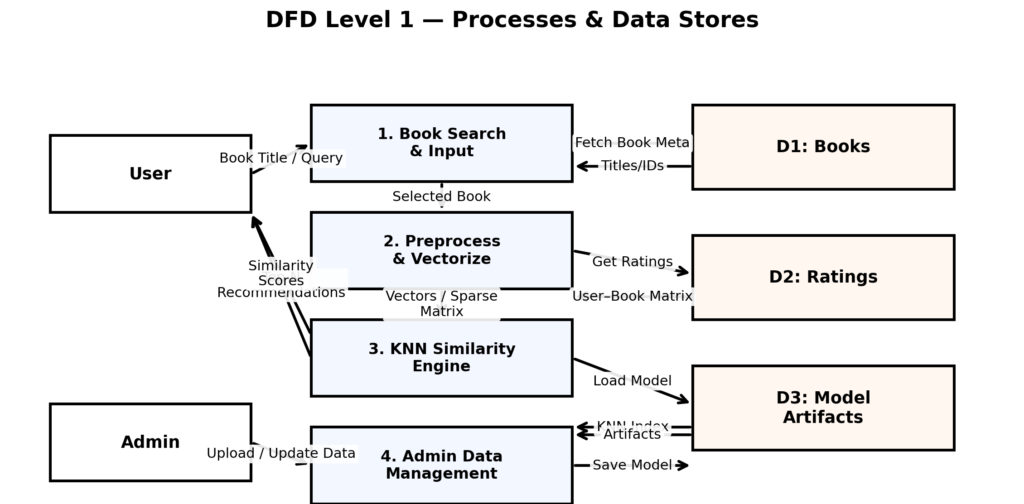
- We create a User × Book rating matrix
- Convert it to a sparse matrix (because most users dont rate most books)
- Use similarity (usually cosine similarity) to find books that are close to each other
- Return top N recommended books for a given book
Why This Project is NEW
Many students make a basic recommender that only returns a list. But this project becomes NEW when you add product-like features that most normal projects dont include. Here are the unique points:
- Explainable Recommendations: not just Book A Book B, but also show why (similarity score + common rating patterns).
- Cold Start Handling: if a book has no ratings, system switches to a fallback method (popular picks or content similarity).
- Smart Filters: remove low-quality results using minimum rating count threshold, so output looks accurate.
- Real Deployment Ready: UI + API + clean project structure (not just a notebook).
Real-World Use Case
This project can be used in multiple real applications like:
- Online Book Stores: You may also like recommendations
- Libraries: suggest books based on borrowing/ratings history
- E-learning platforms: recommend reference books related to course topics
- Reading apps: personalized reading suggestions to increase engagement
Features of This Project
MVP Features
- Upload/load dataset (books + users + ratings)
- Data cleaning (remove duplicates, handle missing values)
- Create user-book rating matrix
- Train KNN model for similarity search
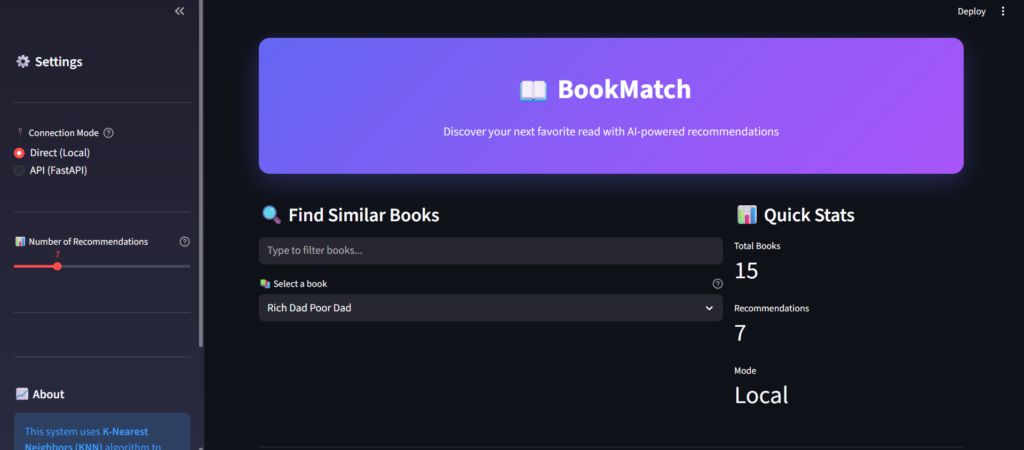
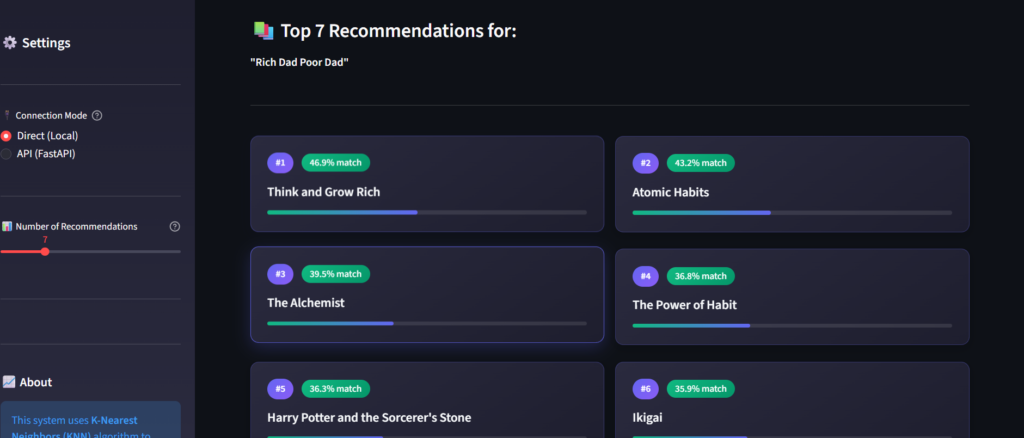
- Search a book title and show top recommended books
- Display similarity score (optional but very useful for viva)
Optional Features (If You Want to Make it Advanced)
- Hybrid recommendation (Collaborative + Content-based)
- Trending / Popular books section
- Filters: genre/language/year (if metadata available)
- Admin panel to update dataset
- API endpoints for recommendation + search
- Recommendation explanation panel (Because you liked)
Tech Stack
- Language: Python
- ML Libraries: Pandas, NumPy, Scikit-learn
- Matrix Handling: SciPy (sparse matrices)
- Frontend/UI: Streamlit (fast) or HTML/CSS/JS
- Backend (Optional): Flask or FastAPI
- Database (Optional): SQLite / PostgreSQL
- Deployment (Optional): Docker + Cloud
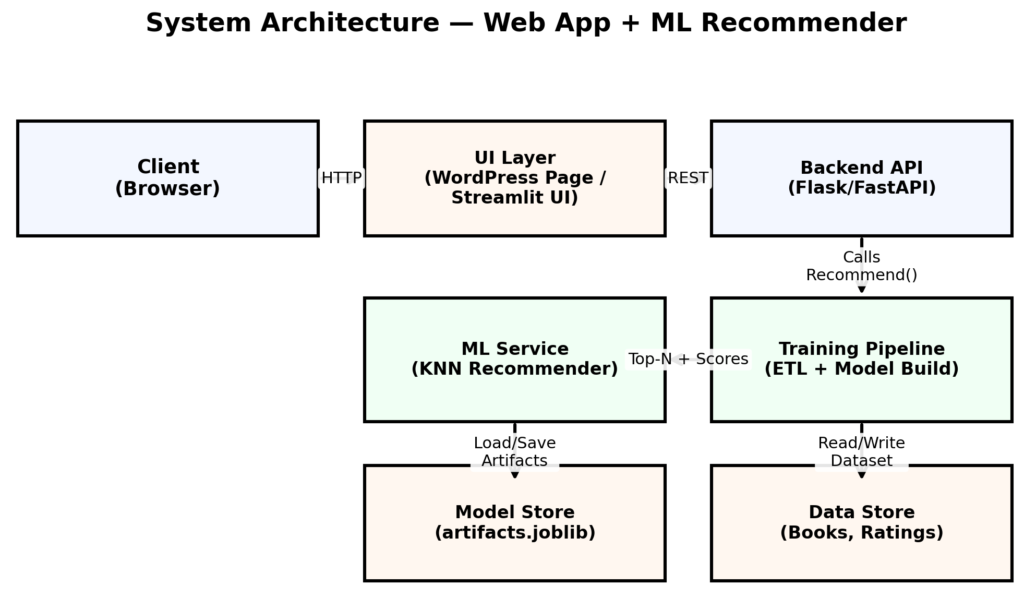
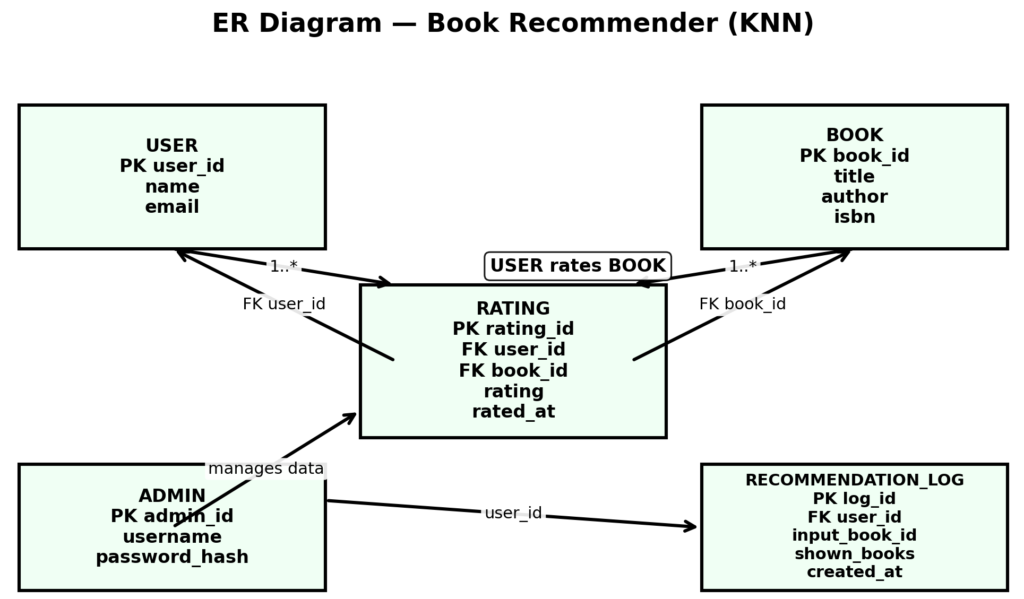
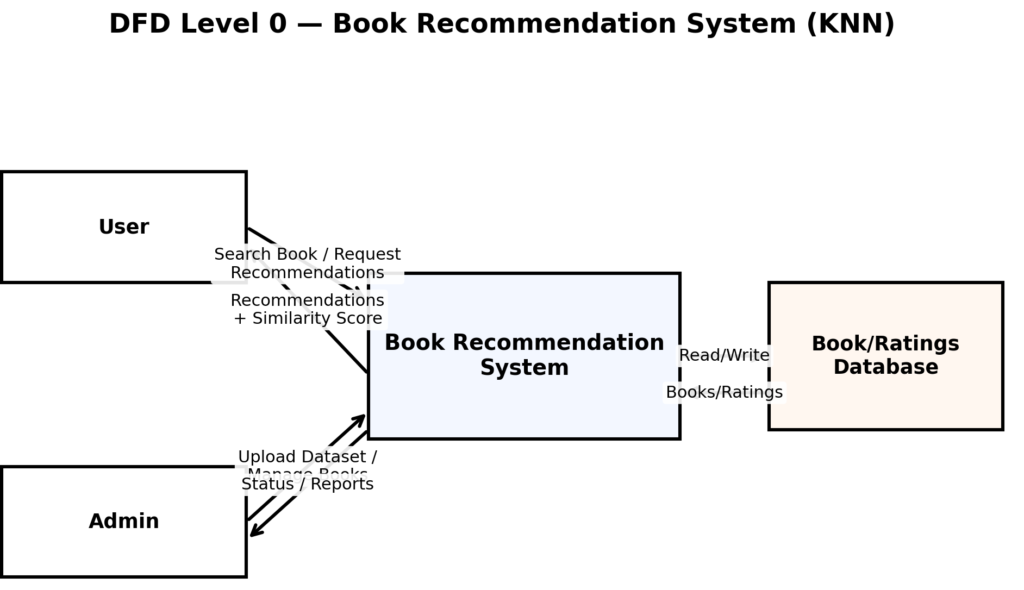
SYSTEM DESIGN
How to Download
The complete package is available so you can run, study, and submit it with confidence. It includes:
- Full Source Code
- Project Report
- Synopsis
- PPT Presentation
Demo Video
Screenshot
Installation Guide
Step 1: Install Python and Visual Studio Code
Download and install Python and Visual Studio Code on your computer.
Step 2: Extract the Project Files
Extract the downloaded project ZIP file and open the project folder in Visual Studio Code.
Step 3: Open the Terminal
In Visual Studio Code, select Terminal > New Terminal.
Step 4: Create a Virtual Environment
Run the following command to create a virtual environment:
python -m venv venvStep 5: Activate the Virtual Environment
On Windows, execute:
venv\Scripts\activateStep 6: Install the Required Libraries
If the project contains a requirements.txt file, install the dependencies using:
pip install -r requirements.txtOtherwise, install the core libraries used by the project:
pip install pandas numpy scikit-learn scipyIf the application uses Streamlit, install it with:
pip install streamlitStep 7: Check the Dataset and Project Files
Verify that the required book dataset, user ratings data, and application files are available. Check the source code for the correct dataset paths and any saved model files.
Step 8: Run the Application
If the project uses Streamlit and its main file is named app.py, run:
streamlit run app.pyIf the project uses another framework, follow the startup instructions provided with the source code.
Step 9: Access the Application
Open the local URL displayed in the terminal. Search for a book title and explore the recommended books generated by the K-Nearest Neighbors (KNN) algorithm.
Note: The exact entry-point filename, dataset structure, and framework depend on the supplied source code. Verify these details before running the application.
Frequently Asked Questions (FAQs)
1. What is a Book Recommendation System Using KNN?
A Book Recommendation System Using KNN is a machine learning project that recommends similar books by identifying relationships between books using rating patterns and similarity calculations.
2. Which technologies are used in this project?
The project uses Python, Pandas, NumPy, Scikit-learn, and SciPy. Streamlit or HTML, CSS, and JavaScript can be used for the interface, depending on the implementation.
3. How does the KNN algorithm recommend books?
The K-Nearest Neighbors algorithm identifies books with similar rating patterns using a similarity measure, such as cosine similarity, and returns relevant recommendations.
4. Which dataset is required for this project?
The project requires book information and user ratings data to build a user-book rating matrix and identify similar books. The exact dataset format depends on the supplied source code.
5. Can the Book Recommendation System Using KNN run in Visual Studio Code?
Yes. You can run the project in Visual Studio Code after installing Python, creating a virtual environment, installing the required dependencies, and following the startup command for the project’s framework.
Final Words
A Book Recommendation System using KNN is a strong project because it combines machine learning + real-world usefulness + deployment scope. If you present it with explanation + clean UI, it looks like an actual product (not only college project).
Keywords: machine learning book recommender, KNN recommendation system, collaborative filtering project, final year ML project, book recommendation project, KNN collaborative filtering ,Book Recommendation System using KNN ,book recommendation system github, book recommendation system project pdf, book recommendation system using machine learning github, book recommendation system project using python, book recommendation system project ppt, book recommendation system using collaborative filtering, book recommendation system website, book recommendation system dataset, book recommendation system project with source code, book recommendation system project github, book recommendation system project for students