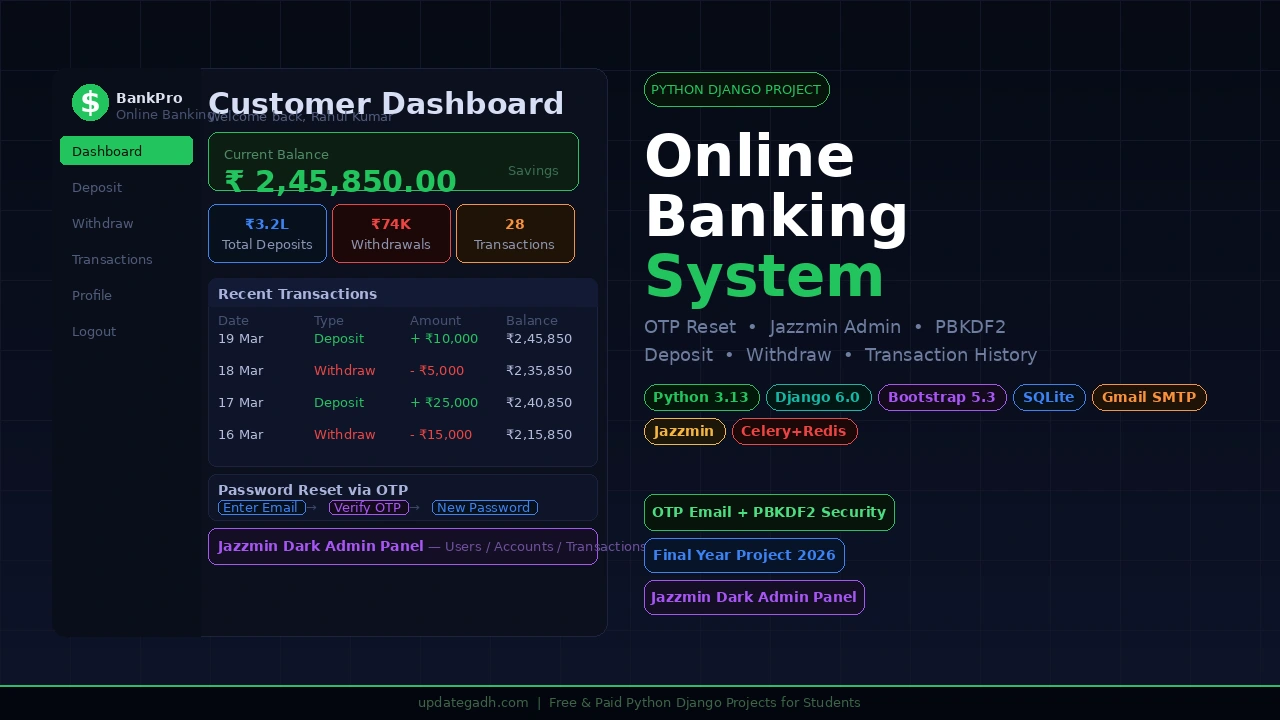
If you want a Python Django final year project that goes far beyond a basic CRUD application, the Online Banking System built with Django 6.0 and Bootstrap 5.3 is the one. It includes a full customer portal with OTP-based password reset via Gmail SMTP, a professional Jazzmin dark-themed admin panel, deposit and withdrawal workflows with account-type limits, filterable transaction history, and PBKDF2 password hashing, making it one of the most complete and secure Django projects available for BCA, MCA, and B.Tech CS students in 2026.
Table of Contents
banking management system project in Python
Project Overview
| Project Name | Online Banking System |
| Backend | Python 3.13, Django 6.0 |
| Frontend | Bootstrap 5.3, Font Awesome 6.5, Google Fonts (Inter) |
| Database | SQLite |
| Admin Theme | django-jazzmin (Darkly dark theme) |
| Gmail SMTP with python-dotenv for secure credentials | |
| Authentication | Email-based login with PBKDF2 password hashing |
| Password Reset | 3-step OTP flow via Gmail SMTP (10-minute expiry) |
| Task Queue | Celery + Redis (optional, for background tasks) |
| Best For | BCA, MCA, B.Tech CS/IT Final Year Students Globally |
Key Features
- OTP-based password reset 3-step flow (enter email, verify 6-digit OTP, set new password) delivered via Gmail SMTP with a 10-minute OTP expiry, making this feel like a real production banking app
- Account-type-based withdrawal limits. Savings accounts cap at 50,000 and Current accounts at 1,00,000 per transaction, enforced automatically through the
BankAccountTypemodel - Filterable transaction history customers filter their full deposit and withdrawal history by custom date ranges using a daterangepicker widget on the transaction report page
- Professional Jazzmin dark admin panel full user management, bank account oversight, transaction monitoring with date hierarchy, and OTP verification logs all in one polished interface
- Multi-field customer registration signup collects account type, gender, date of birth, initial deposit amount, and full address stored across normalised
UserBankAccountandUserAddressmodels - Complete security implementation, PBKDF2 password hashing, CSRF protection on every form, login-required middleware on all protected views, and environment variables for sensitive credentials via
.env - Role-aware navigation the navbar and home page redirect automatically based on whether the logged-in user is an admin or a customer, with completely separate dashboard views
Watch the Full Project Tutorial on YouTube!
We’ve built this project step by step on our YouTube channel. Watch the full video, like, and subscribe for daily project tutorials.
Technologies Used
| Layer | Technology | Purpose |
|---|---|---|
| Backend | Python 3.13 + Django 6.0 | Models, views, forms, URL routing, and ORM |
| Frontend | Bootstrap 5.3 + Font Awesome 6.5 | Responsive UI layout, icons, and components |
| Fonts | Google Fonts (Inter) | Clean professional typography across all pages |
| Database | SQLite | Lightweight relational database, zero setup needed |
| Admin Theme | django-jazzmin (Darkly) | Dark-themed professional admin dashboard |
| Gmail SMTP + python-dotenv | OTP password reset emails with secure credential loading | |
| Security | PBKDF2 + CSRF + Login middleware | Password hashing, form protection, and route guarding |
| Date Picker | daterangepicker | Custom date range filter on transaction history page |
| Task Queue | Celery + Redis | Optional background task processing |
| Config | python-dotenv (.env) | Secure Gmail and secret key environment variable loading |
This is a complete, ready-to-run paid project. It includes the full Django source code, all models, views, forms and templates, SQLite database, Jazzmin admin setup, Gmail SMTP configuration guide, and remote setup support from our team.
Railway Management System in PHP and MySQL
How to Run This Project
Step 1: Enter the project folder
cd "Online Banking System Step 2: Create a virtual environment and activate it
python -m venv venv

# Windows
venv\Scripts\activate

# macOS / Linux
source venv/bin/activate
Step 3: Install all dependencies
pip install -r requirements.txt
pip install django-jazzmin python-dotenv
Step 4: Configure your .env file
Create a .env file in the project root and add your credentials:
EMAIL_HOST_USER=your-gmail@gmail.com
EMAIL_HOST_PASSWORD=your-16-char-app-password
SECRET_KEY=your-django-secret-key-here
To get a Gmail App Password: go to Google Account Security 2-Step Verification App Passwords and generate a 16-character password for this app.
Step 5: Run database migrations
python manage.py migrateStep 6: Create superuser and seed bank account types
python manage.py createsuperuser

# Then seed account types via Django shell:
python manage.py shell
from accounts.models import BankAccountType
BankAccountType.objects.create(name='Savings', maximum_withdrawal_amount=50000, annual_interest_rate=5.00, interest_calculation_per_year=12)
BankAccountType.objects.create(name='Current', maximum_withdrawal_amount=100000, annual_interest_rate=2.00, interest_calculation_per_year=4)
exit()Step 7: Start the development server
python manage.py runserverOpen http://127.0.0.1:8000/ in your browser. Use the default test credentials below to explore both portals.
# Admin login
Email    : admin@gmail.com
Password : Admin@1234

# Customer login
Email    : customer@gmail.com
Password : Customer@1234
URL Routes Reference
| URL | Description | Access |
|---|---|---|
| / | Landing page with role-based redirect | Public |
| /accounts/register/ | Customer registration form | Public |
| /accounts/login/ | Customer and admin login | Public |
| /accounts/password-reset/ | Password reset Step 1: Enter email | Public |
| /accounts/password-reset/verify/ | Password reset Step 2: OTP verification | Public |
| /accounts/password-reset/new-password/ | Password reset Step 3: Set new password | Public |
| /accounts/dashboard/ | Customer dashboard with balance and stats | Login required |
| /accounts/profile/ | Edit customer name and phone | Login required |
| /transactions/deposit/ | Deposit money form | Login required |
| /transactions/withdraw/ | Withdraw money with account-type limit | Login required |
| /transactions/report/ | Filterable transaction history | Login required |
| /admin/ | Jazzmin admin panel | Staff only |
How It Works
Customer registration and dashboard flow
- Customer fills the registration form with name, email, password, account type, gender, DOB, initial deposit, and address
- Django creates a
Userrecord (email-based), a linkedUserBankAccountwith a generated account number, and aUserAddressrecord - On login, the
HomeViewchecks the user role and redirects to the customer dashboard - The dashboard displays current balance, stat cards (total deposits, withdrawals), quick action tiles, and recent transactions
OTP password reset flow
- Customer clicks Forgot Password and enters their registered email address
- Django generates a random 6-digit OTP, saves it to
OTPVerificationwith a 10-minute expiry, and sends it via Gmail SMTP using credentials from the.envfile - Customer enters the OTP on the verify page if correct and not expired, they proceed to Step 3
- The customer sets and confirms the new password. Django hashes it with PBKDF2 and updates the user record
Deposit and withdrawal flow
- Customer navigates to Deposit or Withdraw from their dashboard quick action tiles
- Instantly depositing the entered amount adds it to the
UserBankAccountbalance and creates aTransactionrecord - Withdrawal checks the entered amount against the
BankAccountType.maximum_withdrawal_amountthe form rejects it if the limit is exceeded - On success, the transaction is saved and the updated balance is reflected immediately on the dashboard
Transaction history filter flow
- Customer opens the Transaction Report page which shows all their transactions in a table
- They pick a start and end date using the daterangepicker widget and submit the filter
- Django filters the
Transactionqueryset by the selected date range and returns matching records - The filtered table shows transaction type (Deposit/Withdrawal), amount, and timestamp for each record
Why This is a Great Final Year Project
- Django 6.0 with email-based authentication custom
UserManagerreplaces username with email, a real-world pattern used in most modern web apps - OTP password reset via Gmail SMTP very few student projects implement a real 3-step OTP flow with expiry; this alone makes your project unforgettable during viva
- Jazzmin dark admin panel looks like a commercial product from the first screenshot; examiners immediately see the difference from a standard Django admin setup
- Account-type based withdrawal limits demonstrates database-driven business rule enforcement, a concept that is always tested in placement interviews
- Complete security checklist PBKDF2 hashing, CSRF protection, login middleware, OTP expiry, and
.envsecrets management all covered in one project - Normalised database design five separate models (User, UserBankAccount, BankAccountType, UserAddress, OTPVerification) shows proper relational database design
- Zero extra server setup SQLite requires no installation; the entire project runs with just Python and pip on any laptop in under 10 minutes
Keyword Details
- banking management system project
- banking management system project in java
- banking management system project in python
- banking management system project pdf
- banking management system project class 12
- banking management system project report pdf
- banking management system project in c++
- banking management system project in software engineering
- banking management system project in c language
- banking management system project in mern stack
- banking management system project in python
- banking management system project in python class 12
- banking management system project in python pdf
- banking management system project in python with mysql source code
- banking management system project in python class 12 pdf
- banking management system project in python with mysql class 12
- banking management system project in python with source code
- banking management system project in python with mysql pdf
- banking management system project in python ppt
- banking management system project in python and sql