PG Accommodation Management System
Hey everyone! Today, I’m super excited to share something that I’ve been working on a complete PG Accommodation Management System built with PHP and MySQL. Whether you’re a student looking for a college project or a developer who wants to learn real-world web development, this one’s for you!
What is PG Accommodation Management System Project About?
Let me explain this in simple terms. You know how finding a paying guest (PG) accommodation can be such a hassle, right? And for property owners, managing multiple tenants, collecting rent, and keeping track of payments is no walk in the park either.
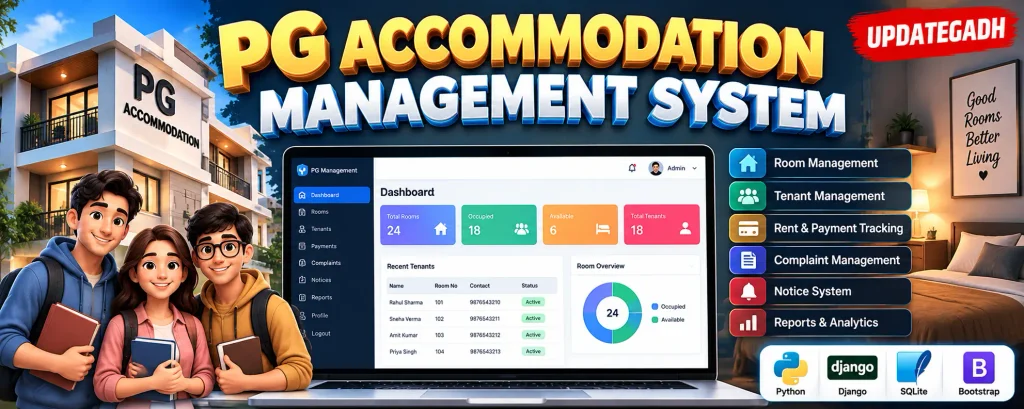
This PG Accommodation System is a web-based application that helps property owners manage their rental properties efficiently. From listing houses to tracking tenant payments everything is handled in one beautiful dashboard.
The system acts as a bridge between property owners and potential tenants. Property owners can register their PG accommodations with complete details like room availability, pricing, facilities, and photos. On the other hand, students or working professionals can search for suitable PG accommodations based on their budget and location preferences.
Complete Advance AI Topics: Click Here
SQL Tutorial: Click Here
YT:- DecodeIT
Key Features That Make It Stand Out
For Property Owners
- Add and manage multiple PG properties
- Track tenant registrations and payments
- Generate monthly rent reports
- Manage room availability status
- Upload property photos and details
For Tenants/Students
- Search PG accommodations by location and budget
- View detailed property information with photos
- Online booking and payment system
- Track payment history
- Leave reviews and ratings
Step-by-Step Development Guide
Let’s break down how to build this system from scratch. I’ll walk you through each step so you can understand the complete development process.
Step 1: Database Design
First, we need to create our database structure. We’ll need tables for users, properties, bookings, and payments.
CREATE DATABASE pg_management;

CREATE TABLE users (
    user_id INT PRIMARY KEY AUTO_INCREMENT,
    username VARCHAR(50) NOT NULL,
    email VARCHAR(100) UNIQUE NOT NULL,
    password VARCHAR(255) NOT NULL,
    user_type ENUM('owner', 'tenant') NOT NULL,
    phone VARCHAR(15),
    created_at TIMESTAMP DEFAULT CURRENT_TIMESTAMP
);

CREATE TABLE properties (
    property_id INT PRIMARY KEY AUTO_INCREMENT,
    owner_id INT,
    property_name VARCHAR(100) NOT NULL,
    address TEXT NOT NULL,
    city VARCHAR(50) NOT NULL,
    rent_amount DECIMAL(10,2) NOT NULL,
    available_rooms INT DEFAULT 0,
    facilities TEXT,
    description TEXT,
    created_at TIMESTAMP DEFAULT CURRENT_TIMESTAMP,
    FOREIGN KEY (owner_id) REFERENCES users(user_id)
);

CREATE TABLE bookings (
    booking_id INT PRIMARY KEY AUTO_INCREMENT,
    property_id INT,
    tenant_id INT,
    booking_date DATE NOT NULL,
    rent_amount DECIMAL(10,2) NOT NULL,
    status ENUM('active', 'inactive') DEFAULT 'active',
    FOREIGN KEY (property_id) REFERENCES properties(property_id),
    FOREIGN KEY (tenant_id) REFERENCES users(user_id)
);
Step 2: Database Connection
Create a PHP file to handle database connections that we’ll use throughout our application.
<?php
// config.php - Database connection file
class Database {
    private $host = "localhost";
    private $db_name = "pg_management";
    private $username = "root";
    private $password = "";
    public $conn;

    public function getConnection() {
        $this->conn = null;
        try {
            $this->conn = new PDO("mysql:host=" . $this->host . ";dbname=" . $this->db_name,
                                  $this->username, $this->password);
            $this->conn->setAttribute(PDO::ATTR_ERRMODE, PDO::ERRMODE_EXCEPTION);
        } catch(PDOException $exception) {
            echo "Connection error: " . $exception->getMessage();
        }
        return $this->conn;
    }
}
?>
Step 3: User Registration System
Now let’s create a user registration form that handles both property owners and tenants.
<?php
// register.php - User registration handling
include_once 'config.php';

if ($_POST['register']) {
    $database = new Database();
    $db = $database->getConnection();

    $username = $_POST['username'];
    $email = $_POST['email'];
    $password = password_hash($_POST['password'], PASSWORD_DEFAULT);
    $user_type = $_POST['user_type'];
    $phone = $_POST['phone'];

    // Check if email already exists
    $check_query = "SELECT email FROM users WHERE email = :email";
    $check_stmt = $db->prepare($check_query);
    $check_stmt->bindParam(":email", $email);
    $check_stmt->execute();

    if ($check_stmt->rowCount() > 0) {
        echo "<script>alert('Email already registered!');</script>";
    } else {
        // Insert new user
        $query = "INSERT INTO users (username, email, password, user_type, phone)
                  VALUES (:username, :email, :password, :user_type, :phone)";
        $stmt = $db->prepare($query);

        $stmt->bindParam(":username", $username);
        $stmt->bindParam(":email", $email);
        $stmt->bindParam(":password", $password);
        $stmt->bindParam(":user_type", $user_type);
        $stmt->bindParam(":phone", $phone);

        if ($stmt->execute()) {
            echo "<script>alert('Registration successful!'); window.location='login.php';</script>";
        } else {
            echo "<script>alert('Registration failed!');</script>";
        }
    }
}
?>
Step 4: Property Management
This section allows property owners to add their PG accommodations to the system.
<?php

// add_property.php - Property addition functionality

session_start();

include_once 'config.php';
// Check if user is logged in as owner

if (!isset($_SESSION['user_id']) || $_SESSION['user_type'] != 'owner') {

    header("Location: login.php");

    exit();

}
if (isset($_POST['add_property'])) {

    $database = new Database();

    $db = $database->getConnection();
    $owner_id = $_SESSION['user_id'];

    $property_name = $_POST['property_name'];

    $address = $_POST['address'];

    $city = $_POST['city'];

    $rent_amount = $_POST['rent_amount'];

    $available_rooms = $_POST['available_rooms'];

    $facilities = $_POST['facilities'];

    $description = $_POST['description'];
    $query = "INSERT INTO properties (owner_id, property_name, address, city,

              rent_amount, available_rooms, facilities, description)

              VALUES (:owner_id, :property_name, :address, :city,

              :rent_amount, :available_rooms, :facilities, :description)";
    $stmt = $db->prepare($