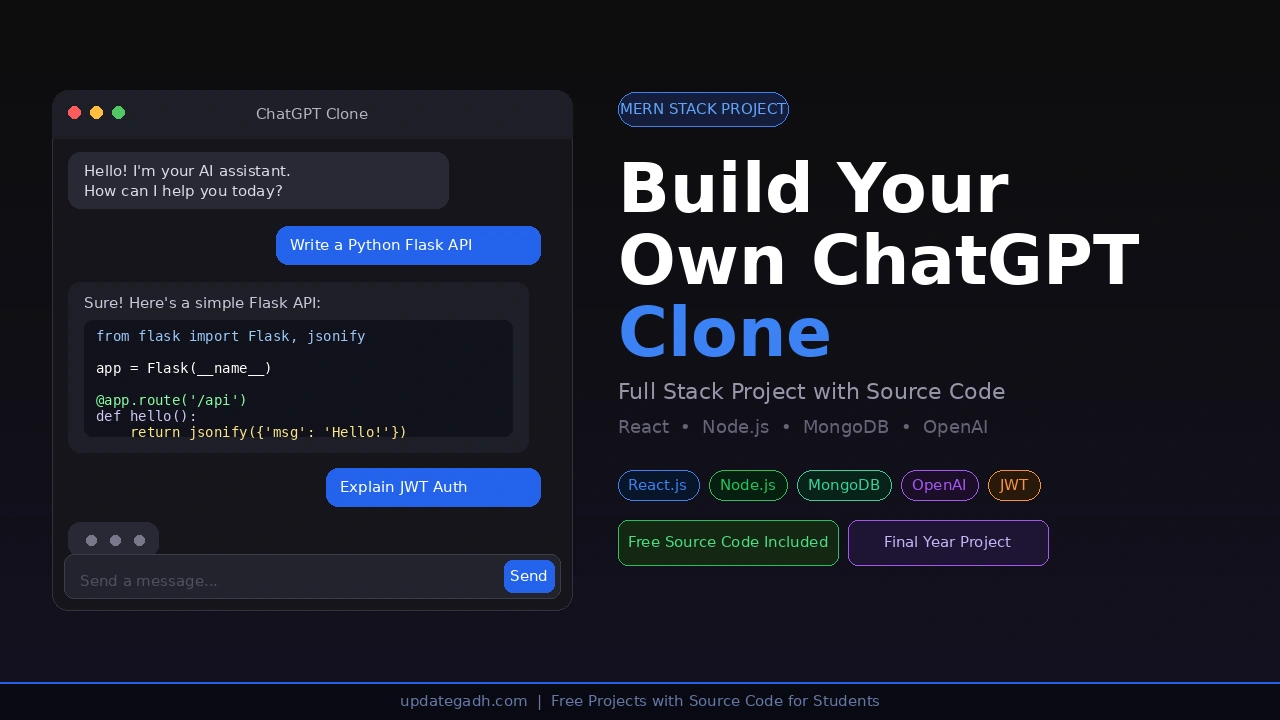
Build Your Build a ChatGPT Clone
Everyone uses ChatGPT but almost no student has built one. That’s exactly what makes this project stand out in your final year viva, your resume, and your GitHub. In this post, you’ll build a fully working ChatGPT Clone using MERN Stack React.js on the frontend, Node.js + Express on the backend, MongoDB for storing chat history, and the OpenAI GPT-3.5 API as the brain.
This is not a toy project. It includes real-time streaming responses, conversation history, user authentication, and a clean UI that looks just like ChatGPT. Whether you’re a BCA, MCA, or B.Tech CS student this is the project that will get you noticed.
Table of Contents
Complete Advance AI Topics: Click Here
Real Time Projects on YouTube:- DecodeIT
Project Overview
| Project Name | ChatGPT Clone |
| Frontend | React.js + Tailwind CSS |
| Backend | Node.js + Express.js |
| Database | MongoDB + Mongoose |
| AI Engine | OpenAI GPT-3.5 Turbo API |
| Authentication | JWT + bcrypt |
| Difficulty | Intermediate |
| Best For | BCA, MCA, B.Tech CS/IT Final Year Students |
Key Features
- Real-time AI responses using OpenAI GPT-3.5 Turbo
- Conversation history saved per user in MongoDB
- Create new chats and switch between old conversations
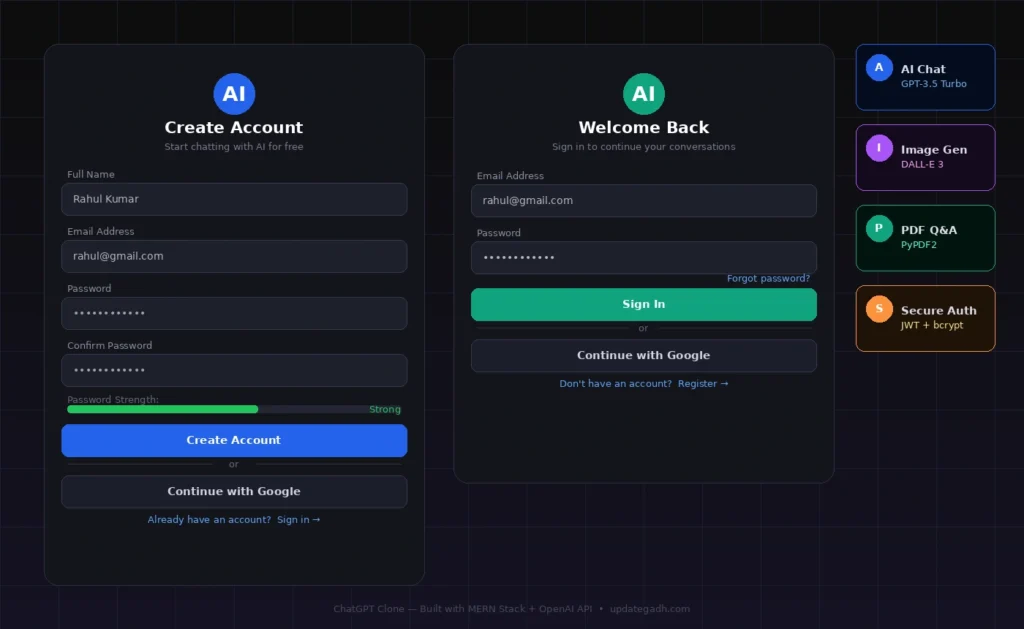
- User registration and login with JWT authentication
- Markdown rendering for code blocks and formatted answers
- Responsive UI works on mobile and desktop
- Delete individual conversations
- Sidebar with all previous chats like the real ChatGPT
Technologies Used
| Layer | Technology | Purpose |
|---|---|---|
| Frontend | React.js | Interactive chat UI with component-based structure |
| Styling | Tailwind CSS | Clean, responsive design system |
| Backend | Node.js + Express.js | REST API server handling all routes |
| AI | OpenAI GPT-3.5 Turbo | Generate intelligent chat responses |
| Database | MongoDB + Mongoose | Store users and conversation history |
| Auth | JWT + bcrypt | Secure login and session management |
| HTTP Client | Axios | Frontend-to-backend API calls |
| Markdown | react-markdown | Render formatted AI responses with code blocks |
Project Folder Structure
chatgpt-clone/

 backend/
    server.js
    .env
    config/
       db.js
    models/
       User.js
       Conversation.js
    routes/
       authRoutes.js
       chatRoutes.js
    controllers/
       authController.js
       chatController.js
    middleware/
        authMiddleware.js

 frontend/
     public/
     src/
        App.jsx
        main.jsx
        components/
           Sidebar.jsx
           ChatWindow.jsx
           MessageBubble.jsx
           InputBar.jsx
        pages/
           Login.jsx
           Register.jsx
           Chat.jsx
        context/
           AuthContext.jsx
        api/
            axios.js
     package.json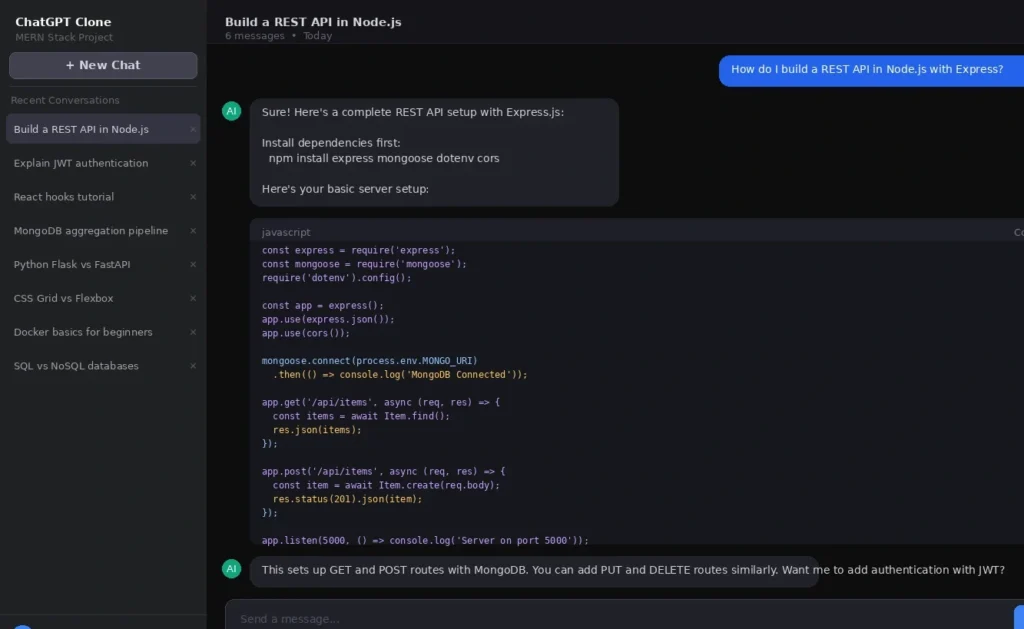
Full Source Code
1. Backend server.js
const express = require('express');
const cors = require('cors');
const dotenv = require('dotenv');
const connectDB = require('./config/db');

dotenv.config();
connectDB();

const app = express();
app.use(cors());
app.use(express.json());

app.use('/api/auth', require('./routes/authRoutes'));
app.use('/api/chat', require('./routes/chatRoutes'));

const PORT = process.env.PORT || 5000;
app.listen(PORT, () => console.log(`Server running on port ${PORT}`));
2. Backend config/db.js
const mongoose = require('mongoose');

const connectDB = async () => {
  try {
    await mongoose.connect(process.env.MONGO_URI);
    console.log('MongoDB Connected');
  } catch (error) {
    console.error(error.message);
    process.exit(1);
  }
};

module.exports = connectDB;
3. Backend models/User.js
const mongoose = require('mongoose');
const bcrypt = require('bcryptjs');

const UserSchema = new mongoose.Schema({
  name:     { type: String, required: true },
  email:    { type: String, required: true, unique: true },
  password: { type: String, required: true },
}, { timestamps: true });

UserSchema.pre('save', async function (next) {
  if (!this.isModified('password')) return next();
  this.password = await bcrypt.hash(this.password, 10);
  next();
});

UserSchema.methods.matchPassword = async function (enteredPassword) {
  return await bcrypt.compare(enteredPassword, this.password);
};

module.exports = mongoose.model('User', UserSchema);
4. Backend models/Conversation.js
const mongoose = require('mongoose');

const MessageSchema = new mongoose.Schema({
  role:    { type: String, enum: ['user', 'assistant'], required: true },
  content: { type: String, required: true },
});

const ConversationSchema = new mongoose.Schema({
  user:     { type: mongoose.Schema.Types.ObjectId, ref: 'User', required: true },
  title:    { type: String, default: 'New Chat' },
  messages: [MessageSchema],
}, { timestamps: true });

module.exports = mongoose.model('Conversation', ConversationSchema);
5. Backend controllers/authController.js
const User = require('../models/User');
const jwt  = require('jsonwebtoken');

const generateToken = (id) =>
  jwt.sign({ id }, process.env.JWT_SECRET, { expiresIn: '7d' });

exports.register = async (req, res) => {
  const { name, email, password } = req.body;
  try {
    const exists = await User.findOne({ email });
    if (exists) return res.status(400).json({ message: 'Email already registered' });
    const user = await User.create({ name, email, password });
    res.status(201).json({ token: generateToken(user._id), name: user.name });
  } catch (err) {
    res.status(500).json({ message: err.message });
  }
};

exports.login = async (req, res) => {
  const { email, password } = req.body;
  try {
    const user = await User.findOne({ email });
    if (!user || !(await user.matchPassword(password)))
      return res.status(401).json({ message: 'Invalid credentials' });
    res.json({ token: generateToken(user._id), name: user.name });
  } catch (err) {
    res.status(500).json({ message: err.message });
  }
};
6. Backend controllers/chatController.js
const OpenAI       = require('openai');
const Conversation = require('../models/Conversation');

const openai = new OpenAI({ apiKey: process.env.OPENAI_API_KEY });

// Send message and get AI response
exports.sendMessage = async (req, res) => {
  const { conversationId, message } = req.body;
  const userId = req.user.id;

  try {
    let conversation;

    if (conversationId) {
      conversation = await Conversation.findById(conversationId);
    } else {
      conversation = await Conversation.create({
        user: userId,
        title: message.slice(0, 40),
        messages: [],
      });
    }

    // Add user message
    conversation.messages.push({ role: 'user', content: message });

    // Build context (last 10 messages)
    const context = conversation.messages.slice(-10).map(m => ({
      role: m.role,
      content: m.content,
    }));

    // Call OpenAI
    const completion = await openai.chat.completions.create({
      model: 'gpt-3.5-turbo',
      messages: [
        { role: 'system', content: 'You are a helpful AI assistant.' },
        ...context,
      ],
    });

    const reply = completion.choices[0].message.content;

    // Save AI response
    conversation.messages.push({ role: 'assistant', content: reply });
    await conversation.save();

    res.json({ reply, conversationId: conversation._id });
  } catch (err) {
    res.status(500).json({ message: err.message });
  }
};

// Get all conversations for sidebar
exports.getConversations = async (req, res) => {
  try {
    const convos = await Conversation.find({ user: req.user.id })
      .select('title createdAt')
      .sort({ createdAt: -1 });
    res.json(convos);
  } catch (err) {
    res.status(500).json({ message: err.message });
  }
};

// Get single conversation messages
exports.getConversation = async (req, res) => {
  try {
    const convo = await Conversation.findById(req.params.id);
    if (!convo) return res.status(404).json({ message: 'Not found' });
    res.json(convo);
  } catch (err) {
    res.status(500).json({ message: err.message });
  }
};

// Delete conversation
exports.deleteConversation = async (req, res) => {
  try {
    await Conversation.findByIdAndDelete(req.params.id);
    res.json({ message: 'Deleted' });
  } catch (err) {
    res.status(500).json({ message: err.message });
  }
};
7. Backend middleware/authMiddleware.js
const jwt  = require('jsonwebtoken');
const User = require('../models/User');

const protect = async (req, res, next) => {
  let token = req.headers.authorization?.split(' ')[1];
  if (!token) return res.status(401).json({ message: 'Not authorized' });
  try {
    const decoded = jwt.verify(token, process.env.JWT_SECRET);
    req.user = await User.findById(decoded.id).select('-password');
    next();
  } catch {
    res.status(401).json({ message: 'Token invalid' });
  }
};

module.exports = protect;
8. Backend routes/authRoutes.js
const express  = require('express');
const router   = express.Router();
const { register, login } = require('../controllers/authController');

router.post('/register', register);
router.post('/login',    login);

module.exports = router;
9. Backend routes/chatRoutes.js
const express  = require('express');
const router   = express.Router();
const protect  = require('../middleware/authMiddleware');
const {
  sendMessage, getConversations,
  getConversation, deleteConversation
} = require('../controllers/chatController');

router.post('/',                          protect, sendMessage);
router.get('/conversations',              protect, getConversations);
router.get('/conversations/:id',          protect, getConversation);
router.delete('/conversations/:id',       protect, deleteConversation);

module.exports = router;
10. Backend .env
MONGO_URI=mongodb://localhost:27017/chatgpt-clone
JWT_SECRET=your_secret_key_here
OPENAI_API_KEY=sk-proj-your-openai-key-here
PORT=5000
11. Frontend src/api/axios.js
import axios from 'axios';

const instance = axios.create({ baseURL: '' });

instance.interceptors.request.use((config) => {
  const token = localStorage.getItem('token');
  if (token) config.headers.Authorization = `Bearer ${token}`;
  return config;
});

export default instance;
12. Frontend src/pages/Chat.jsx (Main Chat Page)
import { useState, useEffect, useRef } from 'react';
import axios from '../api/axios';
import Sidebar from '../components/Sidebar';
import MessageBubble from '../components/MessageBubble';
import InputBar from '../components/InputBar';

export default function Chat() {
  const [conversations, setConversations]   = useState([]);
  const [activeConvoId, setActiveConvoId]   = useState(null);
  const [messages, setMessages]             = useState([]);
  const [loading, setLoading]               = useState(false);
  const bottomRef                           = useRef(null);

  useEffect(() => { fetchConversations(); }, []);
  useEffect(() => { bottomRef.current?.scrollIntoView({ behavior: 'smooth' }); }, [messages]);

  const fetchConversations = async () => {
    const res = await axios.get('/chat/conversations');
    setConversations(res.data);
  };

  const loadConversation = async (id) => {
    setActiveConvoId(id);
    const res = await axios.get(`/chat/conversations/${id}`);
    setMessages(res.data.messages);
  };

  const sendMessage = async (text) => {
    const userMsg = { role: 'user', content: text };
    setMessages(prev => [...prev, userMsg]);
    setLoading(true);

    const res = await axios.post('/chat', {
      message: text,
      conversationId: activeConvoId,
    });

    setMessages(prev => [...prev, { role: 'assistant', content: res.data.reply }]);
    setActiveConvoId(res.data.conversationId);
    setLoading(false);
    fetchConversations();
  };

  const newChat = () => { setActiveConvoId(null); setMessages([]); };

  const deleteConvo = async (id) => {
    await axios.delete(`/chat/conversations/${id}`);
    if (id === activeConvoId) newChat();
    fetchConversations();
  };

  return (
    <div className="flex h-screen bg-gray-900 text-white">
      <Sidebar
        conversations={conversations}
        activeId={activeConvoId}
        onSelect={loadConversation}
        onNew={newChat}
        onDelete={deleteConvo}
      />
      <div className="flex flex-col flex-1">
        <div className="flex-1 overflow-y-auto p-6 space-y-4">
          {messages.length === 0 && (
            <div className="flex items-center justify-center h-full text-gray-400 text-xl">
              How can I help you today?
            </div>
          )}
          {messages.map((msg, i) => (
            <MessageBubble key={i} role={msg.role} content={msg.content} />
          ))}
          {loading && (
            <div className="text-gray-400 animate-pulse">ChatGPT is thinking...</div>
          )}
          <div ref={bottomRef} />
        </div>
        <InputBar onSend={sendMessage} disabled={loading} />
      </div>
    </div>
  );
}
13. Frontend src/components/Sidebar.jsx
export default function Sidebar({ conversations, activeId, onSelect, onNew, onDelete }) {
  return (
    <div className="w-64 bg-gray-800 flex flex-col p-3 gap-2">
      <button
        onClick={onNew}
        className="bg-gray-700 hover:bg-gray-600 rounded-lg p-3 text-sm font-medium"
      >
        + New Chat
      </button>
      <div className="flex-1 overflow-y-auto space-y-1 mt-2">
        {conversations.map(c => (
          <div
            key={c._id}
            onClick={() => onSelect(c._id)}
            className={`flex justify-between items-center p-2 rounded-lg cursor-pointer text-sm
              ${activeId === c._id ? 'bg-gray-600' : 'hover:bg-gray-700'}`}
          >
            <span className="truncate">{c.title}</span>
            <button
              onClick={(e) => { e.stopPropagation(); onDelete(c._id); }}
              className="text-gray-400 hover:text-red-400 ml-2"
            ></button>
          </div>
        ))}
      </div>
    </div>
  );
}
14. Frontend src/components/MessageBubble.jsx
import ReactMarkdown from 'react-markdown';

export default function MessageBubble({ role, content }) {
  const isUser = role === 'user';
  return (
    <div className={`flex ${isUser ? 'justify-end' : 'justify-start'}`}>
      <div className={`max-w-2xl px-4 py-3 rounded-2xl text-sm leading-relaxed
        ${isUser
          ? 'bg-blue-600 text-white rounded-br-sm'
          : 'bg-gray-700 text-gray-100 rounded-bl-sm'}`}
      >
        <ReactMarkdown>{content}</ReactMarkdown>
      </div>
    </div>
  );
}
15. Frontend src/components/InputBar.jsx
import { useState } from 'react';

export default function InputBar({ onSend, disabled }) {
  const [text, setText] = useState('');

  const handleSend = () => {
    if (!text.trim() || disabled) return;
    onSend(text.trim());
    setText('');
  };

  const handleKey = (e) => {
    if (e.key === 'Enter' && !e.shiftKey) { e.preventDefault(); handleSend(); }
  };

  return (
    <div className="p-4 border-t border-gray-700 flex gap-3">
      <textarea
        value={text}
        onChange={e => setText(e.target.value)}
        onKeyDown={handleKey}
        placeholder="Send a message..."
        rows={1}
        className="flex-1 bg-gray-700 text-white rounded-xl px-4 py-3 resize-none outline-none text-sm"
      />
      <button
        onClick={handleSend}
        disabled={disabled || !text.trim()}
        className="bg-blue-600 hover:bg-blue-500 disabled:opacity-40 px-5 rounded-xl text-sm font-medium"
      >
        Send
      </button>
    </div>
  );
}
How to Run This Project
Step 1 Install Backend Dependencies
cd backend
npm install express mongoose dotenv cors bcryptjs jsonwebtoken openai
Step 2 Install Frontend Dependencies
cd frontend
npm install
npm install axios react-markdown
Step 3 Add Your .env File
Create the .env file inside the backend folder and fill in your MongoDB URI and OpenAI API Key.
Step 4 Start the Backend
cd backend
node server.js
Step 5 Start the Frontend
cd frontend
npm run dev
Open in your browser. Register an account, start chatting, and your conversations will be saved automatically!
API Endpoints Reference
| Method | Endpoint | Description | Auth |
|---|---|---|---|
| POST | /api/auth/register | Register a new user | No |
| POST | /api/auth/login | Login and receive JWT | No |
| POST | /api/chat | Send message, get AI reply | Yes |
| GET | /api/chat/conversations | Get all conversations for sidebar | Yes |
| GET | /api/chat/conversations/:id | Load a specific conversation | Yes |
| DELETE | /api/chat/conversations/:id | Delete a conversation | Yes |
Why This is a Perfect Final Year Project
- Massive wow factor you built a working clone of the world’s most popular AI tool
- Full MERN Stack React, Node, Express, MongoDB all in one project
- Real OpenAI API integration shows you can work with production AI services
- JWT Authentication industry-standard security that interviewers love
- Persistent conversation history real database design and data modeling
- Easy to extend add image generation, voice input, GPT-4, or custom models
- GitHub-ready impressive portfolio project that recruiters will notice