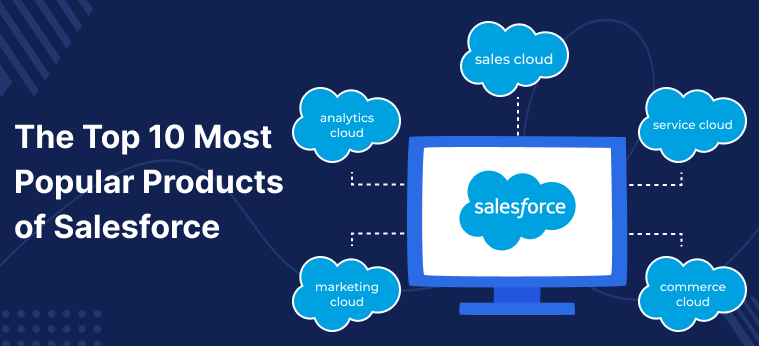
If you are searching for a powerful and job-ready final year project, Top 10 Salesforce Projects stand out as one of the most in-demand choices for BCA, MCA, B.Tech CS/IT, M.Tech, and MBA students in 2026. Salesforce is the world’s leading CRM platform, and hands-on experience with it can directly elevate your resume, impress interviewers, and set you apart in campus placements.
In this guide, you will find the Top 10 Salesforce Projects curated by Updategadh, covering everything from lead management automation and Lightning component development to Einstein Analytics and community portal implementation. Whether you need a project for your final year submission, viva preparation, or to add a practical skill to your portfolio, this list has you covered with complete source code, documentation, and setup support.
Project Overview
| Project Name | Top 10 Salesforce Projects (Collection) |
|---|---|
| Platform / Language | Salesforce Platform (Apex, SOQL, LWC, Visualforce) |
| Framework | Salesforce Lightning Experience, Aura, LWC |
| Database | Salesforce Object Database (SOQL / SOSL) |
| Project Type | CRM / Cloud / Enterprise Application |
| Difficulty Level | Intermediate to Advanced |
| Best For | BCA, MCA, B.Tech CS/IT, M.Tech, MBA (Final Year) |
| Tools / Technologies | Salesforce Developer Edition, Data Loader, Einstein Analytics, Tableau CRM, REST API |
| Deliverables Included | Source Code, Project Report, Synopsis, PPT |
| Developer / Publisher | Updategadh |
| Year | 2026 |
| Support | WhatsApp & YouTube (DecodeIT2) |
About These Salesforce Projects
Modern businesses rely heavily on CRM systems to manage customer data, automate sales workflows, and derive actionable insights. Students who build projects on Salesforce demonstrate an understanding of real-world enterprise cloud platforms that companies like TCS, Infosys, Accenture, and Capgemini actively look for during hiring. However, most students struggle to find structured, viva-ready Salesforce project ideas backed by proper documentation and working code.
This curated collection of ten Salesforce projects by Updategadh solves that problem entirely. Each project covers a distinct functional area of the Salesforce ecosystem, from automating sales processes and integrating e-commerce platforms to building predictive analytics dashboards with Einstein Analytics. Every project in this list is designed to be practical, submission-ready, and aligned with the kind of work you would encounter in a real Salesforce developer or administrator role.
Key Features Across All 10 Salesforce Projects
Project 1: Salesforce Automation for Lead Management
- Custom Lead Fields: Tailored fields capture domain-specific lead data relevant to your sales pipeline.
- Workflow Rules for Lead Assignment: Automatically route leads to the right sales representative based on configurable criteria.
- Validation Rules: Enforce data accuracy and completeness at the point of entry.
- Lead Scoring: Prioritise high-quality leads so the sales team focuses on the most promising opportunities.
Project 2: Customised Salesforce Reporting Dashboard
- Real-Time Metrics Tracking: Monitor key sales and marketing KPIs on a live, personalised dashboard.
- Custom Reports: Build detailed reports tailored to your organisation’s specific data requirements.
- Visual Dashboard Components: Incorporate charts, graphs, and gauges for intuitive data interpretation.
- Team Collaboration: Share dashboards across departments to support data-driven decision-making.
Project 3: Salesforce Integration with E-commerce Platform
- API-Based Synchronisation: Connect Salesforce with an e-commerce platform using REST API for seamless data flow.
- Data Field Mapping: Accurately align customer, order, and product fields between both systems.
- Real-Time Order Visibility: Give support and sales teams instant access to up-to-date order information.
Project 4: Customer Service Optimisation with Salesforce Service Cloud
- Email-to-Case Automation: Automatically convert incoming support emails into trackable service cases.
- Knowledge Base Setup: Create a structured knowledge repository for faster issue resolution.
- Omni-Channel Routing: Intelligently distribute cases across support agents based on skills and availability.
Project 5: Salesforce Mobile App Development
- Custom Mobile Objects and Tabs: Build mobile-specific objects accessible through the Salesforce app.
- Optimised Mobile Layouts: Design clean, responsive layouts that function well on small screens.
- App Store Publishing: Deploy the custom app for real device usage by field teams.
Project 6: Salesforce Lightning Component Development
- Reusable Lightning Web Components: Build modular LWC components that can be embedded across multiple pages.
- Lightning App Builder Integration: Drag-and-drop component placement for rapid page customisation.
- Enhanced UI/UX: Deliver a modern, responsive interface that improves end-user productivity.
Project 7: Salesforce Data Migration and Cleanup
- ETL Process Implementation: Extract, transform, and load legacy data with accuracy and consistency.
- Data Loader Proficiency: Hands-on use of Salesforce Data Loader for bulk import and export operations.
- Duplicate Detection and Removal: Identify and eliminate redundant records to maintain a clean database.
Project 8: Salesforce Workflow Automation for Sales Team
- Process Identification and Mapping: Document existing manual sales processes before automating them.
- Time-Triggered Actions: Schedule automated email alerts and field updates at key pipeline milestones.
- Productivity Measurement: Track time saved after automation to demonstrate business impact.
Project 9: Salesforce Community Portal Implementation
- Branded Community Templates: Customise the portal appearance to align with organisational branding.
- Role-Based Access Control: Define user permissions for customers, partners, and internal employees separately.
- Self-Service Resource Hub: Publish documentation and FAQs to reduce support ticket volume.
Project 10: Salesforce Analytics and Predictive Insights
- Einstein Analytics or Tableau CRM Dashboards: Visualise complex datasets through interactive, intelligent dashboards.
- Predictive Model Integration: Apply built-in AI models to forecast sales trends and customer behaviour.
- Stakeholder Sharing: Distribute insights across teams to drive company-wide data-informed decisions.
Technologies Used
| Layer | Technology | Purpose |
|---|---|---|
| CRM Platform | Salesforce (Professional / Enterprise / Developer Edition) | Core platform for all project implementations |
| Frontend / UI | Lightning Web Components (LWC), Aura Components, Visualforce | Building user interfaces and custom pages |
| Backend / Logic | Apex (Salesforce proprietary Java-like language) | Server-side business logic and triggers |
| Database / Queries | Salesforce Object Database, SOQL, SOSL | Data storage, retrieval, and search operations |
| Integration | REST API, SOAP API | Connecting Salesforce with external platforms (e-commerce, etc.) |
| Data Migration | Salesforce Data Loader | Bulk import, export, and cleanup of records |
| Analytics | Salesforce Einstein Analytics, Tableau CRM | Dashboards, predictive models, and business intelligence |
| Service Module | Salesforce Service Cloud | Customer support, case management, and omni-channel routing |
| Collaboration | Salesforce Communities | Partner, customer, and employee community portals |
| Mobile | Salesforce Mobile App | Field access to CRM data on iOS and Android devices |
How These Salesforce Projects Work
Each project in this collection follows the standard Salesforce development lifecycle. You begin by setting up a free Salesforce Developer Edition account, which gives you a full-featured sandbox environment. From there, you configure objects, fields, validation rules, and workflow automation using point-and-click tools within the Salesforce Setup menu. For more advanced projects such as Lightning Component Development or Salesforce Analytics, you write Apex code and LWC components using Salesforce Developer Console or VS Code with the Salesforce Extension Pack.
For integration projects, you configure REST API connections using tools like Postman to test endpoints before wiring them into the platform. Data Migration projects use Salesforce Data Loader to perform bulk operations with CSV-formatted data exports from legacy systems. The community portal and Service Cloud projects involve installing additional licensed packages within the Salesforce org, then customising them through the platform’s declarative configuration tools. All ten projects are structured so that a student with basic Salesforce knowledge can follow the setup steps and produce a working, demonstrable system suitable for viva and placement discussions.
How to Run These Salesforce Projects
Step 1: Create a Free Salesforce Developer Account
Sign up for a free Developer Edition at the official Salesforce Developer portal. This gives you access to all the core features required for most projects in this list.
Step 2: Log In to Salesforce Setup
After verifying your account, log in and navigate to the Setup menu (gear icon, top right). This is your central hub for all configuration tasks.
Step 3: Install Required Packages (if applicable)
For projects like Service Cloud or Communities, install the relevant managed package from the Salesforce AppExchange or activate the feature from Setup.
Setup > Feature Settings > Service > Service Cloud > EnableStep 4: Configure Objects, Fields, and Workflow Rules
Navigate to Object Manager within Setup. Create or customise the required objects (e.g., Lead, Case, Contact), add custom fields, and build workflow rules or Process Builder flows.
Setup > Object Manager > [Object Name] > Fields & Relationships > NewStep 5: Deploy Apex Code and LWC (for Developer Projects)
For Lightning Component or Analytics projects, open the Salesforce Developer Console or use VS Code with the Salesforce CLI extension to write and deploy Apex classes and LWC bundles.
# Install Salesforce CLI
npm install --global @salesforce/cli

# Authenticate with your Developer Org
sf org login web --alias myDevOrg

# Push local metadata to the org
sf project deploy start --source-dir force-app
Step 6: Load Test Data using Data Loader
For Data Migration projects, prepare a CSV file with your sample records and use Salesforce Data Loader to perform the import operation.
Data Loader > Insert > Select Object (e.g., Lead) > Browse CSV > Map Fields > FinishStep 7: Test and Verify Each Feature
Create sample records, trigger workflow rules, and navigate through dashboards to confirm that all configured features behave as expected before your viva or demo.
Why These Are Great Final Year Projects for 2026
- Industry Relevance: Salesforce is used by thousands of companies globally, making these projects highly valued in campus placements and job interviews.
- Resume-Worthy Skillset: Listing Salesforce CRM, Apex, LWC, or Einstein Analytics on your CV immediately differentiates you from peers with generic project experience.
- Viva-Ready Depth: Each project has a clear problem statement, solution architecture, and real-world business justification that you can articulate confidently during your viva.
- Covers Multiple Domains: The collection spans sales automation, customer service, data analytics, mobile development, and system integration — giving you a well-rounded portfolio.
- Free Platform Access: Salesforce Developer Edition is available at no cost, so you can build and demonstrate any of these projects without additional software expenses.
- Placement Alignment: Roles such as Salesforce Developer, Salesforce Administrator, and CRM Consultant are among the most sought-after IT positions with strong starting salaries.
- MBA-Friendly Options: Projects like Reporting Dashboards, Community Portals, and Analytics are equally relevant for MBA students focusing on business technology or CRM strategy.
How to Download or Get This Salesforce Project
Every Salesforce project from Updategadh comes as a complete, ready-to-submit package. Here is what you receive with your download:
- Full source code (Apex classes, LWC bundles, metadata configuration, and setup documentation)
- Project Report (IEEE-style, 50+ pages)
- Synopsis (2-3 pages, ready for university submission)
- PowerPoint Presentation (PPT) for viva and project defence
- Step-by-step setup and configuration guide
- WhatsApp support for installation and viva queries
Click the button below to access your project package, or reach out directly on WhatsApp for custom project requirements and quick delivery.
WhatsApp Support: +91 79834 34684
Possible Extensions and Future Enhancements
- Integrate Salesforce with WhatsApp Business API to enable direct customer communication from within the CRM.
- Add AI-powered chatbot support using Salesforce Einstein Bots to handle common customer queries automatically.
- Implement Salesforce Flow (the next-generation automation tool) to replace legacy workflow rules for more complex, multi-step processes.
- Connect the community portal to a third-party video conferencing tool (such as Zoom or Teams) for live customer support sessions.
- Build a custom Salesforce mobile offline mode so field agents can update records without an active internet connection.
- Add multi-language support to the community portal and service cloud to cater to a global customer base.
- Extend the analytics dashboard with custom Tableau CRM recipes for advanced data blending and forecasting.
Watch Project Demos on YouTube
All Salesforce projects listed here have detailed video walkthroughs, setup guides, and demo runs available on the DecodeIT2 YouTube channel. Subscribe to stay updated with the latest project tutorials, Salesforce tips, and placement preparation content.
Subscribe to DecodeIT2 on YouTube
Frequently Asked Questions
Are these Salesforce projects suitable for BCA and MCA final year submission?
Yes, absolutely. All ten projects are designed with undergraduate and postgraduate students in mind. Each comes with a complete project report, synopsis, and PPT that meet standard university submission requirements for BCA, MCA, B.Tech CS/IT, M.Tech, and MBA programmes. They are structured to support a thorough viva discussion as well.
Do I need to purchase a Salesforce licence to build these projects?
No. A free Salesforce Developer Edition account is sufficient to implement most of the projects in this collection, including Lead Management, Reporting Dashboards, Lightning Component Development, and Data Migration. Projects involving Service Cloud or Salesforce Communities require specific licences, but your university or a Salesforce Trailhead Playground environment may already provide access.
Is prior Salesforce knowledge required to complete these projects?
Basic familiarity with the Salesforce interface and concepts like objects, fields, and records is helpful. However, each project package from Updategadh includes a step-by-step setup guide that walks you through every configuration task in sequence. Students new to Salesforce can also use the free Trailhead learning platform to build foundational knowledge before starting.
Does the project package include the source code, report, synopsis, and PPT?
Yes. Every Salesforce project package from Updategadh includes the complete source code or metadata configuration files, a detailed project report, a ready-to-submit synopsis, and a PowerPoint presentation prepared for viva and project defence. WhatsApp support is also available for any setup or customisation queries.