Skip to content
  • SiteMap
  • Our Services
  • Frequently Asked Questions (FAQ)
  • Support
  • About Us

UpdateGadh

Update Your Skills.

  • Home
  • Projects
    •  Blockchain projects
    • Python Project
    • Data Science
    •  Ai projects
    • Machine Learning
    • PHP Project
    • React Projects
    • Java Project
    • SpringBoot
    • JSP Projects
    • Java Script Projects
    • Code Snippet
    • Free Projects
  • Tutorials
    • Ai
    • Machine Learning
    • Advance Python
    • Advance SQL
    • DBMS Tutorial
    • Data Analyst
    • Deep Learning Tutorial
    • Data Science
    • Nodejs Tutorial
  • Blog
  • Contact us
  • Toggle search form
Build an Interactive AI ChatGPT with Django

Build an Interactive AI ChatGPT with Django

Posted on April 4, 2025January 16, 2026 By Rishabh saini No Comments on Build an Interactive AI ChatGPT with Django

Build an Interactive AI ChatGPT

Introduction

Build an Interactive AI ChatGPT with Django Integration is a free and open-source web application that combines the power of Django, a robust web framework, with ChatGPT, an AI language model developed by OpenAI. This project enables users to interact with an AI-powered chatbot through a user-friendly chat interface.

    Download New Real Time Projects :-Click here 

Project Details

Project NameBuild an Interactive AI ChatGPT
Language UsedPython (Django Framework)
DatabaseSQLite/MySQL
TypeWeb Application
DeveloperUPDATEGADH

Key Features

  • AI-Powered Chatbot: Interact with ChatGPT seamlessly within the web application.
  • User Authentication: Secure registration and login system for personalized interactions.
  • Chat History Storage: Retrieve past conversations effortlessly.
  • Real-Time Messaging: Smooth chatbot interaction using AJAX requests.
  • Error Handling: Robust API error management to ensure uninterrupted service.
  • Responsive UI: A user-friendly and mobile-compatible interface.

Installation & Setup

The Django ChatGPT Integration project may be set up and operated by following these steps:

  1. Navigate to the project directory: cd django_chatbot
  2. Install the dependencies: pip install -r requirements.txt
  3. Set up API key: OPENAI_API_KEY=your-api-key
  4. Apply database migrations: python manage.py migrate
  5. Run the development server: python manage.py runserver
  6. Access the application: Open your browser and visit http://localhost:8000

How to Use

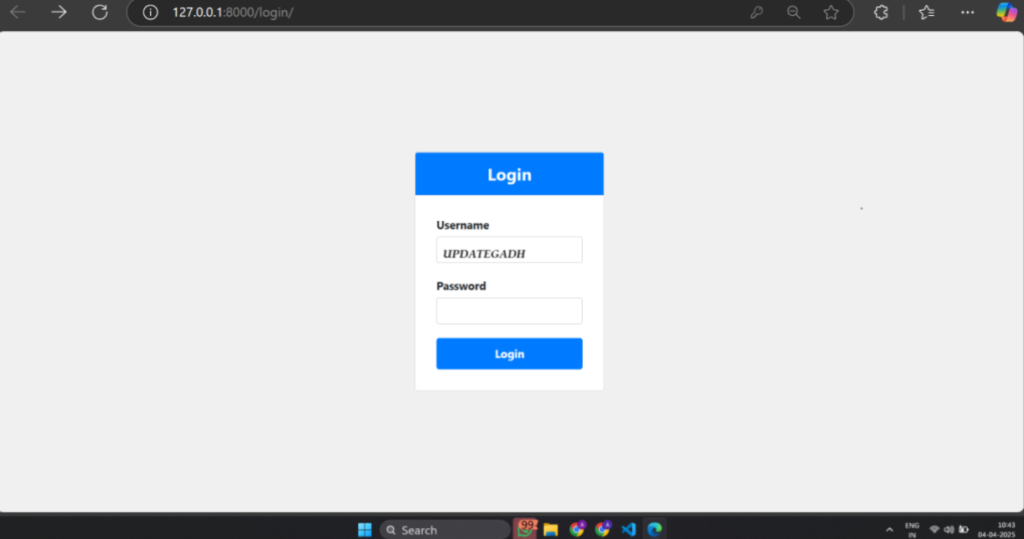
  • Login or Register to access the chatbot.
  • Enter your message in the chat input field and press Send to interact with ChatGPT.
  • View your conversation history for easy reference to previous chats.
    Download Now
    Build an Interactive AI ChatGPT

    Build an Interactive AI ChatGPT github
    Build an Interactive AI ChatGPT gpt
    django project online
    advanced django
    django ml projects
    build an interactive ai chatgpt with source code github
    django api
    django basic to advanced
    build an interactive ai chatgpt with django
    build and deploy your own chatbot ai app in javascript
    build ai chatbot python
    build an app with chatbot
    build an ai chatbot with openai
    build an ai chatbot
    build a chatbot chatbot with django and python
    how to create an ai chatbot in python
    how to build a chatbot with dialogflow
    build chatbot with python
    ai chatbot with python

    Post Views: 726
    PythonFreeProject Tags:automating my life with python, build agents, build anything with ai agents for free! (deepseek-r1 beats chatgpt), build website with ai, build website with chatgpt, build with chatgpt, create website with chatgpt, django chatgpt api, django url dispatcher, entire website with chatgpt, generate website code with chatgpt, no coding website with chatgpt, Python Django, Python Django Projects, python django web development, rest api with django, tech with tim

    Post navigation

    Previous Post: Powerful Data Collection Tools in Healthcare
    Next Post: ✅ Free Django Poll App with Source Code – Full-Featured Voting System in Django

    More Related Articles

    Online Banking System Best Online Banking System Using Python & Django PythonFreeProject
    Thyroid Detection Thyroid Detection PythonFreeProject
    Placement Management System Using Python Placement Management System Using Python: Free Source Code and Guide PythonFreeProject

    Leave a Reply Cancel reply

    Your email address will not be published. Required fields are marked *

    Most Viewed Posts

    1. Top Large Language Models in 2025
    2. Online Shopping System using PHP, MySQL with Free Source Code
    3. login form in php and mysql , Step-by-Step with Free Source Code
    4. Flipkart Clone using PHP And MYSQL Free Source Code
    5. News Portal Project in PHP and MySql Free Source Code
    6. User Login & Registration System Using PHP and MySQL Free Code
    7. Top 10 Final Year Project Ideas in Python
    8. Online Bike Rental Management System Using PHP and MySQL
    9. E learning Website in php with Free source code
    10. E-Commerce Website Project in Java Servlets (JSP)
    • AI
    • ASP.NET
    • Blockchain
    • ChatCPT
    • code Snippets
    • Collage Projects
    • Data Science Project
    • Data Science Tutorial
    • DBMS Tutorial
    • Deep Learning Tutorial
    • Final Year Projects
    • Free Projects
    • How to
    • html
    • Interview Question
    • Java Notes
    • Java Project
    • Java Script Notes
    • JAVASCRIPT
    • Javascript Project
    • JSP JAVA(J2EE)
    • Machine Learning Project
    • Machine Learning Tutorial
    • MySQL Tutorial
    • Node.js Tutorial
    • PHP Project
    • Portfolio
    • Python
    • Python Interview Question
    • Python Projects
    • PythonFreeProject
    • React Free Project
    • React Projects
    • Spring boot
    • SQL Tutorial
    • TOP 10
    • Uncategorized
    • Online Examination System in PHP with Source Code
    • AI Chatbot for College and Hospital
    • Job Portal Web Application in PHP MySQL
    • Online Tutorial Portal Site in PHP MySQL — Full Project with Source Code
    • Online Job Portal System in JSP Servlet MySQL

    Copyright © 2026 UpdateGadh.

    Powered by PressBook Green WordPress theme