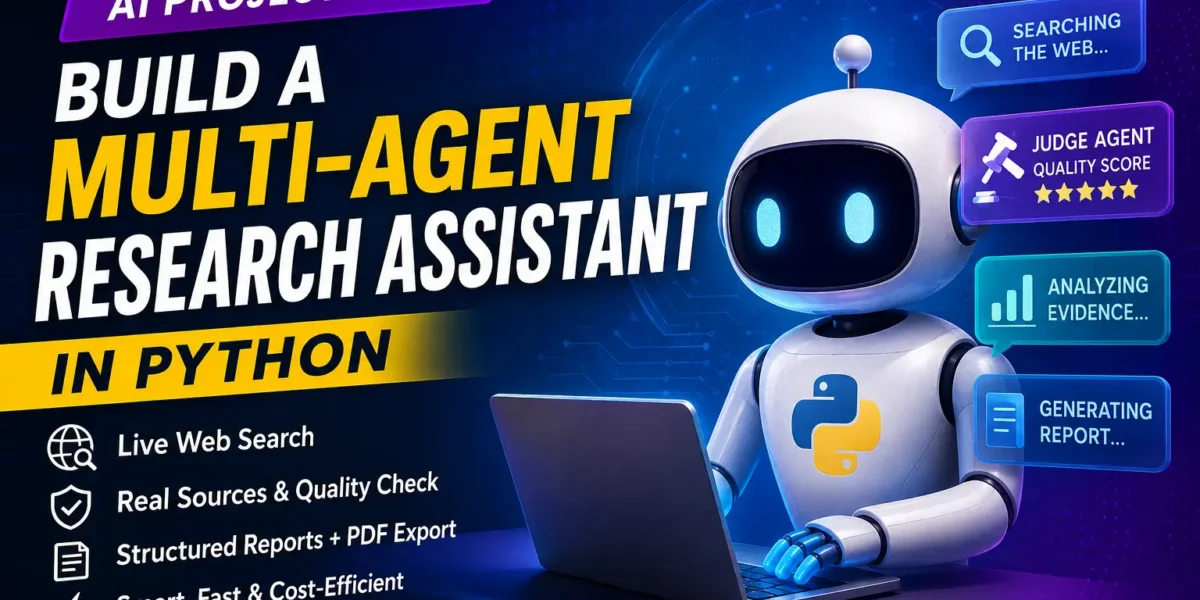
The Multi-Agent Research Assistant in Python is a next-generation AI project that goes far beyond a normal chatbot. Instead of guessing answers from old training data, it searches the live web, judges the quality of its own evidence, and produces a clean, structured research report with real, clickable sources. If you are a final-year student who wants an AI project that instantly stands out in front of an examiner, this is the one.
In this post you will learn exactly what this project does, the multi-agent architecture behind it, the full technology stack, how to run it on your own machine, and why it makes an outstanding placement-relevant final-year project for 2026.
| Detail | Description |
|---|---|
| Project Name | Multi-Agent Research Assistant |
| Language | Python |
| Framework | Reflex (Python web framework) + OpenAI Agents SDK |
| Database | Not required (stateless, API-driven) |
| Project Type | AI / Agentic Web Application |
| Difficulty | Advanced |
| Category | Artificial Intelligence, LLM Agents, Web Research |
| Platform | Web Browser (localhost) |
| Year | 2026 |
| Best For | BCA, MCA, B.Tech CS/IT, M.Tech, MBA (Analytics) |
| Developer | Updategadh |
About the Multi-Agent Research Assistant
Ordinary AI chatbots have a serious weakness: they answer from a fixed snapshot of training data, they rarely cite real sources, and they often hand back one shallow paragraph with no way to verify it. For students, researchers, and professionals who need trustworthy, sourced information, that simply is not good enough. There is no quality check, no early stopping when the answer is strong, and no clean export of the final result.
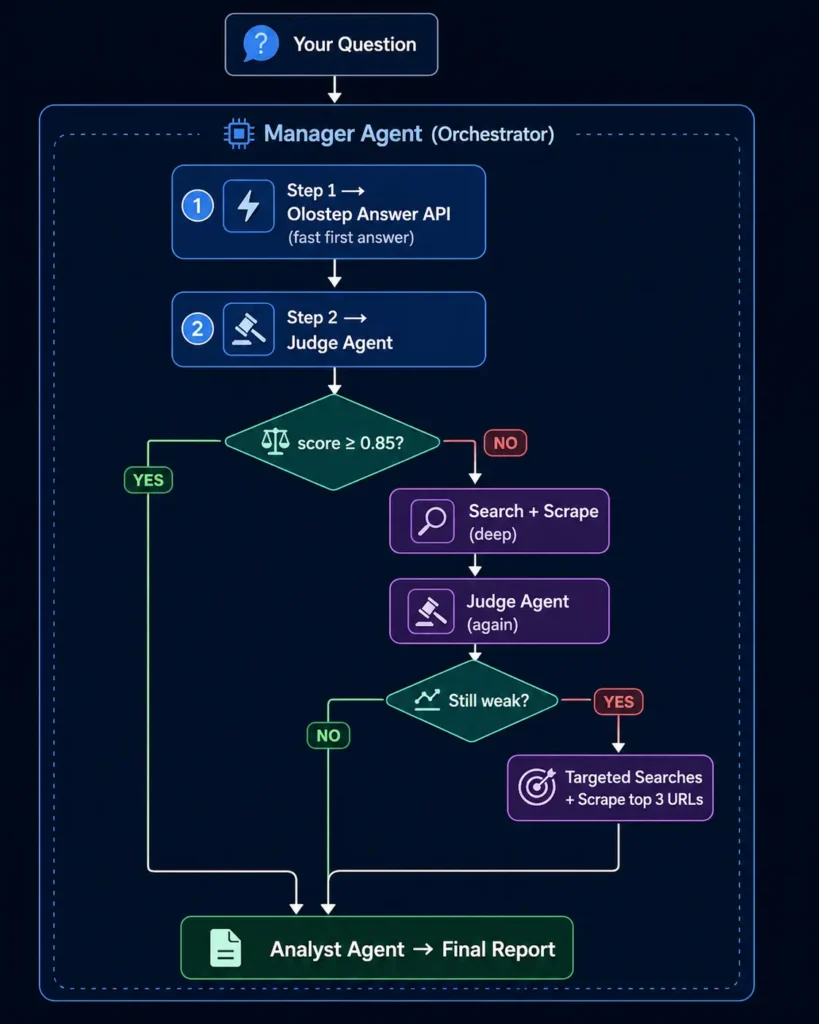
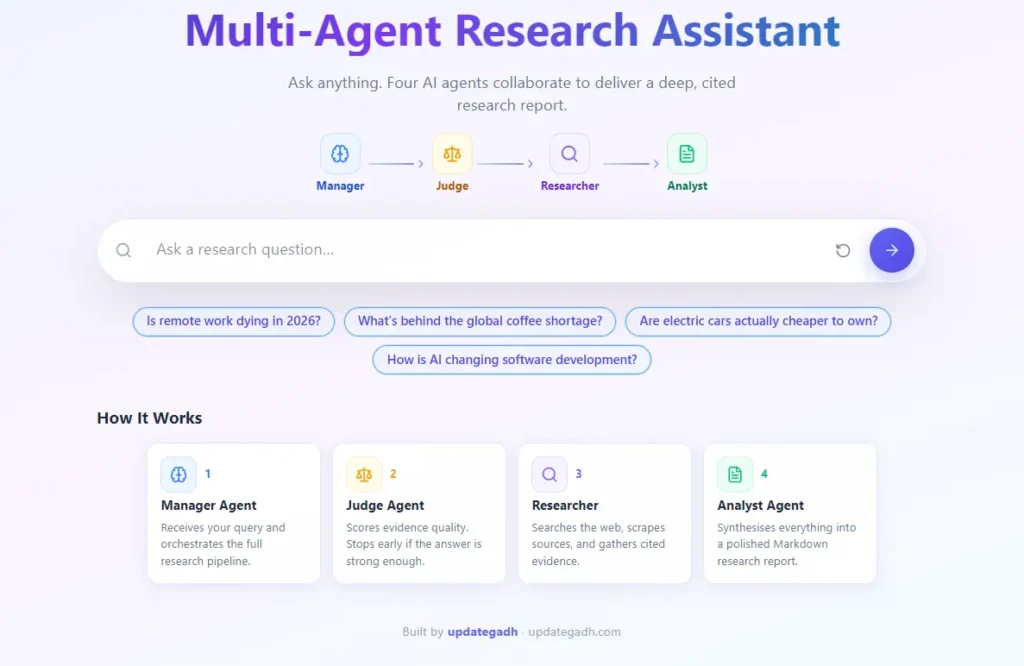
This project solves the problem by using a team of cooperating AI agents instead of a single model. A Manager agent coordinates the whole task, a Judge agent scores the strength of the evidence before it is accepted, and an Analyst agent writes a properly structured report with real URLs. When the first answer is already strong, the system stops early to save time and cost. When it is weak, it digs deeper with targeted web searches and page scraping. The finished report can be read in the browser or downloaded as a formatted PDF with a single click.
Key Features of This AI Research Assistant
- Live Web Search on Every Query: Instead of relying on stale training data, the assistant searches the live web for each question, so answers stay current and relevant.
- Real Sources Cited: Every report includes genuine, clickable URLs so the reader can verify each claim rather than trusting a single guess.
- Judge Agent Quality Check: A dedicated Judge agent scores the gathered evidence and decides whether it is strong enough before the report is written.
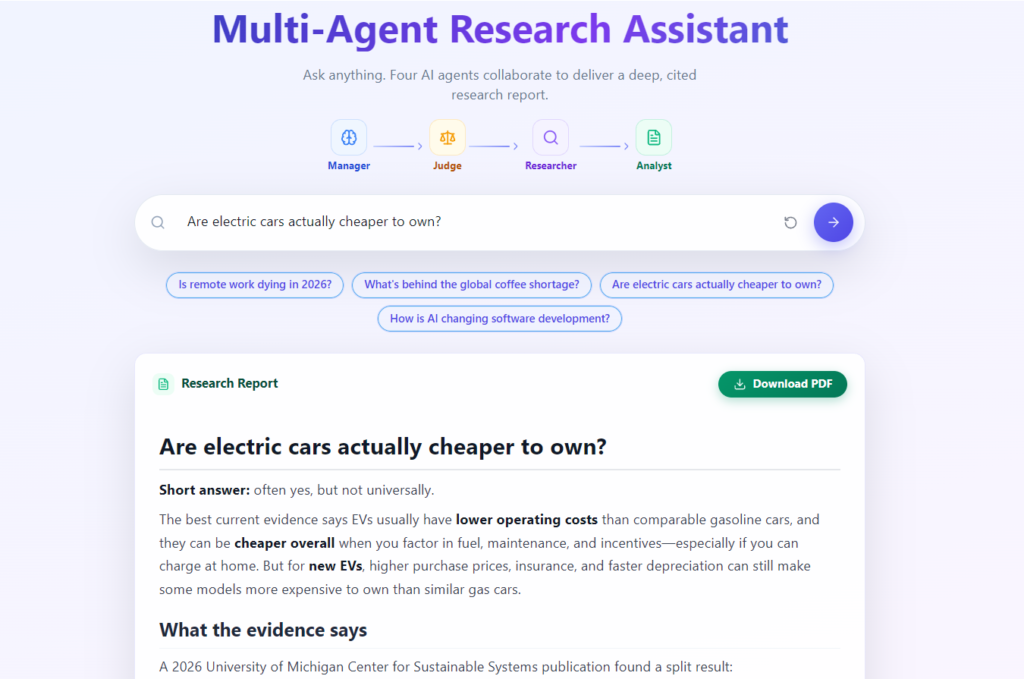
- Structured, In-Depth Reports: Output arrives as a well-organised document with headings, tables, bullet points, and analysis, not a shallow one-line reply.
- Stop Button and Early Exit: Users can stop a runaway request at any time, and the system exits early when the evidence is already convincing.
- One-Click PDF Export: The final report can be downloaded as a cleanly formatted PDF for submission, sharing, or archiving.
- Cost-Efficient Retrieval: If a good answer is found at the first step, the workflow stops there, avoiding unnecessary and expensive extra calls.
- Live Progress Logs: Each agent step is streamed in real time, so the user can watch the research unfold instead of staring at a blank loading screen.
- Deep Retrieval Path: When early evidence is weak, the Manager runs multiple targeted searches, picks the top relevant pages, and scrapes them for richer detail.
Technologies Used
| Layer | Technology | Purpose |
|---|---|---|
| Frontend / UI | Reflex (Python-based web framework) | Renders the browser interface, input box, progress logs, and report view |
| Agent Orchestration | OpenAI Agents SDK | Coordinates the Manager, Judge, and Analyst agents and their tool calls |
| Language Model | OpenAI GPT model (configurable) | Powers reasoning, judging, and report writing |
| Web Retrieval | Olostep Answer, Search, and Scrape APIs | Fetches live answers, searches the web, and scrapes selected pages |
| PDF Export | ReportLab | Generates the downloadable formatted PDF report |
| Backend / Logic | Python 3 | Core application logic, state handling, and workflow control |
| Deployment | Docker (optional) | Containerised setup for consistent running across machines |
Why Use a Multi-Agent Research Assistant?
| Problem With a Normal AI | How This Project Fixes It |
|---|---|
| Answers from old training data | Searches the live web on every query |
| No sources cited | Every report includes real URLs |
| Single model, no quality check | Judge agent scores evidence before accepting it |
| Shallow one-paragraph answers | Structured reports with headings, tables, and analysis |
| Cannot stop runaway requests | Stop button plus early exit when evidence is already strong |
| No export option | Download as PDF with one click |
| Expensive to run | Stops early at Step 1 if the answer is good enough |
AI Chatbot for College and Hospital
Who it is for:
- Students: writing research papers and final year submissions
- Developers: investigating new tech stacks quickly
- Journalists: fact-checking a story against real sources
- Anyone: who needs a sourced, structured answer, not just a chatbot guess
How the Multi-Agent Research Assistant Works
- The user enters a research question into the browser interface.
- The Manager agent takes over and first requests a quick answer from the Olostep Answer API.
- The Judge agent scores that first answer. If the confidence score meets the threshold (0.85 or above), the workflow moves straight to writing the report.
- If the answer is weak, the Manager runs a web search with page scraping and asks the Judge to score the new evidence.
- If evidence is still weak, the Manager fires multiple targeted searches, selects the top three most relevant URLs, and scrapes those pages for deeper detail.
- All the collected evidence — the answer, the judge scores, the search results, and the scraped content — is passed to the Analyst agent.
- The Analyst writes a polished report with headings, tables, and cited sources, which is rendered in the browser and can be exported as a PDF.
How to Run This Project
Step 1 — Prerequisites
Make sure you have Python 3.10 or higher installed, along with pip. You will also need an OpenAI API key and an Olostep API key to power the agents and retrieval tools.
Step 2 — Download the Project
Download the complete project package from Updategadh and extract it to a working folder on your machine.
Step 3 — Install Dependencies
pip install -r requirements.txtStep 4 — Configure Environment Variables
Create a .env file in the project root and add your API keys and model name:
OPENAI_API_KEY=your_openai_api_key
OLOSTEP_API_KEY=your_olostep_api_key
OPENAI_MODEL=your_chosen_openai_model
Step 5 — Run the App
reflex runStep 6 — Open in the Browser
Once the app starts, open the local URL printed in the terminal, usually:
http://localhost:3000Screenshots
Why This Is a Great Final Year Project
- Trending Topic: Multi-agent AI systems are one of the hottest areas in 2026, so examiners and interviewers will immediately recognise its relevance.
- Viva-Ready Architecture: The clear Manager, Judge, and Analyst design gives you concrete, easy-to-explain talking points for your viva.
- Placement-Relevant Skills: You demonstrate real experience with LLM agents, API integration, and web frameworks that companies are actively hiring for.
- Resume-Worthy: An agentic AI research tool with live web search and PDF export sounds far more impressive than a standard CRUD project.
- Real-World Utility: Unlike toy projects, this actually solves a genuine problem, which makes your demo far more convincing.
- Extendable: The modular design gives you plenty of room to add your own features and show initiative.
How to Download This Project
You can get the complete Multi-Agent Research Assistant package from Updategadh, :
For any queries or custom requirements, reach out on WhatsApp: +91 79834 34684
Possible Extensions and Future Enhancements
- Add user authentication and a saved history of past research reports.
- Support multiple language models so users can switch providers.
- Introduce a citation confidence rating shown next to each source.
- Allow export in additional formats such as Word and Markdown.
- Add a follow-up question mode that builds on the previous report.
- Store reports in a database for team collaboration and search.
- Add domain filters so users can restrict searches to trusted sites.
- Integrate charts and visual summaries generated from the findings.
Watch More Projects on YouTube
For full video walkthroughs, demos, and setup guides on projects like this, subscribe to our channel.
Subscribe to DecodeIT2 on YouTube
Frequently Asked Questions
What technology stack does the Multi-Agent Research Assistant use?
It is built in Python using the OpenAI Agents SDK for orchestration, the Reflex framework for the web interface, Olostep APIs for live web retrieval, and ReportLab for PDF export.
Is this project suitable for BCA, MCA, and B.Tech students?
Yes. It is an advanced project ideal for BCA, MCA, B.Tech CS/IT, M.Tech, and MBA analytics students who want a modern, placement-relevant AI topic for their final year.
Does this project need a database?
No traditional database is required. The workflow is stateless and API-driven, though you can add a database as an enhancement to store report history.
Does the download package include the report, PPT, and synopsis?
Yes. The Updategadh package includes the full source code, project report, synopsis, and PPT presentation, so you are ready for both submission and viva.