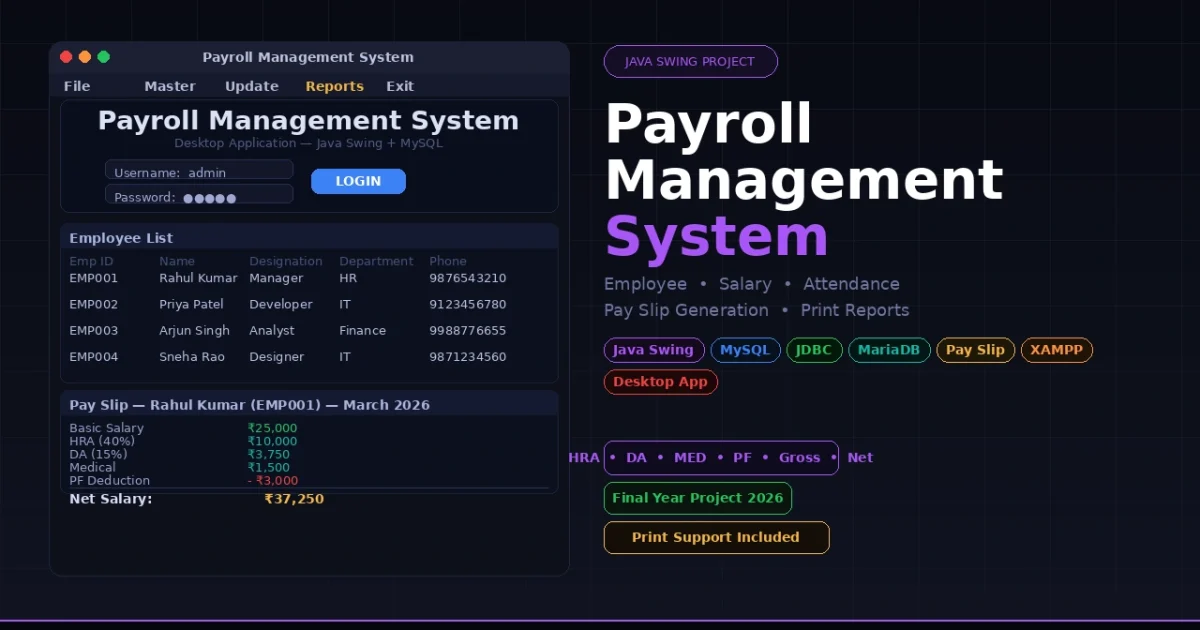
If you are a BCA, MCA, or B.Tech CS student looking for a Java Swing final year project that covers real business logic — from salary component configuration and attendance tracking to pay slip generation with gross and net salary calculations — the Payroll Management System built with Java Swing and MySQL is one of the most complete desktop Java projects you can submit in 2026. It runs entirely as a standalone desktop application with no web server required, making it incredibly easy to demo on any lab computer during your viva presentation.
Payroll Management System in Java
Project Overview
| Project Name | Payroll Management System |
| Type | Desktop Application |
| GUI Framework | Java Swing |
| Language | Java JDK 8+ |
| Database | MySQL / MariaDB (via XAMPP) |
| DB Connectivity | JDBC (MySQL Connector/J 8.3.0) |
| Salary Components | HRA, DA, MED, PF, Basic Salary |
| Attendance | First Half / Second Half daily tracking |
| Reports | Pay slip generation and attendance list with print support |
| Best For | BCA, MCA, B.Tech CS/IT Final Year Students Globally |
Key Features
- Secure login authentication — splash screen loads first, then a login page validates credentials against the
logintable before granting access to the main menu - Complete employee management — add new employees, view the full employee list, update existing records, and delete employees — all from dedicated Swing form screens
- Salary component configuration — set and update all five salary components (Basic Salary, HRA, DA, Medical, and PF) individually per employee and update them anytime from the Update menu
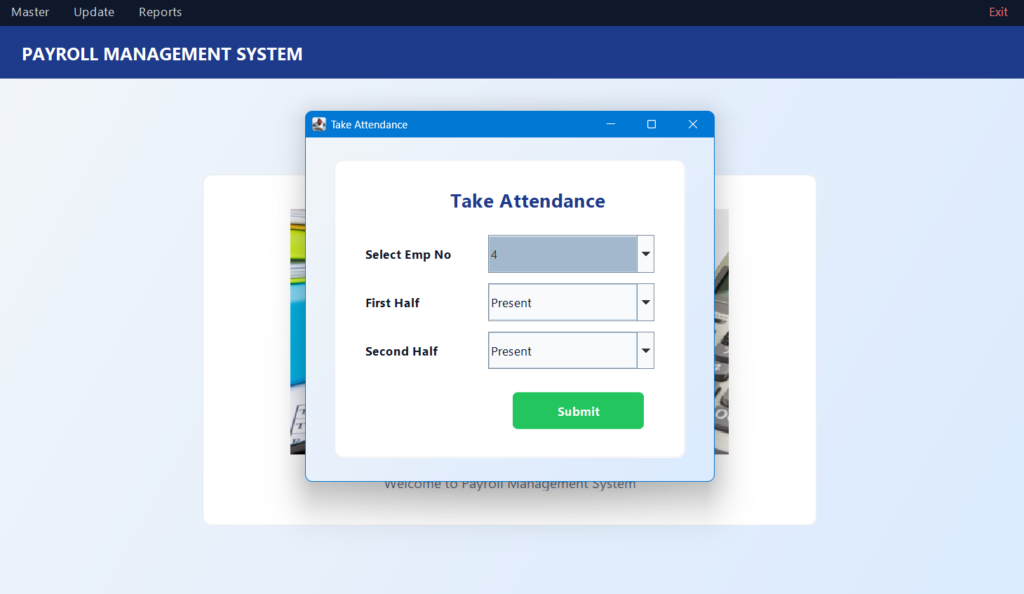
- First Half and Second Half attendance tracking — record daily attendance per employee with half-day granularity and view the complete attendance history from the Reports menu
- Detailed pay slip generation — automatically calculates gross salary, tax deductions, and net salary based on stored components and attendance data and displays a formatted pay slip
- Print support — print the employee list and attendance reports directly from the application using Java’s built-in print framework
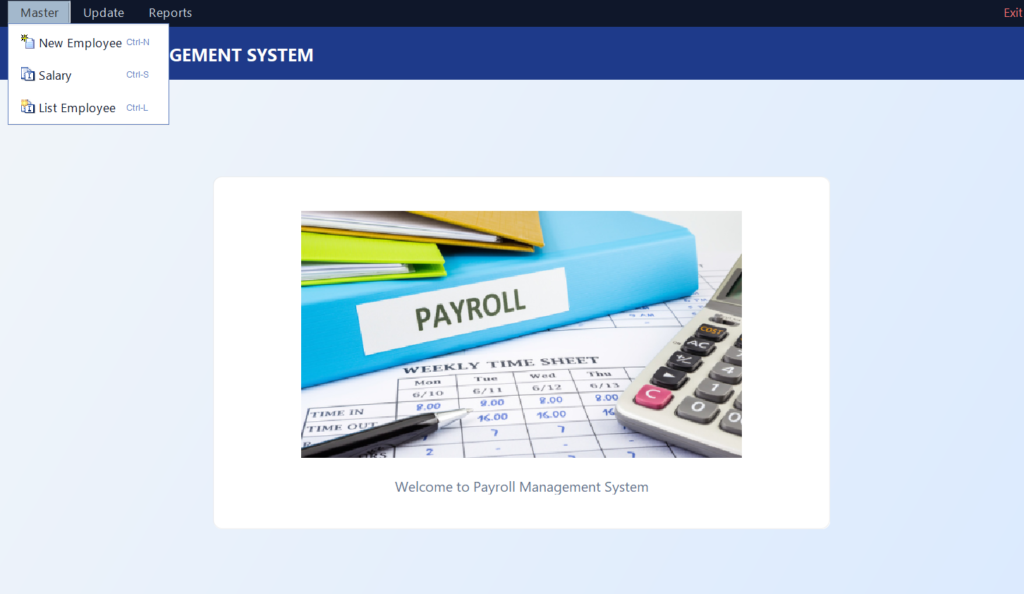
- Menu-driven navigation — organised Master, Update, and Reports menu bar keeps the interface clean and easy to explain during viva presentations
🎬 Watch the Full Project Tutorial on YouTube!
We’ve built this project step by step on our YouTube channel. Watch the full video, like, and subscribe for daily project tutorials.
Technologies Used
| Layer | Technology | Purpose |
|---|---|---|
| Language | Java JDK 8+ | Core application logic and object-oriented design |
| GUI Framework | Java Swing | All desktop forms, tables, dialogs, and menu bar |
| Database | MySQL / MariaDB | Store employees, salaries, attendance, and login data |
| DB Connectivity | JDBC (mysql-connector-j-8.3.0) | Raw SQL queries from Java to MySQL — no ORM |
| Local Server | XAMPP / WAMP | Run MySQL locally during development and demo |
| Print Support | Java Print Framework | Print employee lists and attendance reports |
| IDE | Eclipse / IntelliJ IDEA / NetBeans | Import, compile, and run the project |
Project Folder Structure
payroll-management-system/
├── src/
│   ├── conn.java                 # JDBC database connection
│   ├── splash.java               # Splash screen — app entry point
│   ├── login.java                # Login page with credential validation
│   ├── home.java                 # Main window with menu bar
│   ├── New_Employee.java         # Add new employee form
│   ├── List_Employee.java        # View all employees (with print)
│   ├── Update_employee.java      # Update or delete employee records
│   ├── Salary.java               # Set salary components for employee
│   ├── Update_salary.java        # Update or delete salary records
│   ├── TakeAttendence.java       # Record daily attendance (First/Second Half)
│   ├── List_Attendence.java      # View attendance records (with print)
│   ├── pay_slip.java             # Generate pay slip (gross + net + tax)
│   ├── icon/                     # Image resources
│   └── icons/                    # Additional icon assets
│
├── payroll.sql                   # Full database schema + seed data
├── lib/
│   └── mysql-connector-j-8.3.0.jar   # JDBC driver — required for DB connection
├── build/
│   └── classes/                  # Compiled .class files
└── README.md
Database Schema
| Table | Purpose | Key Fields |
|---|---|---|
| login | Admin login credentials | username, password (default: admin / admin) |
| employee | Employee personal and job details | empid, name, designation, department, doj, phone, address |
| salary | Salary components per employee | empid, basic, hra, da, med, pf, gross |
| attendence | Daily attendance records | empid, month, year, first_half, second_half |
Get This Project
This is a complete, ready-to-run paid project. It includes the full Java Swing source code, all form classes, the payroll.sql database script, the bundled JDBC connector JAR, and remote setup support from our team.
Payroll Management System — Java Swing + MySQL
Full source code + SQL database + JDBC JAR + setup guide + remote support included
Need help after purchase? Contact us on WhatsApp or via our support page
How to Run This Project
Step 1 — Install prerequisites
1. Java JDK 8 or higher   → https://www.oracle.com/java/downloads/
2. XAMPP (MySQL/MariaDB)  → https://www.apachefriends.org/
3. Eclipse IDE            → https://www.eclipse.org/downloads/
   (or IntelliJ IDEA / NetBeans)
Step 2 — Set up the database
Start Apache and MySQL in XAMPP, then import the SQL script:
# Using MySQL command line:
mysql -u root -p < payroll.sql

# Or using phpMyAdmin:
# Open http://localhost/phpmyadmin → Import → select payroll.sql → Go
This creates the payroll database with all four tables and seeds the default admin login (admin / admin).
Step 3 — Update the database connection
Open src/conn.java and update your MySQL password if it is not blank:
c = DriverManager.getConnection(
    "jdbc:mysql://localhost:3306/payroll",
    "root",           // your MySQL username
    "your_password"   // your MySQL password (blank for default XAMPP)
);
Step 4 — Compile the project
# Windows (use ; as separator)
javac -cp "lib/mysql-connector-j-8.3.0.jar;src" -d build/classes src/*.java

# Linux / macOS (use : as separator)
javac -cp "lib/mysql-connector-j-8.3.0.jar:src" -d build/classes src/*.java
Step 5 — Run the application
# Windows
java -cp "lib/mysql-connector-j-8.3.0.jar;build/classes" splash

# Linux / macOS
java -cp "lib/mysql-connector-j-8.3.0.jar:build/classes" splash
The splash screen loads first, followed by the login page. Use the default credentials to log in:
Username : admin
Password : admin
Application Menu Structure
| Menu | Sub-menu | Action |
|---|---|---|
| Master | New Employee | Add a new employee record with all personal details |
| Master | Salary | Set all salary components for a selected employee |
| Master | List Employee | View all employees in a table — with print support |
| Update | Update Salary | Edit or delete salary components for any employee |
| Update | Update Employee | Edit or delete an existing employee record |
| Update | Take Attendance | Mark First Half / Second Half attendance per employee |
| Reports | Generate Pay Slip | Calculate and display gross salary, deductions, and net pay |
| Reports | List Attendance | View all attendance records — with print support |
| Exit | — | Close the application |
How It Works
Employee and salary setup flow
- Admin logs in —
login.javaqueries thelogintable and starts a session; the mainhome.javawindow with the menu bar opens - Admin goes to Master → New Employee and fills in the employee form — the record is inserted into the
employeetable via JDBC - Admin goes to Master → Salary — selects the employee and enters Basic Salary, HRA, DA, Medical, and PF values — stored in the
salarytable - Any component can be changed later via Update → Update Salary without affecting the employee record itself
Attendance recording flow
- Admin opens Update → Take Attendance and selects the employee and month
- Marks each day as First Half present, Second Half present, or absent
- The attendance data is saved to the
attendencetable with the employee ID, month, and year - Admin can view the full attendance history under Reports → List Attendance and print it directly from the application
Pay slip generation flow
- Admin opens Reports → Generate Pay Slip and selects the employee and month
- The
pay_slip.javaclass queries thesalaryandattendencetables for that employee - Gross salary is calculated from the stored salary components; deductions (PF and tax) are subtracted to compute net salary
- A formatted pay slip is displayed on screen showing employee details, all components, gross pay, deductions, and net salary
Why This is a Great Final Year Project
- Java Swing desktop application — demonstrates GUI programming with forms, tables, dialogs, and a menu bar — all core Java skills tested in university exams
- Salary component calculation logic (HRA, DA, PF, gross, net, tax) shows you understand real business rules that companies actually implement in their HR systems
- JDBC raw SQL without ORM — using raw
PreparedStatementandResultSetdemonstrates a thorough understanding of how Java connects to and queries a database - First Half / Second Half attendance is a granular, real-world attendance model that makes your project stand out from basic present/absent systems
- Print support for reports — being able to physically print the employee list and attendance reports during a viva demonstration is immediately impressive
- No web server needed — runs directly with
java splashfrom the command line; nothing to configure during live demo apart from XAMPP and the SQL import - Complete end-to-end flow — login → add employee → set salary → mark attendance → generate pay slip covers every major HR payroll concept in one project
You Might Also Like:
- Human Resource Management System in Java Swing and MySQL
- Employee Management System in Java — Free Source Code
- Railway Reservation System in Java and MySQL
- Electricity Billing System in Java and MySQL — Free Download
- University Management System using Java and MySQL
- All Java Projects with Source Code — UpdateGadh
SEO Details
- payroll management system in java
- payroll management system in java netbeans source code
- payroll management system project in java
- payroll management system project in java pdf
- payroll management system project in java github
- employee payroll management system in java
- payroll management system source code in java
- employee payroll management system project in java
- employee payroll management system project in java with source code
- what is payroll management systempayroll management system project
- payroll management system project report pdf
- payroll management system github
- payroll management system project pdf
- payroll management system meaning
- payroll management system er diagram
- payroll management system use case diagram
- payroll management system class diagram
- payroll management system kya hai
- payroll management system example
🎓 Need Complete Final Year Project?
Get Source Code + Report + PPT + Viva Questions (Instant Access)
🛒 Visit UpdateGadh Store →