Complaint Management System Using Python Django
The Complaint Management System Using Python Django is a web-based application designed to simplify complaint registration, tracking, and resolution. Built using Python, Django, and SQLite, the system provides a structured platform for users to submit complaints and administrators to manage them through a centralized dashboard.
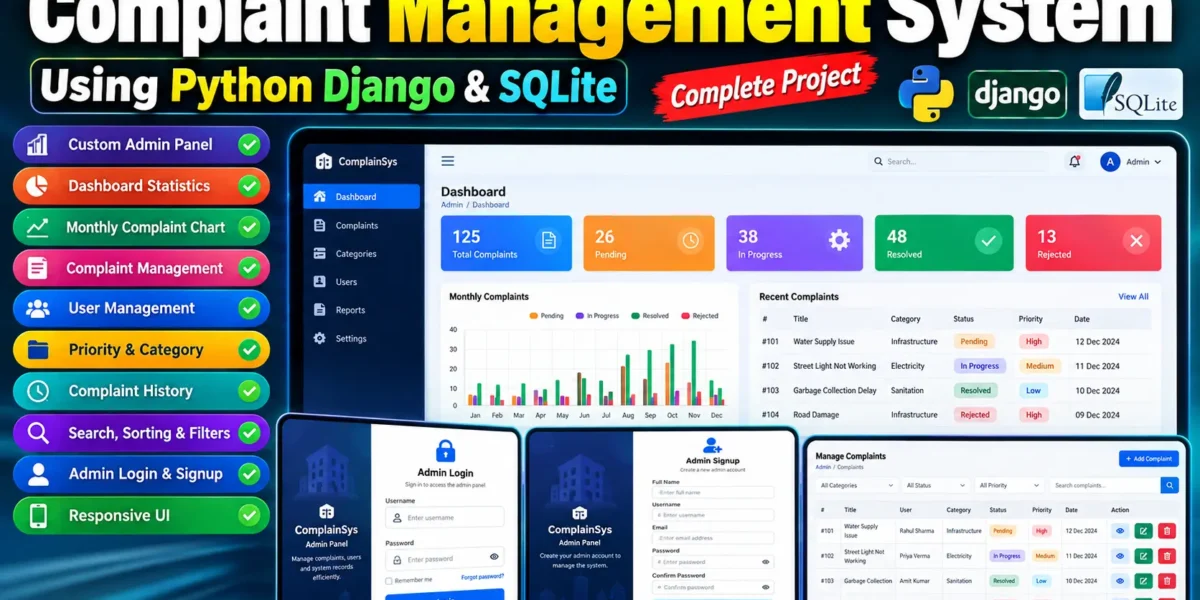
The project includes a custom Admin Panel, redesigned authentication pages, complaint status management, priority settings, category management, user management, and complaint history. Its responsive interface helps administrators manage complaints efficiently while maintaining an organized workflow.
Table of Contents
Complete Advance AI Topics: Click Here
Real Time Projects on YouTube:- DecodeIT
Project Overview
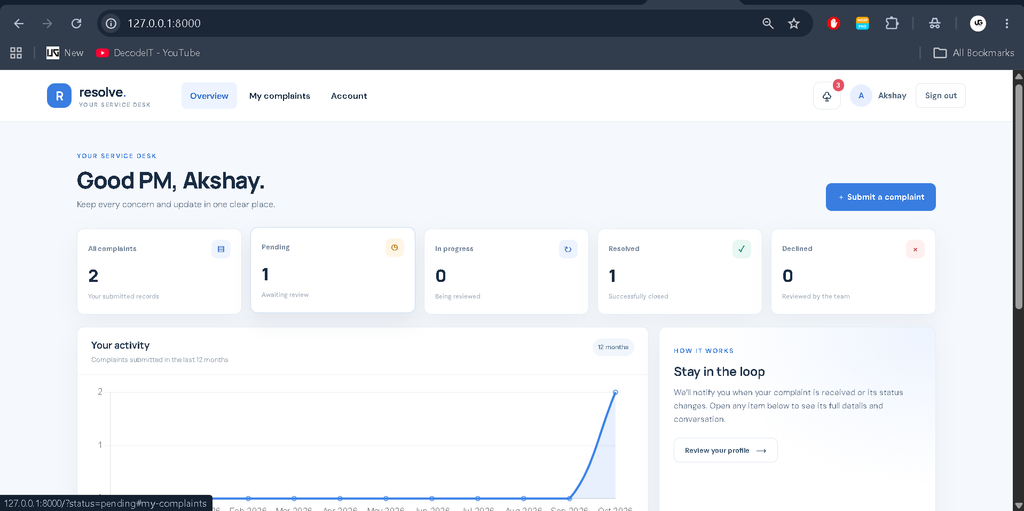
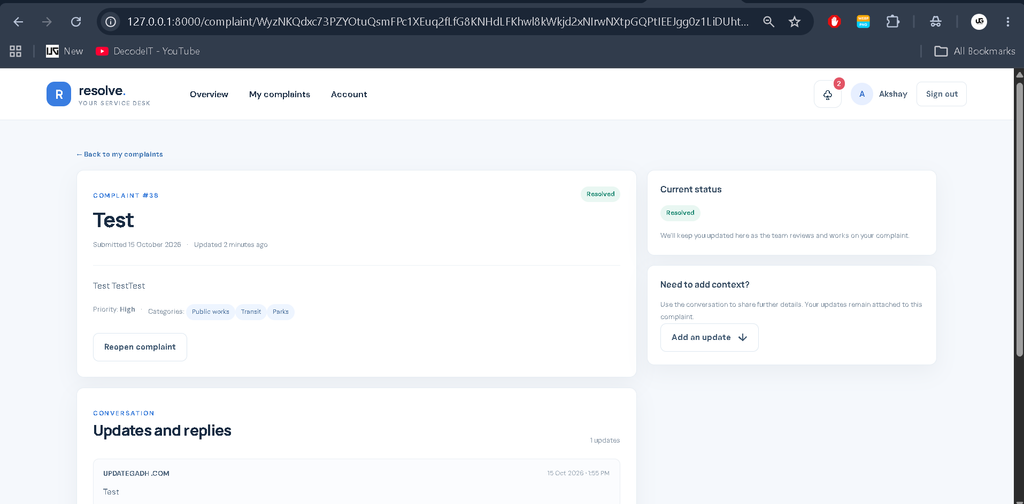
The application provides separate functionality for users and administrators. Users can register, log in, submit complaints, and track their progress. Administrators can access a dedicated management dashboard to review complaints, update statuses, manage users, and monitor complaint statistics.
Unlike the default Django Admin interface, the project uses a custom administrative interface with its own dashboard, navigation, tables, and management pages. The login and signup pages also follow a consistent design.
Project Details
| Project Information | Details |
|---|---|
| Project Name | Complaint Management System |
| Language/s Used | Python, HTML, CSS, JavaScript |
| Framework | Django |
| Database | SQLite |
| Type | Web Application |
Available Features
1. Custom Admin Dashboard
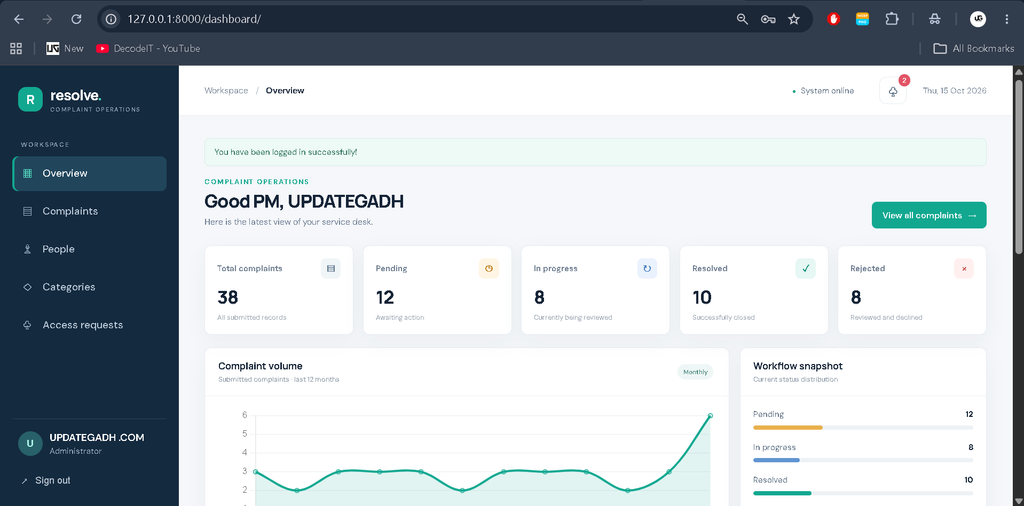
The application includes a dedicated Admin Dashboard with a professional interface, sidebar navigation, top navigation bar, statistics cards, charts, and management tables. Administrators can access important complaint and user information from one place.
2. Complaint Statistics
The dashboard displays complaint statistics, including total complaints, pending complaints, in-progress complaints, resolved complaints, and rejected complaints. These statistics are calculated from database records rather than manually entered values.
3. Monthly Complaint Chart
The monthly complaint chart helps administrators understand complaint activity over time. It presents complaint trends using information retrieved from the database.
4. Complaint Management
Administrators can view complaint details, review submitted information, update complaint status, and manage complaint records. Search, sorting, and filtering options help locate specific complaints more efficiently.
5. Priority Management
Administrators can assign priority levels to complaints according to their urgency. This helps organize complaint handling and identify issues that require attention first.
6. Complaint Category Management
The system provides category management functionality for organizing complaints according to their type. Administrators can manage categories according to the implemented application rules.
7. Complaint History
The complaint history feature helps administrators review complaint progress and available status updates. It supports better record tracking throughout the complaint-resolution process.
8. User Management
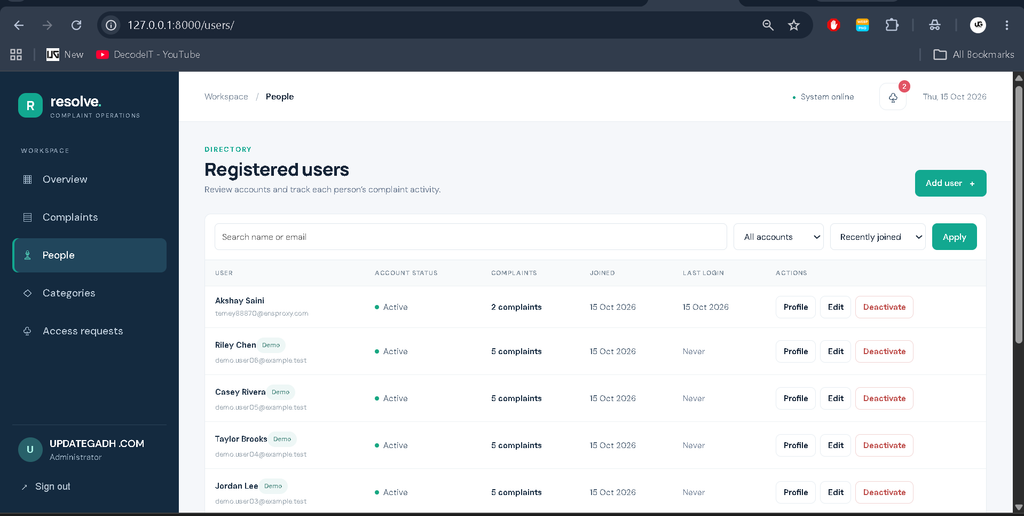
Administrators can view registered users, inspect user profiles, activate or deactivate accounts, and review complaints associated with individual users.
9. Redesigned Admin Login Page
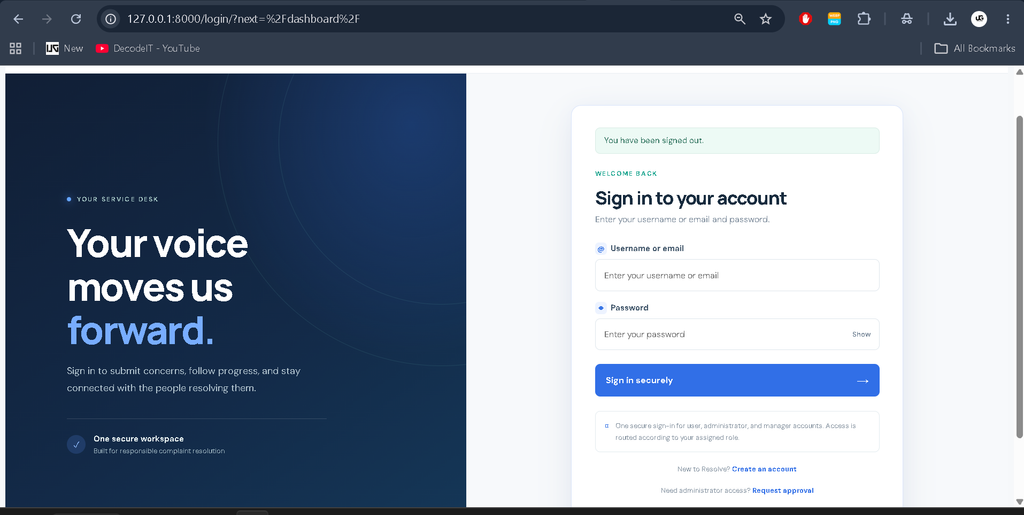
The custom Admin Login page uses a consistent, professional design with structured form fields, password visibility controls, and validation messages. Authentication protects the administrative dashboard from unauthorized access.
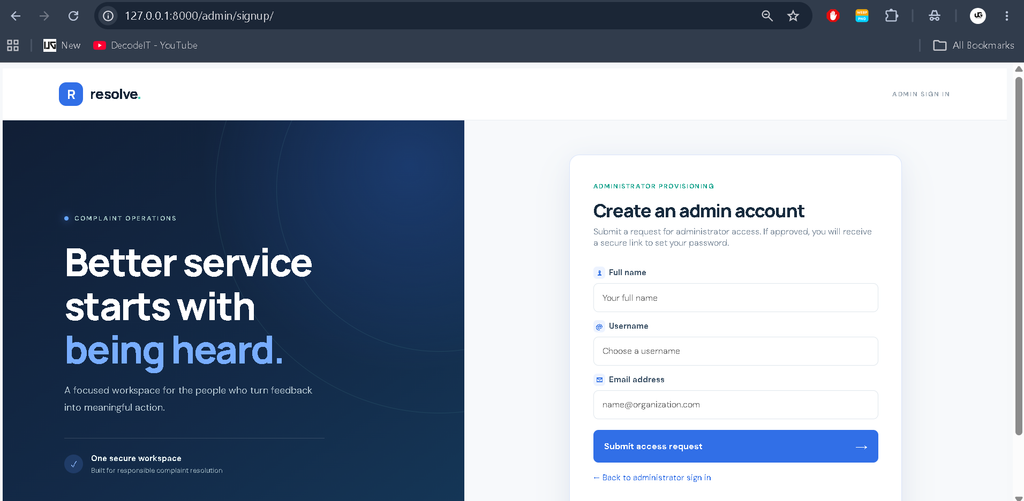
10. Admin Signup Page
The redesigned Admin Signup page provides fields for administrator account registration, including name, username, email, password, and password confirmation. Administrative privileges must be granted through an authorized process rather than automatically through public registration.
11. Secure Authentication
Django authentication and password hashing support secure account management. Protected administrative routes restrict access to authorized administrators, while logout functionality allows administrators to end their sessions.
12. Responsive User Interface
The custom administrative interface is designed to work across desktop and mobile screens. Consistent layouts, readable tables, forms, and navigation improve usability throughout the application.
13. Gmail Email Notifications
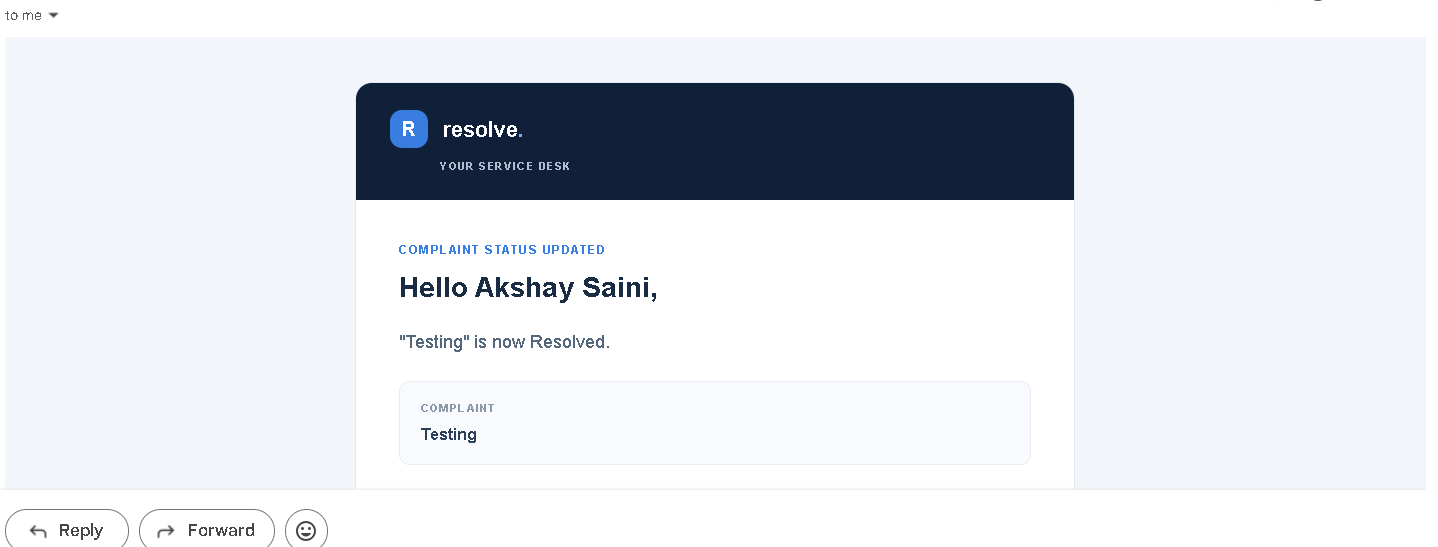
Sends email notifications to users and administrators when complaints are submitted or their status changes, using securely configured Gmail SMTP settings.
14. Real-Time In-App Notifications
Displays new complaint notifications to users and administrators instantly without requiring a manual page refresh.
15. Notification Bell and Unread Count
Displays a notification bell with an unread notification counter on the dashboard, allowing users and administrators to identify new alerts easily.
16. User Complaint Alerts
Keeps users informed about complaint submissions, status changes, and resolution updates through email and in-app notifications.
17. Admin Complaint Alerts
Notifies administrators about newly submitted complaints and important complaint updates, helping them respond efficiently.
18. Secure Gmail SMTP Configuration
Uses environment variables stored in a .env file to manage Gmail credentials securely without hardcoding sensitive information in the source code.
19. Interactive Admin Dashboard
Provides clickable dashboard statistics, charts, sidebar navigation, and complaint management actions connected to relevant pages and real database records.
Technology Stack
- Frontend: HTML, CSS, JavaScript
- Backend: Python
- Framework: Django
- Database: SQLite
- Development Environment: Visual Studio Code
How to Download
The complete package is available so you can run, study, and submit it with confidence. It includes:
- Full Source Code
- Project Report
- Synopsis
- PPT Presentation
Screenshot
How to Set Up
- Install Python: Install a Python version compatible with the project’s dependencies.
- Open the Project: Extract the project files and open the folder in Visual Studio Code.
- Create a Virtual Environment:
python -m venv venv310 - Activate the Environment:
venv310\Scripts\activate - Install Dependencies:
python -m pip install -r requirements.txt - Apply Database Migrations:
python manage.py migrate - Start the Application:
python manage.py runserver - Open
http://127.0.0.1:8000/in your browser. Access the custom admin login page through the URL configured in the project. Admin account creation must follow the application’s authorized registration process.
Database Setup
The application uses SQLite for storing complaint records, user information, categories, priorities, and other supported data. Django’s ORM handles database operations, while migrations create and update the required tables according to the application’s models.
Project Benefits
- Centralized complaint registration and tracking.
- Custom administrative interface instead of the default Django Admin UI.
- Database-driven dashboard statistics and monthly complaint charts.
- Organized complaint status, priority, and category management.
- Registered user management and user-wise complaint tracking.
- Consistent login and signup page designs.
- Practical experience with Django authentication, templates, ORM, and SQLite.
5 Frequently Asked Questions (FAQs)
1. What is a Complaint Management System using Python Django?
A Complaint Management System is a web-based application developed using Python and Django that allows users to submit complaints, track their status, and helps administrators manage complaint records efficiently.
2. Which technologies are used in this project?
The project uses Python and Django for backend development, HTML, CSS, and JavaScript for the user interface, and SQLite for database management.
3. What features are available in the Admin Panel?
The custom Admin Panel includes complaint statistics, monthly complaint charts, complaint status updates, priority and category management, complaint history, search and filters, and registered user management.
4. Does the project include a custom Admin Login and Signup page?
Yes, the project includes redesigned Admin Login and Signup pages with form validation and authentication. Administrator access should be granted only through an authorized process.
5. How can I run the Complaint Management System in VS Code?
Create and activate a Python virtual environment, install the dependencies using pip install -r requirements.txt, run database migrations using python manage.py migrate, and start the server using python manage.py runserver.
Conclusion
The Complaint Management System Using Python Django provides a structured approach to complaint handling through a custom administrative dashboard and redesigned authentication pages. Complaint statistics, status management, priority settings, complaint history, and user management help administrators organize complaint records efficiently.
Keywords: Complaint Management System Using Python Django, complaint management system project in Python, custom Django admin dashboard, complaint tracking system, Django SQLite project, complaint management web application,
Complaint Management System Using Python Django, Complaint Management System Using Django and SQLite, Complaint Management System Project in Python, Complaint Management System Real-Time Notifications, Complaint Management System Login and Signup, Complaint Management System Using PHP and MySQL, Complaint Management System in Laravel, Hospital Complaint Management System, Banking Complaint Management System, Complaint Management System in Hindi, Complaint Management System in Excel, Complaint Management System Project for Students, Python Django Web Application.