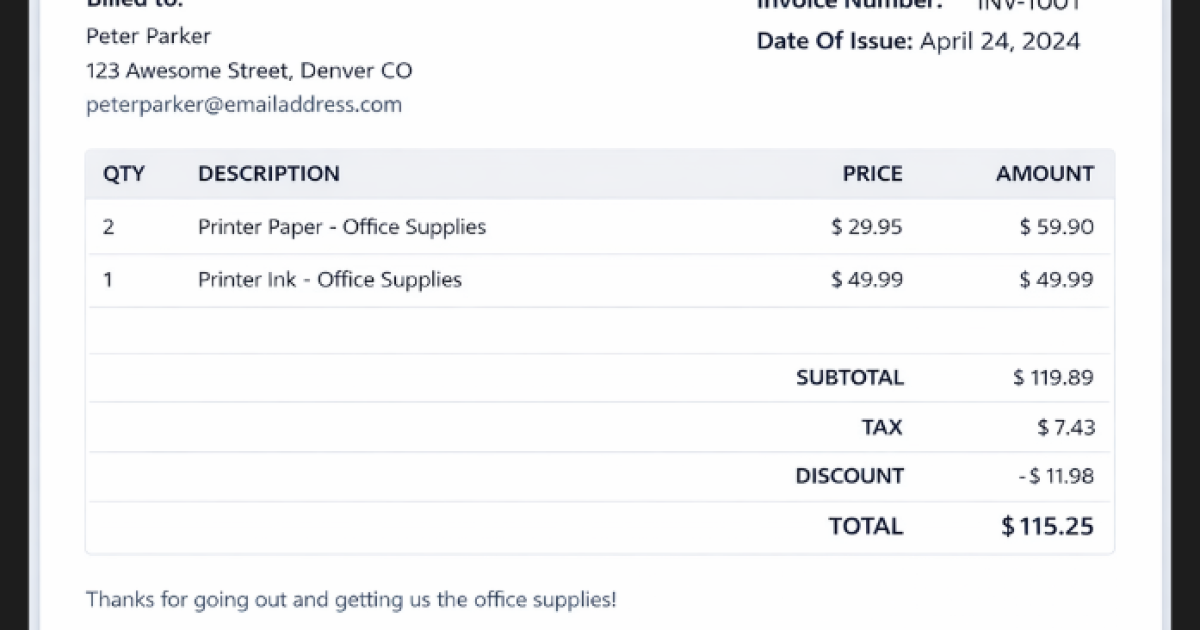
Invoice Generator Project
Creating invoices is something almost every freelancer, startup, or small business has to do. But let’s be honest — making invoices again and again in Word or Excel quickly becomes frustrating. That’s why building an Invoice Generator web application is such a smart and practical project. It’s simple on the surface, yet powerful enough to show your real development skills. This project focuses on generating professional PDF invoices instantly using a clean React-based interface.
Project Overview
| Detail | Description |
|---|---|
| Project Name | Invoice Generator |
| Technology | React JS |
| Database | Not Required |
| Project Type | Frontend Web Application |
| Output | Downloadable PDF Invoice |
| Best For | Portfolio / Mini Project / Learning React |
Key Features of the Invoice Generator
Core Features
- Add multiple invoice items dynamically
- Automatic calculation of subtotal, tax, and discounts
- Clean and responsive user interface
- Generate and download invoices in PDF format
- No backend required (runs completely on the frontend)
Why This Project Is a Smart Choice
Most beginners stop at very basic apps like counters or to-do lists. This project goes a step further and helps you learn:
- Real-time state management
- Form handling and validations
- PDF generation logic
- A real business workflow
Step-by-Step Installation Guide
Step 1: Install Node.js and Check version: node -v
Step 2: Install Dependencies and run: npm install
Step 3: Start the Development Server npm start
Step 4: Open in Browser http://localhost:3000.


An Invoice Generator project may look simple, but it carries strong real-world value. It is easy to understand, easy to explain, and genuinely useful. That combination makes it an excellent choice for portfolios and academic submissions
KEYWORDS:
Best invoice generator project, React billing system project, PDF invoice generator React, React mini project ideas
🎓 Need Complete Final Year Project?
Get Source Code + Report + PPT + Viva Questions (Instant Access)
🛒 Visit UpdateGadh Store →