Build an AI-Powered Resume Analyzer Resume : Analyzer
If you are a college student and searching for a real-world project idea that actually makes sense for placements and internships, then this one is really worth checking out.
Resume Analyzer is an AI-powered resume analysis project that helps users compare their resume with a job description and get smart feedback. It is practical, useful, and also looks impressive on a student portfolio.
⭐ What is Resume Analyzer?
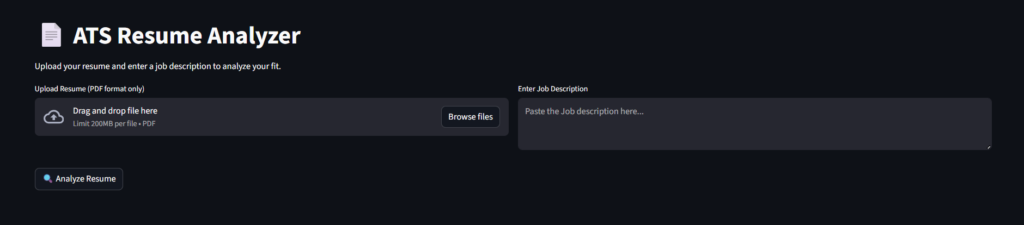
Resume Analyzer is a web-based application that allows users to upload their resume in PDF format and compare it against a job description.
Using Artificial Intelligence, the system analyzes both inputs and provides results like:
- Resume and job match percentage
- Missing and existing skills
- Suggestions to improve resume content
- Resume strengths and weak points
- Learning recommendations to fill skill gaps
🧠 Why Resume Analyzer Is a Great Project for Students
This project is especially useful for students because it gives both learning value and personal benefit.
Learn real-world AI integration
- You will understand how AI models can analyze text data like resumes and job descriptions. This skill is highly demanded in today’s tech industry.
Improve your own resume
- You can use the same project to improve your own resume before placements or internship applications.
Strong portfolio value
- Having an AI-based web application shows recruiters that you understand modern development, not just basic coding.
🛠 Tech Stack Used in Resume Analyzer
This project uses tools that are popular and beginner-friendly:
- Python – main backend logic
- Streamlit – for building the web interface quickly
- Google Gemini API – for AI-powered text analysis
- PyMuPDF – for extracting text from PDF resumes
- Streamlit Cloud – for deployment
This stack makes the project easy to explain during viva or interviews.
Project tutorials, coding guides & placement tips for students.
⚙️ How Resume Analyzer Works (Project Flow)
The working flow of Resume Analyzer is simple but effective:
- User uploads resume in PDF format
- Resume text is extracted from the PDF
- User provides a job description
- AI processes both resume and job description
- System generates:
- Match percentage
- Skill gap analysis
- Improvement suggestions
Behind the scenes, the AI performs natural language understanding, which makes this project technically strong.
🚀 How to Run the Project (Basic Idea)
To run this project locally, students generally need to:
- Download the project files
- Install required Python libraries
- Add Google API key for AI processing
- Run the app using Streamlit
- Upload resume and job description
- View analysis results in browser
This setup is easy to demonstrate in college reviews.
✨ What Makes Resume Analyzer Unique?
There are many resume tools available, but this project stands out because:
- It uses AI instead of basic keyword matching
- Resume and job description are analyzed together
- Feedback is meaningful and actionable
- Built using modern tools students actually learn
This makes it more than just a normal college project.
🎯 Best For Students Who Are
- Doing final year or mini projects
- Learning AI and NLP basics
- Preparing for placements and internships
- Building a strong project portfolio
- Practicing Streamlit and API integration
👥 Who Can Use Resume Analyzer?
This project is useful for:
- Students improving resumes
- Job seekers applying for roles
- Recruiters screening candidates
- Anyone interested in AI-based career tools
Screenshot
Download
Download AI Resume Analyzer Project (ZIP)
Get the complete source code for the AI-Powered Resume Analyzer project. Built using Python, Streamlit, and AI integration, this project is ideal for students, final year submissions, and placement preparation.
❓ Frequently Asked Questions (FAQ)
What is an AI-Powered Resume Analyzer?
It is a web application that compares a resume with a job description and generates a match score, skill gap insights, and suggestions to improve the resume. It uses AI for understanding text, not only keyword matching.
Is this project good for final year or college submissions?
Yes. It looks more real-world than basic CRUD projects because it includes AI integration, PDF parsing, and a complete working web app with deployment potential.
What tech stack is used in this project?
Python for logic, Streamlit for UI, PyMuPDF for extracting text from PDF resumes, and Google Gemini API for AI-based resume and job description analysis.
Do I need Gemini API to run this?
For the full AI experience, yes. The Gemini API is used to generate intelligent comparisons and suggestions. If you don’t want API usage, you can create a basic version using keyword similarity, but results won’t be as smart.
Can beginners build this project?
Yes. If you know basic Python and you can follow setup steps, Streamlit makes the UI part simple. It is beginner-friendly but still feels advanced in presentation.
What improvements can I add to make it more advanced?
You can add DOCX support, resume scoring dashboard, export report (PDF/JSON), charts for skill gaps, multiple job role comparison, and a chat feature for resume improvement tips.
🎓 Need Complete Final Year Project?
Get Source Code + Report + PPT + Viva Questions (Instant Access)
🛒 Visit UpdateGadh Store →