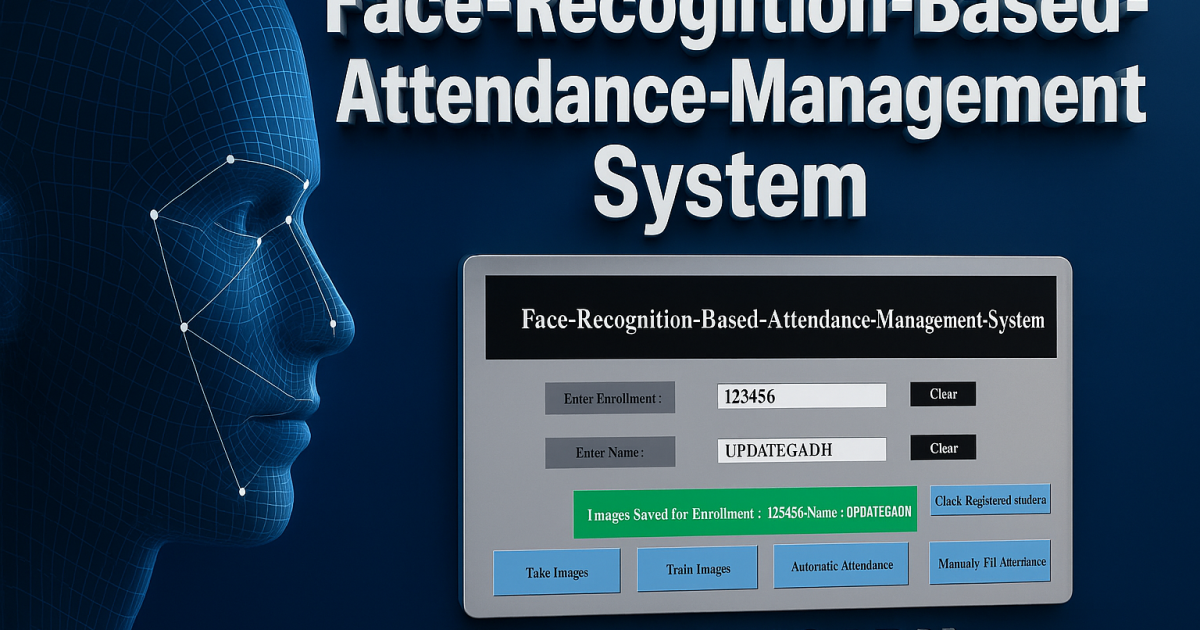
Face Recognition Based Attendance Management System
Overview
A simple project based on a Face Recognition Attendance System which is developed in Python using OpenCV and Tkinter. The main aim of this project is to automate the attendance process by recognizing faces, so teachers or admins don’t need to call out names manually. It is a smart and efficient solution that saves time and reduces errors in maintaining attendance records.
This project is beginner-friendly yet practical and can be used for schools, colleges, coaching centers, or small offices. With its simple GUI, users can register new faces, train the model, and start taking attendance instantly. The attendance is stored in a CSV/Excel file, making it easy to track and manage.
Project Description
The Face Recognition Attendance System works in three easy steps:
Register Face – Capture and store face images of each user.
Train Model – Use the stored images to train a recognition model with OpenCV.
Take Attendance – Start the attendance session, and the system will recognize faces in real time and automatically mark them present.
This process is simple but effective, ensuring smooth operation without requiring complex setup.
Project Summary
| Project Attribute | Details |
|---|---|
| Project Name | Face Recognition Attendance Management System |
| Language/s Used | Python |
| Database | MySQL (Optional for storing attendance data) |
| Type | Desktop Application |
Download New Real Time Projects :-Click here
Code Requirements
Before running the project, ensure the following Python libraries are installed:
OpenCV(pip install opencv-python)Tkinter(built-in with Python)Pillow(pip install Pillow)Pandas(pip install pandas)
Additionally, if database integration is required, set up WAMP Server and configure MySQL.
Project Structure
The project is structured with clarity to allow easy navigation and setup:
AMS_Run.py: Main application file with the GUITrainingImage/: Stores user face images (automatically created)TrainingImageLabel/Trainner.yml: Trained face dataStudentDetails/StudentDetails.csv: Contains user recordsAttendance/: Stores attendance logshaarcascade_frontalface_default.xml: Face detection model
Functional Flow
- Image Capture:
Users enter their ID and name, then click on Take Images. The system captures 200 facial images and stores them inTrainingImage/. - Model Training:
After collecting data, clicking Train Image trains the face recognizer using OpenCV’s LBPH algorithm. This creates the trained model inTrainingImageLabel/. - Automatic Attendance:
Clicking on Automatic Attendance activates the camera, recognizes faces in real time, and marks attendance into a.csvfile based on time and subject. - Manual Attendance Option:
A button is available for Manually Fill Attendance to record attendance without facial recognition. - Database Integration (Optional):
Attendance records can be stored in a MySQL database by configuring the DB name inAMS_Run.pyand using WAMP Server.
Available Features
The Face Recognition Attendance System comes with several powerful yet easy-to-use features that make it a complete attendance management solution:
1. Face Data Capture and Storage
The system allows users (students or employees) to register their faces by capturing multiple images through the webcam. These images are stored locally, ensuring that the system has enough samples to recognize the individual later with high accuracy.
2. Real-time Face Recognition and Attendance Logging
Once trained, the system can detect and recognize faces in real-time using OpenCV. When a registered face is matched, the system automatically records attendance along with the date and time, eliminating the need for manual entry.
3. CSV-based Attendance Report Generation
Attendance data is automatically saved into CSV files, which makes it easy to open, view, and manage using applications like MS Excel. Teachers, admins, or employers can quickly check attendance logs without needing a complex database setup.
4. Manual Attendance Support
In case the camera fails to detect a face or if a student/employee needs to be marked manually, the system provides an option to add attendance entries by hand. This ensures accuracy and flexibility in real-world use.
5. Optional MySQL Database Storage
While the system works with CSV files by default, it also includes optional support for MySQL integration. This feature is helpful for larger organizations or institutions where centralized storage and advanced reporting are required.
6. Simple and User-friendly Tkinter GUI
The entire system is built with a clean Tkinter graphical interface, making it easy to use for non-technical people as well. The interface provides options like “Register Face,” “Train Data,” and “Take Attendance” in an intuitive layout.
7. Customizable Subject and Session Timing
Admins can configure subject names, classes, or work sessions directly in the system. This ensures that attendance is logged under the correct category, which is useful for academic or workplace reporting.
8. Optimized for Training up to 10 Users
The project is designed as a lightweight solution, suitable for small classes or offices. It can effectively train and recognize up to 10 users, making it a great project for students as well as small-scale practical use.
How to Use
- Download and extract the ZIP file.
- Install all required dependencies.
- Create a
TrainingImagefolder in the root directory if not already present. - Open
AMS_Run.pyand configure your system paths and database credentials (if needed). - Run
AMS_Run.pyand use the UI for registration, training, and attendance.
We have projects Available in all languages:–Click Here


face recognition based attendance-system project report
face recognition based attendance system project source code
face recognition attendance system project
face recognition based attendance system using python project report
face recognition attendance system project report pdf
attendance system using face recognition github
face recognition attendance system research paper ieee
ai based attendance-system github
face recognition based attendance management system project
face recognition based attendance management system project report
face recognition based attendance system project report
face recognition based attendance management system pdf
face recognition based attendance management system excel
🎓 Need Complete Final Year Project?
Get Source Code + Report + PPT + Viva Questions (Instant Access)
🛒 Visit UpdateGadh Store →