
PG Accommodation Management System
Hey everyone! Today, I’m super excited to share something that I’ve been working on – a complete PG Accommodation Management System built with PHP and MySQL. Whether you’re a student looking for a college project or a developer who wants to learn real-world web development, this one’s for you!
What is PG Accommodation Management System Project About?
Let me explain this in simple terms. You know how finding a paying guest (PG) accommodation can be such a hassle, right? And for property owners, managing multiple tenants, collecting rent, and keeping track of payments is no walk in the park either.
This PG Accommodation System is a web-based application that helps property owners manage their rental properties efficiently. From listing houses to tracking tenant payments – everything is handled in one beautiful dashboard.
Key Features That Make It Stand Out
For Property Owners
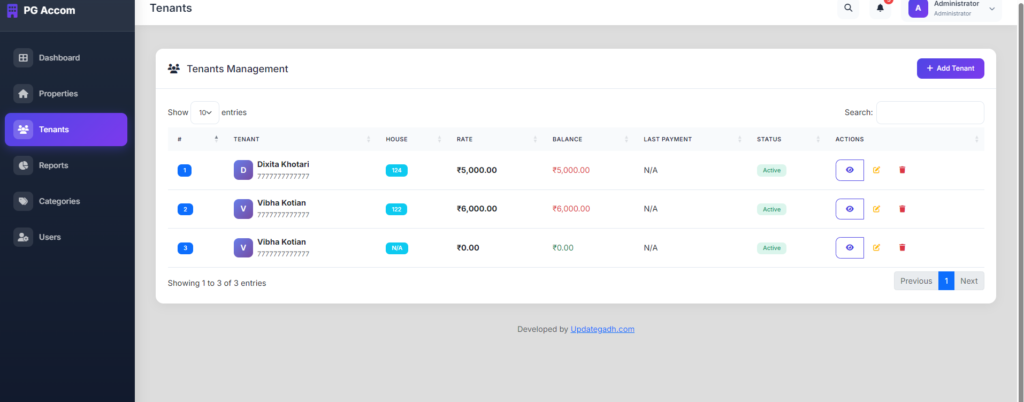
- Tenant management – Keep track of all your tenants in one place
- Payment tracking – See who paid and who hasn’t at a glance
- Dashboard with statistics – Get a bird’s eye view of your entire business
For Admins
- User management – Control who can access the system
- Reports generation – Generate payment and balance reports
- Complete overview – Monitor all properties and transactions
Technologies Used
- Frontend: HTML5, CSS3, Bootstrap 5, JavaScript, jQuery
- Backend: PHP
- Database: MySQL (works perfectly with XAMPP)
- Additional Libraries: DataTables, Font Awesome icons, Select2
How to Install and Run
Step 1: Install XAMPP
First, download and install XAMPP from the official website. This gives you Apache server and MySQL database in one package.
Step 2: Set Up the Database
- Open phpMyAdmin (usually at localhost/phpmyadmin)
- Create a new database called
house_rental - Import the SQL file included in the project
Step 3: Configure the Connection
Open the db_connect.php file and make sure your database credentials are correct:
$conn = new mysqli("localhost", "root", "", "house_rental");Step 4: Run the Project
- Place the folder in
htdocsand access vialocalhost/PGAccomdationsystem - Or run PHP’s built-in server:
php -S localhost:8000
Step 5: Login
Default Login Credentials:
Username: admin
Password: admin123
Screenshots
The dashboard welcomes you with a clean interface showing:
- Total properties count
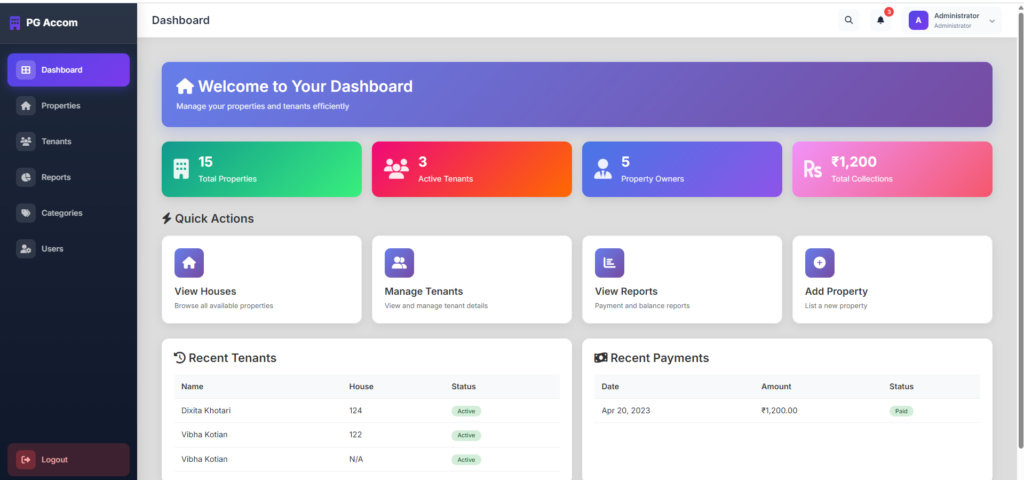
- Active tenants
- Property owners
- Total collections in rupees
Tags:
pg management system project with source code
paying guest management system project documentation
pg management software free
pg-management system github
pg management services
hostel management system template
hostel management system template free download
pg accommodation management system ppt
pg accommodation management system template
pg accommodation management system pdf
pg accommodation management system in india
pg accommodation management system free
🎓 Need Complete Final Year Project?
Get Source Code + Report + PPT + Viva Questions (Instant Access)
🛒 Visit UpdateGadh Store →