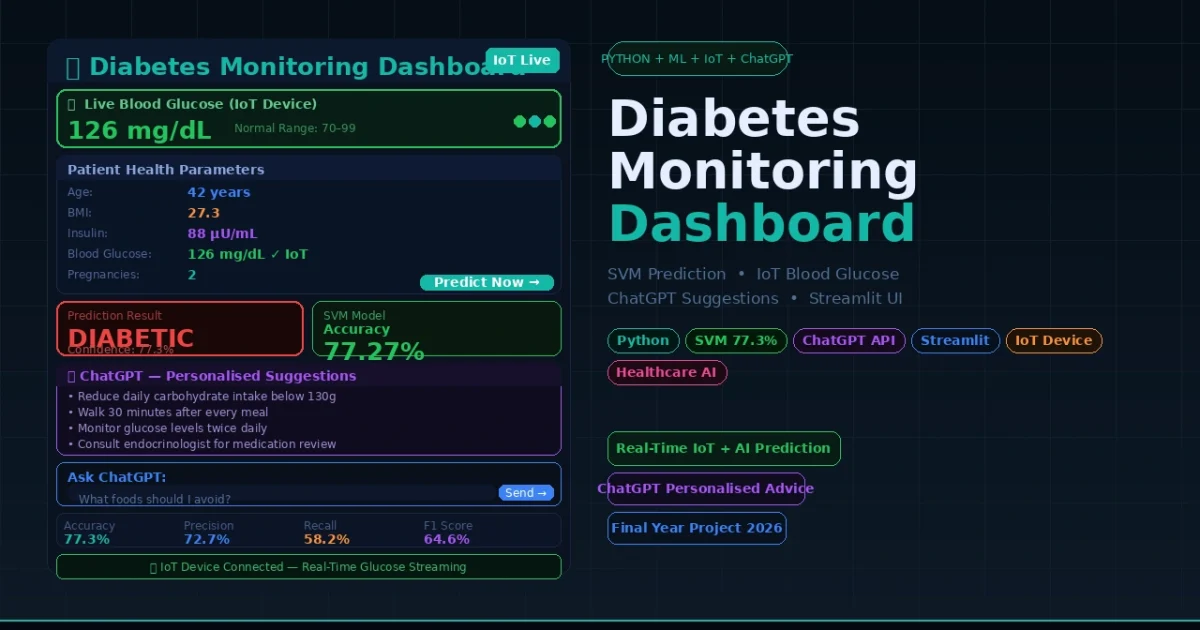
Healthcare AI is one of the most impactful and most sought-after domains for final year projects in 2026 — and this Diabetes Monitoring Dashboard sits right at the intersection of Machine Learning, IoT, and Generative AI. Built with Python and Streamlit, this project goes far beyond a basic prediction form. It integrates a real-time IoT device for live blood glucose measurement, uses a trained SVM (Support Vector Machine) model to predict whether a patient is diabetic, and then connects to the ChatGPT API to deliver personalised lifestyle improvement suggestions for every individual user. For BCA, MCA, B.Tech CS/IT, and Data Science students who want a project that will genuinely impress examiners, interviewers, and industry professionals in 2026 — this is it.
Diabetes Monitoring Dashboard using Python SVM ChatGPT
Project Overview
| Project Name | Diabetes Monitoring Dashboard |
| Language | Python |
| ML Algorithm | SVM — Support Vector Machine |
| Model Accuracy | 77.27% |
| Frontend / UI | Streamlit Web Application |
| AI Integration | ChatGPT API (OpenAI) for lifestyle suggestions |
| IoT Integration | Real-time blood glucose level measurement device |
| Dataset | diabetesv2.0 (custom curated — minimum required parameters) |
| Type | Healthcare Web Application |
| Best For | BCA, MCA, B.Tech CS/IT, Data Science Final Year Students |
Key Features
- Real-time IoT blood glucose integration — the dashboard connects to a hardware IoT device that measures blood glucose levels live, feeding actual patient data directly into the prediction pipeline instead of relying on manually entered values
- SVM-powered diabetes prediction — the trained Support Vector Machine model analyses patient health parameters and predicts with 77.27% accuracy whether the individual is diabetic or non-diabetic
- ChatGPT-powered lifestyle suggestions — after every prediction, the integrated ChatGPT API generates personalised fitness and dietary improvement suggestions tailored to each individual user’s data and result
- Real-time user input dashboard — users fill in their health data in real time through an intuitive Streamlit interface, making the system usable by non-technical patients without any guidance
- Personalised health insights — the system does not just return a diabetic or non-diabetic label; it provides actionable, personalised advice on how to maintain or improve health based on the individual’s specific readings
- Streamlit web application — deployable locally via
streamlit run webApp.py, accessible from any browser on the same network — no complex server setup required - Minimal required parameters — the custom diabetesv2.0 dataset uses only the minimum health parameters needed for prediction, making the form simple for patients to fill in without needing lab reports
- In-dashboard AI chat — ChatGPT is available directly within the dashboard so users can ask follow-up questions about their results and get further health insights without leaving the app
🎬 Watch the Full Project Tutorial on YouTube!
We build this project step by step on our YouTube channel with full explanation of the ML model, IoT integration, and ChatGPT API setup. Watch, like, and subscribe.
Technologies Used
| Layer | Technology | Purpose |
|---|---|---|
| ML Algorithm | SVM — Support Vector Machine (Scikit-learn) | Core diabetes prediction model trained on diabetesv2.0 dataset |
| Web Framework | Streamlit | Build and serve the interactive healthcare dashboard UI |
| AI / LLM | OpenAI ChatGPT API | Generate personalised lifestyle suggestions and enable in-dashboard chat |
| IoT Integration | Blood Glucose IoT Device | Measure real-time blood glucose levels and feed data directly into the app |
| Data Handling | Pandas + NumPy | Dataset loading, preprocessing, and feature engineering |
| Model Training | Scikit-learn | SVM training, evaluation, and serialisation with pickle |
| Language | Python 3.x | All backend logic, model integration, and API calls |
| Dataset | diabetesv2.0 (custom) | Curated minimum-parameter dataset optimised for real-user inputs |
ML Model Performance
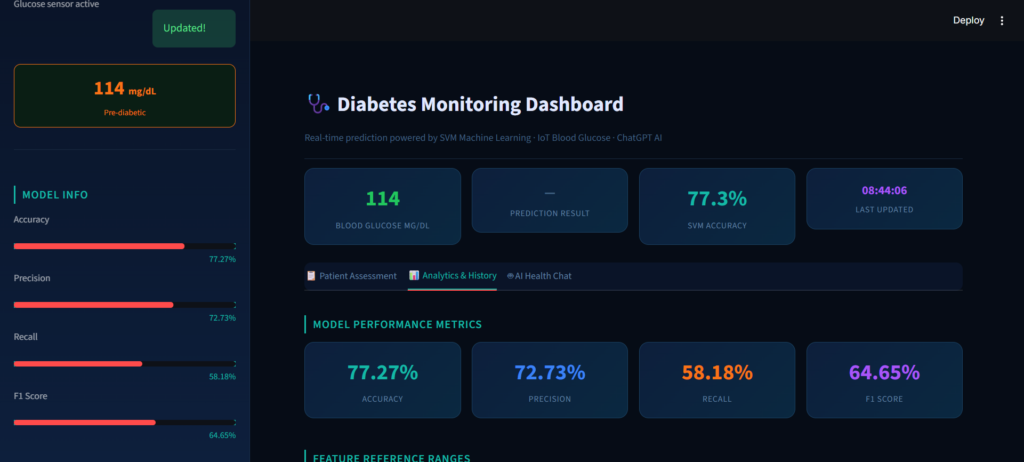
The SVM model was trained and evaluated on the diabetesv2.0 dataset. Here are the verified performance metrics:
| Metric | Score | What It Means |
|---|---|---|
| Accuracy | 77.27% | Correctly classifies diabetic vs non-diabetic patients 77 out of 100 times |
| Precision | 72.73% | Of all patients predicted as diabetic, 72.73% actually are diabetic |
| Recall | 58.18% | Of all actual diabetic patients, the model correctly identifies 58.18% |
| F1 Score | 64.65% | Harmonic mean of precision and recall — balanced performance measure |
Project Folder Structure
Diabetes-Monitoring-Dashboard/
│
├── webApp.py                  # Main Streamlit app — entry point
├── chat.py                    # ChatGPT API integration module
│                              # (Add your OpenAI API key here)
├── model.py                   # SVM model training and evaluation script
├── requirements.txt           # All Python dependencies
│
├── diabetesv2.0.csv           # Custom curated dataset (minimum parameters)
├── model.pkl                  # Saved trained SVM model (pickle file)
│
├── iot/
│   └── glucose_reader.py      # IoT device interface — reads live blood glucose
│
└── assets/
    └── dashboard_ui/          # Streamlit UI components and styling
Project Screenshots
Here is a walkthrough of the main screens of the Diabetes Monitoring Dashboard:
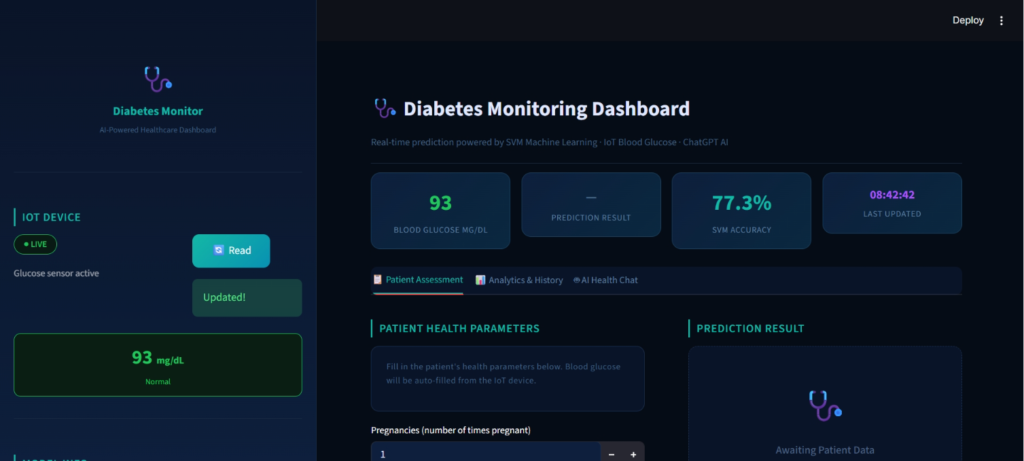
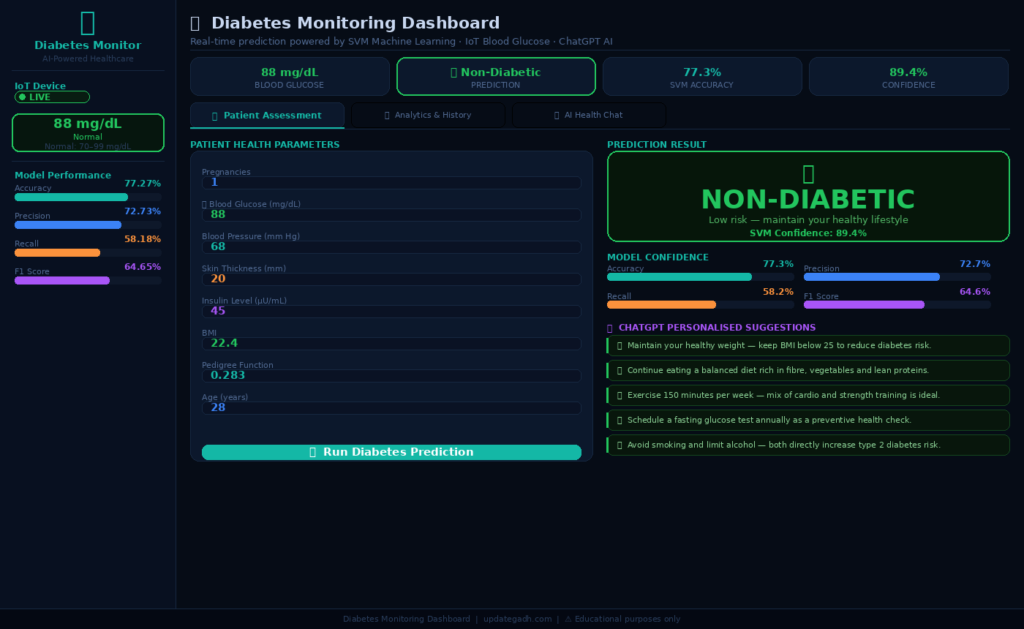
1. Main Dashboard — Patient Input Form
The home screen of the Streamlit dashboard. Patients fill in their real-time health parameters — age, blood glucose (automatically filled by the IoT device), BMI, insulin levels, and other minimum required fields. The interface is clean, simple, and designed for non-technical users.
2. Prediction Result Screen
After submitting the form, the SVM model processes the inputs and returns the prediction result — Diabetic or Non-Diabetic — displayed clearly with the confidence level. The result is colour-coded for instant readability at a glance.
3. ChatGPT Lifestyle Suggestions Panel
Immediately after the prediction, the ChatGPT API generates personalised lifestyle and dietary improvement suggestions based on the patient’s specific health data. Every user receives a different, tailored response — not a generic advice block.
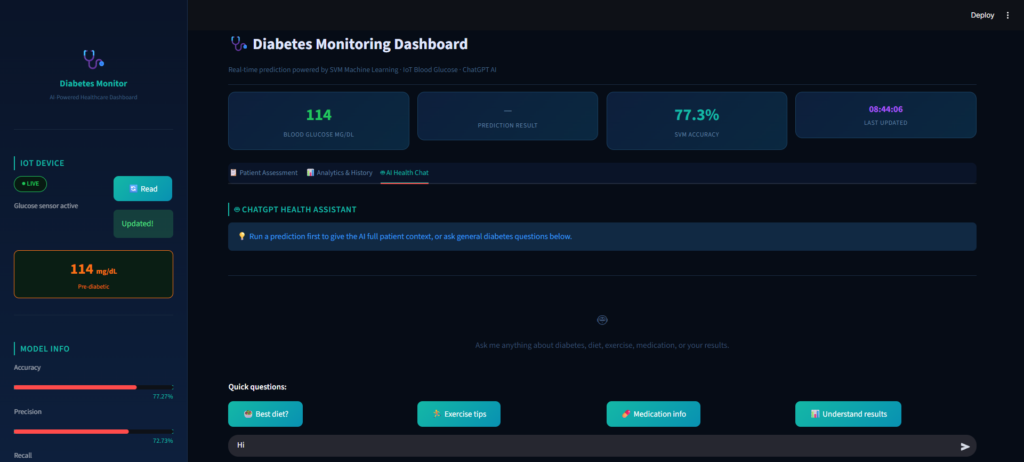
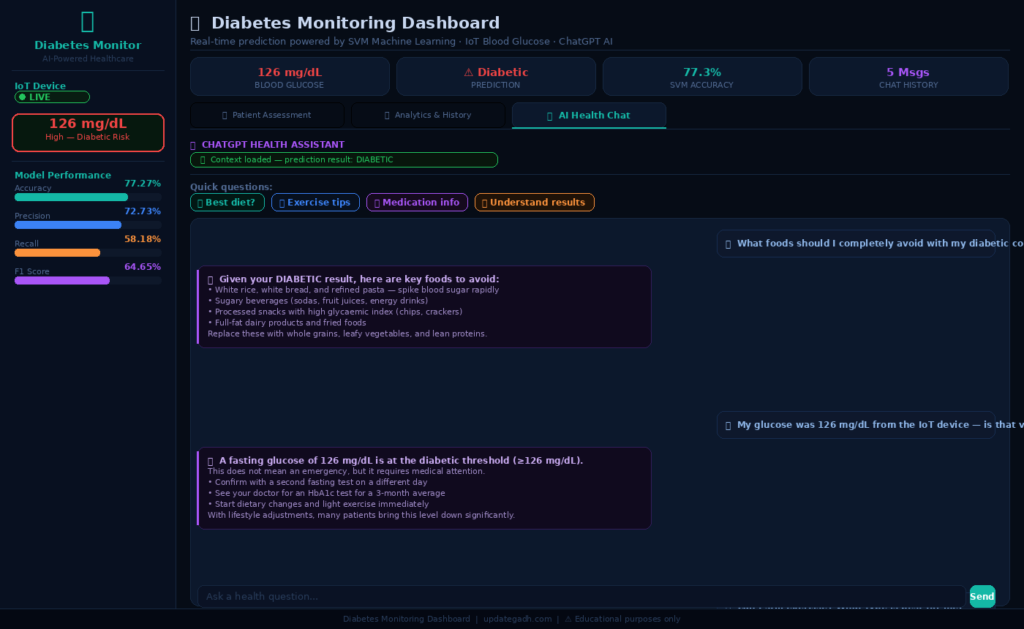
4. In-Dashboard AI Chat
The built-in ChatGPT chat panel allows users to ask follow-up questions about their results, symptoms, diet, or medication — all without leaving the dashboard. The chat remembers the user’s result context and provides relevant answers.
5. IoT Device Real-Time Reading
The connected IoT blood glucose device streams live readings directly into the dashboard. The current glucose level updates in real time on the form — patients do not need to manually enter this critical value, eliminating one of the biggest sources of error in diabetes prediction systems.
Get This Project
This is a complete, ready-to-run paid project. It includes the full Python source code, trained SVM model (.pkl file), the custom diabetesv2.0 dataset, ChatGPT API integration setup guide, IoT device connection instructions, requirements.txt with all dependencies, and remote setup support from our team.
Diabetes Monitoring Dashboard — Python + SVM + ChatGPT + IoT
Full source code + trained ML model + dataset + ChatGPT setup + IoT guide + remote support
Need help after purchase? Contact us on WhatsApp or via our support page
How to Run This Project
Step 1 — Install all required packages
# Open terminal in the project folder and run:
pip install -r requirements.txt
Step 2 — Add your OpenAI API key
# Open chat.py in VS Code or any editor
# Find the API key line and replace with your key:
openai.api_key = "YOUR_OPENAI_API_KEY_HERE"
# Get your API key from: platform.openai.com/api-keys
Step 3 — Connect the IoT device
# Connect the blood glucose IoT device to your system via USB or Bluetooth
# The device configuration and port settings are in:
iot/glucose_reader.py

# Update the COM port or Bluetooth address as per your device specs
# (Full setup instructions are provided in the included README)
Step 4 — Launch the Streamlit dashboard
streamlit run webApp.pyStep 5 — Open in your browser
# Streamlit automatically opens the dashboard in your browser at:
localhost:8501

# Any client on the same local network can also access it at:
YOUR_LOCAL_IP:8501

# Recommended browser: Google Chrome
How It Works
Patient prediction flow
- Patient opens the dashboard in the browser — the IoT blood glucose device is already connected and auto-populates the glucose field with a live reading in real time
- Patient fills in the remaining minimum health parameters — age, BMI, insulin level, and any other fields required by the diabetesv2.0 dataset
- Patient clicks Submit — the Streamlit app sends the input values to the trained SVM model loaded from the pickle file
- The SVM model processes the feature vector and returns a prediction — Diabetic or Non-Diabetic — which is displayed immediately on screen with a confidence indicator
- The result is passed to the ChatGPT API via
chat.py— the API generates a personalised lifestyle suggestion report specific to the patient’s health data and prediction result - The patient can then use the in-dashboard chat panel to ask follow-up questions — the ChatGPT integration maintains context of the current session’s result for relevant, accurate answers
ML model training flow
- The diabetesv2.0 dataset is loaded and preprocessed — handling missing values, normalising features, and selecting the minimum required parameters
- The dataset is split into training and testing sets — the SVM classifier is trained on the training split using Scikit-learn
- Model performance is evaluated on the test split — Accuracy (77.27%), Precision (72.73%), Recall (58.18%), and F1 Score (64.65%) are computed
- The trained SVM model is serialised to a .pkl file using pickle — the Streamlit app loads this file at startup for fast, real-time predictions without retraining
Why This is a Great Final Year Project
- Three technologies in one project — Machine Learning (SVM), Generative AI (ChatGPT API), and IoT hardware integration is a combination almost no other student project has — it immediately sets you apart in every viva and interview
- Real IoT hardware integration is a concept taught in every engineering curriculum but rarely actually implemented in student projects — having it working and demonstrable live is a massive differentiator
- ChatGPT API integration shows you can connect a production LLM to a data-driven application — one of the single most asked-about skills in AI developer job postings in 2026
- Healthcare domain — diabetes affects over 500 million people globally; every examiner immediately understands the problem, the impact, and why the solution matters without needing explanation
- Personalised output — going beyond a binary diabetic/non-diabetic label to generate individual lifestyle advice shows system design thinking that interviewers at product companies actively look for
- Streamlit deployment runs on any laptop and is accessible network-wide — perfect for live viva demonstrations where you need the project running reliably in front of an examiner
- Custom minimum-parameter dataset shows you understood the user problem — most diabetes datasets require extensive lab reports; this one asks only what a real patient can realistically know
You Might Also Like:
- Heart Disease Risk Prediction using Python and Machine Learning
- Car Price Prediction System using Machine Learning
- Student Performance Prediction Web App using Machine Learning
- UPI Fraud Detection System using Python
- How to Build an AI Chatbot Using OpenAI and Streamlit
- All Machine Learning Projects with Source Code — UpdateGadh
SEO Details
- diabetes monitoring machine
- diabetes monitoring device
- diabetes monitoring patch
- diabetes monitoring patch price
- diabetes monitoring device on arm
- diabetes monitoring chart
- diabetes monitoring watch
- diabetes monitoring sensor
- diabetes monitoring app
- diabetes monitoring patch india
- Diabetes Monitoring Dashboard using Python SVM ChatGPT
🎓 Need Complete Final Year Project?
Get Source Code + Report + PPT + Viva Questions (Instant Access)
🛒 Visit UpdateGadh Store →