Skip to content
  • SiteMap
  • Our Services
  • Frequently Asked Questions (FAQ)
  • Support
  • About Us

UpdateGadh

Update Your Skills.

  • Home
  • Projects
    •  Blockchain projects
    • Python Project
    • Data Science
    •  Ai projects
    • Machine Learning
    • PHP Project
    • React Projects
    • Java Project
    • SpringBoot
    • JSP Projects
    • Java Script Projects
    • Code Snippet
    • Free Projects
  • Tutorials
    • Ai
    • Machine Learning
    • Advance Python
    • Advance SQL
    • DBMS Tutorial
    • Data Analyst
    • Deep Learning Tutorial
    • Data Science
    • Nodejs Tutorial
  • Blog
  • Contact us
  • Toggle search form
Node.js Command Line Options

Node.js Command Line Options

Posted on September 19, 2025September 19, 2025 By Rishabh saini No Comments on Node.js Command Line Options

Node.js Command Line Options

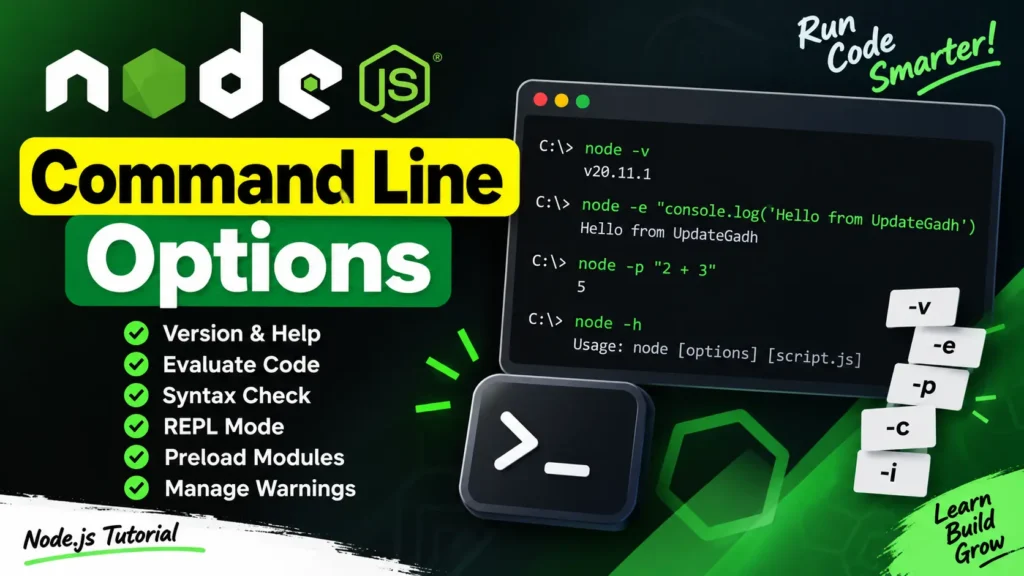
Node.js provides a wide range of command line options that make it more flexible for developers. These options allow you to execute scripts, check syntax, load modules, manage warnings, and much more.

In this guide from UpdateGadh, we’ll explore the most commonly used Node.js command line options along with examples.

Introduction to Applied AI:-Click Here

List of Node.js Command Line Options

IndexOptionDescription
1.-v, --versionPrints the Node.js version.
2.-h, --helpDisplays all available command line options.
3.-e, --eval "script"Evaluates the provided argument as JavaScript. REPL predefined modules can also be used.
4.-p, --print "script"Works like -e, but also prints the result.
5.-c, --checkPerforms a syntax check without running the script.
6.-i, --interactiveOpens the REPL even when stdin is not a terminal.
7.-r, --require modulePreloads a module at startup (by path or module name).
8.--no-deprecationSuppresses deprecation warnings.
9.--trace-deprecationPrints stack traces for deprecations.
10.--throw-deprecationThrows errors for deprecations.
11.--no-warningsSuppresses all process warnings.
12.--trace-warningsPrints stack traces for all warnings.
13.--trace-sync-ioShows a stack trace when synchronous I/O occurs after the event loop begins.
14.--zero-fill-buffersAutomatically fills newly allocated buffers with zeros.
15.--track-heap-objectsTracks heap object allocations for snapshots.
16.--prof-processProcesses V8 profiler output generated with --prof.
17.--v8-optionsPrints V8 command line options.
18.--tls-cipher-list=listSpecifies an alternative TLS cipher list (requires crypto support).
19.--enable-fipsEnables FIPS-compliant crypto at startup (requires special build).
20.--force-fipsForces FIPS crypto at startup and cannot be disabled in scripts.
21.--icu-data-dir=fileSets the ICU data load path (overrides NODE_ICU_DATA).

Machine Learning Tutorial:–Click Here

Node.js Command Line Options Examples

1. Check Node.js Version

node -v
# or
node --version

2. Get Help

node -h
# or
node --help

3. Evaluate a Script (without printing result)

node -e "console.log('Hello from UpdateGadh')"

4. Evaluate a Script and Print Result

node -p "2 + 3"

5. Open REPL Even If stdin Is Not a Terminal

node -i
# or
node --interactive

Download New Real Time Projects :–Click here

Final Thoughts

Command line options in Node.js are powerful tools that make development smoother. Whether you’re debugging, checking syntax, or preloading modules, knowing these options will save time and effort.

For more Node.js tips and guides, stay connected with UpdateGadh.

 DBMS Tutorial:-Click Here
Deep Learning Tutorial:– Click Here
Complete Advance AI topics:- CLICK HERE


node js command line options
node js command line arguments
node js command line arguments parser
node js command line arguments library
node js command line arguments example
node js parse command line arguments
node js named command line arguments
node js accept command line arguments
how to use node.js command prompt
node.js command line tutorial
node js command line options list
node js command line options w3schools
node js command-line arguments parser
node js run command
node command line
node js commands cheat sheet
node.js pass arguments to function
node options

    Post Views: 285
    Node.js Tutorial Tags:command line arguments in nodejs, command line argumnets in nodejs, command line interface with javascript and nodejs, how to get command line arguments in nodejs, how to pass command line arguments in node.js, how to read command line arguments in nodejs, node.js command line, node.js command line interface, nodejs - command line arguments, nodejs command line args, nodejs command line arguments, read data from command line nodejs, read values from command line nodejs

    Post navigation

    Previous Post: Best Hospital Management System in PHP & MySQL
    Next Post: Best College Management System Project in PHP, MySQL, HTML, CSS, and JavaScript

    More Related Articles

    Node.js MongoDB Create a Database Node.js MongoDB Create a Database Node.js Tutorial
    Node.js MongoDB Sorting Node.js MongoDB Sorting – Full Stack Web Project Node.js Tutorial
    Node.js Image Upload, Processing, and Resizing using Sharp Package Node.js Image Upload, Processing, and Resizing using Sharp Package Node.js Tutorial

    Leave a Reply Cancel reply

    Your email address will not be published. Required fields are marked *

    You may also like

    1. Install Nodejs on Windows
    2. Node.js Child Process
    3. Node.js Assertion Testing
    4. Node.js Events
    5. Node.js MySQL Delete Records
    6. Node.js Create Connection with MongoDB

    Most Viewed Posts

    1. Top Large Language Models in 2025
    2. Online Shopping System using PHP, MySQL with Free Source Code
    3. login form in php and mysql , Step-by-Step with Free Source Code
    4. Flipkart Clone using PHP And MYSQL Free Source Code
    5. News Portal Project in PHP and MySql Free Source Code
    6. User Login & Registration System Using PHP and MySQL Free Code
    7. Top 10 Final Year Project Ideas in Python
    8. Blog Site In PHP And MYSQL With Source Code || Best Project
    9. Online Bike Rental Management System Using PHP and MySQL
    10. E learning Website in php with Free source code
    • AI
    • ASP.NET
    • Blockchain
    • ChatCPT
    • code Snippets
    • Collage Projects
    • Data Science Project
    • Data Science Tutorial
    • DBMS Tutorial
    • Deep Learning Tutorial
    • Final Year Projects
    • Free Projects
    • How to
    • html
    • Interview Question
    • Java Notes
    • Java Project
    • Java Script Notes
    • JAVASCRIPT
    • Javascript Project
    • JSP JAVA(J2EE)
    • Machine Learning Project
    • Machine Learning Tutorial
    • MySQL Tutorial
    • Node.js Tutorial
    • PHP Project
    • Portfolio
    • Python
    • Python Interview Question
    • Python Projects
    • PythonFreeProject
    • React Free Project
    • React Projects
    • Spring boot
    • SQL Tutorial
    • TOP 10
    • Uncategorized
    • Agentic RAG AI System Using Python – Complete Final Year Project Guide
    • AI-Powered Online Examination System with Face Detection Using PHP & MySQL
    • Real-Time Medical Queue & Appointment System with Django
    • Online Examination System in PHP with Source Code
    • AI Chatbot for College and Hospital

    Most Viewed Posts

    • Top Large Language Models in 2025 (8,630)
    • Online Shopping System using PHP, MySQL with Free Source Code (5,248)
    • login form in php and mysql , Step-by-Step with Free Source Code (4,911)

    Copyright © 2026 UpdateGadh.

    Powered by PressBook Green WordPress theme